
ssm 框架实现增删改查CRUD操作(Spring + SpringMVC + Mybatis 实现增删改查)
ssm 框架实现增删改查
SpringBoot 项目整合
一、项目准备
1.1 ssm 框架环境搭建
博客地址:ssm项目框架搭建
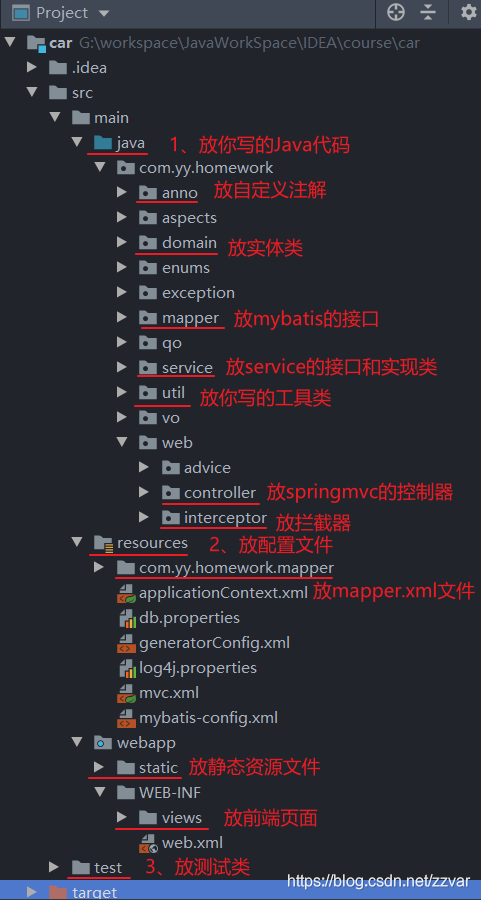
1.2 项目结构图如下
1.3 数据表结构图如下
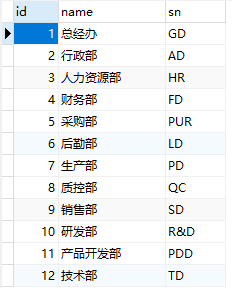
CREATE TABLE `department` (

  `id` bigint(20) NOT NULL AUTO_INCREMENT,

  `name` varchar(255) DEFAULT NULL,

  `sn` varchar(255) DEFAULT NULL,

  PRIMARY KEY (`id`) USING BTREE

) ENGINE=InnoDB AUTO_INCREMENT=13 DEFAULT CHARSET=utf8 ROW_FORMAT=DYNAMIC;
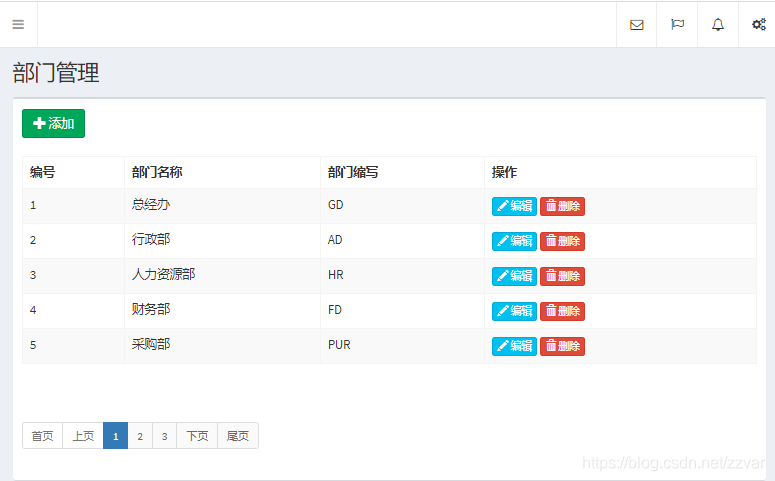
1.4 运行结果
二、项目实现
1. EmployeeController 控制器
package com.yy.homework.web.controller;

import com.github.pagehelper.PageInfo;

import com.yy.homework.anno.RequiredPermission;

import com.yy.homework.domain.Department;

import com.yy.homework.qo.DepartmentPageObject;

import com.yy.homework.service.IDepartmentService;

import com.yy.homework.service.IDepartmentService;

import org.springframework.beans.factory.annotation.Autowired;

import org.springframework.stereotype.Controller;

import org.springframework.ui.Model;

import org.springframework.web.bind.annotation.ModelAttribute;

import org.springframework.web.bind.annotation.RequestMapping;

@Controller

@RequestMapping("/department")

public class DepartmentController {

    @Autowired

    private IDepartmentService departmentService;

    @RequestMapping("/list")

    @RequiredPermission(name = "部门查询", expression = "department:list")

    public String selectAll(Model model, @ModelAttribute("qo")DepartmentPageObject qo) {

    	// Mybatis分页插件 PageHelper

    	//qo:页面模糊查询传入的值和分页查询传入的当前页和每页条数分装成 DepartmentPageObject 对象

        PageInfo<Department> pageInfo = departmentService.selectForList(qo);

        model.addAttribute("pageInfo", pageInfo);

        return "department/list";

    }

    @RequestMapping("/input")

    @RequiredPermission(name = "部门新增或修改", expression = "department:saveOrUpdate")

    public String input(Department department, Model model) {

        if (department.getId() != null) {

            Department e = departmentService.selectById(department.getId());

            model.addAttribute("department", e);

        }

        return "department/input";

    }

    @RequestMapping("/saveOrUpdate")

    @RequiredPermission(name = "部门新增或修改", expression = "department:saveOrUpdate")

    public String saveOrUpdate(Department department) {

        if (department.getId() != null) {

            departmentService.update(department);

        } else {

            departmentService.insert(department);

        }

        return "redirect:/department/list";

    }

    @RequestMapping("/delete")

    @RequiredPermission(name = "部门删除", expression = "department:delete")

    public String delete(Long id) {

        departmentService.delete(id);

        return "redirect:/department/list";

    }

}
2. IDepartmentService 接口
package com.yy.homework.service;

import com.github.pagehelper.PageInfo;

import com.yy.homework.domain.Department;

import com.yy.homework.domain.Department;

import com.yy.homework.qo.DepartmentPageObject;

import java.util.List;

public interface IDepartmentService {

    void insert(Department department);

    void delete(Long id);

    void update(Department department);

    Department selectById(Long id);

    PageInfo<Department> selectForList(DepartmentPageObject qo);

    List<Department> selectAll();

}
3. DepartmentServiceImpl 接口实现类
package com.yy.homework.service.impl;

import com.github.pagehelper.PageHelper;

import com.github.pagehelper.PageInfo;

import com.yy.homework.domain.Department;

import com.yy.homework.domain.Department;

import com.yy.homework.mapper.DepartmentMapper;

import com.yy.homework.qo.DepartmentPageObject;

import com.yy.homework.service.IDepartmentService;

import org.springframework.beans.factory.annotation.Autowired;

import org.springframework.stereotype.Service;

import java.util.List;

@Service

public class DepartmentServiceImpl implements IDepartmentService {

    @Autowired

    private DepartmentMapper departmentMapper;

    @Override

    public void insert(Department department) {

        departmentMapper.insert(department);

    }

    @Override

    public void delete(Long id) {

        departmentMapper.deleteByPrimaryKey(id);

    }

    @Override

    public void update(Department department) {

        departmentMapper.updateByPrimaryKey(department);

    }

    @Override

    public Department selectById(Long id) {

        return departmentMapper.selectByPrimaryKey(id);

    }

    @Override

    public PageInfo<Department> selectForList(DepartmentPageObject qo) {

        // 使用分页插件,传入当前页,每页显示数量

        PageHelper.startPage(qo.getCurrentPage(), qo.getPageSize());

        List<Department> department = departmentMapper.selectForList(qo);

        return new PageInfo<>(department);

    }

    @Override

    public List<Department> selectAll() {

        return departmentMapper.selectAll();

    }

}
4. DepartmentMapper 接口
package com.yy.homework.mapper;

import com.yy.homework.domain.Department;

import com.yy.homework.qo.DepartmentPageObject;

import java.util.List;

public interface DepartmentMapper {

    int deleteByPrimaryKey(Long id);

    int insert(Department record);

    Department selectByPrimaryKey(Long id);

    List<Department> selectForList(DepartmentPageObject qo);

    int updateByPrimaryKey(Department record);

    List<Department> selectAll();

}
5. DepartmentMapper.xml
<?xml version="1.0" encoding="UTF-8" ?>

<!DOCTYPE mapper PUBLIC "-//mybatis.org//DTD Mapper 3.0//EN" "http://mybatis.org/dtd/mybatis-3-mapper.dtd" >

<mapper namespace="com.yy.homework.mapper.DepartmentMapper" >

  <resultMap id="BaseResultMap" type="com.yy.homework.domain.Department" >

    <id column="id" property="id" />

    <result column="name" property="name" />

    <result column="sn" property="sn" />

  </resultMap>

  <delete id="deleteByPrimaryKey" >

    delete from department

    where id = #{id}

  </delete>

  <insert id="insert" useGeneratedKeys="true" keyProperty="id" >

    insert into department (name, sn)

    values (#{name}, #{sn})

  </insert>

  <update id="updateByPrimaryKey" >

    update department

    set name = #{name},

      sn = #{sn}

    where id = #{id}

  </update>

  <select id="selectByPrimaryKey" resultMap="BaseResultMap" >

    select id, name, sn

    from department

    where id = #{id}

  </select>

  <select id="selectForList" resultMap="BaseResultMap" >

    select id, name, sn

    from department

  </select>

    <select id="selectAll" resultMap="BaseResultMap">

      select id, name, sn

      from department

    </select>

</mapper>
6. list.ftl 页面(可以不使用 FreeMarker 模板,自己定义)
<!DOCTYPE html>
<html>
<head>
<meta charset="utf-8">
<meta http-equiv="X-UA-Compatible" content="IE=edge">
<title>部门管理</title>
<!-- 使用相对当前模板文件的路径 再去找另一个模板文件 -->
<#include "/common/link.ftl">
<script>
$(function () {
/* 添加 */
$('.btn-input').click(function () {
let tr = this.parentNode.parentNode;
console.log(tr);
if (tr.childNodes[1].innerText) {
$('input[name=id]').val(tr.childNodes[1].innerText);
$('input[name=name]').val(tr.childNodes[5].innerText);
// console.log($('#exampleInputEmail1').val());
$('input[name=sn]').val(tr.childNodes[7].innerText);
}
$('.modal').modal('show'); //官方文档中表示通过该方法即可弹出模态框
});
/*$('.btn-input').click(function () {
$('.modal').modal('show'); //官方文档中表示通过该方法即可弹出模态框
});*/
});
</script>
</head>
<body class="hold-transition skin-black sidebar-mini">
<div class="wrapper">
<#include "/common/navbar.ftl">
<!--定义一个变量 用于菜单回显-->
<#assign currentMenu="department"/>
<#include "/common/menu.ftl">
<div class="content-wrapper">
<section class="content-header">
<h1>部门管理</h1>
</section>
<section class="content">
<div class="box">
<!--高级查询--->
<form class="form-inline" id="searchForm" action="/department/list" method="post">
<input type="hidden" name="currentPage" id="currentPage" value="1">
<a href="#" class="btn btn-success btn-input" style="margin: 10px">
<span class="glyphicon glyphicon-plus"></span> 添加
</a>
</form>
<!--编写内容-->
<div class="box-body table-responsive ">
<table class="table table-hover table-bordered table-striped">
<thead>
<tr>
<th>编号</th>
<th>部门名称</th>
<th>部门缩写</th>
<th>操作</th>
</tr>
</thead>
<tbody>
<#list pageInfo.list as department>
<tr>
<td style="display: none">${department.id}</td>
<td>${department_index + pageInfo.startRow}</td>
<td>${department.name}</td>
<td>${department.sn}</td>
<td>
<a href="#" class="btn btn-info btn-xs btn-input">
<span class="glyphicon glyphicon-pencil"></span> 编辑
</a>
<a class="btn btn-danger btn-xs btn-delete" data-url="/department/delete?id=${department.id}">
<span class="glyphicon glyphicon-trash"></span> 删除
</a>
</td>
</tr>
</#list>
</tbody>
</table>
<!--分页-->
<#include "/common/page.ftl" >
</div>
</div>
</section>
</div>
<#include "/common/footer.ftl" >
<div class="modal fade" tabindex="-1" role="dialog">
<div class="modal-dialog" role="document">
<div class="modal-content">
<div class="modal-header">
<button type="button" class="close" data-dismiss="modal" aria-label="Close"><span
aria-hidden="true">×</span>
</button>
<h4 class="modal-title">添加/修改部门</h4>
</div>
<form action="/department/saveOrUpdate" method="post">
<input type="hidden" name="id">
<div class="modal-body">
<div class="form-group">
<label for="exampleInputEmail1">部门名称</label>
<input type="text" name="name" class="form-control" id="exampleInputEmail1"
placeholder="部门名称">
</div>
<div class="form-group">
<label for="exampleInputPassword1">部门缩写</label>
<input type="text" name="sn" class="form-control" id="exampleInputPassword1"
placeholder="部门编号">
</div>
</div>
<div class="modal-footer">
<button type="submit" class="btn btn-primary">保存</button>
<button type="button" class="btn btn-default" data-dismiss="modal">关闭</button>
</div>
</form>
</div><!-- /.modal-content -->
</div><!-- /.modal-dialog -->
</div><!-- /.modal -->
</div>
</body>
</html>
总结
以上就是 ssm 框架实现增删改查的操作了,代码仅供参考,欢迎讨论交流。
SpringBoot 项目搭建详细介绍请看我下一篇博客
博客地址:SpringBoot 项目整合源码
ssm 框架实现增删改查CRUD操作(Spring + SpringMVC + Mybatis 实现增删改查)的更多相关文章
- SSM 框架-06-详细整合教程(IDEA版)(Spring+SpringMVC+MyBatis)
SSM 框架-06-详细整合教程(IDEA版)(Spring+SpringMVC+MyBatis) SSM(Spring.Spring MVC和Mybatis)如果你使用的是 Eclipse,请查看: ...
- SSM 框架-05-详细整合教程(Eclipse版)(Spring+SpringMVC+MyBatis)
SSM 框架-05-详细整合教程(Eclipse版)(Spring+SpringMVC+MyBatis) 如果你使用的是 Intellij IDEA,请查看: SSM的配置流程详细的写了出来,方便很少 ...
- SSM框架搭建web服务器实现登录功能(Spring+SpringMVC+Mybatis)
初学java EE,虽然知道使用框架会使开发更加便捷高效,但是对于初学者来说,感到使用框架比较迷惑,尤其是各种jar包的引用.各种框架的配置.注解的使用等等. 最好的学习方法就是实践,于是下载了一个现 ...
- 记录-项目java项目框架搭建的一些问题(maven+spring+springmvc+mybatis)
伴随着项目框架的落成后,本以为启动就能成功的,but.... 项目启动开始报错误1:java.lang.ClassNotFoundException: org.springframework.web. ...
- Spring+SpringMVC+Mybatis(SSM)框架集成搭建
Spring+SpringMVC+Mybatis框架集成搭建教程 一.背景 最近有很多同学由于没有过SSM(Spring+SpringMvc+Mybatis , 以下简称SSM)框架的搭建的经历,所以 ...
- Spring+SpringMvc+Mybatis框架集成搭建教程
一.背景 最近有很多同学由于没有过SSM(Spring+SpringMvc+Mybatis , 以下简称SSM)框架的搭建的经历,所以在自己搭建SSM框架集成的时候,出现了这样或者那样的问题,很是苦恼 ...
- 第三百零七节,Django框架,models.py模块,数据库操作——表类容的增删改查
Django框架,models.py模块,数据库操作——表类容的增删改查 增加数据 create()方法,增加数据 save()方法,写入数据 第一种方式 表类名称(字段=值) 需要save()方法, ...
- 五 Django框架,models.py模块,数据库操作——表类容的增删改查
Django框架,models.py模块,数据库操作——表类容的增删改查 增加数据 create()方法,增加数据 save()方法,写入数据 第一种方式 表类名称(字段=值) 需要save()方法, ...
- 10天学会phpWeChat——第九天:数据库增、删、改、查(CRUD)操作
数据库的操作(CRUD)是一个现代化计算机软件的核心,尤其针对web应用软件.虽然在前面的几讲里,我们针对数据库操作大致有了一些了解,但今天我们需要再次强化下. 除了新瓶装老酒,我们今天还引入一个新的 ...
随机推荐
- 推荐 5 个 yyds 的开源 Python Web 框架
提到 Python 的 Web 框架,第一反应就是老三样,Django,Flask 和 Tornado.如果按流行度来排名的话,应该也是这个顺序. 在 2016 年,发布了一款 Web 框架,叫 Sa ...
- 1.1 STL基本概念
文章目录 1 STL概述 1.1 STL基本概念 1.2 STL 六大组件 1.3 STL优点 2.1 容器 2.2 算法 2.3 迭代器 2.4 示例 1 STL概述 STL是StandardTem ...
- centos 在线安装 docker
镜像下载.域名解析.时间同步请点击 阿里巴巴开源镜像站 在新主机上首次安装Docker Engine之前,需要设置Docker存储库.之后,您可以从存储库安装和更新Docker. 设置存储库 安装yu ...
- 5月10日 python学习总结 单表查询 和 多表连接查询
一. 单表查询 一 语法 select distinct 查询字段1,查询字段2,... from 表名 where 分组之前的过滤条件 group by 分组依据 having 分组之后的过滤条件 ...
- k8s集群Job Pod 容器可能因为多种原因失效,想要更加稳定的使用Job负载,有哪些需要注意的地方?
k8s集群Job Pod 容器可能因为多种原因失效,想要更加稳定的使用Job负载,有哪些需要注意的地方? 面试官:"计数性Job默认完成模式是什么?Indexed模式如何发布自定义索引呢?& ...
- bzoj5417/luoguP4770 [NOI2018]你的名字(后缀自动机+线段树合并)
bzoj5417/luoguP4770 [NOI2018]你的名字(后缀自动机+线段树合并) bzoj Luogu 给出一个字符串 $ S $ 及 $ q $ 次询问,每次询问一个字符串 $ T $ ...
- Spring AOP统一日志 全量日志
Spring AOP 切面@Around注解的具体使用 lichuangcsdn 2019-02-19 23:21:36 63936 收藏 61分类专栏: Spring 文章标签: Spring AO ...
- synchronized底层实现原理及锁优化
一.概述 1.synchronized作用 原子性:synchronized保证语句块内操作是原子的 可见性:synchronized保证可见性(通过"在执行unlock之前,必须先把此变量 ...
- 如果一个 linux 新手想要知道当前系统支持的所有命令的列表,他需要怎么做?
使用命令 compgen -c,可以打印出所有支持的命令列表. [root@localhost ~]$ compgen -cl.lllswhichifthen elseelifficaseesacfo ...
- 如何实现 Spring Boot 应用程序的安全性?
为了实现 Spring Boot 的安全性,我们使用 spring-boot-starter-security 依赖项,并且必须添加安全配置.它只需要很少的代码.配置类将必须扩展WebSecurity ...