
Elasticsearch8.1-ElasticsearchClient-Java客户端简单增删查改-随笔
- 环境准备
- Springboot 基本环境
- 自行前往https://start.spring.io/ 构建一个即可
- Elasticsearch服务端
- 简单说下windows版本的安装 https://www.elastic.co/cn/downloads/elasticsearch 下载最新版8.1.0,之后解压 不要放到中文目录下,进入bin目录双击运行elasticsearch.bat.
- Springboot 基本环境
- 相关依赖
pom.xml ELasticsearch相关的依赖
<dependency>

    <groupId>co.elastic.clients</groupId>

    <artifactId>elasticsearch-java</artifactId>

    <version>8.1.0</version>

</dependency>

<dependency>

    <groupId>com.fasterxml.jackson.core</groupId>

    <artifactId>jackson-databind</artifactId>

    <version>2.13.2</version>

</dependency>- application.yml
elasticsearch:

  host: 127.0.0.1

  port: 9200
- 代码逻辑解释
- 创建Elasticsearch 客户端 的bean 对象
查看代码
package cn.daimao.TestTryProject.bean;

import co.elastic.clients.elasticsearch.ElasticsearchClient;

import co.elastic.clients.json.jackson.JacksonJsonpMapper;

import co.elastic.clients.transport.ElasticsearchTransport;

import co.elastic.clients.transport.rest_client.RestClientTransport;

import org.apache.http.HttpHost;

import org.elasticsearch.client.RestClient;

import org.elasticsearch.client.RestClientBuilder;

import org.springframework.beans.factory.annotation.Value;

import org.springframework.context.annotation.Bean;

import org.springframework.stereotype.Component;

@Component

public class ElasticClient {

    @Value("${elasticsearch.host}")

    private String host;

    @Value("${elasticsearch.port}")

    private Integer port;

    @Bean

    public ElasticsearchClient getClient(){

        RestClientBuilder builder = RestClient.builder(

                new HttpHost(host, port));

        ElasticsearchTransport transport = new RestClientTransport(builder.build(),new JacksonJsonpMapper());

        return new ElasticsearchClient(transport);

    }

}
- 准备测试对象
- 创建测试商品表
SET NAMES utf8mb4;

SET FOREIGN_KEY_CHECKS = 0;

-- ----------------------------

-- Table structure for t_product

-- ----------------------------

DROP TABLE IF EXISTS `t_product`;

CREATE TABLE `t_product`  (

  `product_id` bigint(0) NOT NULL AUTO_INCREMENT,

  `product_name` varchar(255) CHARACTER SET utf8mb4 COLLATE utf8mb4_0900_ai_ci NULL DEFAULT NULL COMMENT '商品名称',

  `product_price` decimal(10, 2) NULL DEFAULT NULL COMMENT '商品价格',

  `product_category` bigint(0) NULL DEFAULT NULL COMMENT '商品分类',

  `product_imgurl` varchar(255) CHARACTER SET utf8mb4 COLLATE utf8mb4_0900_ai_ci NULL DEFAULT NULL COMMENT '商品图片地址',

  `product_num` int(0) NULL DEFAULT NULL COMMENT '商品库存',

  `product_description` varchar(500) CHARACTER SET utf8mb4 COLLATE utf8mb4_0900_ai_ci NULL DEFAULT NULL COMMENT '商品简单描述',

  `sale` bigint(0) NULL DEFAULT NULL COMMENT '销量',

  `quill` longtext CHARACTER SET utf8mb4 COLLATE utf8mb4_0900_ai_ci NULL COMMENT '详细描述',

  `product_status` int(0) NULL DEFAULT NULL COMMENT '状态',

  `create_time` datetime(0) NULL DEFAULT NULL COMMENT '创建时间',

  `create_id` bigint(0) NULL DEFAULT NULL COMMENT '创建人',

  PRIMARY KEY (`product_id`) USING BTREE

) ENGINE = InnoDB CHARACTER SET = utf8mb4 COLLATE = utf8mb4_0900_ai_ci ROW_FORMAT = Dynamic;

SET FOREIGN_KEY_CHECKS = 1;
2.使用mybatis-plus 生成商品相应对象、service、mapper等
<dependency>

    <groupId>com.baomidou</groupId>

    <artifactId>mybatis-plus-boot-starter</artifactId>

    <version>3.5.1</version>

</dependency>
查看代码
package cn.daimao.TestTryProject.domain;

import com.baomidou.mybatisplus.annotation.IdType;

import com.baomidou.mybatisplus.annotation.TableField;

import com.baomidou.mybatisplus.annotation.TableId;

import com.baomidou.mybatisplus.annotation.TableName;

import java.io.Serializable;

import java.math.BigDecimal;

import java.util.Date;

import lombok.Data;

/**

 *

 * @TableName t_product

 */

@TableName(value ="t_product")

@Data

public class TProduct implements Serializable {

    /**

     *

     */

    @TableId(type = IdType.AUTO)

    private Long productId;

    /**

     * 商品名称

     */

    private String productName;

    /**

     * 商品价格

     */

    private BigDecimal productPrice;

    /**

     * 商品分类

     */

    private Long productCategory;

    /**

     * 商品图片地址

     */

    private String productImgurl;

    /**

     * 商品库存

     */

    private Integer productNum;

    /**

     * 商品简单描述

     */

    private String productDescription;

    /**

     * 销量

     */

    private Long sale;

    /**

     * 详细描述

     */

    private String quill;

    /**

     * 状态

     */

    private Integer productStatus;

    /**

     * 创建时间

     */

    private Date createTime;

    /**

     * 创建人

     */

    private Long createId;

    @TableField(exist = false)

    private static final long serialVersionUID = 1L;

    @Override

    public boolean equals(Object that) {

        if (this == that) {

            return true;

        }

        if (that == null) {

            return false;

        }

        if (getClass() != that.getClass()) {

            return false;

        }

        TProduct other = (TProduct) that;

        return (this.getProductId() == null ? other.getProductId() == null : this.getProductId().equals(other.getProductId()))

            && (this.getProductName() == null ? other.getProductName() == null : this.getProductName().equals(other.getProductName()))

            && (this.getProductPrice() == null ? other.getProductPrice() == null : this.getProductPrice().equals(other.getProductPrice()))

            && (this.getProductCategory() == null ? other.getProductCategory() == null : this.getProductCategory().equals(other.getProductCategory()))

            && (this.getProductImgurl() == null ? other.getProductImgurl() == null : this.getProductImgurl().equals(other.getProductImgurl()))

            && (this.getProductNum() == null ? other.getProductNum() == null : this.getProductNum().equals(other.getProductNum()))

            && (this.getProductDescription() == null ? other.getProductDescription() == null : this.getProductDescription().equals(other.getProductDescription()))

            && (this.getSale() == null ? other.getSale() == null : this.getSale().equals(other.getSale()))

            && (this.getQuill() == null ? other.getQuill() == null : this.getQuill().equals(other.getQuill()))

            && (this.getProductStatus() == null ? other.getProductStatus() == null : this.getProductStatus().equals(other.getProductStatus()))

            && (this.getCreateTime() == null ? other.getCreateTime() == null : this.getCreateTime().equals(other.getCreateTime()))

            && (this.getCreateId() == null ? other.getCreateId() == null : this.getCreateId().equals(other.getCreateId()));

    }

    @Override

    public int hashCode() {

        final int prime = 31;

        int result = 1;

        result = prime * result + ((getProductId() == null) ? 0 : getProductId().hashCode());

        result = prime * result + ((getProductName() == null) ? 0 : getProductName().hashCode());

        result = prime * result + ((getProductPrice() == null) ? 0 : getProductPrice().hashCode());

        result = prime * result + ((getProductCategory() == null) ? 0 : getProductCategory().hashCode());

        result = prime * result + ((getProductImgurl() == null) ? 0 : getProductImgurl().hashCode());

        result = prime * result + ((getProductNum() == null) ? 0 : getProductNum().hashCode());

        result = prime * result + ((getProductDescription() == null) ? 0 : getProductDescription().hashCode());

        result = prime * result + ((getSale() == null) ? 0 : getSale().hashCode());

        result = prime * result + ((getQuill() == null) ? 0 : getQuill().hashCode());

        result = prime * result + ((getProductStatus() == null) ? 0 : getProductStatus().hashCode());

        result = prime * result + ((getCreateTime() == null) ? 0 : getCreateTime().hashCode());

        result = prime * result + ((getCreateId() == null) ? 0 : getCreateId().hashCode());

        return result;

    }

    @Override

    public String toString() {

        StringBuilder sb = new StringBuilder();

        sb.append(getClass().getSimpleName());

        sb.append(" [");

        sb.append("Hash = ").append(hashCode());

        sb.append(", productId=").append(productId);

        sb.append(", productName=").append(productName);

        sb.append(", productPrice=").append(productPrice);

        sb.append(", productCategory=").append(productCategory);

        sb.append(", productImgurl=").append(productImgurl);

        sb.append(", productNum=").append(productNum);

        sb.append(", productDescription=").append(productDescription);

        sb.append(", sale=").append(sale);

        sb.append(", quill=").append(quill);

        sb.append(", productStatus=").append(productStatus);

        sb.append(", createTime=").append(createTime);

        sb.append(", createId=").append(createId);

        sb.append(", serialVersionUID=").append(serialVersionUID);

        sb.append("]");

        return sb.toString();

    }

}
查看代码
package cn.daimao.TestTryProject.service;

import cn.daimao.TestTryProject.domain.TProduct;

import com.baomidou.mybatisplus.extension.service.IService;

/**

* @author 毛明辉

* @description 针对表【t_product】的数据库操作Service

* @createDate 2022-04-06 14:40:35

*/

public interface TProductService extends IService<TProduct> {

}
package cn.daimao.TestTryProject.service.impl;

import com.baomidou.mybatisplus.extension.service.impl.ServiceImpl;

import cn.daimao.TestTryProject.domain.TProduct;

import cn.daimao.TestTryProject.service.TProductService;

import cn.daimao.TestTryProject.mapper.TProductMapper;

import org.springframework.stereotype.Service;

/**

* @author 毛明辉

* @description 针对表【t_product】的数据库操作Service实现

* @createDate 2022-04-06 14:40:35

*/

@Service

public class TProductServiceImpl extends ServiceImpl<TProductMapper, TProduct>

    implements TProductService{

}
<?xml version="1.0" encoding="UTF-8"?>
<!DOCTYPE mapper
PUBLIC "-//mybatis.org//DTD Mapper 3.0//EN"
"http://mybatis.org/dtd/mybatis-3-mapper.dtd">
<mapper namespace="cn.daimao.TestTryProject.mapper.TProductMapper"> <resultMap id="BaseResultMap" type="cn.daimao.TestTryProject.domain.TProduct">
<id property="productId" column="product_id" jdbcType="BIGINT"/>
<result property="productName" column="product_name" jdbcType="VARCHAR"/>
<result property="productPrice" column="product_price" jdbcType="DECIMAL"/>
<result property="productCategory" column="product_category" jdbcType="BIGINT"/>
<result property="productImgurl" column="product_imgurl" jdbcType="VARCHAR"/>
<result property="productNum" column="product_num" jdbcType="INTEGER"/>
<result property="productDescription" column="product_description" jdbcType="VARCHAR"/>
<result property="sale" column="sale" jdbcType="BIGINT"/>
<result property="quill" column="quill" jdbcType="VARCHAR"/>
<result property="productStatus" column="product_status" jdbcType="INTEGER"/>
<result property="createTime" column="create_time" jdbcType="TIMESTAMP"/>
<result property="createId" column="create_id" jdbcType="BIGINT"/>
</resultMap> <sql id="Base_Column_List">
product_id,product_name,product_price,
product_category,product_imgurl,product_num,
product_description,sale,quill,
product_status,create_time,create_id
</sql>
</mapper>
- Elasticsearch相关
- 创建索引product,可以手动创建,客户端API方法如下,indexName传product即可,简单创建一下就行。
@Autowired

private ElasticsearchClient elasticsearchClient;

@PostMapping("/createIndex")

public ResultJson createIndex(@RequestParam String indexName) throws IOException {

    elasticsearchClient.indices().create(createIndex -> createIndex.index(indexName));

    return ResultJson.success();

} - product 增删改 直接上代码 ,毕竟简单
package cn.daimao.TestTryProject.service;

import cn.daimao.TestTryProject.common.ResultJson;

import cn.daimao.TestTryProject.domain.TProduct;

import co.elastic.clients.elasticsearch.ElasticsearchClient;

import co.elastic.clients.elasticsearch.core.DeleteRequest;

import co.elastic.clients.elasticsearch.core.IndexRequest;

import co.elastic.clients.elasticsearch.core.UpdateRequest;

import org.springframework.beans.factory.annotation.Autowired;

import org.springframework.stereotype.Service;

import java.io.IOException;

@Service

public class ElasticSearchService {

    @Autowired

    private ElasticsearchClient elasticsearchClient;

    /**

     * 上传商品相关数据到Elasticsearch

     * @param tProduct

     */

    public ResultJson uploadProduct(TProduct tProduct)  {

        IndexRequest<TProduct> req ;

        req = IndexRequest.of( b->

                b.index("product").id(tProduct.getProductId()+"").document(tProduct));

        try {

            elasticsearchClient.index(req);

            return ResultJson.success();

        } catch (IOException e) {

            return ResultJson.failure(e.toString());

        }

    }

    /**

     * 修改

     * @param tProduct

     * @return

     */

    public ResultJson updateDocument(TProduct tProduct){

        UpdateRequest<TProduct,TProduct> req;

        req = UpdateRequest.of(

                b-> b.index("product").id(tProduct.getProductId()+"")

                                .doc(tProduct)

        );

        try {

            elasticsearchClient.update(req,TProduct.class);

            return ResultJson.success();

        } catch (IOException e) {

            return ResultJson.failure(e.toString());

        }

    }

    /**

     * 删除

     * @param productId

     * @return

     */

    public ResultJson deleteDocument(Long productId){

        DeleteRequest req ;

        req = DeleteRequest.of(

                b-> b.index("product").id(productId+"")

        );

        try {

            elasticsearchClient.delete(req);

            return ResultJson.success();

        } catch (IOException e) {

            return ResultJson.failure(e.toString());

        }

    }

}
在商品操作的时候调用一下即可
package cn.daimao.TestTryProject.controller;

import cn.daimao.TestTryProject.common.ResultJson;

import cn.daimao.TestTryProject.domain.TProduct;

import cn.daimao.TestTryProject.service.ElasticSearchService;

import cn.daimao.TestTryProject.service.TProductService;

import org.springframework.beans.factory.annotation.Autowired;

import org.springframework.web.bind.annotation.*;

import java.util.Date;

@RestController

@RequestMapping("/api/product")

public class ProductController {

    @Autowired

    private TProductService tProductService;

    @Autowired

    private ElasticSearchService elasticSearchService;

    @PostMapping("/save")

    public ResultJson save(@RequestBody TProduct tProduct){

        tProduct.setCreateTime(new Date());

        tProductService.save(tProduct);

        return elasticSearchService.uploadProduct(tProduct);

    }

    @PostMapping("/update")

    public ResultJson update(@RequestBody TProduct tProduct){

        tProductService.updateById(tProduct);

        return elasticSearchService.updateDocument(tProduct);

    }

    @PostMapping("/delete")

    public ResultJson delete(@RequestParam Long productId){

        tProductService.removeById(productId);

        return elasticSearchService.deleteDocument(productId);

    }

}
漏发了一个通用类,比较简单, 不发了。
- 创建索引product,可以手动创建,客户端API方法如下,indexName传product即可,简单创建一下就行。
- 创建测试商品表
- 创建Elasticsearch 客户端 的bean 对象
- 成果展示
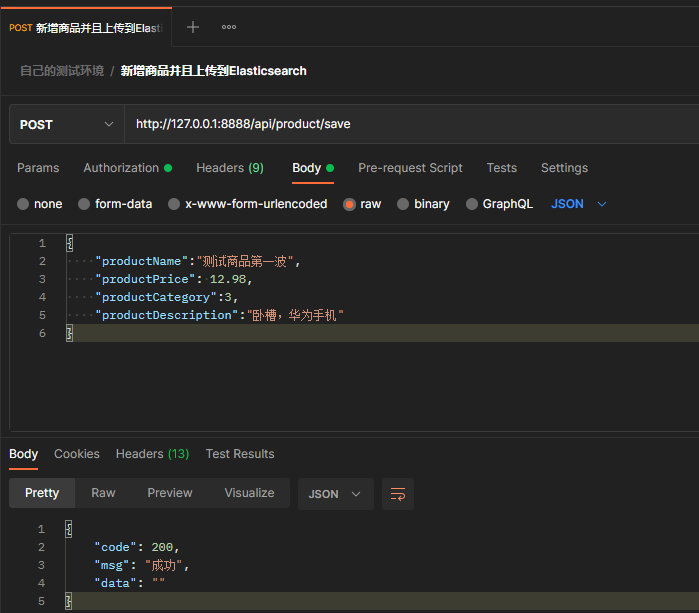
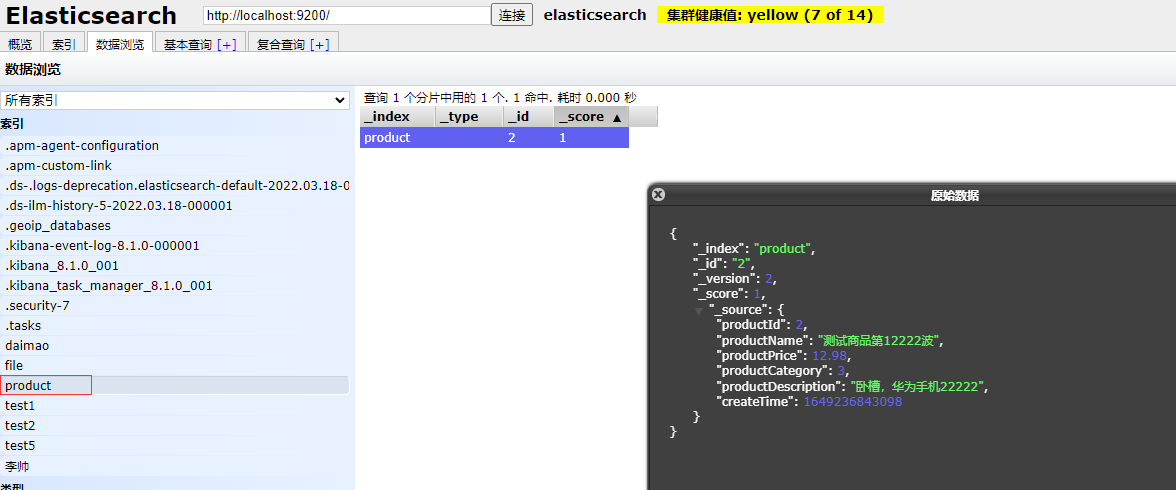 数据我update过,总之是已经传到Elasticsearch上面了。
- 查询,后面再补,这个才是关键。
Elasticsearch8.1-ElasticsearchClient-Java客户端简单增删查改-随笔的更多相关文章
- java中CRUD(增删查改)底层代码的实现
java中CRUD(增删查改)底层代码的实现: package com.station.dao; import com.station.model.Product; import java.sql.* ...
- MongoDB在Java下的增删查改
我们总不能一直使用cmd对数据库操作,数据库总是要在程序中使用的.今天来说一下怎么通过Java调用MongoDB. 学习一下最基本也是最常用的增删查改语句,这是使用数据库的基础. 注意事项: 1.要打 ...
- mybatis、spring、mysql、maven实现简单增删查改
之前写过的mybatis博客作为学习mybatis.spring还是不太合适. 现在找到一个不错的例子,首先将这个完整的mybatis增删查改例子在本地上实现出来,然后再进行学习. 项目结构与运行结果 ...
- Linq实现对XML的简单增删查改
一.传统DOM创建XML方法 private static void CreateXmlDocWithDom() { XmlDocument doc =new XmlDocument(); XmlEl ...
- C#实现对mongoDB的简单增删查改
首先添加所需要驱动包(可通过nuget获得) using MongoDB.Bson;using MongoDB.Driver;using MongoDB.Driver.Builders; 一.设置配置 ...
- Node.js+Navicat for MySQL实现的简单增删查改
前提准备: 电脑上必须装有服务器环境,Navicat for MySQL(我用的是这款MySQL,可随意),Node环境 效果如图所示: 源码地址: GitHub:https://github.com ...
- java实现简单的数据库的增删查改,并布局交互界面
一.系统简介 1.1.简介 本系统提供了学生信息管理中常见的基本功能,主要包括管理员.管理员的主要功能有对学生信息进行增加.删除.修改.查找等操作,对信息进行管理,对信息进行修改.查找等操作 ...
- Java连接MySQL数据库及简单的增删查改操作
主要摘自 https://www.cnblogs.com/town123/p/8336244.html https://www.runoob.com/java/java-mysql-connect.h ...
- java:Hibernate框架1(环境搭建,Hibernate.cfg.xml中属性含义,Hibernate常用API对象,HibernteUitl,对象生命周期图,数据对象的三种状态,增删查改)
1.环境搭建: 三个准备+7个步骤 准备1:新建项目并添加hibernate依赖的jar文件 准备2:在classpath下(src目录下)新建hibernate的配置文件:hibernate.cf ...
随机推荐
- Intellij IDEA远程debug线上项目记录
远程调试,特别是当你在本地开发的时候,你需要调试服务器上的程序时,远程调试就显得非常有用. JAVA 支持调试功能,本身提供了一个简单的调试工具JDB,支持设置断点及线程级的调试同时,不同的JVM通过 ...
- ClickHouse镜像在阿里云镜像站首发上线
镜像下载.域名解析.时间同步请点击阿里云开源镜像站 简介 ClickHouse是开源.高性能的列式OLAP的数据库管理系统(DBMS).使用SQL进行实时分析. ClickHouse可以做用户行为分析 ...
- sqli-labs下载与安装
Sqli-labs 下载 Sqli-labs是一个印度程序员写的,用来学习sql注入的一个游戏教程. 博客地址为:http://dummy2dummies.blogspot.hk/, 博客当中有一些示 ...
- 程序流程控制1 if 分支机构
通常,程序结构分为三种,顺序结构,循环结构和分支结构.程序中的语句按照先后顺序执行,成为顺序结构.分支结构则根据测试条件执行不同的代码.循环结构指重复执行相同的代码.Python用if ...
- T12焊台控制器制作教程 | T12烙铁 | PID增量式算法恒温控制 | 运算放大器-热电偶电压采集 | OLED屏幕显示-SPI通信 | 旋转编码器EC11用户操作
前言 购买T12烙铁的相关配件已经1年多了,期间也尝试了一些开源的T12控制器,但都没有成功,要么是配套资料少,要么是英文的,其中51和arduino的居多,STM32的较少.求人不如求己,索性自己开 ...
- CF1452E Two Editorials (思维题,暴力+差分)
题目描述: 给你m个位于[1,n]的区间p,现在有长度为K的区间b和c.设对于区间$p[i]$,定义$a[i]$为$p[i]$分别与b,c相交长度的较大值,现在问区间b和c位于何处时,$\sum p_ ...
- 什么是LSA,在OSPF中LSA是什么
什么是LSA:链路状态通告,它存在于LSU(链路状态更新包) Type 1 LSA:路由器LSA 每个OSPF路由器都会产生路由器LSA,描述了对应设备的物理接口所连接的链路和接口,并指明 ...
- jdk源码阅读笔记
1.环境搭建 http://www.komorebishao.com/2020/idea-java-jdk-funyard/ 2. 好的源码阅读资源 https://zhuanlan.zhihu.co ...
- 深入理解Java虚拟机-JVM运行时数据区域
一.运行时数据区域 1.程序计数器 程序计数器( Program Counter Register) 是一块较小的内存空间, 它可以看作是当前线程所执行的字节码的行号指示器. Java虚拟机的多线程是 ...
- 什么是RabbitMQ?RabbitMQ的使用场景是什么?
参考链接:RabbitMQ 简介以及使用场景