
Django学习笔记3
From the last two parts, we know, by using the HttpResponse we can return text to the web page, and by using admin site we can edit our question. Then we have to show our polls on the page. We are going to show latest 5 questions link. We can click it to see the details.
1.Showing the question link
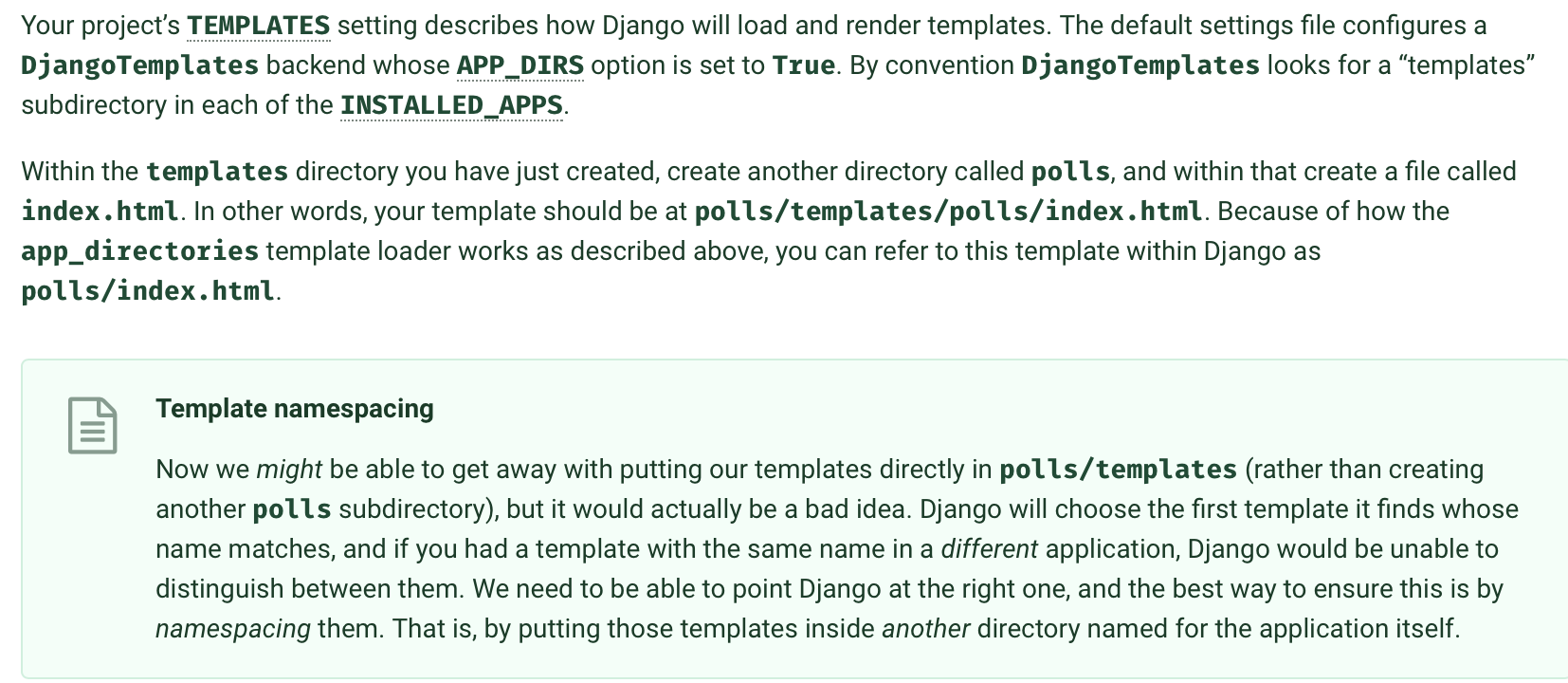
Work with views.py index function. We only need an argument, request from the server. Then call the Question model and visit the latest five question by coding Question.objects.order_by('-pub_time')[:5]. Of course we can code the display lines in it. But it will be troublesome when we have a lot to write and edit. So why not write it in the html file to make the structure more clearly. So now let's create a templates directory in the app polls and subdirectory polls to contain the html files.Why not directly put the html files in the templates? I'm not satisfied with the answer. But from my understanding, the program will traverse the INSTALLED_APPS and look into the templates. It will go into the first one that matches the html name. So we need one subdirectory with the app name to differentiate the html files with the same name in different apps. Create templates->polls->index.html, detail.html.
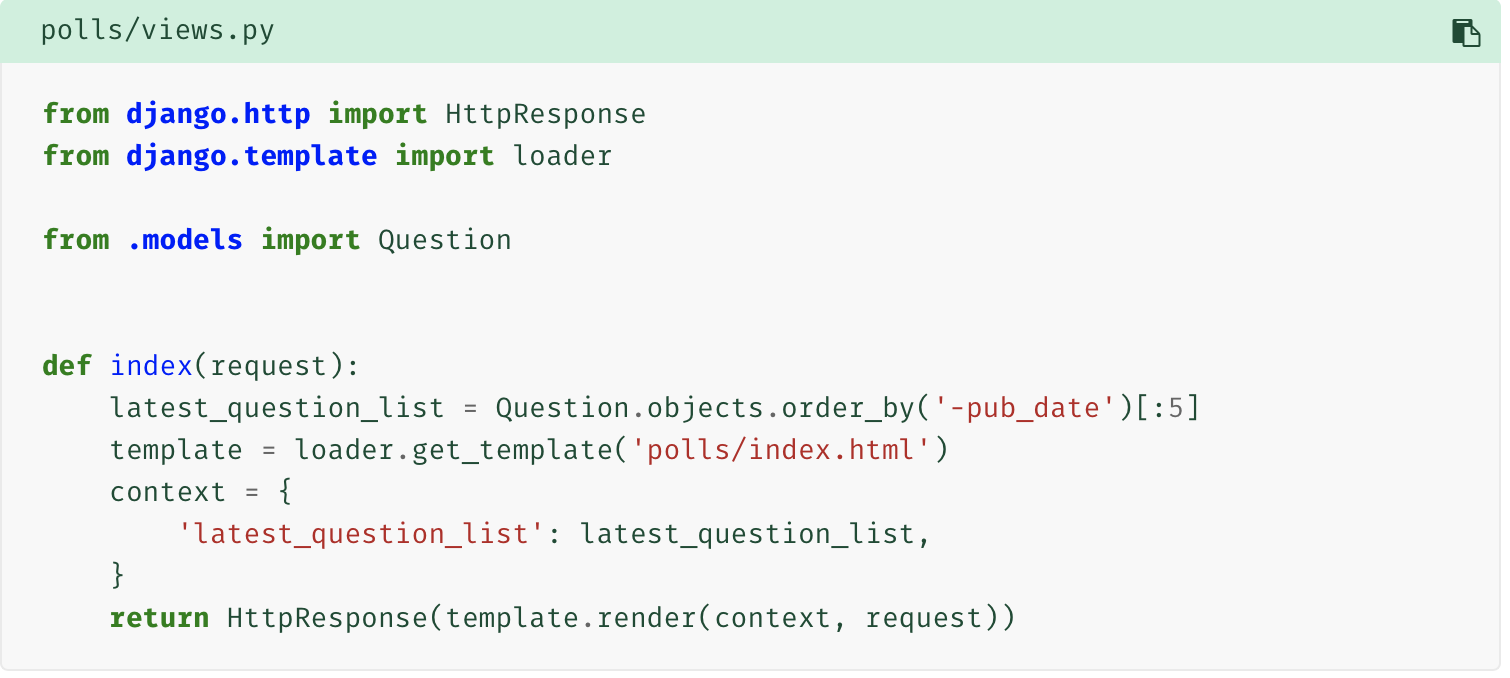
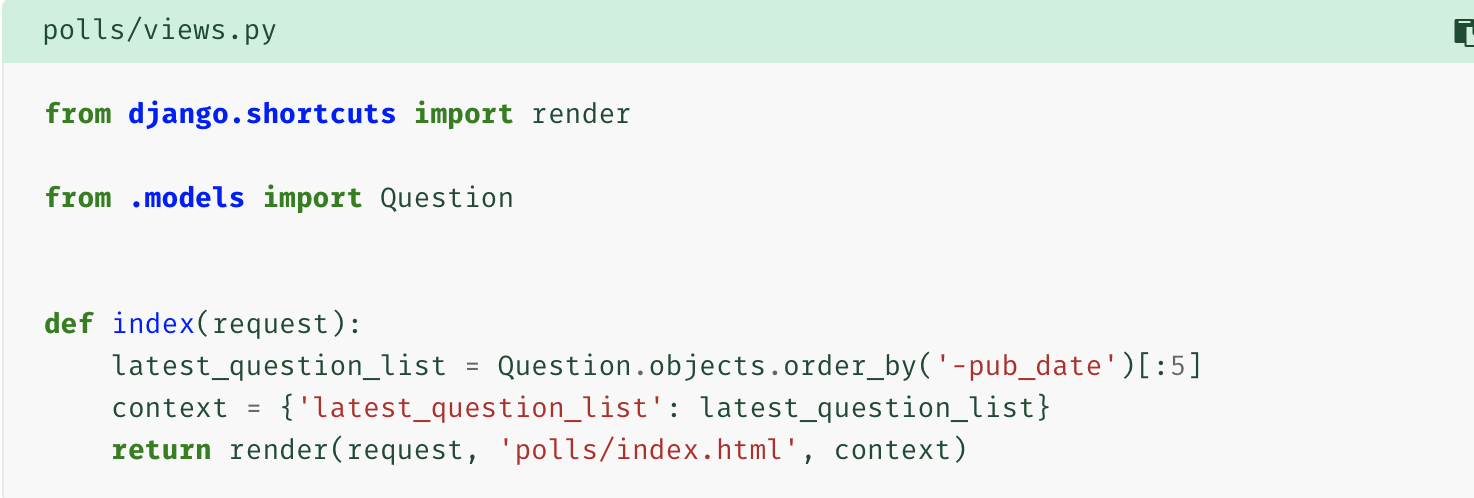
But how do we correspond the templates with views.py function. In the views.py index function, we load the designated templates html file, pass a context which is a dictionary form to deliver arguments, render it, namely to process it and make it in a state and return the HttpResponse rendered result. But we can just return the render() shortcut to tackle all of them. Amazing render!!!

next version:
next version:
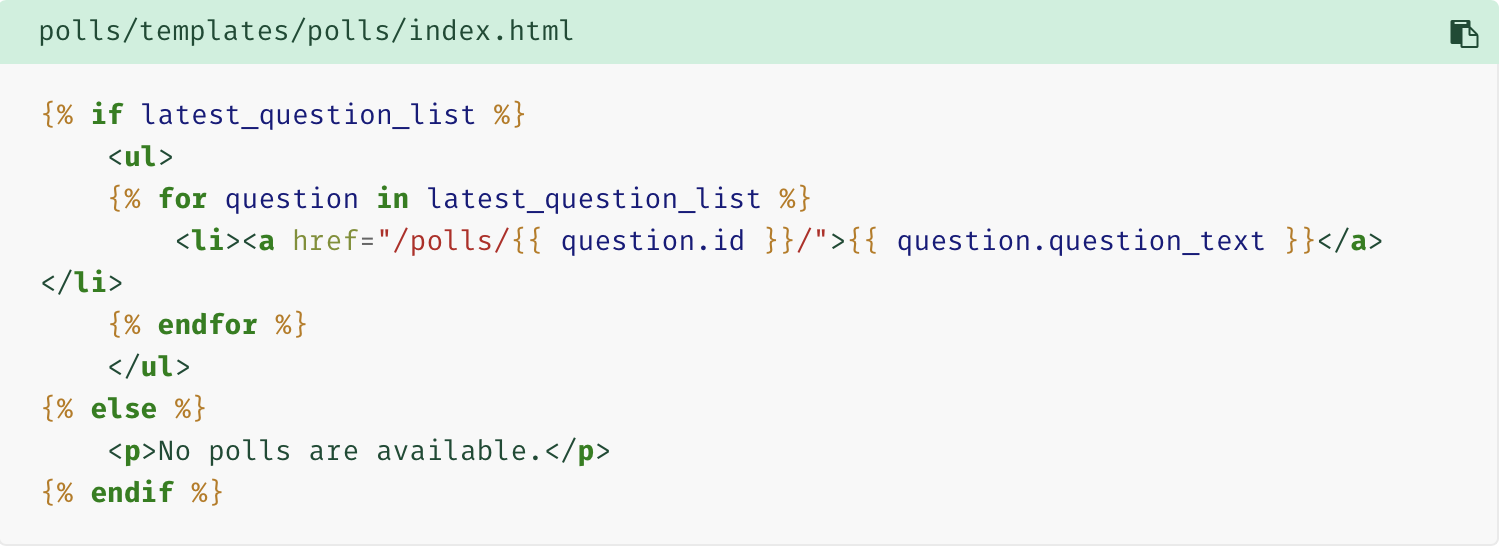
Here comes the html edition. But it has a shortcome that the url is hardcoded. Recall the url path we wrote before, path('<int:question_id>/', views.detail, name='detail'), the name is nickname of the path, so that we can use the nickname which will be easier for us to change another path in the future.
next version:

next version: to differentiate the same url name in different apps, we can write app_name = 'polls' in polls/urls.py top of the INSTALLED_APPS.

2. showing the choice.
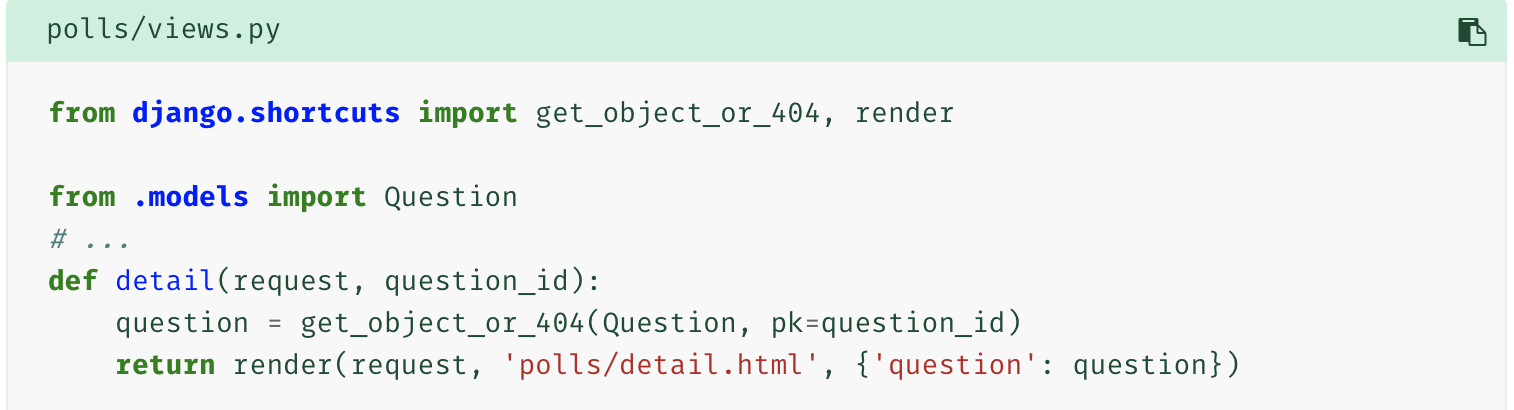
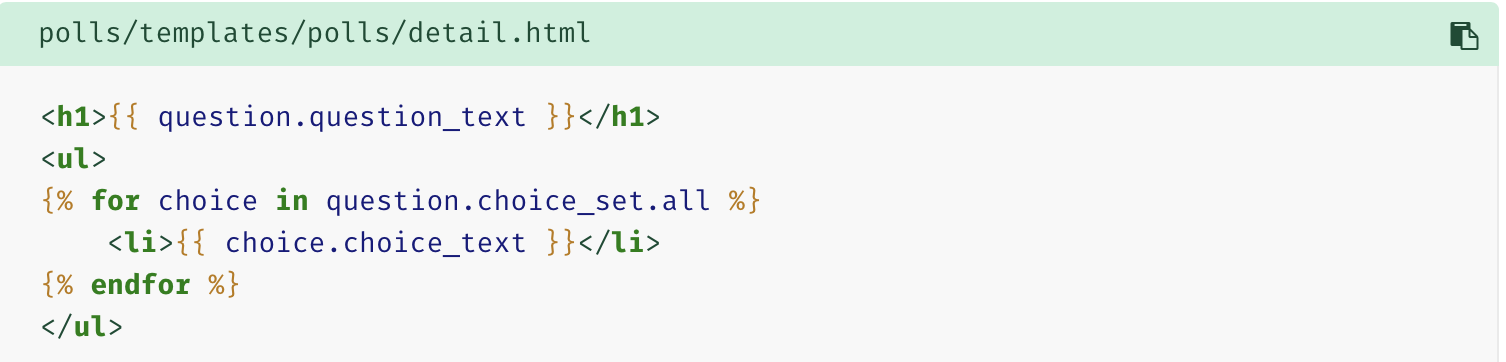
We've writtern the url link to the detail of the question. So go to the detail funtion in views.py and deliver the question to the html file, meanwhile an exception is necessary to takcle the problem of question=none. And we code the question and choices display lines in detail.html.
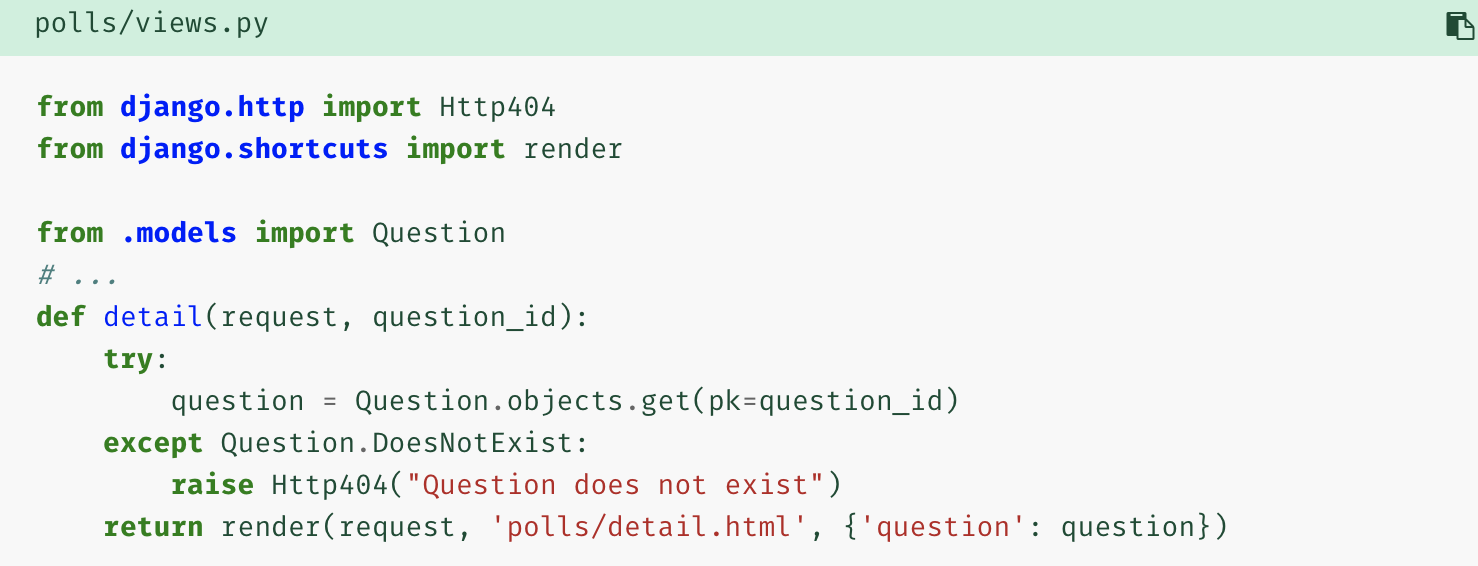
next version:
Django学习笔记3的更多相关文章
- Django 学习笔记之四 QuerySet常用方法
QuerySet是一个可遍历结构,它本质上是一个给定的模型的对象列表,是有序的. 1.建立模型: 2.数据文件(test.txt) 3.文件数据入库(默认的sqlite3) 入库之前执行 数据库同步命 ...
- Django 学习笔记之三 数据库输入数据
假设建立了django_blog项目,建立blog的app ,在models.py里面增加了Blog类,同步数据库,并且建立了对应的表.具体的参照Django 学习笔记之二的相关命令. 那么这篇主要介 ...
- Django学习笔记(五)—— 表单
疯狂的暑假学习之 Django学习笔记(五)-- 表单 參考:<The Django Book> 第7章 1. HttpRequest对象的信息 request.path ...
- Django学习笔记(三)—— 型号 model
疯狂暑期学习 Django学习笔记(三)-- 型号 model 參考:<The Django Book> 第5章 1.setting.py 配置 DATABASES = { 'defaul ...
- Django 学习笔记(二)
Django 第一个 Hello World 项目 经过上一篇的安装,我们已经拥有了Django 框架 1.选择项目默认存放的地址 默认地址是C:\Users\Lee,也就是进入cmd控制台的地址,创 ...
- Django 学习笔记(五)模板标签
关于Django模板标签官方网址https://docs.djangoproject.com/en/1.11/ref/templates/builtins/ 1.IF标签 Hello World/vi ...
- Django 学习笔记(四)模板变量
关于Django模板变量官方网址:https://docs.djangoproject.com/en/1.11/ref/templates/builtins/ 1.传入普通变量 在hello/Hell ...
- Django 学习笔记(三)模板导入
本章内容是将一个html网页放进模板中,并运行服务器将其展现出来. 平台:windows平台下Liunx子系统 目前的目录: hello ├── manage.py ├── hello │ ├── _ ...
- Django 学习笔记(七)数据库基本操作(增查改删)
一.前期准备工作,创建数据库以及数据表,详情点击<Django 学习笔记(六)MySQL配置> 1.创建一个项目 2.创建一个应用 3.更改settings.py 4.更改models.p ...
- Django 学习笔记(六)MySQL配置
环境:Ubuntu16.4 工具:Python3.5 一.安装MySQL数据库 终端命令: sudo apt-get install mysql-server sudo apt-get install ...
随机推荐
- 【daily】sql分组,每组取N条
数据准备 -- mysql语法 DROP TABLE IF EXISTS `test_group_type`; CREATE TABLE `test_group_type` ( `id` int(11 ...
- SqlServer视图查询效率测试
一. 测试背景开发一个项目,数据库用的是sqlserver.帐号表数据有一两百万,不算大,也不算小.在考虑是否要使用视图,担心效率,百度了下资料,众说纷纭,好吧,实践是最好的证明,那么我们就来测试吧 ...
- linux - top与ps间的区别
背景 在linux系统中提供了2个查询系统负荷值的命令,一个是 ps -o THREAD 一个是 top ,这两个命令都能够查询当前进程的CPU使用率情况,但是所代表的含义确实不一样的,ps -o T ...
- centos安装gitlab及汉化
GitLab 是一个用于仓库管理系统的开源项目,使用Git作为代码管理工具,并在此基础上搭建起来的web服务.今天,就记录一下centos部署gitlab及其汉化的操作方法. 1.下载安装 下载地址: ...
- django-分页(非海量数据)
views.py class AnalysisDataHandler(View): def get(self, request): analysis_data = MonitorCenterDataA ...
- 小白的linux笔记2:关于进程的基本操作
1.ps命令查看进程.ps -aux查看所有进程.可以用grep提取相关的部分进程,如只看python有关的:ps -aux |grep python. 进程状态:R运行中,T暂停,S休眠静止. 和进 ...
- P1980 计数问题(int,string,stringstream)
题目描述 试计算在区间 1 到 n 的所有整数中,数字x(0 ≤ x ≤ 9)共出现了多少次?例如,在 1 到 11 中,即在 1,2,3,4,5,6,7,8,9,10,11 中,数字 1 出现了 4 ...
- [大数据技术]datax的安装以及使用
1.datax简述 DataX 是阿里巴巴集团内被广泛使用的离线数据同步工具/平台,实现包括 MySQL.Oracle.SqlServer.Postgre.HDFS.Hive.ADS.HBase.Ta ...
- kali-linux下载地址
1 https://www.kali.org/downloads/2 http://cdimage.kali.org/ 下载地址.
- Wannafly Winter Camp 2020 Day 6J K重排列 - dp
求 \(K\) 是多少个 \(n\) 元置换的周期.\(T\leq 100, n\leq 50, K \leq 10^{18}\) Solution 置换可以被试做若干个环组成的有向图,于是考虑 dp ...