
Xcode 编译运行旧项目报错解决之路
运行几年前做的项目,发现各种编译报错,一个一个解决记录下:
1、Xcode(Xcode9)编译运行报错,但是在 issue navigatior 栏看不到错误信息;
解决方案:在 show report navigator 栏查看编译错误信息:
Showing All Messages
The operation couldn’t be completed. Unable to log in with account '**@**.com'. (The login details for account '**@**.com' were rejected.)

根据错误信息显示,说这个账户失效了(之前公司的Apple ID),需要在偏好设置中移除相应账户即可。
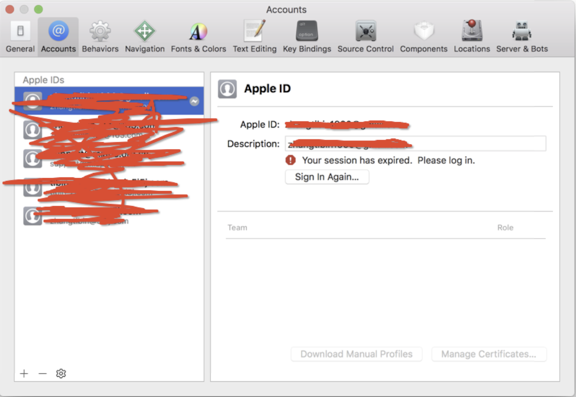
继续编译,下一个报错信息:
2、error: implicit declaration of function 'ether_ntoa' is invalid in C99 [-Werror,-Wimplicit-function-declaration]
strcpy(temp, (char *)ether_ntoa(LLADDR(sdl)));
解决方案:找到错误位置,引用类库:
    导入这三个头文件即可,

    #include <sys/types.h>

    #include <sys/socket.h>

    #include <net/ethernet.h>

    然后上面那行代码会有一个警告:"Incompatible pointer types passing 'caddr_t' (aka 'char *') to parameter of type 'const struct ether_addr *'" ;

    可以在LLADDR的前面加上(const struct ether_addr *) 也就是这样:
    strcpy(temp, (char *)ether_ntoa((const struct ether_addr *)LLADDR(sdl)));
    这样就没有警告了。
3、.xib: Compiling IB documents for earlier than iOS 7 is no longer supported. 工程是14年之前 Xcode创建的,升级到Xcode9后报错。
解决方案:将builds For 改成 iOS10之后就可以了。
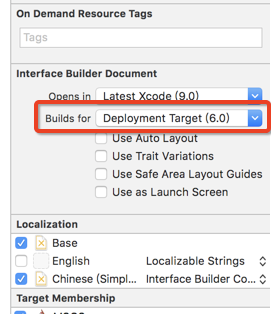
解决完成,大功告成,编译运行成功。接下来就是各种适配问题了 。
Xcode 编译运行旧项目报错解决之路的更多相关文章
- 运行springboot项目报错:Field userMapper in XX required a bean of type 'xx' that could not be found.
运行springboot项目报错: *************************** APPLICATION FAILED TO START ************************** ...
- Android——eclipse下运行android项目报错 Conversion to Dalvik format failed with error 1解决
在eclipse中导入android项目,项目正常没有任何错误,但是运行时候会报错,(clean什么的都没用了.....)如图: 百度大神大多说是jdk的问题,解决: 右键项目-Properties如 ...
- quick3.3final版创建项目报错解决
PHP Notice: Undefined index: QUICK_V3_ROOT in 405,469,497,520,551这5行代码都访问了一个环境变量$_ENV['QUICK_V3_ROO ...
- Mac运行React Native安卓项目报错解决
传送门参考: 下面的这个链接很详细了,一步一步就好.... https://github.com/NARUTOyuyang/React-Native 然而在运行react-native run-and ...
- npm run dev运行Vue项目报错:Node Sass does not yet support your current environment
导入Vue项目后,#npm run dev 报错: error in ./src/pages/hello.vue Module build failed: Error: Node Sass does ...
- 运行springboot项目报错 Error running 'ResourceApplication': Command line is too long. Shorten comma
方法1 IDEA 运行报错:Error running '***': Command line is too long 技术标签: IDEA Error running 'Test': Com ...
- IDEA新建SpringMVC项目报错解决办法
网页运行的错误: HTTP Status 500 - Handler processing failed; nested exception is java.lang.NoClassDefFoundE ...
- 运行gulp项目报错:AssertionError: Task function must be specified。
一.问题描述: gulp项目在本地windows 10机器上跑没有任何问题,但是放在centos 7虚拟机上跑报错:AssertionError: Task function must be spec ...
- 【原创】Eclipse导入Android项目报错解决
1.点击报错的项目--->右键--->Properties--->选择Android--->将Project Build Target选择其一勾上-->Is Librar ...
随机推荐
- 输入一个整形数组,数组里有正数也有负数。 数组中连续的一个或多个整数组成一个子数组,每个子数组都有一个和。 求所有子数组的和的最大值。要求时间复杂度为O(n)
我没有实现时间复杂度为O(n)的算法. 思路:从第一数开始,onelist[0]:onelist[0]+onelist[1]:这样依次推算出每个子数组的sum值.和max进行比较.最后得到max值. ...
- Spring核心知识
目录 Spring 概述 依赖注入 Spring beans Spring注解 Spring数据访问 Spring面向切面编程(AOP) Spring MVC Spring 概述 1. 什么是spri ...
- python3练习100题——023
再做一道,把这周的任务搞定- 其实看到这道题,很熟悉,让我想起大一时被C语言支配的恐惧.那个时候不停的在push自己,给自己很大的压力.上C语言课的时候让人昏昏欲睡,但是还是逼迫自己打起精神来学习,一 ...
- Python实现共享内存通信方式
创建共享内存python文件: import mmap import contextlib import time with contextlib.closing(mmap.mmap(-1, 100, ...
- vue基础实例
<html> <head> <script src="https://cdn.jsdelivr.net/npm/vue/dist/vue.js"> ...
- Commercial Lighting: LED Ceiling Light, LED Ceiling Light
Unlike ceiling lamps, floor lamps, chandeliers, lamps that can sometimes rely on "faces", ...
- 【C语言】用C语言输出一个吃豆人
大圆盘减去扇形和小圆盘: #include <math.h> #include <stdio.h> int main() { double x, y; ; y >= -; ...
- 程序设计实验:一个Python游戏,体验软件开发。
小组在GitHub上找了一个Pygame实现的超级马里奥游戏.所以我的学习过程大致如下: 1.快速学习Python基础语法. 2.学习pygame并着手理解这个项目. 3.完成作业以及各种文档报告. ...
- dbGet
dbGet是Innovus/Encounter DBTCL命令的一种.除了dbGet,DBTCL的命令还包括以下几种: 1. dbSet 2. setDbGetMode/getDbGetMode 3. ...
- Jquery判断单个checkbox 是否被选中
jquery判断checked的三种方法: .attr("checked") .prop("checked") .is(":checked" ...