
PyQt5打印机
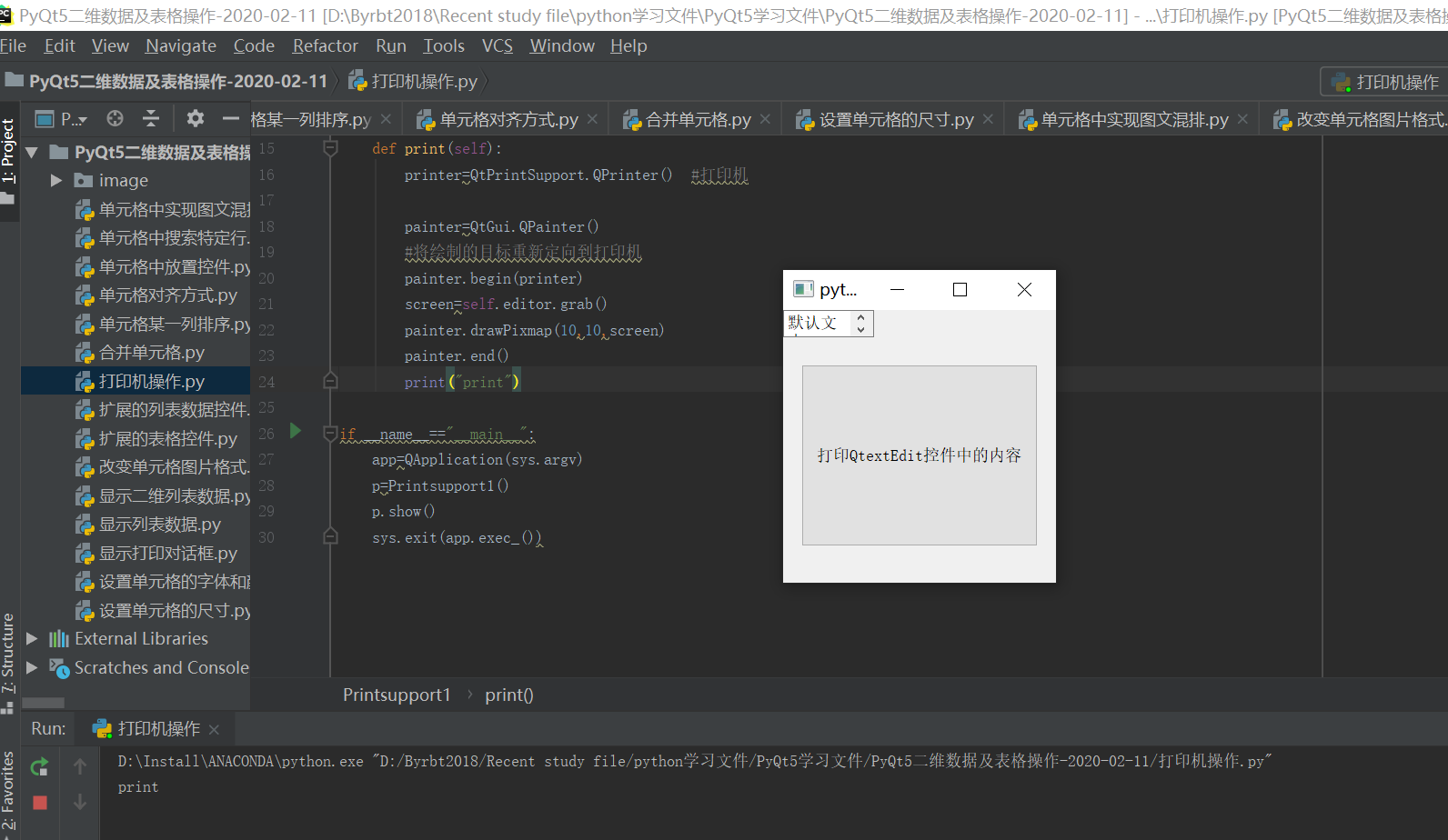
1、打印机操作(打印默认文本里面的内容)
from PyQt5 import QtGui,QtWidgets,QtPrintSupport
from PyQt5.QtWidgets import *
import sys

class Printsupport1(QMainWindow):
    def __init__(self):
        super(Printsupport1,self).__init__()
        self.setGeometry(500,200,300,300)
        self.button=QPushButton("打印QtextEdit控件中的内容",self)
        self.button.setGeometry(20,60,260,200)
        self.editor=QTextEdit("默认文本",self)
        self.button.clicked.connect(self.print)

    def print(self):
        printer=QtPrintSupport.QPrinter()  #打印机

        painter=QtGui.QPainter()
        #将绘制的目标重新定向到打印机
        painter.begin(printer)
        screen=self.editor.grab()
        painter.drawPixmap(10,10,screen)
        painter.end()
        print("print")

if __name__=="__main__":
    app=QApplication(sys.argv)
    p=Printsupport1()
    p.show()
    sys.exit(app.exec_())
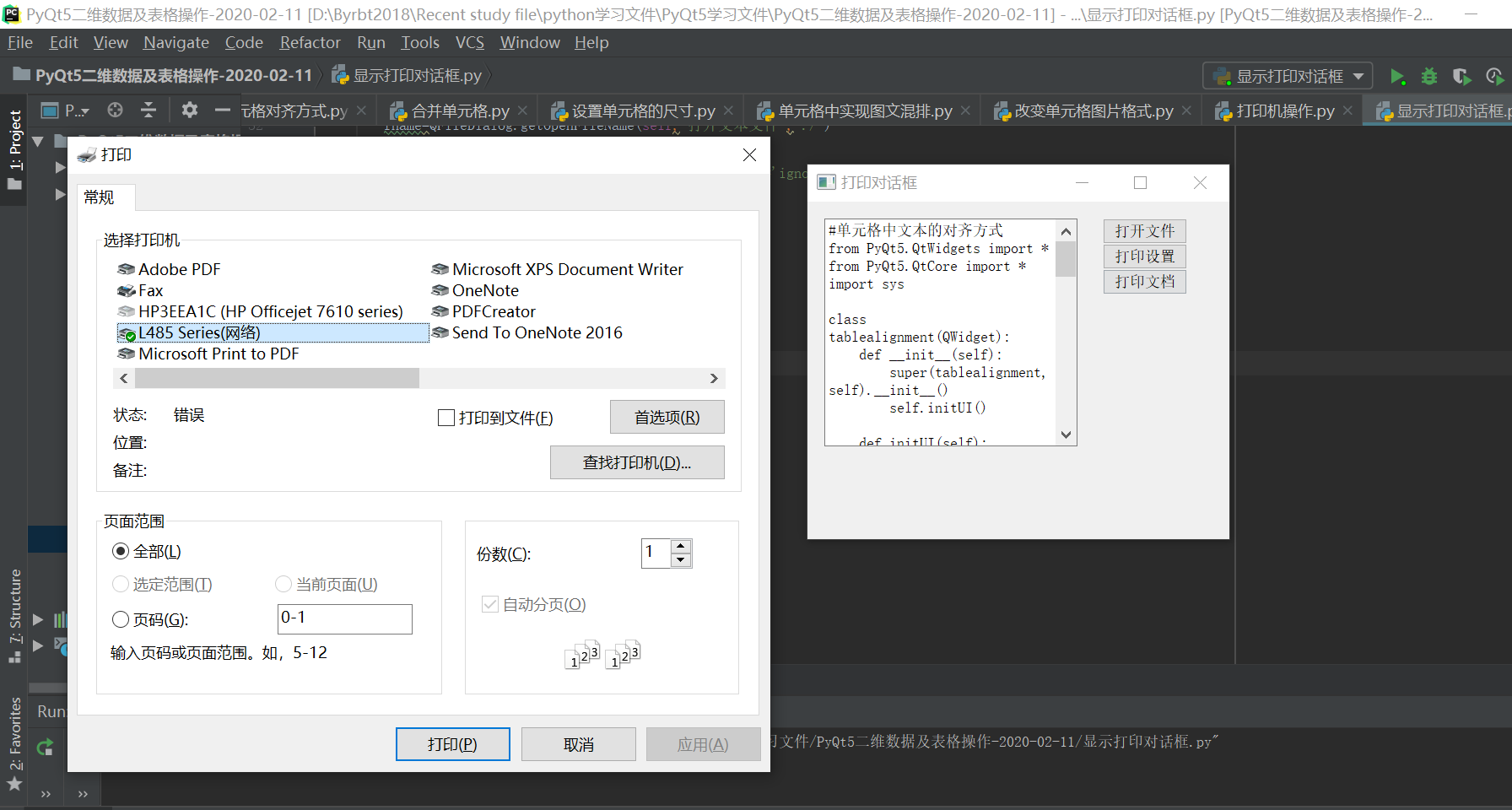
2、显示打印样式设置对话框
from PyQt5.QtPrintSupport import QPageSetupDialog,QPrintDialog,QPrinter
from PyQt5.QtWidgets import *
import sys

class Printdialog(QMainWindow):
    def __init__(self):
        super(Printdialog,self).__init__()
        self.printer=QPrinter()  #定义一个默认的打印机
        self.initUI()

    def initUI(self):
        self.setGeometry(300,300,500,400)
        self.setWindowTitle("打印对话框")
        self.editor=QTextEdit(self)
        self.editor.setGeometry(20,20,300,270)

        self.openbutton=QPushButton("打开文件",self)
        self.openbutton.move(350,20)

        self.settingbutton=QPushButton("打印设置",self)
        self.settingbutton.move(350,50)

        self.printbutton=QPushButton("打印文档",self)
        self.printbutton.move(350,80)

        self.openbutton.clicked.connect(self.openfile)
        self.settingbutton.clicked.connect(self.showsettingdailog)
        self.printbutton.clicked.connect(self.showprintdialog)
    #打开文件
    def openfile(self):
        fname=QFileDialog.getOpenFileName(self,"打开文本文件","./")
        if fname[0]:
            with open(fname[0],"r",encoding='utf-8',errors='ignore') as f:
                self.editor.setText(f.read())

    #显示打印设置对话框
    def showsettingdailog(self):
        printerdailog=QPageSetupDialog(self.printer,self)
        printerdailog.exec()

    #显示打印对话框
    def showprintdialog(self):
        print1=QPrintDialog(self.printer,self)
        if QDialog.Accepted==print1.exec():
            self.editor.print(self.printer)

if __name__=="__main__":
    app=QApplication(sys.argv)
    p=Printdialog()
    p.show()
    sys.exit(app.exec_())
PyQt5打印机的更多相关文章
- Python调用打印机参考例子
参考资料: http://blog.csdn.net/jdh99/article/details/42585987 http://www.oschina.net/question/1438043_23 ...
- 清除打印机队列中无法清除的任务 & 清空打印池
故障现象典型表现为以下两种情况 1.当打印任务开始进行时,这些打印任务便被保存在打印作业列表(也称打印队列)内.如果打印机因意外暂停(如打印机未连接)而未完成打印任务,则该打印任务将列入打印队列,并且 ...
- 用 eric6 与 PyQt5 实现python的极速GUI编程(系列04)---- PyQt5自带教程:地址簿(address book)
[引子] 在PyQt5自带教程中,地址簿(address book)程序没有完全实现界面与业务逻辑分离. 本文我打算用eric6+PyQt5对其进行改写,以实现界面与逻辑完全分离. [概览] 1.界面 ...
- Java jacob调用打印机打印word文档
前面说了Java如何生成复杂的Word文档,今年记录下Java如何调用打印机打印word文档. 起初用的是自带的PrintJob,但是系统提供的打印机制并不成熟完整.网上的代码也是千篇一律,在我的打印 ...
- Java使用POS打印机(无驱)
使用原因:应项目要求,需要使用打印机,但是如果使用Windows驱动来实现打印,在某些条件下会发生网络堵塞等,而且没有提示,所以为了确保信息的完整,避免数据丢失.我们使用无驱打印(直接写端口的方法), ...
- PDF虚拟打印机
1.安装福昕PDF阅读器,自己就会安装上PDF虚拟打印机 2.通过office2010之后版本中自带的另存为功能转换为pdf 3.pdf虚拟打印机工具:工具1:http://www.win2pdf.c ...
- HP网络打印机--如何添加打印机
HP网络打印机采用web服务形式,应添加打印机-通过Internet的打印机--填写网址http://192.168.1.10:80(从其他win7电脑-计算机-网络-网络设备中双击添加打印机,然后在 ...
- PyQt5+Python3.5.2-32bit开发环境搭建
1.基本环境. Window 8.1 64bit Python3.5.2-32bit.exe PyQt5 2.安装python. 去官网下载32位版本的python3.5.2(就是x86那个) 备 ...
- Windows远程桌面打印机映射
计算机的打印机驱动能打印,需要满足两个条件,一个是有打印驱动本身,一个是要有连接好了的端口.这样,打印作业就会被打印驱动程序封装成一种打印机能识别的组织形式,然后通过打印端口发送给打印机,然后打印! ...
随机推荐
- (c#)拼写单词
题目 解
- Python出现Could not find a version that satisfies the requirement openpyxl (from versions: )
一.环境使用python3.7时,用pip安装openpyxl出现如下错误: 系统环境:windows10家庭版Python版本:python3.7.1IDE:sublime_text 3二. 解决方 ...
- 动态IL织入框架Harmony简单入手
Harmony是一个开放源代码库,旨在在运行时替换.修饰或修改任何现有C#方法.它的主要用在用Mono语言编写的游戏和插件,但是该技术可以与任何.NET版本一起使用.它还照顾对同一方法的多次更改(它们 ...
- CDH安装时,无法纳管全部的节点的一个bug
问题描述: 使用CDH 5.2版本安装时,agent节点有12个.按照安装说明,在各个节点启动cm-agent之后,发现只有6个节点能被纳管.其它的节点总是无法加入纳管中. 在确认防火墙已经关闭后 ...
- 【StarUML】用例图
用例图是在项目初期确认需求的时候,需要明确各个参与者之间的关系以及对应的功能,它可视化地展示了整个系统的功能以及功能之间.功能与参与者之间的关系. 1.元素 1.1 角色(actor) 角色不一定是人 ...
- [LeetCode]1.Two Sum 两数之和&&第一次刷题感想
---恢复内容开始--- 参考博客: https://www.cnblogs.com/grandyang/p/4130379.html https://blog.csdn.net/weixin_387 ...
- .net C# Chart控件的简单使用
1.拖控件Chart 到界面 2. 清除默认的序列 chart1.Series.Clear(); 3.生成一个序列,并添加到chart1中,序列可添加多个 Series s1 = new Se ...
- 每天进步一点点------Alpha半透明图形叠加算法Matlab+Verilog实现
Alpha图形叠加算法Matlab+Verilog实现 1.1. Alpha算法的研究 Alpha通道是一个8位的灰度通道,该通道用256级灰度来记录图像中的透明度信息,定义透明.不透明和半透明区域, ...
- BFSDFS模板
BFS模板: private static void bfs(HashMap<Character, LinkedList<Character>> graph,HashMap&l ...
- aarch64环境下,搭建并配置服务器tomcat:
aarch64环境下,搭建并配置服务器tomcat: 环境说明及下载相关文件: 1. ARM环境:aarch64开发板 2.JDK安装包: jdk-8u231-linux-arm64-vfp-hflt ...