
网站windows可以访问mac和linux无法访问【MTU MSS问题】
环境:
阿里云LB 内网地址类型,代理后面的k8s上的服务
公司和阿里云之间vpn打通
在windows上进行访问一切正常,在相同的办公局域网linux主机内访问不通,mac笔记本访问同样不通,telnet 端口是正常的,就很诡异
抓包,windows安装wireshark,curl该地址,然后对该端口进行抓包,这个时候需要知道MSS这个东西了

在内网linux上或者mac上进行curl 该地址,然后去k8s对应的服务pod内进行tcpdump抓包
curl "http://10.255.30.26:8080/xxxxxxx&src=linux" #&src=windows这个后缀自己加的用于筛选抓包的信息
tcpdump -i any -vv -w src-linux #输出结果到src-linx文件,用于导出到wireshark查看分析使用
结果:
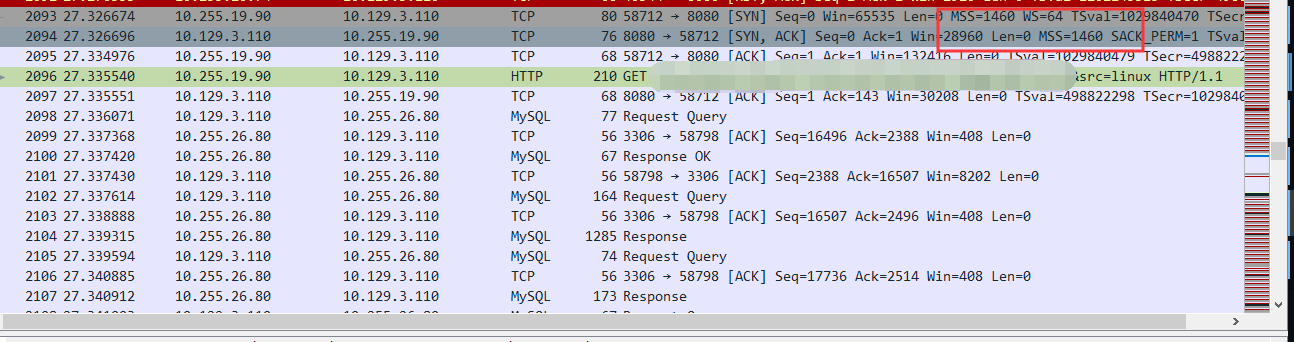
从windows正常能访问的上面进行curl 然后在服务端抓包比较,方法和上面相同,把src=linux改成src=windows,这个就是为了筛选结果用,随意命名
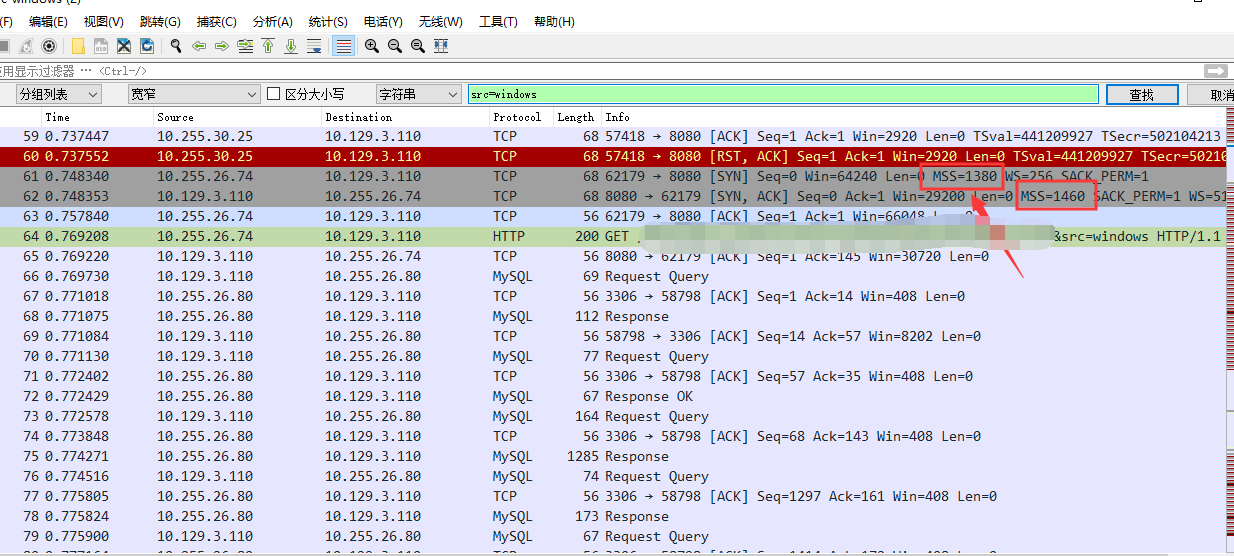
对于网络自己不是很清楚,但是和mss的确有关系,相关介绍参看下面
https://blog.51cto.com/virtualadc/692407
https://blog.csdn.net/scythe666/article/details/51967606
最终解决办法,在路由上加了一条
firewall-cmd --permanent --direct --add-passthrough ipv4 -I FORWARD -p tcp --tcp-flags SYN,RST SYN -j TCPMSS --clamp-mss-to-pmtu
参考http://www.enerco.si/blog/centos-and-masquerading
https://blog.csdn.net/bytxl/article/details/45027921
原文内容:
The other day I had weird problems with masqueraded connections. Certain HTTP connections were simply going deaf after a random amount of time. The behaviour seemed random at first, but then I discovered that only specific webservers like www.nmap.org or www.speedtest.net are affected.

The server, doing the masquerading was based on Centos 7. It was also using the new FirewallD system, so I thought the problem might be there. Normally, I wouldn't bother, but this one somehow didn't let me sleep.

Following the leads, I discovered that certain TCP packets are not coming through. How come, if all the PING replies are there? I could confirm that the really big packets are being lost. This brought me to the TCP fragmentation.

enp1s0: flags=4163<UP,BROADCAST,RUNNING,MULTICAST>  mtu 1500
ppp0: flags=4305<UP,POINTOPOINT,RUNNING,NOARP,MULTICAST>  mtu 1492
See the MTU (maximum transmission unit) value? I guessed certain packets are not being properly fragmented, thus not passing the route. Doing some reading, I found this:

When a user requests a web site, a client/server negotiation occurs between the PC and the web server that hosts the web site. During the negotiation, a maximum MTU size is negotiated. Since the PC negotiates and its default MTU size is 1500 bytes (Windows 3x, 9x, NT, ME, and so forth), the web server negotiates an MTU size of 1500 bytes. Therefore, regardless of the MTU size you configure on the router, the web server still sends packets up to 1500 bytes in size.

Luckily the guys at Netfilter wrote an extension that solves the problem. In the words of the author.

This patch by Marc Boucher <marc+nf@mbsi.ca> adds a new target that allows you to examine and alter the MSS value of TCP SYN packets, to control the maximum size for that connection. As explained by Marc himself, THIS IS A HACK, used to overcome criminally brain-dead ISPs or servers which block ICMP Fragmentation Needed packets.

Typical usage would be :

# iptables -A FORWARD -p tcp --tcp-flags SYN,RST SYN -j TCPMSS --clamp-mss-to-pmtu

So, applying this to the new firewalld system solved the problem.

firewall-cmd --permanent --direct --add-passthrough ipv4 -I FORWARD -p tcp --tcp-flags SYN,RST SYN
-j TCPMSS --clamp-mss-to-pmtu

A little bit of explanation here.
网站windows可以访问mac和linux无法访问【MTU MSS问题】的更多相关文章
- Golang 在 Mac、Linux、Windows 下如何交叉编译(转)
原文地址:Golang 在 Mac.Linux.Windows 下如何交叉编译 Golang 支持交叉编译,在一个平台上生成另一个平台的可执行程序,最近使用了一下,非常好用,这里备忘一下. Mac 下 ...
- Golang 在 Mac、Linux、Windows 下如何交叉编译
转自 https://blog.csdn.net/panshiqu/article/details/53788067 Golang 支持交叉编译,在一个平台上生成另一个平台的可执行程序,最近使用了一下 ...
- 在 Mac、Linux、Windows 下Go交叉编译
Golang 支持交叉编译,在一个平台上生成另一个平台的可执行程序,最近使用了一下,非常好用,这里备忘一下. Mac 下编译 Linux 和 Windows 64位可执行程序 CGO_ENABLED= ...
- Linux内核访问外设I/O--动态映射(ioremap)和静态映射(map_desc) (转载)
[转](转)Linux内核访问外设I/O资源的方式-静态映射(map_desc)方式 Linux内核访问外设I/O资源的方式 Author: Dongas Date: 08-08-02 我们知道默认外 ...
- windows下使用远程工具登录虚拟机上的Linux、访问虚拟机上的服务 、端口转发、win7 telnet登陆虚拟机
首先要清楚virtual box如何设置端口转发: 一篇文章: 如何使用VirtualBox进行端口转发 由于默认的方式是用NAT来做虚拟机网络的,因此如果从外网想访问虚拟机的应用会比较麻烦.以前一直 ...
- 在Windows、Mac和 Linux系统中安装Python与 PyCharm
“工欲善其事,必先利其器”,本文介绍 Python环境的安装和 Python的集成开发环境(IDE) PyCharn的安装. 一.Python安装( Windows.Mac和 Linux) 当前主 ...
- 如何选择一款适合自己操作系统、Windows、Mac还是Linux?
如何选择一款适合自己操作系统.Windows.Mac还是Linux? 作者:我们都很努力着 简介:电脑已经逐渐离不开我们生活,但是如何选择一个我们最佳,最适合的电脑操作系统就成了一些困难选择人士的一个 ...
- linux查看访问windows共享目录NT_STATUS_DUPLICATE_NAME问题解决
linux查看访问windows共享目录NT_STATUS_DUPLICATE_NAME问题解决 [jason@superfreak ~]$ smbclient //powerhouse-smb.my ...
- 在Linux下访问Windows共享目录的配置方法
在Linux下访问Windows共享目录的配置方法 1.在Windows上设置一个共享目录 如:将d:\RedHat_disk设置为共享目录 2.在Windows上创建一个用户,如tommy,密码11 ...
随机推荐
- SpringCloud-Hystrix原理
Hystrix官网的原理介绍以及使用介绍非常详细,非常建议看一遍,地址见参考文档部分. 一 Hystrix原理 1 Hystrix能做什么 通过hystrix可以解决雪崩效应问题,它提供了资源隔离.降 ...
- js获取url地址栏参数的方法,解决中文乱码问题,能支持中文参数
第一种:参数只能是英文的 function getQuery(name) { var reg = new RegExp("(^|&)" + name + "=([ ...
- 创建django报错使用miniconda
sqlite文件缺失 下载地址 https://sqlite.org/download.html https://blog.csdn.net/xuzhexing/article/details/905 ...
- 多级反向代理java获取真实IP地址
public static String getIpAddress(HttpServletRequest request){ String ip = request.getHeader("x ...
- poj-1753题题解思路
今天天气很好! 首先题意是这样的:: 翻盖游戏是在一个长方形的4x4场上进行的,其16个方格中的每一个都放置了双面的棋子.每一块的一边是白色的,另一边是黑色的,每一块都是躺着的,要么是黑色的,要么是白 ...
- PHP——foreach
一.foreach 在PHP中foreach循环语句,常用于遍历数组,一般有两种使用方式:不取下标.取下标 (一)只取值,不取下标 <?php foreach (数组 as 值){ //执行的任 ...
- java小心机(4)| 继承与组合的爱恨情仇
在java中,有两种主要复用代码的方法:继承和组合. 继承,是OOP的一大特性,想必大家都非常熟悉了;组合,其实也很常见,只是不知道它的名字罢了. 继承 子类拥有父类的基本特性,需使用extend关键 ...
- Python3中的super()函数详解
关于Python3中的super()函数 我们都知道,在Python3中子类在继承父类的时候,当子类中的方法与父类中的方法重名时,子类中的方法会覆盖父类中的方法, 那么,如果我们想实现同时调用父类和子 ...
- linux--->linux 各个文件夹及含义
1./bin 是binary的缩写 存放linux常用命令 2./lib 该目录用来存放系统动态链接共享库,几乎所有的应用程序都会用到该目录下的共享库. 3./dev 该目录包含了Linux系统中使用 ...
- Codeforces Round #617 (Div. 3)F. Berland Beauty
题意: 给一棵树,边权未知,现在给m组约束,每组约束给出从u到v路径中的最小值,现在让你给出一组边权,使得符合之前的约束,不能给出输出-1 思路: 因为n较小,对于每组约束我们可以直接暴力修改路径上的 ...