
Android学习14
Fragment
- Fragment是依赖于Activity的,不能独立存在的。
一个Activity里可以有多个Fragment。
一个Fragment可以被多个Activity重用。
Fragment有自己的生命周期,并能接收输入事件。
- 我们能在Activity运行时动态地添加或删除Fragment。
Fragment的生命周期
Fragment必须是依存于Activity而存在的,因此Activity的生命周期会直接影响到Fragment的生命周期。

- onAttach(Activity); //当Activity与Fragment发生关联时调用
- onCreateView(LayoutInflater,ViewGroup,Bundle); //创建该Fragment的视图
- onActivityCreate(bundle); //当Activity的onCreate();方法返回时调用
- onDestoryView(); //与onCreateView相对应,当改Fragment被移除时调用
- onDetach(); //与onAttach()相对应,当Fragment与Activity的关联被取消时调用
Container.java:
import androidx.appcompat.app.AppCompatActivity;

import android.os.Bundle;

import android.view.View;

import android.widget.Button;

import android.widget.FrameLayout;

import com.example.helloworld.R;

public class ContainerActivity extends AppCompatActivity {

    private AFragment aFragment;

    private BFragment bFragment;

    private Button mBtnChange;

    @Override

    protected void onCreate(Bundle savedInstanceState) {

        super.onCreate(savedInstanceState);

        setContentView(R.layout.activity_container);

        mBtnChange = findViewById(R.id.btn_change);

        mBtnChange.setOnClickListener(new View.OnClickListener() {

            @Override

            public void onClick(View v) {

                if(bFragment == null){

                    bFragment = new BFragment();

                }

                getSupportFragmentManager().beginTransaction().replace(R.id.fl_container,bFragment).commitAllowingStateLoss();

            }

        });

        //实例化AFragment

        aFragment = new AFragment();

        //把AFragment添加到Activity中

        getSupportFragmentManager().beginTransaction().add(R.id.fl_container,aFragment).commitAllowingStateLoss();

    }

}
activity_container:
<?xml version="1.0" encoding="utf-8"?>

<RelativeLayout xmlns:android="http://schemas.android.com/apk/res/android"

    android:layout_width="match_parent"

    android:layout_height="match_parent">

    <Button

        android:id="@+id/btn_change"

        android:layout_width="match_parent"

        android:layout_height="50dp"

        android:text="更换Fragment" />

    <FrameLayout

        android:id="@+id/fl_container"

        android:layout_width="match_parent"

        android:layout_height="match_parent"

        android:layout_below="@+id/btn_change"/>

</RelativeLayout>
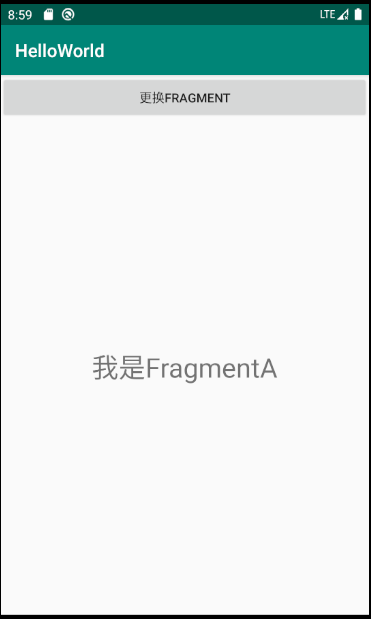
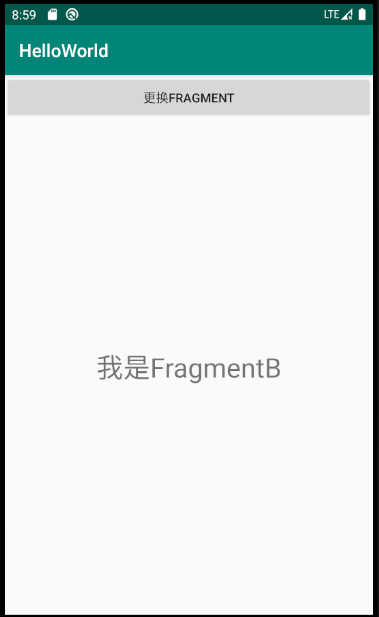
两个Fragment 分别为AFagment和BFragment
import android.app.Activity;

import android.content.Context;

import android.os.Bundle;

import android.view.LayoutInflater;

import android.view.View;

import android.view.ViewGroup;

import android.widget.TextView;

import androidx.annotation.NonNull;

import androidx.annotation.Nullable;

import androidx.fragment.app.Fragment;

import com.example.helloworld.R;

public class AFragment extends Fragment {

    private TextView mTvTitle;

    private Activity mActivity;

    @Nullable

    @Override

    public View onCreateView(@NonNull LayoutInflater inflater, @Nullable ViewGroup container, @Nullable Bundle savedInstanceState) {

        View view = inflater.inflate(R.layout.fragment_a,container,false);

        return view;

    }

    @Override

    public void onViewCreated(@NonNull View view, @Nullable Bundle savedInstanceState) {

        super.onViewCreated(view, savedInstanceState);

        mTvTitle = view.findViewById(R.id.tv_title);

    }

}
点击按钮 切换Fragment
Android学习14的更多相关文章
- 【Android学习】《Android开发视频教程》第一季笔记
视频地址: http://study.163.com/course/courseMain.htm?courseId=207001 课时5 Activity基础概念 1.Android开发技术结构 ...
- Android – 学习操作NFC – 2
在<Android – 学习操作NFC – 1>说明了Android在处理NFC tag的机制.tag dispatch system的运作流程,以及三种ACTION_NDEF_DISCO ...
- 10、android学习资源整理
1.github上整理好的开源工程 https://github.com/Trinea/android-open-project 2.最流行的android组件大全 http://colobu.com ...
- android学习系列:jercy——AI3 的博客
[android学习之十七]——特色功能2:桌面组件(快捷方式,实时文件夹) 二.桌面组件 1.快捷方式 Android手机上得快捷方式的意思可以以我们实际PC机器上程序的快捷方式来理解.而andro ...
- Android学习笔记之JSON数据解析
转载:Android学习笔记44:JSON数据解析 JSON(JavaScript Object Notation)是一种轻量级的数据交换格式,采用完全独立于语言的文本格式,为Web应用开发提供了一种 ...
- Android学习系列(7)--App轮询服务器消息
这篇文章是android开发人员的必备知识. 1.轮询服务器 一般的应用,定时通知消息可以采用轮询的方法从服务器拿取消息,当然实时消息通知的话,建议采用推送服务. 其中需要注意轮询的频率 ...
- Android学习系列(15)--App列表之游标ListView(索引ListView)
游标ListView,提供索引标签,使用户能够快速定位列表项. 也可以叫索引ListView,有的人称也为Tweaked ListView,可能更形象些吧. 一看图啥都懂了: 1. ...
- Android学习系列(23)--App主界面实现
在上篇文章<Android学习系列(22)--App主界面比较>中我们浅略的分析了几个主界面布局,选了一个最大众化的经典布局.今天我们就这个经典布局,用代码具体的实现它. 1.预览图先看下 ...
- Xamarin.Android学习之应用程序首选项
Xamarin.Android学习之应用程序首选项 一.前言 任何App都会存在设置界面,如果开发者利用普通控件并绑定监听事件保存设置,这一过程会非常的枯燥,而且耗时.我们可以看到Android系统的 ...
随机推荐
- LED Keychain-A Tool To Drive Specific Market Segments
LED keychain are an excellent tool to drive specific market segments. They can focus on a small grou ...
- 机器学习作业(三)多类别分类与神经网络——Matlab实现
题目太长了!下载地址[传送门] 第1题 简述:识别图片上的数字. 第1步:读取数据文件: %% Setup the parameters you will use for this part of t ...
- Wannafly Camp 2020 Day 2J 邦邦的2-SAT模板
#include <bits/stdc++.h> using namespace std; int main() { int n; cin>>n; cout<<n& ...
- Java判断一个字符串是否有中文
Java判断一个字符串是否有中文一般情况是利用Unicode编码(CJK统一汉字的编码区间:0x4e00–0x9fbb)的正则来做判断,但是其实这个区间来判断中文不是非常精确,因为有些中文的标点符号比 ...
- PP: Toeplitz Inverse Covariance-Based Clustering of Multivariate Time Series Data
From: Stanford University; Jure Leskovec, citation 6w+; Problem: subsequence clustering. Challenging ...
- Linux - mysql 异常:登录不上mysql数据库
问题描述 重启虚拟机之后,用命令 mysql -u root -p 登录不上 mysql 数据库,页面显示: 但是,用命令 service mysqld status 可以查看状态 解决方案 1.查看 ...
- springboot整合websocket实现客户端与服务端通信
定义 WebSocket是通过单个TCP连接提供全双工(双向通信)通信信道的计算机通信协议.此WebSocket API可在用户的浏览器和服务器之间进行双向通信.用户可以向服务器发送消息并接收事件驱 ...
- 想要学好Git,应该掌握哪些基础知识?
说到Git,作为程序员的你,在项目开发中一定会使用到或将来也一定会使用到的,但是我相信,很多在使用Git的人,都只是停留一些简单的操作上,比如提交(commit).拉取(pull).推送(push). ...
- not under version control
表示这个文件没有在SVN的控制之下 你在执行commit操作的时候,只有处于SVN控制之下的文件才能被commit,从update得到的文件是在SVN控制之下的(比如原来就存在的文本文件,你可以对其修 ...
- 记manjaro图形驱动删除后的一次补救
#一.前言 众所周知,NVIDIA的闭源驱动在Linux上的兼容性不是很好,再加上我不玩游戏,于是我就想卸载独显只留核显.我以为我装了独显和核显两种驱动,原本想直接删除独显驱动,没想到删除的是bumb ...