
C# 对象对比是否相等 工作笔记
需要在Linq 中对比两个对象是否相等
/// <summary>

    /// 定义一个点

    /// </summary>

    class Point

    {

        public int x { get; set; }

        public int y { get; set; }

        public Point(int x, int y)

        {

            this.x = x;

            this.y = y;

        }

    }
 List<Point> list1 = new List<Point>() { new Point(,), new Point(, ), new Point(, ), new Point(, ), new Point(, ), new Point(, )};

 var result1 = list1.Where(M => M == new Point(, ));
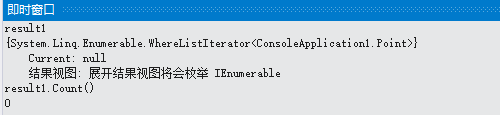
三种对比方法均不能
Point p1 = new Point(, );

Point p2 = new Point(, );

Console.WriteLine(p1 == p2);//False

Console.WriteLine(p1.Equals(p2));//False

// ReferenceEquals 方法用于对象的引用是否相等

// ReferenceEquals 不能重写 注意

Console.WriteLine(System.Object.ReferenceEquals(p1, p2));//False

p1 = p2;

Console.WriteLine(System.Object.ReferenceEquals(p1, p2));//True
由于没有重写 == 运算符 和 Equals 方法,不能够 直接使用否则对比的将是对象的引用地址
需要对类进行重写,详细如下
   /// <summary>

    /// 定义一个点,并重写对象与对象是否相等的方法

    /// 可用于判断对象是否相等

    /// eg:

    ///     obj1 == obj2

    ///     obj1.Equals(obj2)

    /// </summary>

    class TestPoint : IEquatable<TestPoint>

    {

        public int x { get; set; }

        public int y { get; set; }

        public TestPoint(int x, int y)

        {

            this.x = x;

            this.y = y;

        }

        /// <summary>

        /// 重载 == 运算符

        /// </summary>

        /// <param name="p1"></param>

        /// <param name="p2"></param>

        /// <returns></returns>

        public static bool operator ==(TestPoint p1, TestPoint p2)

        {

            return (p1.x == p2.x) && (p1.y == p2.y);

        }

        /// <summary>

        /// 重载 != 运算符

        /// </summary>

        /// <param name="p1"></param>

        /// <param name="p2"></param>

        /// <returns></returns>

        public static bool operator !=(TestPoint p1, TestPoint p2)

        {

            return (p1.x != p2.x) || (p1.y != p2.y);

        }

        /// <summary>

        /// 重写Equals(object obj)

        /// </summary>

        /// <param name="obj"></param>

        /// <returns></returns>

        public override bool Equals(object obj)

        {

            return this.Equals(obj as TestPoint);

        }

        /// <summary>

        /// 重写 计算对象的哈希值方法(自定义 这里只是示范)
     /// 该方法用于判断对象的哈希值是否相等 如对象哈希值相同 就认为两个对象 相等

        /// </summary>

        /// <returns></returns>

        public override int GetHashCode()

        {

            return this.x.GetHashCode() + this.y.GetHashCode();

        }

        /// <summary>

        /// 继承定义Equals<T>方法

        /// 需要继承接口IEquatable<T>

        /// </summary>

        /// <param name="other"></param>

        /// <returns></returns>

        public bool Equals(TestPoint other)

        {

            return (this.x == other.x) && (this.y == other.y);

        }

    }
使用大概示范
       Point p1 = new Point(, );

            Point p2 = new Point(, );

            Console.WriteLine(p1 == p2);//False

            Console.WriteLine(p1.Equals(p2));//False

            // ReferenceEquals 方法用于对象的引用是否相等

            // ReferenceEquals 不能重写 注意

            Console.WriteLine(System.Object.ReferenceEquals(p1, p2));//False

            p1 = p2;

            Console.WriteLine(System.Object.ReferenceEquals(p1, p2));//True

            TestPoint p3 = new TestPoint(, );

            TestPoint p4 = new TestPoint(, );

            Console.WriteLine(p3 == p4);//True

            Console.WriteLine(p3.Equals(p4));//True

            // ReferenceEquals 方法用于对象的引用是否相等

            // ReferenceEquals 不能重写 注意

            Console.WriteLine(System.Object.ReferenceEquals(p3, p4));//False

            p3 = p4;

            Console.WriteLine(System.Object.ReferenceEquals(p3, p4));//True

            List<Point> list1 = new List<Point>() { new Point(,), new Point(, ), new Point(, ), new Point(, ), new Point(, ), new Point(, )};

            var result1 = list1.Where(M => M == new Point(, ));

            List<TestPoint> list2 = new List<TestPoint>() { new TestPoint(, ), new TestPoint(, ), new TestPoint(, ), new TestPoint(, ), new TestPoint(, ), new TestPoint(, ) };

            var result2 = list2.Where(M => M == new TestPoint(, ));
完整代码
using System;

using System.Collections.Generic;

using System.Linq;

using System.Text;

using System.Threading.Tasks;

namespace ConsoleApplication1

{

    /// <summary>

    /// 定义一个点

    /// </summary>

    class Point

    {

        public int x { get; set; }

        public int y { get; set; }

        public Point(int x, int y)

        {

            this.x = x;

            this.y = y;

        }

    }

    /// <summary>

    /// 定义一个点,并重写对象与对象是否相等的方法

    /// 可用于判断对象是否相等

    /// eg:

    ///     obj1 == obj2

    ///     obj1.Equals(obj2)

    /// </summary>

    class TestPoint : IEquatable<TestPoint>

    {

        public int x { get; set; }

        public int y { get; set; }

        public TestPoint(int x, int y)

        {

            this.x = x;

            this.y = y;

        }

        /// <summary>

        /// 重载 == 运算符

        /// </summary>

        /// <param name="p1"></param>

        /// <param name="p2"></param>

        /// <returns></returns>

        public static bool operator ==(TestPoint p1, TestPoint p2)

        {

            return (p1.x == p2.x) && (p1.y == p2.y);

        }

        /// <summary>

        /// 重载 != 运算符

        /// </summary>

        /// <param name="p1"></param>

        /// <param name="p2"></param>

        /// <returns></returns>

        public static bool operator !=(TestPoint p1, TestPoint p2)

        {

            return (p1.x != p2.x) || (p1.y != p2.y);

        }

        /// <summary>

        /// 重写Equals(object obj)

        /// </summary>

        /// <param name="obj"></param>

        /// <returns></returns>

        public override bool Equals(object obj)

        {

            return this.Equals(obj as TestPoint);

        }

        /// <summary>

        /// 重写 计算对象的哈希值方法(自定义 这里只是示范)

        /// </summary>

        /// <returns></returns>

        public override int GetHashCode()

        {

            return this.x.GetHashCode() + this.y.GetHashCode();

        }

        /// <summary>

        /// 继承定义Equals<T>方法

        /// 需要继承接口IEquatable<T>

        /// </summary>

        /// <param name="other"></param>

        /// <returns></returns>

        public bool Equals(TestPoint other)

        {

            return (this.x == other.x) && (this.y == other.y);

        }

    }

    class Program

    {

        static void Main(string[] args)

        {

            Point p1 = new Point(, );

            Point p2 = new Point(, );

            Console.WriteLine(p1 == p2);//False

            Console.WriteLine(p1.Equals(p2));//False

            // ReferenceEquals 方法用于对象的引用是否相等

            // ReferenceEquals 不能重写 注意

            Console.WriteLine(System.Object.ReferenceEquals(p1, p2));//False

            p1 = p2;

            Console.WriteLine(System.Object.ReferenceEquals(p1, p2));//True

            TestPoint p3 = new TestPoint(, );

            TestPoint p4 = new TestPoint(, );

            Console.WriteLine(p3 == p4);//True

            Console.WriteLine(p3.Equals(p4));//True

            // ReferenceEquals 方法用于对象的引用是否相等

            // ReferenceEquals 不能重写 注意

            Console.WriteLine(System.Object.ReferenceEquals(p3, p4));//False

            p3 = p4;

            Console.WriteLine(System.Object.ReferenceEquals(p3, p4));//True

            List<Point> list1 = new List<Point>() { new Point(,), new Point(, ), new Point(, ), new Point(, ), new Point(, ), new Point(, )};

            var result1 = list1.Where(M => M == new Point(, ));

            List<TestPoint> list2 = new List<TestPoint>() { new TestPoint(, ), new TestPoint(, ), new TestPoint(, ), new TestPoint(, ), new TestPoint(, ), new TestPoint(, ) };

            var result2 = list2.Where(M => M == new TestPoint(, ));

            Console.Read();

        }

    }

}
ReferenceEquals 不能重写 注意
用于工作记录
2018年12月7日13:22:13
lxp
C# 对象对比是否相等 工作笔记的更多相关文章
- 2016年第2周读书笔记与工作笔记 scrollIntoView()与datalist元素
这一周主要是看了html5网页开发实例与javascript 高级程序设计,供以后翻阅查找. html5网页开发实例第1章与第二章的2.1部分: 第1章内容: html5在w3c的发展史. 浏览器的 ...
- javascript - 工作笔记 (事件四)
在javascript - 工作笔记 (事件绑定二)篇中,我将事件的方法做了简单的包装, JavaScript Code 12345 yx.bind(item, "click&quo ...
- 工作笔记3.手把手教你搭建SSH(struts2+hibernate+spring)环境
上文中我们介绍<工作笔记2.软件开发经常使用工具> 从今天開始本文将教大家怎样进行开发?本文以搭建SSH(struts2+hibernate+spring)框架为例,共分为3步: 1)3个 ...
- python学习Day14 带参装饰器、可迭代对象、迭代器对象、for 迭代器工作原理、枚举对象、生成器
复习 函数的嵌套定义:在函数内部定义另一个函数 闭包:被嵌套的函数 -- 1.外层通过形参给内层函数传参 -- 2.返回内部函数对象----> 延迟执行, 开放封闭原则: 功能可以拓展,但源代 ...
- 关于Java 中Integer 和Long对象 对比的陷阱(简单却容易犯的错误)
彩票客户端“忘记密码”功能有bug,今天调试时,发现了原因: 功能模块中有一段: if(userpo.getId()!=Long.valueOf(uid)){ throw new VerifyExce ...
- Sencha Touch2 工作笔记
Sencha Touch2 工作笔记 Ext.dataview.List activate( this, newActiveItem, oldActiveItem, eOpts ) Fires whe ...
- 工作笔记5.JAVA图片验证码
本文主要内容为:利用JAVA图片制作验证码. 设计思路: 1.拷贝AuthImageServlet.class图片验证码 2.配置web.xml 3.JSP中,调用封装好的AuthImageServl ...
- 读书笔记——《MySQL DBA 工作笔记》
关于前言 作者在前言中提出的一些观点很具有参考价值, 梳理完整的知识体系 这是每一个技术流都应该追逐的,完整的知识体系能够使我们对知识的掌握更加全面,而不仅仅局限于点 建立技术连接的思维,面对需求,永 ...
- 《工作笔记:移动web页面前端开发总结》
工作笔记:移动web页面前端开发总结 移动web在当今的发展速度是一日千里,作为移动领域的门外汉,在这段时间的接触后,发现前端开发这一块做一个小小的总结. 1.四大浏览器内核 1.Trident (I ...
随机推荐
- AVR单片机丢固件原因分析和解决方案
一.硬件方面 除了下面列举的方面,还需要评估下其他措施. 1.电源因素,禁干扰. 只要用廉价劣质的开关电源,不管哪个单片机,都存在EEPROM丢数据和单片机程序丢失的情况. 1.转接板走线,直接接到了 ...
- 【你不知道的javaScript 上卷 笔记1】 javaScript 是如何工作的?
一.什么是作用域? 作用域是用来存储变量以及方便寻找变量的一套规则. 二.javaScript 编译过程(编译发生在代码执行前的几微妙) 分词/词法分析(Tokenizing/Lexing)-> ...
- 申请一个美国paypal账户
近期为了做PayPal支付,进口demo已经写好,就差一个美国PayPal账户进行支付测试,几经折腾,终于申请下来,附上参考链接: paypal官网: https://www.paypal.com ...
- java mail发送html格式的邮件
// 获取系统属性 Properties properties = System.getProperties(); // 设置邮件服务器 properties.setProperty("ma ...
- 多个iframe,删除详情页时刷新同级iframe的table list
说明:在使用iframe开发时,经常遇到多个iframe之间的操作. 下面就是一个需求:在一个iframe中关闭时,刷新指定的iframe: 添加需要刷新的标识reload=true //添加npi2 ...
- C# asp.net 配置文件连接sql 数据库
先引用 using System.Configuration;//配置文件using System.Data.SqlClient; 我这里使用的是SqlServer 2008 sa 用户 密码也为s ...
- 模块二、shell脚本逻辑结构
七.if结构条件句知识与实践 (一)if条件句单双分支语法 1.单分支 if 条件 then 指令 fi 2.双分支 if 条件 then 指令 else 指令集2 fi (二)if条件句多分支语句 ...
- PHP 中 16 个魔术方法详解
PHP 中 16 个魔术方法详解 前言 PHP中把以两个下划线__开头的方法称为魔术方法(Magic methods),这些方法在PHP中充当了举足轻重的作用. 魔术方法包括: __constru ...
- 计蒜客 - A1633.蒜头君的数轴
我感觉出的很好的一道题,首先不难想到(其实我刚开始没想到),加点的个数就是找已有点两两形成区间的gcd,那么问题就出在了复杂度上,每次循环哪个区间不要复杂度过高,所以运用正反两次前缀和(?好像不能这么 ...
- Spring - Spring Boot - Thymeleaf - textual 模式
概述 thymeleaf 的 text 模式简单使用 过程会比较啰嗦, 需要结论的同学, 可以直接到底部去寻找 背景 想尝试做一个简单的 模板工具 目的 自动生成一些简单的 重复文本 思路 尽量简单 ...