
C# monitor keyboard and print pressed key
using System;

using System.Windows.Forms;

using System.Runtime.InteropServices;

using System.Diagnostics;

namespace ConsoleApplication3

{

    class MonitorHelper

    {

        internal const int WHKEYBOARDLLValue = ;

        internal const int WMKEYDOWNValue = 0x0100;

        internal static LowLevelKeyboardProc procValue = HookCallback;

        internal static IntPtr hookIDValue = IntPtr.Zero;

        internal delegate IntPtr LowLevelKeyboardProc(int nCode, IntPtr wParam, IntPtr lParam);

        [DllImport("user32.dll", CharSet = CharSet.Auto, SetLastError = true)]

        internal static extern IntPtr SetWindowsHookEx(int idHook, LowLevelKeyboardProc lpfn, IntPtr hMod, uint dwThreadId);

        [DllImport("user32.dll", CharSet = CharSet.Auto, SetLastError = true)]

        [return: MarshalAs(UnmanagedType.Bool)]

        internal static extern bool UnhookWindowsHookEx(IntPtr hhk);

        [DllImport("user32.dll", CharSet = CharSet.Auto, SetLastError = true)]

        internal static extern IntPtr CallNextHookEx(IntPtr hhk, int nCode, IntPtr wParam, IntPtr lParam);

        [DllImport("kernel32.dll", CharSet = CharSet.Auto, SetLastError = true)]

        internal static extern IntPtr GetModuleHandle(string lpModuleName);

        internal static IntPtr HookCallback(int nCode, IntPtr wParam, IntPtr lParam)

        {

            if (nCode >=  && wParam == (IntPtr)WMKEYDOWNValue)

            {

                int vkCode = Marshal.ReadInt32(lParam);

                Console.WriteLine((Keys)vkCode);

            }

            return CallNextHookEx(hookIDValue, nCode, wParam, lParam);

        }

        internal static IntPtr SetHook(LowLevelKeyboardProc proc)

        {

            using (Process curProcess = Process.GetCurrentProcess())

            using (ProcessModule curModule = curProcess.MainModule)

            {

                return SetWindowsHookEx(WHKEYBOARDLLValue, proc,

                    GetModuleHandle(curModule.ModuleName), );

            }

        }

    }

}
using System.Windows.Forms;

 static void Main(string[] args)

        {

            MonitorDemo();

            Console.ReadLine();

        }

        static void MonitorDemo()

        {

            MonitorHelper.hookIDValue = MonitorHelper.SetHook(MonitorHelper.procValue);

            Application.Run();

            MonitorHelper.UnhookWindowsHookEx(MonitorHelper.hookIDValue);

        }
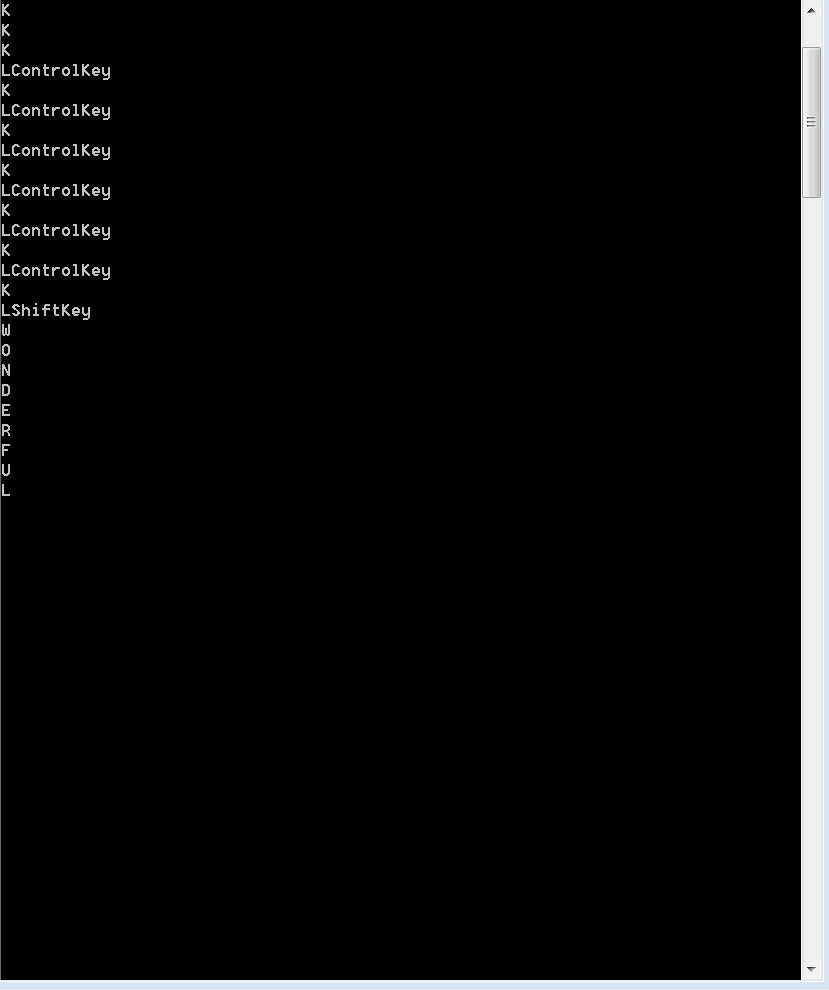
referenced https://stackoverflow.com/questions/604410/global-keyboard-capture-in-c-sharp-application
#region Assembly System.Windows.Forms, Version=4.0.0.0, Culture=neutral, PublicKeyToken=b77a5c561934e089
// C:\Program Files (x86)\Reference Assemblies\Microsoft\Framework\.NETFramework\v4.7.2\System.Windows.Forms.dll
#endregion using System.ComponentModel;
using System.Runtime.InteropServices; namespace System.Windows.Forms
{
//
// Summary:
// Specifies key codes and modifiers.
[ComVisible(true)]
[Editor("System.Windows.Forms.Design.ShortcutKeysEditor, System.Design, Version=4.0.0.0, Culture=neutral, PublicKeyToken=b03f5f7f11d50a3a", typeof(Drawing.Design.UITypeEditor))]
[Flags]
[TypeConverter(typeof(KeysConverter))]
public enum Keys
{
//
// Summary:
// The bitmask to extract modifiers from a key value.
Modifiers = -,
//
// Summary:
// No key pressed.
None = ,
//
// Summary:
// The left mouse button.
LButton = ,
//
// Summary:
// The right mouse button.
RButton = ,
//
// Summary:
// The CANCEL key.
Cancel = ,
//
// Summary:
// The middle mouse button (three-button mouse).
MButton = ,
//
// Summary:
// The first x mouse button (five-button mouse).
XButton1 = ,
//
// Summary:
// The second x mouse button (five-button mouse).
XButton2 = ,
//
// Summary:
// The BACKSPACE key.
Back = ,
//
// Summary:
// The TAB key.
Tab = ,
//
// Summary:
// The LINEFEED key.
LineFeed = ,
//
// Summary:
// The CLEAR key.
Clear = ,
//
// Summary:
// The RETURN key.
Return = ,
//
// Summary:
// The ENTER key.
Enter = ,
//
// Summary:
// The SHIFT key.
ShiftKey = ,
//
// Summary:
// The CTRL key.
ControlKey = ,
//
// Summary:
// The ALT key.
Menu = ,
//
// Summary:
// The PAUSE key.
Pause = ,
//
// Summary:
// The CAPS LOCK key.
Capital = ,
//
// Summary:
// The CAPS LOCK key.
CapsLock = ,
//
// Summary:
// The IME Kana mode key.
KanaMode = ,
//
// Summary:
// The IME Hanguel mode key. (maintained for compatibility; use HangulMode)
HanguelMode = ,
//
// Summary:
// The IME Hangul mode key.
HangulMode = ,
//
// Summary:
// The IME Junja mode key.
JunjaMode = ,
//
// Summary:
// The IME final mode key.
FinalMode = ,
//
// Summary:
// The IME Hanja mode key.
HanjaMode = ,
//
// Summary:
// The IME Kanji mode key.
KanjiMode = ,
//
// Summary:
// The ESC key.
Escape = ,
//
// Summary:
// The IME convert key.
IMEConvert = ,
//
// Summary:
// The IME nonconvert key.
IMENonconvert = ,
//
// Summary:
// The IME accept key, replaces System.Windows.Forms.Keys.IMEAceept.
IMEAccept = ,
//
// Summary:
// The IME accept key. Obsolete, use System.Windows.Forms.Keys.IMEAccept instead.
IMEAceept = ,
//
// Summary:
// The IME mode change key.
IMEModeChange = ,
//
// Summary:
// The SPACEBAR key.
Space = ,
//
// Summary:
// The PAGE UP key.
Prior = ,
//
// Summary:
// The PAGE UP key.
PageUp = ,
//
// Summary:
// The PAGE DOWN key.
Next = ,
//
// Summary:
// The PAGE DOWN key.
PageDown = ,
//
// Summary:
// The END key.
End = ,
//
// Summary:
// The HOME key.
Home = ,
//
// Summary:
// The LEFT ARROW key.
Left = ,
//
// Summary:
// The UP ARROW key.
Up = ,
//
// Summary:
// The RIGHT ARROW key.
Right = ,
//
// Summary:
// The DOWN ARROW key.
Down = ,
//
// Summary:
// The SELECT key.
Select = ,
//
// Summary:
// The PRINT key.
Print = ,
//
// Summary:
// The EXECUTE key.
Execute = ,
//
// Summary:
// The PRINT SCREEN key.
Snapshot = ,
//
// Summary:
// The PRINT SCREEN key.
PrintScreen = ,
//
// Summary:
// The INS key.
Insert = ,
//
// Summary:
// The DEL key.
Delete = ,
//
// Summary:
// The HELP key.
Help = ,
//
// Summary:
// The 0 key.
D0 = ,
//
// Summary:
// The 1 key.
D1 = ,
//
// Summary:
// The 2 key.
D2 = ,
//
// Summary:
// The 3 key.
D3 = ,
//
// Summary:
// The 4 key.
D4 = ,
//
// Summary:
// The 5 key.
D5 = ,
//
// Summary:
// The 6 key.
D6 = ,
//
// Summary:
// The 7 key.
D7 = ,
//
// Summary:
// The 8 key.
D8 = ,
//
// Summary:
// The 9 key.
D9 = ,
//
// Summary:
// The A key.
A = ,
//
// Summary:
// The B key.
B = ,
//
// Summary:
// The C key.
C = ,
//
// Summary:
// The D key.
D = ,
//
// Summary:
// The E key.
E = ,
//
// Summary:
// The F key.
F = ,
//
// Summary:
// The G key.
G = ,
//
// Summary:
// The H key.
H = ,
//
// Summary:
// The I key.
I = ,
//
// Summary:
// The J key.
J = ,
//
// Summary:
// The K key.
K = ,
//
// Summary:
// The L key.
L = ,
//
// Summary:
// The M key.
M = ,
//
// Summary:
// The N key.
N = ,
//
// Summary:
// The O key.
O = ,
//
// Summary:
// The P key.
P = ,
//
// Summary:
// The Q key.
Q = ,
//
// Summary:
// The R key.
R = ,
//
// Summary:
// The S key.
S = ,
//
// Summary:
// The T key.
T = ,
//
// Summary:
// The U key.
U = ,
//
// Summary:
// The V key.
V = ,
//
// Summary:
// The W key.
W = ,
//
// Summary:
// The X key.
X = ,
//
// Summary:
// The Y key.
Y = ,
//
// Summary:
// The Z key.
Z = ,
//
// Summary:
// The left Windows logo key (Microsoft Natural Keyboard).
LWin = ,
//
// Summary:
// The right Windows logo key (Microsoft Natural Keyboard).
RWin = ,
//
// Summary:
// The application key (Microsoft Natural Keyboard).
Apps = ,
//
// Summary:
// The computer sleep key.
Sleep = ,
//
// Summary:
// The 0 key on the numeric keypad.
NumPad0 = ,
//
// Summary:
// The 1 key on the numeric keypad.
NumPad1 = ,
//
// Summary:
// The 2 key on the numeric keypad.
NumPad2 = ,
//
// Summary:
// The 3 key on the numeric keypad.
NumPad3 = ,
//
// Summary:
// The 4 key on the numeric keypad.
NumPad4 = ,
//
// Summary:
// The 5 key on the numeric keypad.
NumPad5 = ,
//
// Summary:
// The 6 key on the numeric keypad.
NumPad6 = ,
//
// Summary:
// The 7 key on the numeric keypad.
NumPad7 = ,
//
// Summary:
// The 8 key on the numeric keypad.
NumPad8 = ,
//
// Summary:
// The 9 key on the numeric keypad.
NumPad9 = ,
//
// Summary:
// The multiply key.
Multiply = ,
//
// Summary:
// The add key.
Add = ,
//
// Summary:
// The separator key.
Separator = ,
//
// Summary:
// The subtract key.
Subtract = ,
//
// Summary:
// The decimal key.
Decimal = ,
//
// Summary:
// The divide key.
Divide = ,
//
// Summary:
// The F1 key.
F1 = ,
//
// Summary:
// The F2 key.
F2 = ,
//
// Summary:
// The F3 key.
F3 = ,
//
// Summary:
// The F4 key.
F4 = ,
//
// Summary:
// The F5 key.
F5 = ,
//
// Summary:
// The F6 key.
F6 = ,
//
// Summary:
// The F7 key.
F7 = ,
//
// Summary:
// The F8 key.
F8 = ,
//
// Summary:
// The F9 key.
F9 = ,
//
// Summary:
// The F10 key.
F10 = ,
//
// Summary:
// The F11 key.
F11 = ,
//
// Summary:
// The F12 key.
F12 = ,
//
// Summary:
// The F13 key.
F13 = ,
//
// Summary:
// The F14 key.
F14 = ,
//
// Summary:
// The F15 key.
F15 = ,
//
// Summary:
// The F16 key.
F16 = ,
//
// Summary:
// The F17 key.
F17 = ,
//
// Summary:
// The F18 key.
F18 = ,
//
// Summary:
// The F19 key.
F19 = ,
//
// Summary:
// The F20 key.
F20 = ,
//
// Summary:
// The F21 key.
F21 = ,
//
// Summary:
// The F22 key.
F22 = ,
//
// Summary:
// The F23 key.
F23 = ,
//
// Summary:
// The F24 key.
F24 = ,
//
// Summary:
// The NUM LOCK key.
NumLock = ,
//
// Summary:
// The SCROLL LOCK key.
Scroll = ,
//
// Summary:
// The left SHIFT key.
LShiftKey = ,
//
// Summary:
// The right SHIFT key.
RShiftKey = ,
//
// Summary:
// The left CTRL key.
LControlKey = ,
//
// Summary:
// The right CTRL key.
RControlKey = ,
//
// Summary:
// The left ALT key.
LMenu = ,
//
// Summary:
// The right ALT key.
RMenu = ,
//
// Summary:
// The browser back key (Windows 2000 or later).
BrowserBack = ,
//
// Summary:
// The browser forward key (Windows 2000 or later).
BrowserForward = ,
//
// Summary:
// The browser refresh key (Windows 2000 or later).
BrowserRefresh = ,
//
// Summary:
// The browser stop key (Windows 2000 or later).
BrowserStop = ,
//
// Summary:
// The browser search key (Windows 2000 or later).
BrowserSearch = ,
//
// Summary:
// The browser favorites key (Windows 2000 or later).
BrowserFavorites = ,
//
// Summary:
// The browser home key (Windows 2000 or later).
BrowserHome = ,
//
// Summary:
// The volume mute key (Windows 2000 or later).
VolumeMute = ,
//
// Summary:
// The volume down key (Windows 2000 or later).
VolumeDown = ,
//
// Summary:
// The volume up key (Windows 2000 or later).
VolumeUp = ,
//
// Summary:
// The media next track key (Windows 2000 or later).
MediaNextTrack = ,
//
// Summary:
// The media previous track key (Windows 2000 or later).
MediaPreviousTrack = ,
//
// Summary:
// The media Stop key (Windows 2000 or later).
MediaStop = ,
//
// Summary:
// The media play pause key (Windows 2000 or later).
MediaPlayPause = ,
//
// Summary:
// The launch mail key (Windows 2000 or later).
LaunchMail = ,
//
// Summary:
// The select media key (Windows 2000 or later).
SelectMedia = ,
//
// Summary:
// The start application one key (Windows 2000 or later).
LaunchApplication1 = ,
//
// Summary:
// The start application two key (Windows 2000 or later).
LaunchApplication2 = ,
//
// Summary:
// The OEM Semicolon key on a US standard keyboard (Windows 2000 or later).
OemSemicolon = ,
//
// Summary:
// The OEM 1 key.
Oem1 = ,
//
// Summary:
// The OEM plus key on any country/region keyboard (Windows 2000 or later).
Oemplus = ,
//
// Summary:
// The OEM comma key on any country/region keyboard (Windows 2000 or later).
Oemcomma = ,
//
// Summary:
// The OEM minus key on any country/region keyboard (Windows 2000 or later).
OemMinus = ,
//
// Summary:
// The OEM period key on any country/region keyboard (Windows 2000 or later).
OemPeriod = ,
//
// Summary:
// The OEM question mark key on a US standard keyboard (Windows 2000 or later).
OemQuestion = ,
//
// Summary:
// The OEM 2 key.
Oem2 = ,
//
// Summary:
// The OEM tilde key on a US standard keyboard (Windows 2000 or later).
Oemtilde = ,
//
// Summary:
// The OEM 3 key.
Oem3 = ,
//
// Summary:
// The OEM open bracket key on a US standard keyboard (Windows 2000 or later).
OemOpenBrackets = ,
//
// Summary:
// The OEM 4 key.
Oem4 = ,
//
// Summary:
// The OEM pipe key on a US standard keyboard (Windows 2000 or later).
OemPipe = ,
//
// Summary:
// The OEM 5 key.
Oem5 = ,
//
// Summary:
// The OEM close bracket key on a US standard keyboard (Windows 2000 or later).
OemCloseBrackets = ,
//
// Summary:
// The OEM 6 key.
Oem6 = ,
//
// Summary:
// The OEM singled/double quote key on a US standard keyboard (Windows 2000 or later).
OemQuotes = ,
//
// Summary:
// The OEM 7 key.
Oem7 = ,
//
// Summary:
// The OEM 8 key.
Oem8 = ,
//
// Summary:
// The OEM angle bracket or backslash key on the RT 102 key keyboard (Windows 2000
// or later).
OemBackslash = ,
//
// Summary:
// The OEM 102 key.
Oem102 = ,
//
// Summary:
// The PROCESS KEY key.
ProcessKey = ,
//
// Summary:
// Used to pass Unicode characters as if they were keystrokes. The Packet key value
// is the low word of a 32-bit virtual-key value used for non-keyboard input methods.
Packet = ,
//
// Summary:
// The ATTN key.
Attn = ,
//
// Summary:
// The CRSEL key.
Crsel = ,
//
// Summary:
// The EXSEL key.
Exsel = ,
//
// Summary:
// The ERASE EOF key.
EraseEof = ,
//
// Summary:
// The PLAY key.
Play = ,
//
// Summary:
// The ZOOM key.
Zoom = ,
//
// Summary:
// A constant reserved for future use.
NoName = ,
//
// Summary:
// The PA1 key.
Pa1 = ,
//
// Summary:
// The CLEAR key.
OemClear = ,
//
// Summary:
// The bitmask to extract a key code from a key value.
KeyCode = ,
//
// Summary:
// The SHIFT modifier key.
Shift = ,
//
// Summary:
// The CTRL modifier key.
Control = ,
//
// Summary:
// The ALT modifier key.
Alt =
}
}
C# monitor keyboard and print pressed key的更多相关文章
- C# monitor keyboard and mouse actions based on MouseKeyHook.
1.Install-package MouseKeyHook 2. using Gma.System.MouseKeyHook; using System; namespace ConsoleApp1 ...
- 使用VTK与Python实现机械臂三维模型可视化
三维可视化系统的建立依赖于三维图形平台, 如 OpenGL.VTK.OGRE.OSG等, 传统的方法多采用OpenGL进行底层编程,即对其特有的函数进行定量操作, 需要开发人员熟悉相关函数, 从而造成 ...
- OS X: Keyboard shortcuts
Using keyboard shortcuts To use a keyboard shortcut, press a modifier key at the same time as a char ...
- [转载]-虚拟键值表-virtual key code
转载 虚拟键值表, virtual key code Virtual-Key Codes VK_LBUTTON (01)Left mouse button VK_RBUTTON (02)Right ...
- Linux使用Public Key方式远程登录
一.前言: ssh远程登录密码认证的方式有三种,password.Keyboard Interactive.Public Key 前面两种方式就是密码认证,含义都是一样大同小异.第三种是登录方式最安全 ...
- 带有key参数的函数filter,map,max,min
内置函数———filter def is_not_empty(s): return s and len(s.strip()) > 0 filter(is_not_empty, ['test', ...
- 证书脚本--生成csr,key
#!/bin/sh # this script can make certificate of each line in file you point which one! if [ $# -ne 1 ...
- python 对字典分别按照key值、value值进行排序
1.sorted函数首先介绍sorted函数,sorted(iterable,key,reverse),sorted一共有iterable,key,reverse这三个参数. 其中iterable表示 ...
- Yet Another Broken Keyboard
time limit per test2 secondsmemory limit per test256 megabytesinput: standard inputoutput: standard ...
随机推荐
- 看片微信号+薇myy9199买片微信号+myy9199绝对靠谱号
最新看片卖片微信号+myy9199,2020最新有效靠谱号,诚信有效,死链包换,2019年11月,我决定学习计算机编程,以java语言为主.我就读于传统工科专业,没怎么接触过计算机相关概念与课程,我知 ...
- MySQL物理物理备份与还原工具xtraBackup
(一)xtraBackup简介 xtraBackup是Percona公司开发的一款MySQL数据库备份软件,在备份模式中属于物理备份.其显著特点是开源.免费.备份执行过程中不会阻塞事物.备份可压缩.支 ...
- 《快乐编程大本营》java语言训练班 1课:第一个java程序:你好,范冰冰;
1Java介绍 2安装java环境JDK 3安装web环境tomcat 4安装开发工具Idea2017 5编写第一个程序 ‘你好,范冰冰!’ 地址: http://code6g.com 1.Java介 ...
- C语言宏的神奇写法:语句块作为参数,算半个函数式编程?
我想要写几个循环做测试代码,每次都写 `for(size_t i = 0; i < n; i++)` 很烦人,然后就灵机一动,能不能用宏实现,然后就写出了: #define repeat(n, ...
- Codeforces_803
A. 填k个1,使矩阵主对角线对称,相同情况选择上面1数量多的. #include<bits/stdc++.h> using namespace std; ][] = {}; int ma ...
- Codeforces_512_B
http://codeforces.com/problemset/problem/512/B dp题,因为状态很多,所以用map保存,注意代码中的那个二层循环不能内外换,因为map会自动排序. #in ...
- Python - os.walk()详细使用
os.walk() 方法简单介绍 主要用来遍历一个目录内各个子目录和子文件 是一个简单易用的文件.目录遍历器,可以帮助我们高效的处理文件.目录方面的事情. 方法参数介绍 os.walk(top[, t ...
- PPT导出图片质量太差?简单操作直接导出印刷质地图片
PPT导出图片质量太差?简单操作直接导出印刷质地图片 PPT不仅可以用于展示文档,还可以用于简单图片合成处理,同时,PPT文档还可以全部导出为图片. 默认情况下,PPT导出的图片为96DPI ...
- Python 调用 Shell命令
python程序中调用shell命令,是件很酷且常用的事情今天来总结一下 1.使用os模块 的 system 此函数会启动子进程,在子进程中执行command,并返回comman ...
- 【阿里云IoT+YF3300】15.阿里云物联网小程序构建
2013年8月,“轻应用”概念提出,但是仅仅活跃四年随后淡出 ,直到2017年1月9号借助微信小程序成功续命.一时间,以微信小程序和支付宝小程序为代表的轻应用解决方案迅速贯穿多个环节,成为“万物互联” ...