
学习笔记(22)- plato-训练端到端的模型
原始文档
Train an end-to-end model
To get started we can train a very simple model using Ludwig (feel free to use
your favourite deep learning framework here):
input_features:

    -

        name: user

        type: text

        level: word

        encoder: rnn

        cell_type: lstm

        reduce_output: null

output_features:

    -

        name: system

        type: text

        level: word

        decoder: generator

        cell_type: lstm

        attention: bahdanau

training:

  epochs: 100
You can modify this config to reflect the architecture of your choice and train
using Ludwig:
ludwig train \

       --data_csv data/metalwoz.csv \

       --model_definition_file plato/example/config/ludwig/metalWOZ_seq2seq_ludwig.yaml \

       --output_directory "models/joint_models/"
我的笔记
训练端到端模型:
- 输入文件是
metalwoz.csv、metalWOZ_seq2seq_ludwig.yaml - 输出文件是
models/joint_models/
注意模型训练完毕,加载模型文件(使用模型)的时候,还需要(1)写一个类文件,实现plato提供的接口;(2)写一个yaml配置文件,用--config 参数 来告诉plato run 加载的模型的路径。
先准备数据,然后训练模型。
csv文件需要解析得到。
1. 下载metalwoz数据集
https://www.microsoft.com/en-us/research/project/metalwoz/
2. 解压数据
- 以shoping为例. 901个对话,2个角色
解压之后得到:
/Users/huihui/data/metalwoz-v1/dialogues/SHOPPING.txt
文件内容举例:
{"id": "47d85004", "user_id": "891cf0fb", "bot_id": "0f9f7619", "domain": "SHOPPING", "task_id": "5e456a4d", "turns": ["Hello how may I help you?", "i want to order a mattress from walmart", "Great. I can help you with your mattress order.", "how long will it take to arrive", "From the time of purchase it will take three days for us to ship it.", "great, lets start the order", "Once we have shipped it however, we dont know when it will arrive at your location", "how can i find out an exact date for it to arrive", "We ship priority mail through USPS. The length of time will vary with depending on the carrier", "well then i will try somewhere else, thank you anyway", "I am sorry we were not able to accommodate you"]}
3. 将txt文件转化为csv文件
- 3.1 准备yaml文件
编写文件
plato/example/config/parser/Parse_MetalWOZ.yaml
---

package: plato.utilities.parser.parse_metal_woz

class: Parser

arguments:

  data_path: /Users/huihui/data/metalwoz-v1/dialogues/SHOPPING.txt
- 3.2 使用脚本执行转换
plato parse --config Parse_MetalWOZ.yaml
解析之后的文件在data/metalwoz.csv
- 注意:只有2个角色。不是多角色会话
user,system

hi,How can I help you today. I am a bot.

Can you help me order on an online shop,"Sure, I would love to help you. What is it you would like to order?"

I like to order bicycle helmet,Which brand helmet would you like to purchase.

yoni,"OK, what size helmet would you like to order."

small,"OK. I found a Yoni bicycle helmet in size small. It comes in black, red, blue or white. Which color would you like to order?"

black,The cost is $39.99. Would you like to go ahead and place an order?

ok pls,Great. Your order has been placed.

thank you,You are quite welcome. Have a great day!

hi,Hello how may I help you?
至此,csv文件准备完毕
4. 准备model_definition_file文件
官方文档给了例子,
plato/example/config/ludwig/metalWOZ_seq2seq_ludwig.yaml
---

input_features:

    -

        name: user

        type: text

        level: word

        encoder: rnn

        cell_type: lstm

        reduce_output: null

output_features:

    -

        name: system

        type: text

        level: word

        decoder: generator

        cell_type: lstm

        attention: bahdanau

training:

  epochs: 100
5. 开始训练模型
ludwig train \

       --data_csv data/metalwoz.csv \

       --model_definition_file plato/example/config/ludwig/metalWOZ_seq2seq_ludwig.yaml \

       --output_directory "models/joint_models/"

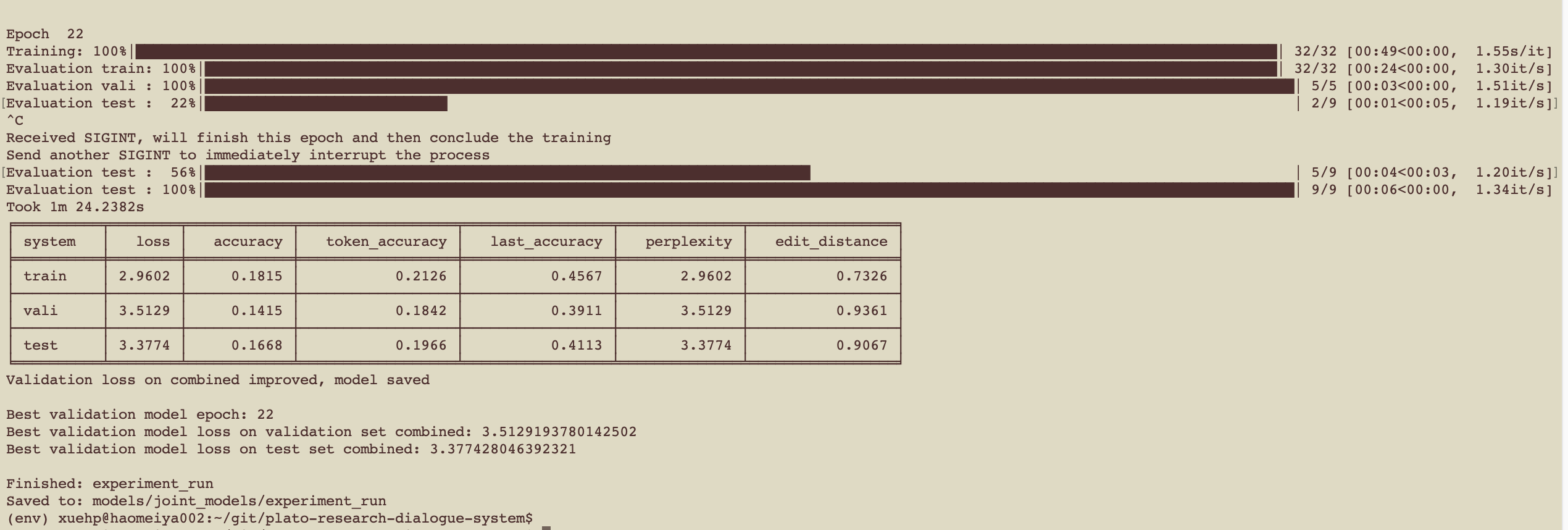
一共训练100轮
不等训练完毕
6. 写类文件,加载模型
Write a class inheriting from Conversational Module that loads and queries the model
This class simply needs to handle loading of the model, querying it
appropriately and formatting its output appropriately. In our case, we need to
wrap the input text into a pandas dataframe, grab the predicted tokens from
the output and join them in a string that will be returned. See the class here:
plato.agent.component.joint_model.metal_woz_seq2seq.py
package: plato.agent.component.joint_model.metal_woz_seq2seq

class: MetalWOZSeq2Seq
文件:
plato/agent/component/joint_model/metal_woz_seq2seq.py
"""

MetalWOZ is an MetalWOZ class that defines an interface to Ludwig models.

"""

class MetalWOZSeq2Seq(ConversationalModule):

    ……
7. 运行Agent
Write a Plato generic yaml config and run your agent!
See plato/example/config/application/metalwoz_generic.yaml for an example generic
configuration file that interacts with the seq2seq agent over text. You can try
it out as follows:
plato run --config metalwoz_text.yaml
plato/example/config/application/metalwoz_text.yaml
8. 测试结果
Dialogue 1 (out of 10)

USER > I want to buy a bicycle

(DEBUG) system> what is the helmet ?

USER > yoni

(DEBUG) system> what size ?

USER > small

……
2020-02-21 15:57:20 效果不好
模型没有训练好?
再继续训练看看
总结上面的流程

学习笔记(22)- plato-训练端到端的模型的更多相关文章
- Ext.Net学习笔记22:Ext.Net Tree 用法详解
Ext.Net学习笔记22:Ext.Net Tree 用法详解 上面的图片是一个简单的树,使用Ext.Net来创建这样的树结构非常简单,代码如下: <ext:TreePanel runat=&q ...
- SQL反模式学习笔记22 伪键洁癖,整理数据
目标:整理数据,使不连续的主键Id数据记录变的连续. 反模式:填充断档的数据空缺. 1.不按照顺序分配编号 在插入新行时,通过遍历表,找到的第一个未分配的主键编号分配给新行,来代替原来自动分配的伪主键 ...
- Caffe学习笔记(一):Caffe架构及其模型解析
Caffe学习笔记(一):Caffe架构及其模型解析 写在前面:关于caffe平台如何快速搭建以及如何在caffe上进行训练与预测,请参见前面的文章<caffe平台快速搭建:caffe+wind ...
- 学习笔记(26)- plato-端到端模型-定闹钟
今天用了定闹钟的场景语料,在plato框架尝试了端到端的模型. 本文先记录英文的训练过程,然后记录中文的训练过程. 训练端到端的模型 发现使用英文的模型,还是显示有中文,所以,新建目录,重新训练 1. ...
- Netty4 学习笔记之二:客户端与服务端心跳 demo
前言 在上一篇Netty demo 中,了解了Netty中的客户端和服务端之间的通信.这篇则介绍Netty中的心跳. 之前在Mina 中心跳的使用是通过继承 KeepAliveMessageFacto ...
- TensorFlow学习笔记——LeNet-5(训练自己的数据集)
在之前的TensorFlow学习笔记——图像识别与卷积神经网络(链接:请点击我)中了解了一下经典的卷积神经网络模型LeNet模型.那其实之前学习了别人的代码实现了LeNet网络对MNIST数据集的训练 ...
- Hadoop学习笔记—22.Hadoop2.x环境搭建与配置
自从2015年花了2个多月时间把Hadoop1.x的学习教程学习了一遍,对Hadoop这个神奇的小象有了一个初步的了解,还对每次学习的内容进行了总结,也形成了我的一个博文系列<Hadoop学习笔 ...
- [原创]java WEB学习笔记22:MVC案例完整实践(part 3)---多个请求对应一个Servlet解析
本博客为原创:综合 尚硅谷(http://www.atguigu.com)的系统教程(深表感谢)和 网络上的现有资源(博客,文档,图书等),资源的出处我会标明 本博客的目的:①总结自己的学习过程,相当 ...
- Cocos2d-x 学习笔记(22) TableView
[Cocos2d-x 学习笔记 ]目录 1. 简介 TableView直接继承了ScrollView和ScrollViewDelegate.说明TableView能实现ScrollView拖动cont ...
- [Firefly引擎][学习笔记二][已完结]卡牌游戏开发模型的设计
源地址:http://bbs.9miao.com/thread-44603-1-1.html 在此补充一下Socket的验证机制:socket登陆验证.会采用session会话超时的机制做心跳接口验证 ...
随机推荐
- XMLHttpRequest: 网络错误 0x2ee4, 由于出现错误 00002ee4 而导致此项操作无法完成
原因: IE11有默认设置安全策略,如果url需要证书,一发送请求IE11就会拒绝,因为ssl certificate(SSL证书) 是非法的 解决方案: (1)修改IE浏览器配置 - 用户使用的电脑 ...
- NetMQ用作IPC的实例
发送端/接收端 using System; using System.Threading; using NetMQ; using NetMQ.Sockets; namespace NetMQIPCSe ...
- 松软科技课堂:jQuery 语法
jQuery 语法 jQuery 语法是为 HTML 元素的选取编制的,可以对元素执行某些操作. 基础语法是:$(selector).action() 美元符号定义 jQuery 选择符(select ...
- HTMLinput标签
<input> 标签用于搜集用户信息. 常用的属性: type指定输入项的类型 name定义 input 元素的名称. id给输入项取一个名字,方便后期找到和操作 type指定输入项的类型 ...
- css实现移动端滚动条隐藏仍然可以滚动内容
.g-panel { height: calc(100% - 112px); overflow: auto; &::-webkit-scrollbar { display: none; // ...
- 关于python 的 __future__
经常看到__future__: from __future__ import absolute_importfrom __future__ import print_functionfrom __fu ...
- span强制不换行
<nobr>不换行内容</nobr> 无论多少文字均不希望换行显示,超出宽度的内容会显示不出来. <div> <nobr> <span class ...
- [Linux] Ubuntu18.04 安装之后配置过程
前言 最终还是安装了Ubuntu 虽然一开始想用Deepin 但是死活安装不上,我也很绝望(引导一直找不到 恢复BIOS默认设置也还是不行 所以 有些绝望啊....) 所以 为了让以后的我不再那么 ...
- SpringBoot整合mybatis使用pageHelper插件进行分页操作
SpringBoot整合mybatis分页操作 SpringBoot整合Mybatis进行分页操作,这里需要使用Mybatis的分页插件:pageHelper, 关于pageHelper的介绍,请查看 ...
- 水题Eating Soup
A. Eating Souptime limit per test1 secondmemory limit per test256 megabytesinputstandard inputoutput ...