
Spring Cloud Alibaba 使用Sentinel实现接口限流
Sentinel是什么
Sentinel的官方标题是:分布式系统的流量防卫兵。从名字上来看,很容易就能猜到它是用来作服务稳定性保障的。对于服务稳定性保障组件,如果熟悉Spring Cloud的用户,第一反应应该就是Hystrix。但是比较可惜的是Netflix已经宣布对Hystrix停止更新。那么,在未来我们还有什么更好的选择呢?除了Spring Cloud官方推荐的resilience4j之外,目前Spring Cloud Alibaba下整合的Sentinel也是用户可以重点考察和选型的目标。
Sentinel的功能和细节比较多,一篇内容很难介绍完整。所以下面我会分多篇来一一介绍Sentinel的重要功能。本文就先从限流入手,说说如何把Sentinel整合到Spring Cloud应用中,以及如何使用Sentinel Dashboard来配置限流规则。通过这个简单的例子,先将这一套基础配置搭建起来。
使用Sentinel实现接口限流
Sentinel的使用分为两部分:
sentinel-dashboard:与hystrix-dashboard类似,但是它更为强大一些。除了与hystrix-dashboard一样提供实时监控之外,还提供了流控规则、熔断规则的在线维护等功能。
客户端整合:每个微服务客户端都需要整合sentinel的客户端封装与配置,才能将监控信息上报给dashboard展示以及实时的更改限流或熔断规则等。
下面我们就分两部分来看看,如何使用Sentienl来实现接口限流。
部署Sentinel Dashboard
使用Spring Cloud Alibaba 0.2.2,由于该版本中升级了Sentinel到1.5.2,所以对sentinel-dashboard做一次升级。但是sentinel-dashboard的1.5.2版本的打包文件没有提供下载,如果一定要该版本的话,需要自己编译。这里笔者尝试了一下直接使用1.6.0的sentinel-dashboard,暂时也没有发现什么问题,所以就以这个版本为例。
下载地址:sentinel-dashboard-1.6.0.jar https://github.com/alibaba/Sentinel/releases/download/1.6.0/sentinel-dashboard-1.6.0.jar
其他版本:Sentinel/releases
同以往的Spring Cloud教程一样,这里也不推荐大家跨版本使用,不然可能会出现各种各样的问题。
通过命令启动:
java -jar sentinel-dashboard-1.6.0.jar --server port =8888 后面是指定端口的,

在浏览器输入localhost:8888
然后使用项目整合:
pom.xml
<?xml version="1.0" encoding="UTF-8"?>

<project xmlns="http://maven.apache.org/POM/4.0.0" xmlns:xsi="http://www.w3.org/2001/XMLSchema-instance"

    xsi:schemaLocation="http://maven.apache.org/POM/4.0.0 http://maven.apache.org/xsd/maven-4.0.0.xsd">

    <modelVersion>4.0.</modelVersion>

    <parent>

        <groupId>org.springframework.boot</groupId>

        <artifactId>spring-boot-starter-parent</artifactId>

        <version>2.0..RELEASE</version>

        <relativePath/> <!-- lookup parent from repository -->

    </parent>

    <groupId>com.cxy</groupId>

    <artifactId>sentinel</artifactId>

    <version>0.0.-SNAPSHOT</version>

    <name>sentinel</name>

    <description>Demo project for Spring Boot</description>

    <properties>

        <java.version>1.8</java.version>

    </properties>

    <dependencyManagement>

        <dependencies>

            <dependency>

                <groupId>org.springframework.cloud</groupId>

                <artifactId>spring-cloud-dependencies</artifactId>

                <version>Finchley.SR1</version>

                <type>pom</type>

                <scope>import</scope>

            </dependency>

            <dependency>

                <groupId>org.springframework.cloud</groupId>

                <artifactId>spring-cloud-alibaba-dependencies</artifactId>

                <version>0.2..RELEASE</version>

                <type>pom</type>

                <scope>import</scope>

            </dependency>

        </dependencies>

    </dependencyManagement>

    <dependencies>

        <dependency>

            <groupId>org.springframework.boot</groupId>

            <artifactId>spring-boot-starter-web</artifactId>

        </dependency>

        <dependency>

            <groupId>org.springframework.cloud</groupId>

            <artifactId>spring-cloud-starter-alibaba-sentinel</artifactId>

        </dependency>

        <dependency>

            <groupId>org.projectlombok</groupId>

            <artifactId>lombok</artifactId>

            <version>1.18.</version>

            <optional>true</optional>

        </dependency>

        <dependency>

            <groupId>org.springframework.boot</groupId>

            <artifactId>spring-boot-starter-test</artifactId>

            <scope>test</scope>

        </dependency>

    </dependencies>

    <build>

        <plugins>

            <plugin>

                <groupId>org.springframework.boot</groupId>

                <artifactId>spring-boot-maven-plugin</artifactId>

            </plugin>

        </plugins>

    </build>

</project>
配置:
spring.application.name=alibaba-sentinel-rate-limiting

server.port=

# sentinel dashboard

spring.cloud.sentinel.transport.dashboard=localhost:
启动类:
package com.cxy;

import lombok.extern.slf4j.Slf4j;

import org.springframework.boot.SpringApplication;

import org.springframework.boot.autoconfigure.SpringBootApplication;

import org.springframework.web.bind.annotation.GetMapping;

import org.springframework.web.bind.annotation.RestController;

@SpringBootApplication

public class SentinelApplication {

    public static void main(String[] args) {

        SpringApplication.run(SentinelApplication.class, args);

    }

    @Slf4j

    @RestController

    static class TestController {

        @GetMapping("/hello")

        public String hello() {

            return "didispace.com";

        }

    }

}
访问:


进行限流:
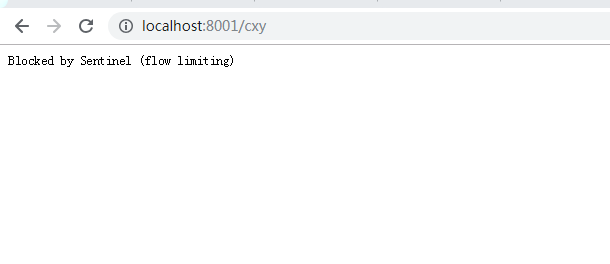
说明在控制台的限流是生效了
Spring Cloud Alibaba 使用Sentinel实现接口限流的更多相关文章
- Spring Cloud alibaba网关 sentinel zuul 四 限流熔断
spring cloud alibaba 集成了 他内部开源的 Sentinel 熔断限流框架 Sentinel 介绍 官方网址 随着微服务的流行,服务和服务之间的稳定性变得越来越重要.Sentine ...
- spring cloud gateway整合sentinel作网关限流
说明: sentinel可以作为各微服务的限流,也可以作为gateway网关的限流组件. spring cloud gateway有限流功能,但此处用sentinel来作为替待. 说明:sentine ...
- Spring Cloud Alibaba基础教程:使用Sentinel实现接口限流
最近管点闲事浪费了不少时间,感谢网友libinwalan的留言提醒.及时纠正路线,继续跟大家一起学习Spring Cloud Alibaba. Nacos作为注册中心和配置中心的基础教程,到这里先告一 ...
- Spring Cloud Alibaba:Sentinel实现熔断与限流
一.什么是Sentinel Sentinel,中文翻译为哨兵,是为微服务提供流量控制.熔断降级的功能,它和Hystrix提供的功能一样,可以有效的解决微服务调用产生的“雪崩效应”,为微服务系统提供了稳 ...
- Spring Cloud Alibaba(10)---Sentinel控制台搭建+整合SpringCloudAlibaba
上一篇博客讲了Sentinel一些概念性的东西 Spring Cloud Alibaba(9)---Sentinel概述 这篇博客主要讲 Sentinel控制台搭建,和 整合SpringCloudAl ...
- Spring Cloud Alibaba整合Sentinel
Spring Cloud Alibaba 整合 Sentinel 一.需求 二.实现步骤 1.下载 sentinel dashboard 2.服务提供者和消费者引入sentinel依赖 3.配置控制台 ...
- Spring Cloud Alibaba(11)---Sentinel+Nacos持久化
Sentinel+Nacos持久化 有关Sentinel之前有写过两篇 Spring Cloud Alibaba(9)---Sentinel概述 Spring Cloud Alibaba(10)--- ...
- Spring Cloud Alibaba 之 Sentinel 限流规则和控制台实例
这一节我们通过一个简单的实例,学习Sentinel的基本应用. 一.Sentinel 限流核心概念 在学习Sentinel的具体应用之前,我们先来了解一下Sentinel中两个核心的概念,资源和规则. ...
- Spring Cloud Alibaba整合Sentinel流控
前面我们都是直接通过集成sentinel的依赖,通过编码的方式配置规则等.对于集成到Spring Cloud中阿里已经有了一套开源框架spring-cloud-alibaba,就是用于将一系列的框架成 ...
随机推荐
- Win32SDK应用程序
转自:https://blog.csdn.net/jxf_ioriyagami/article/details/1486626 1 说在前面 由于VC6及MFC的特点,我们许多人从标准C++学习 ...
- Java 仓储模式
使用的Spring boot +Jpa 项目层级: common里包含了model,以及一些viewModel等等 下面就是设计的仓储模式 先看下SysUser: @MappedSuperclass ...
- c_数据结构_图_邻接表
课程设计------邻接表 图的遍历实现课程设计:https://files.cnblogs.com/files/Vera-y/图的遍历_课程设计.zip #include<stdio.h> ...
- C++ 系列:交换两个数字
1. 创建中间变量 这是最快也是最简单的办法,例如: #include<stdio.h> int main(){ int a=10; int b=20; int temp; printf( ...
- css---文本新增样式
opacity属性指定了一个元素的透明度 默认值:1.0 不可继承 兼容性不是太好 兼容性写法 opacity{ opacity:0.5; filter:alpha(opacity=); //f ...
- 5.从物理层到MAC层
第一层(物理层) 如何用两台电脑构成最小的局域网(LAN)? 网线的水晶头1.2和3.6脚分别起着收.发信号的作用,随意只要将水晶头做交叉线1-3.2-6交叉法,然后连接两台电脑.除了 ...
- Windows 设置IP解决方案
{ super + e / windows + e Mouse Right play down network link }
- Windows ping
用法: ping [-t] [-a] [-n count] [-l size] [-f] [-i TTL] [-v TOS] [-r count] [-s count] [[-j ...
- VS2010-MFC(对话框:属性页对话框及相关类的介绍)
转自:http://www.jizhuomi.com/software/164.html 一 属性页对话框的分类 属性页对话框想必大家并不陌生,XP系统中桌面右键点属性,弹出的就是属性页对话框,它通过 ...
- Mybatis笔记 - 原始Dao开发方法
使用Mybatis开发Dao,通常有两个方法,即原始Dao开发方法和Mapper接口开发方法.原始Dao的开发方式是基于入门程序的基础上,对 控制程序 进行分层开发,程序员需要 编写 Dao接口 和 ...