
iOS开发UITableView的动画cell
1、动画cell
针对cell的动画,在Delegate中对cell的layer进行操作:
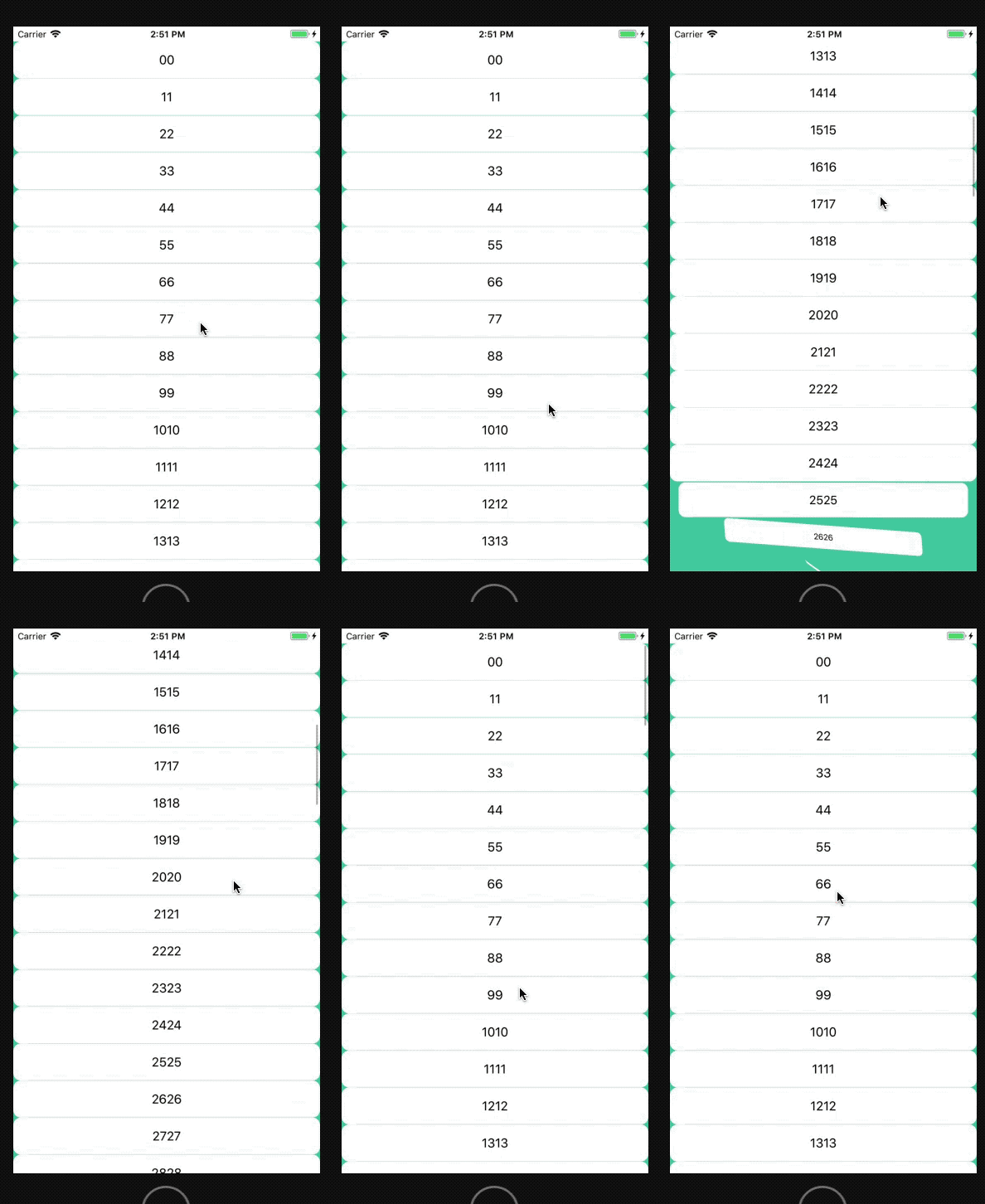
2、实现代码
#import "ViewController.h"

#import "TableViewCell.h"

#define CScreenWidth        [[UIScreen mainScreen] bounds].size.width

#define CScreenHeight       [[UIScreen mainScreen] bounds].size.height

@interface ViewController ()<UITableViewDelegate,UITableViewDataSource>

@property (weak, nonatomic) IBOutlet UITableView *tableView;

@property(nonatomic, strong)NSMutableArray *dataArr;

@end

@implementation ViewController

- (void)viewDidLoad {

    [super viewDidLoad];

    // Do any additional setup after loading the view, typically from a nib.

    _dataArr = [NSMutableArray array];

    for (int i=; i<; i++) {

        [_dataArr addObject:[NSString stringWithFormat:@"%d%d",i,i]];

    }

    [_tableView registerNib:[UINib nibWithNibName:@"TableViewCell" bundle:nil] forCellReuseIdentifier:@"cell"];

}

- (NSInteger)tableView:(UITableView *)tableView numberOfRowsInSection:(NSInteger)section{

    return _dataArr.count;

}

- (UITableViewCell *)tableView:(UITableView *)tableView cellForRowAtIndexPath:(NSIndexPath *)indexPath{

    TableViewCell *cell = [tableView dequeueReusableCellWithIdentifier:@"cell"];

    cell.label.text = _dataArr[indexPath.row];

    return cell;

}

//快照截图

//- (nullable UIView *)snapshotViewAfterScreenUpdates:(BOOL)afterUpdates NS_AVAILABLE_IOS(7_0);

// 将rect由rect所在视图转换到目标视图view中,返回在目标视图view中的rect

//- (CGRect)convertRect:(CGRect)rect toView:(UIView *)view;

// 将rect从view中转换到当前视图中,返回在当前视图中的rect

//- (CGRect)convertRect:(CGRect)rect fromView:(UIView *)view;

- (void)tableView:(UITableView *)tableView didSelectRowAtIndexPath:(NSIndexPath *)indexPath{

    [tableView deselectRowAtIndexPath:indexPath animated:YES];

    UITableViewCell * selectedCell = (UITableViewCell *)[tableView cellForRowAtIndexPath:indexPath];

    UIView *clipView = [selectedCell snapshotViewAfterScreenUpdates:NO];//快照

    CGRect clipFrame =[selectedCell convertRect:selectedCell.bounds toView:self.view];

    NSLog(@"==%@",NSStringFromCGRect(clipFrame));

    clipView.frame = clipFrame;

    UIView *view = [[UIView alloc] initWithFrame:clipFrame];

    view.backgroundColor = [UIColor redColor];

    [self.view addSubview:view];

    [self.view addSubview:clipView];

    [UIView animateWithDuration: animations:^{

        view.backgroundColor = [[UIColor redColor] colorWithAlphaComponent:.];

        view.transform = CGAffineTransformMakeScale(, CScreenHeight/clipFrame.size.height*);

    } completion:^(BOOL finished) {

        [clipView removeFromSuperview];

        [view removeFromSuperview];

    }];

}

- (CGFloat)tableView:(UITableView *)tableView heightForRowAtIndexPath:(NSIndexPath *)indexPath{

    return ;

}

- (void)tableView:(UITableView *)tableView willDisplayCell:(UITableViewCell *)cell forRowAtIndexPath:(NSIndexPath *)indexPath{

    CATransform3D transA = CATransform3DIdentity;

    transA.m34 = -/;

    transA = CATransform3DRotate(transA, M_PI_2, , , );

    cell.layer.transform = CATransform3DScale(transA, 0.1, 0.1, );;

    [UIView animateWithDuration:0.5 animations:^{

        cell.layer.transform = CATransform3DIdentity;

        cell.layer.cornerRadius = ;

        cell.layer.masksToBounds = YES;

    }];

}

@end
3、附件:TableView的Delegate和DataSource的方法简介(iOS11.0)
@protocol UITableViewDelegate<NSObject, UIScrollViewDelegate>

@optional

// cell、区头、区尾将要呈现和已经呈现

- (void)tableView:(UITableView *)tableView willDisplayCell:(UITableViewCell *)cell forRowAtIndexPath:(NSIndexPath *)indexPath;

- (void)tableView:(UITableView *)tableView willDisplayHeaderView:(UIView *)view forSection:(NSInteger)section NS_AVAILABLE_IOS(6_0);

- (void)tableView:(UITableView *)tableView willDisplayFooterView:(UIView *)view forSection:(NSInteger)section NS_AVAILABLE_IOS(6_0);

- (void)tableView:(UITableView *)tableView didEndDisplayingCell:(UITableViewCell *)cell forRowAtIndexPath:(NSIndexPath*)indexPath NS_AVAILABLE_IOS(6_0);

- (void)tableView:(UITableView *)tableView didEndDisplayingHeaderView:(UIView *)view forSection:(NSInteger)section NS_AVAILABLE_IOS(6_0);

- (void)tableView:(UITableView *)tableView didEndDisplayingFooterView:(UIView *)view forSection:(NSInteger)section NS_AVAILABLE_IOS(6_0);

// cell、区头、区尾高度设置

- (CGFloat)tableView:(UITableView *)tableView heightForRowAtIndexPath:(NSIndexPath *)indexPath;

- (CGFloat)tableView:(UITableView *)tableView heightForHeaderInSection:(NSInteger)section;

- (CGFloat)tableView:(UITableView *)tableView heightForFooterInSection:(NSInteger)section;

// cell、区头、区尾高度估算(heightForRowAtIndexPath获取cell会死循环)

- (CGFloat)tableView:(UITableView *)tableView estimatedHeightForRowAtIndexPath:(NSIndexPath *)indexPath NS_AVAILABLE_IOS(7_0);

- (CGFloat)tableView:(UITableView *)tableView estimatedHeightForHeaderInSection:(NSInteger)section NS_AVAILABLE_IOS(7_0);

- (CGFloat)tableView:(UITableView *)tableView estimatedHeightForFooterInSection:(NSInteger)section NS_AVAILABLE_IOS(7_0);

// 区头、区尾自定义view

- (nullable UIView *)tableView:(UITableView *)tableView viewForHeaderInSection:(NSInteger)section;

- (nullable UIView *)tableView:(UITableView *)tableView viewForFooterInSection:(NSInteger)section;

// 设置附件类型、附件被点击方法

- (UITableViewCellAccessoryType)tableView:(UITableView *)tableView accessoryTypeForRowWithIndexPath:(NSIndexPath *)indexPath NS_DEPRECATED_IOS(2_0, 3_0) __TVOS_PROHIBITED;

- (void)tableView:(UITableView *)tableView accessoryButtonTappedForRowWithIndexPath:(NSIndexPath *)indexPath;

// Selection

// cell是否高亮、高亮和取消高亮调用函数

- (BOOL)tableView:(UITableView *)tableView shouldHighlightRowAtIndexPath:(NSIndexPath *)indexPath NS_AVAILABLE_IOS(6_0);

- (void)tableView:(UITableView *)tableView didHighlightRowAtIndexPath:(NSIndexPath *)indexPath NS_AVAILABLE_IOS(6_0);

- (void)tableView:(UITableView *)tableView didUnhighlightRowAtIndexPath:(NSIndexPath *)indexPath NS_AVAILABLE_IOS(6_0);

// 将要选择、取消某个cell(适用于拦截点击某个cell)

- (nullable NSIndexPath *)tableView:(UITableView *)tableView willSelectRowAtIndexPath:(NSIndexPath *)indexPath;

- (nullable NSIndexPath *)tableView:(UITableView *)tableView willDeselectRowAtIndexPath:(NSIndexPath *)indexPath NS_AVAILABLE_IOS(3_0);

// 已经选择、取消某个cell(适用于cell事件处理)

- (void)tableView:(UITableView *)tableView didSelectRowAtIndexPath:(NSIndexPath *)indexPath;

- (void)tableView:(UITableView *)tableView didDeselectRowAtIndexPath:(NSIndexPath *)indexPath NS_AVAILABLE_IOS(3_0);

// 设置cell的编辑样式、删除确定按钮的标题文字 --左滑操作

- (UITableViewCellEditingStyle)tableView:(UITableView *)tableView editingStyleForRowAtIndexPath:(NSIndexPath *)indexPath;

- (nullable NSString *)tableView:(UITableView *)tableView titleForDeleteConfirmationButtonForRowAtIndexPath:(NSIndexPath *)indexPath NS_AVAILABLE_IOS(3_0) __TVOS_PROHIBITED;

// 添加cell的编辑操作(就是多个操作按钮)--左滑操作按钮

- (nullable NSArray<UITableViewRowAction *> *)tableView:(UITableView *)tableView editActionsForRowAtIndexPath:(NSIndexPath *)indexPath NS_AVAILABLE_IOS(8_0) __TVOS_PROHIBITED;

// 取代上方editActionsForRowAtIndexPath方法

- (nullable UISwipeActionsConfiguration *)tableView:(UITableView *)tableView leadingSwipeActionsConfigurationForRowAtIndexPath:(NSIndexPath *)indexPath API_AVAILABLE(ios(11.0)) API_UNAVAILABLE(tvos);

// 创建操作按钮UIContextualAction,UISwipeActionsConfiguration相当于封装类

//UIContextualActionStyleNormal,UIContextualActionStyleDestructive(一直右滑直接删除cell)

- (nullable UISwipeActionsConfiguration *)tableView:(UITableView *)tableView trailingSwipeActionsConfigurationForRowAtIndexPath:(NSIndexPath *)indexPath API_AVAILABLE(ios(11.0)) API_UNAVAILABLE(tvos);

// 编辑时是否缩进

- (BOOL)tableView:(UITableView *)tableView shouldIndentWhileEditingRowAtIndexPath:(NSIndexPath *)indexPath;

// 将要、已经结束编辑cell

- (void)tableView:(UITableView *)tableView willBeginEditingRowAtIndexPath:(NSIndexPath *)indexPath __TVOS_PROHIBITED;

- (void)tableView:(UITableView *)tableView didEndEditingRowAtIndexPath:(nullable NSIndexPath *)indexPath __TVOS_PROHIBITED;

// Moving/reordering

// 移动特定的某行cell

- (NSIndexPath *)tableView:(UITableView *)tableView targetIndexPathForMoveFromRowAtIndexPath:(NSIndexPath *)sourceIndexPath toProposedIndexPath:(NSIndexPath *)proposedDestinationIndexPath;

// 设置cell行缩进(可用于设置不同级别)

- (NSInteger)tableView:(UITableView *)tableView indentationLevelForRowAtIndexPath:(NSIndexPath *)indexPath; // return 'depth' of row for hierarchies

// 是否指定cell显示菜单、弹出菜单方法、选择菜单调用方法

- (BOOL)tableView:(UITableView *)tableView shouldShowMenuForRowAtIndexPath:(NSIndexPath *)indexPath NS_AVAILABLE_IOS(5_0);

- (BOOL)tableView:(UITableView *)tableView canPerformAction:(SEL)action forRowAtIndexPath:(NSIndexPath *)indexPath withSender:(nullable id)sender NS_AVAILABLE_IOS(5_0);

- (void)tableView:(UITableView *)tableView performAction:(SEL)action forRowAtIndexPath:(NSIndexPath *)indexPath withSender:(nullable id)sender NS_AVAILABLE_IOS(5_0);

// 能否获得焦点、是否将要更新焦点、已经更新焦点、返回上一个焦点的NSIndexPath

- (BOOL)tableView:(UITableView *)tableView canFocusRowAtIndexPath:(NSIndexPath *)indexPath NS_AVAILABLE_IOS(9_0);

- (BOOL)tableView:(UITableView *)tableView shouldUpdateFocusInContext:(UITableViewFocusUpdateContext *)context NS_AVAILABLE_IOS(9_0);

- (void)tableView:(UITableView *)tableView didUpdateFocusInContext:(UITableViewFocusUpdateContext *)context withAnimationCoordinator:(UIFocusAnimationCoordinator *)coordinator NS_AVAILABLE_IOS(9_0);

- (nullable NSIndexPath *)indexPathForPreferredFocusedViewInTableView:(UITableView *)tableView NS_AVAILABLE_IOS(9_0);

// Spring Loading

// cell是否支持iOS11 新特性 Drag and Drop (默认YES)

- (BOOL)tableView:(UITableView *)tableView shouldSpringLoadRowAtIndexPath:(NSIndexPath *)indexPath withContext:(id<UISpringLoadedInteractionContext>)context API_AVAILABLE(ios(11.0)) API_UNAVAILABLE(tvos, watchos);

@end
UITableViewDelegate
@protocol UITableViewDataSource<NSObject>

@required

//每个区返回多少行、初始化cell

- (NSInteger)tableView:(UITableView *)tableView numberOfRowsInSection:(NSInteger)section;

- (UITableViewCell *)tableView:(UITableView *)tableView cellForRowAtIndexPath:(NSIndexPath *)indexPath;

@optional

//返回多少区(默认一个区)

- (NSInteger)numberOfSectionsInTableView:(UITableView *)tableView;              // Default is 1 if not implemented

//设置区头、区尾文字

- (nullable NSString *)tableView:(UITableView *)tableView titleForHeaderInSection:(NSInteger)section;

- (nullable NSString *)tableView:(UITableView *)tableView titleForFooterInSection:(NSInteger)section;

// Editing

//cell是否能编辑、是否能移动

- (BOOL)tableView:(UITableView *)tableView canEditRowAtIndexPath:(NSIndexPath *)indexPath;

- (BOOL)tableView:(UITableView *)tableView canMoveRowAtIndexPath:(NSIndexPath *)indexPath;

// 设置索引栏标题数组(右侧的ABCD……)、设置索引栏标题对应的分区

- (nullable NSArray<NSString *> *)sectionIndexTitlesForTableView:(UITableView *)tableView;

- (NSInteger)tableView:(UITableView *)tableView sectionForSectionIndexTitle:(NSString *)title atIndex:(NSInteger)index;

// cell编辑时、移动时调用的方法

- (void)tableView:(UITableView *)tableView commitEditingStyle:(UITableViewCellEditingStyle)editingStyle forRowAtIndexPath:(NSIndexPath *)indexPath;

- (void)tableView:(UITableView *)tableView moveRowAtIndexPath:(NSIndexPath *)sourceIndexPath toIndexPath:(NSIndexPath *)destinationIndexPath;

@end
UITableViewDataSource
iOS开发UITableView的动画cell的更多相关文章
- IOS开发系列 --- 核心动画
原始地址:http://www.cnblogs.com/kenshincui/p/3972100.html 概览 在iOS中随处都可以看到绚丽的动画效果,实现这些动画的过程并不复杂,今天将带大家一窥i ...
- iOS开发-UITableView自定义Cell
UITableView在iOS中开发的重要地位是毋庸置疑的,基本上应用中用到的比例是一半左右,而且大部分情况都是需要自定义单元格的,这样用户看到的App才能更有美感.之前写过UITableView的基 ...
- iOS开发 QQ粘性动画效果
QQ(iOS)客户端的粘性动画效果 时间 2016-02-17 16:50:00 博客园精华区 原文 http://www.cnblogs.com/ziyi--caolu/p/5195615.ht ...
- iOS开发UITableView基本使用方法总结
本文为大家呈现了iOS开发中UITableView基本使用方法总结.首先,Controller需要实现两个delegate ,分别是UITableViewDelegate 和UITableViewDa ...
- iOS开发UITableView基本使用方法总结 分类: ios技术 2015-04-03 17:51 68人阅读 评论(0) 收藏
本文为大家呈现了iOS开发中UITableView基本使用方法总结.首先,Controller需要实现两个delegate ,分别是UITableViewDelegate 和UITableViewDa ...
- iOS开发,UITableView相关问题
第一条:UITableViewCell 内容的设置 //文本放到最后 NSIndexPath *indexPath = [NSIndexPath indexPathForRow:_dataArr.co ...
- iOS开发之各种动画各种页面切面效果
因工作原因,有段时间没发表博客了,今天就发表篇博客给大家带来一些干货,切勿错过哦.今天所介绍的主题是关于动画的,在之前的博客中也有用到动画的地方,今天就好好的总结一下iOS开发中常用的动画.说道动画其 ...
- 【转】iOS开发之各种动画各种页面切面效果
原文: http://www.cnblogs.com/ludashi/p/4160208.html?utm_source=tuicool 因工作原因,有段时间没发表博客了,今天就发表篇博客给大家带来一 ...
- iOS开发基础-序列帧动画之Tom猫
新建一个Single View Application,向该工程中导入Tom猫的图片资源,本示例演示Tom猫喝牛奶的动作.图片的名字为 drink_00.jpg.drink_01.jpg.....dr ...
随机推荐
- sklearn参数优化
学习器模型中一般有两个参数:一类参数可以从数据中学习估计得到,还有一类参数无法从数据中估计,只能靠人的经验进行指定,后一类参数就叫超参数 比如,支持向量机里的C,Kernel,gama,朴素贝叶斯里的 ...
- IDEA与Tomcat的相关配置说明
1.IDEA会为每个Tomcat部署的项目单独建立一份配置文件 查看控制台的log输出:Using CATAINA_BASE 2.工作空间项目和Tomcat部署的web项目 WEB-INF:内的资源不 ...
- 现代软件工程HW2:结对编程-生成五则运算式-Core10组 [PB16110698+PB16120162]
作业具体要求点 这里 Core组要求: 1.Calc() 这个Calc 函数接受字符串的输入(字符串里就是算术表达式,例如 “5*3.5”,“7/8 - 3/8 ”,“3 + 90 * 0.3”等等) ...
- .Net Core 从MySql数据库生成实体类 Entity Model
1.首先建测试库 2.新建一个.Net Core 项目 3. cd到项目里面执行命令: dotnet add package MySql.Data.EntityFrameworkCore 4.继续执行 ...
- COGS2356 【HZOI2015】有标号的DAG计数 IV
题面 题目描述 给定一正整数n,对n个点有标号的有向无环图进行计数. 这里加一个限制:此图必须是弱连通图. 输出答案mod 998244353的结果 输入格式 一个正整数n. 输出格式 一个数,表示答 ...
- 阿里云ECS发送邮件失败
阿里云发送SMTP邮件失败 N多测试发现 阿里云服务器不能用25端口发邮件,配置465端口阿里云发送邮件是成功的 修改mail.rc 里的smtp 端口为465 配置如下 set from=*** ...
- 校园商铺-2项目设计和框架搭建-7验证Dao
以最简单的地区表为例 1.插入数据 insert into tb_area (area_name, priority) values('东苑', 1),('南苑', 7),('北苑', 5); sel ...
- Oracle大数据查询优化
1.对于像状态之类的列,不是很多的,就可以加位图索引,对于唯一的列,就加唯一索引,其余的创建普通索引. 2.尽量不要使用select * 这样的查询,指定需要查询的列. 3.使用hits selec ...
- 阿里云宣布进入 Serverless 容器时代,推出弹性容器实例服务 ECI
摘要: 阿里云宣布弹性容器实例 ECI(Elastic Container Instance)正式商业化. 为了应对业务高峰,打算提前多久执行ECS扩展?买了ECS虚拟机,容器规格不能完美装箱怎么办? ...
- HTTP协议请求篇
http协议的基本概念 超文本传输协议(HTTP,HyperText Transfer Protocol)是互联网上应用最为广泛的一种网络协议.是工作在tcp/ip协议基础上的,所有的WWW文件都必须 ...