
Nginx auto_index和auth_basic
Nginx auto_index和auth_basic
1、nginx auto_index
nginx站点目录浏览功能,默认情况下为关闭
启用或禁用目录列表输出
开启这个功能的前提是站点目录下没有首页index.html
官方说明:http://nginx.org/en/docs/http/ngx_http_autoindex_module.html
语法Syntax: autoindex on | off;
默认值Default: autoindex off;
使用字段Context: http(全局选项), server(单个网站选项), location(针对单个location)
使用范围:分享文件,搭建yum源等
1.1 在http下开启
http {
include mime.types;
default_type application/octet-stream;
sendfile on;
keepalive_timeout 65;
autoindex on;
server {
省略其他内容
1.2 在location下开启
location / {
autoindex on;
省略其他内容
}
1.3 在server下开启
server {
listen 80;
server_name localhost;
autoindex on;
location
省略其他内容
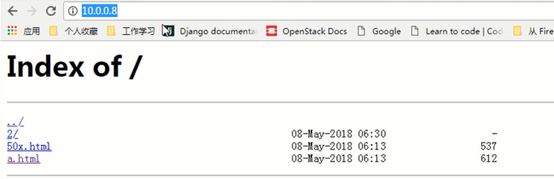
开启目录浏览功能后,即可通过浏览器访问到站点并浏览目录,也可针对于某一目录
2、nginx auth_basic
有时,我们需要为网站设置访问账号和密码权限,这样操作后,只有拥有账号密码的用户才能访问网站内容,这种使用账号密码才可以访问网站的功能主要应用在企业内部人员访问的地址上,例如:企业网站后台,MySQL客户端phpMyAdmin、企业内部的CRM、WIKI网站平台等。
官方说明:http://nginx.org/en/docs/http/ngx_http_auth_basic_module.html
2.1 HTTP基本认证协议启用用户名和密码验证
语法Syntax: auth_basic string(任意字符串) | off(关闭);
默认值Default: auth_basic off;
使用字段Context: http, server, location, limit_except
用法
修改配置文件,指定后面生成的密码文件保存路径(相对路径或绝对路径)
location / {
auth_basic "closed site";
auth_basic_user_file conf/htpasswd;
}
2.2 生成密码文件的方法
2.2.1 通过软件httpd-tools生成
安装生成验证密码文件的软件
yum install httpd-tools –y
查看安装httpd-tools后可用的二进制命令
rpm -ql httpd-tools
[root@Web01 conf]# rpm -ql httpd-tools
/usr/bin/ab
/usr/bin/htdbm
/usr/bin/htdigest
/usr/bin/htpasswd
省略输出
查看htpasswd用法
[root@Web01 conf]# htpasswd --help
Usage:
htpasswd [-cmdpsD] passwordfile username
htpasswd -b[cmdpsD] passwordfile username password
htpasswd -n[mdps] username
htpasswd -nb[mdps] username password
-c Create a new file.
-n Don't update file; display results on stdout.
-m Force MD5 encryption of the password.
-d Force CRYPT encryption of the password (default).
-p Do not encrypt the password (plaintext).
-s Force SHA encryption of the password.
-b Use the password from the command line rather than prompting for it.
-D Delete the specified user.
On Windows, NetWare and TPF systems the '-m' flag is used by default.
On all other systems, the '-p' flag will probably not work.
使用第二种方法非交互式一条命令生成密码文件
[root@Web01 conf]# htpasswd -bc /application/nginx/conf/htpasswd test 123456
Adding password for user test
[root@Web01 conf]# cat /application/nginx/conf/htpasswd
test:Hf2ctuRKkWaig
2.2.2 在线生成
利用网站在线生成
链接: http://tool.oschina.net/htpasswd
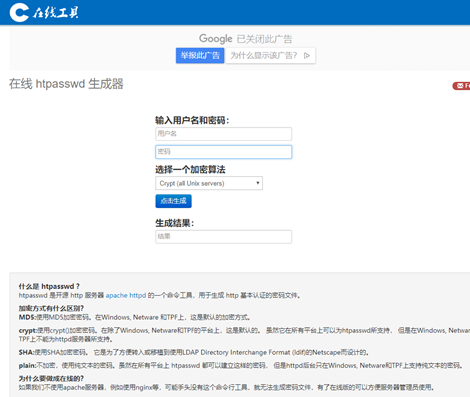
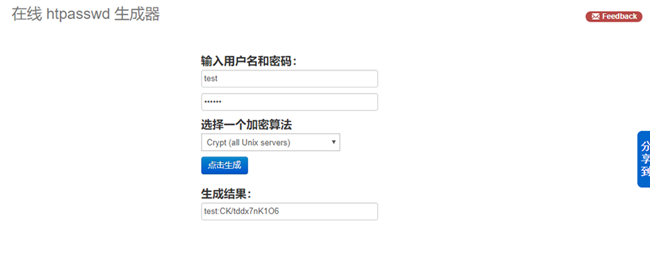
输入用户名和密码,选择适合当前web服务器的加密算法,然后把生成的结果手动添加到密码文件中
2.3 修改配置文件并生效
[root@Web01 conf]# vim nginx.conf
location / {
root html;
index index.html index.htm;
auth_basic "test";
auth_basic_user_file /application/nginx/conf/htpasswd;
}
省略其他内容
[root@Web01 conf]# nginx -t #检查语法
nginx: the configuration file /application/nginx-1.12.2/conf/nginx.conf syntax is ok
nginx: configuration file /application/nginx-1.12.2/conf/nginx.conf test is successful
[root@Web01 conf]# nginx -s reload #平滑重启
清除浏览器缓存,访问站点测试,输入用户名密码后能进行访问

博主原创文章,转载请务必注明出处
Nginx auto_index和auth_basic的更多相关文章
- nginx配置指令auth_basic、auth_basic_user_file及相关知识
参考链接 https://www.jianshu.com/p/1c0691c9ad3c auth_basic_user_file 所需要的密码,可以通过如下方法生成 1)安装htpasswd (yum ...
- Nginx 学习
1.Nginx编译安装 nginx依赖于pcre库,需要先安装pcre(二进制包,跟正则表达式有关),pcre-devel(头文件) configure --prefix=/usr/local/ng ...
- Nginx+Keepalived主主负载均衡服务器
Nginx+keepalived主主负载均衡服务器测试实验环境: 主Nginx之一:192.168.11.27主Nginx之二:192.168.11.28Web服务器一:192.168.11.37We ...
- ELK+Redis 解析Nginx日志
一.ELK简介 Elk是指logstash,elasticsearch,kibana三件套,我们一般使用它们做日志分析. ELK工作原理图: 简单来讲ELK具体的工作流程就是客户端的logstash ...
- centos7.3给squid搭建代理服务器添加认证nginx
1先安装 nginx 这里是教程 点击查看 2 然后 使用命令 创建用户 htpasswd -c /etc/nginx/passwd.db baker 输入密码 提示添加完毕 3 查看加密后的用户和 ...
- Nginx主主负载均衡架构
在和一些朋友交流Nginx+Keepalived技术时,我虽然已成功多次实Nginx+Keepaived项目方案,但这些都是用的单主Nginx在工作,从Nginx长期只是处于备份状态,所以我们想将二台 ...
- nginx索引目录配置
为了简单共享文件,有些人使用svn,有些人使用ftp,但是更多得人使用索引(index)功能.apache得索引功能强大,并且也是最常见得,nginx得auto_index实现得目录索引偏少,而且功能 ...
- nginx虚拟主机配置实践
1.配置基于域名的虚拟主机 [root@web01 html]# egrep -v "#|^$" /application/nginx/conf/nginx.conf.defaul ...
- nginx典型官方模块解释
模块名称 作用 语法 默认 配置位置 配置举例 结果验证 备注 1 --with-http_stub_status_module 监控Nginx的服务器连接状态 stub_status serve ...
随机推荐
- 公路建设 (highway.c/cpp/pas)
2.公路建设 (highway.c/cpp/pas) 在滨海市一共有 n 个城市,编号依次为 1 到 n,它们之间计划修建 m 条双向道路,其中 修建第 i 条道路的费用为 ci. 海霸王作为滨海市公 ...
- [解决方案]NuGet打包报错: 'X' already has a dependency defined for 'Y'
大家在打包Nuget包的时候,最后会执行以下语句 nuget pack .\ML.Common.SDK.csproj -Prop Configuration=Release 执行此句后,提示以下报错信 ...
- SQL UNPIVOT和PIVOT
/* table_source PIVOT( 聚合函数(value_column) FOR pivot_column IN(<column_list>) ) 完整语法: table_sou ...
- 百度之星初赛(A)——T2
数据分割 小w来到百度之星的赛场上,准备开始实现一个程序自动分析系统. 这个程序接受一些形如x_i = x_jxi=xj 或 x_i \neq x_jxi≠xj 的相等/不等约 ...
- [模板]大步小步算法——BSGS算法
大步小步算法用于解决:已知A, B, C,求X使得 A^x = B (mod C) 成立. 我们令x = im - j | m = ceil(sqrt(C)), i = [1, m], j = [0, ...
- Altium Designer 总线式布线
1.常规布线:不详细说了,是个人就知道怎么弄.需要说明的是在布线过程中,可按小键盘的*键或大键盘的数字2键添加一个过孔:按L键可以切换布线层:按数字3可设定最小线宽.典型线宽.最大线宽的值进行切换. ...
- Linux内核实践之tasklet机制【转】
转自:http://blog.csdn.net/bullbat/article/details/7423321 版权声明:本文为博主原创文章,未经博主允许不得转载. 作者:bullbat 源代码分析与 ...
- Activity管理类
package com.yunpai.tms.application; import android.app.Activity; import android.app.ActivityManager; ...
- 应用程序已被Java安全阻止
提示 您的安全设置已阻止自签名的应用程序运行 控制面板-JAVA-安全-例外站点-https://域名或IP/或http://域名或IP/,注意结尾必须要加/否则还是会一直提示被阻止
- [scrapy] 爬了第一页就停止 filtered off site request to
我碰到这个问题的原因是 allowed_domains 写错了 至于还有没有别的原因就不知道了