
Sublime Text3安装、配置及常用插件(陆续补全中~)
一、安装Sublime Text3
网址:http://www.sublimetext.com/3
注册码:(sublime Text3汉化和激活注册码)
----- BEGIN LICENSE -----

sgbteam

Single User License

EA7E-1153259

8891CBB9 F1513E4F 1A3405C1 A865D53F

115F202E 7B91AB2D 0D2A40ED 352B269B

76E84F0B CD69BFC7 59F2DFEF E267328F

215652A3 E88F9D8F 4C38E3BA 5B2DAAE4

969624E7 DC9CD4D5 717FB40C 1B9738CF

20B3C4F1 E917B5B3 87C38D9C ACCE7DD8

5F7EF854 86B9743C FADC04AA FB0DA5C0

F913BE58 42FEA319 F954EFDD AE881E0B

------ END LICENSE ------
二、安装 package control
说明网址:https://packagecontrol.io/installation
自动安装(代码安装)方法:
1、按住Ctrl+~键,调出控制台。
2、输入:
import urllib.request,os,hashlib; h = '6f4c264a24d933ce70df5dedcf1dcaee' + 'ebe013ee18cced0ef93d5f746d80ef60'; pf = 'Package Control.sublime-package'; ipp = sublime.installed_packages_path(); urllib.request.install_opener( urllib.request.build_opener( urllib.request.ProxyHandler()) ); by = urllib.request.urlopen( 'http://packagecontrol.io/' + pf.replace(' ', '%20')).read(); dh = hashlib.sha256(by).hexdigest(); print('Error validating download (got %s instead of %s), please try manual install' % (dh, h)) if dh != h else open(os.path.join( ipp, pf), 'wb' ).write(by)
3、重启Sublime Text 3。
4、如果在 Perferences --> package settings 中看到 package control 这一项,则安装成功。
手动安装方法:
1、选择 Preferences -> Browse Packages…
2、进入上一级目录后,再进入 Installed Packages/ 目录下
3、下载 Package Control.sublime-package 并将它复制到刚才的 Installed Packages/ 目录下
4、重启 Sublime Text
三、用package control安装插件
1、按下 Ctrl+Shift+P 调出命令面板。或者选择 Perferences(首选项)--> package control 调出命令面板。
2、输入 install 调出 Install Package 选项并回车,然后在列表中选中要安装的插件。
3、插件参考网址:https://packagecontrol.io/browse
四、常用插件
- ChineseLocalization
汉化插件,各种语言都有。
- Emmet
设置Tab补全代码:(默认快捷键为“Ctrl+E”)(Sublime插件Emmet的安装及Tab补全代码问题解决)
1. 打开Preferences-->Package Settings-->Emmet-->Key Bindings-User
2. 加入:
[{"keys": ["tab"], "args": {"action": "expand_abbreviation"}, "command": "run_emmet_action", "context": [{"key": "emmet_action_enabled.expand_abbreviation"}]}]
- Sublime CodeIntel
代码自动提示。
- Bracket Highlighter
高亮匹配各种括号。
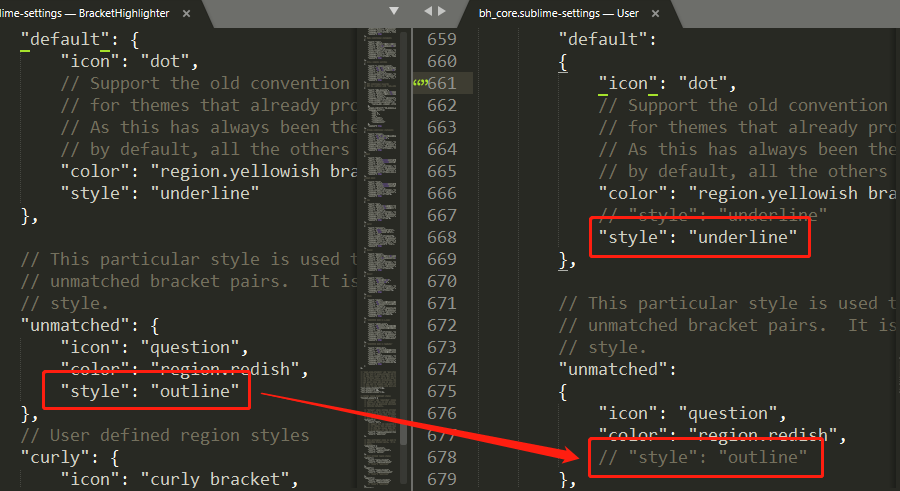
使用方法:(参考:SublimeText 3插件Bracket Highlighter高亮设置)
1.点击菜单栏的 Preferences --> Package Settings --> BracketHighlighter --> Bracket Settings
2.在弹出的窗口中, 全选左侧的文件并复制粘贴到右侧的user文件中,保存
3.在第664行,确认【"style": "underline"】("default"为默认设置)
4.将后面所有的【"style"】部分都注释掉
- DocBlockr
简化了在Javascript,PHP,CoffeeScript,Actionscript,C&C ++中编写DocBlock注释的过程。
使用方法:Sublime2 DocBlocker插件在自动补全注释时输出自定义作者和当前时间等信息
- SideBarEnhancements
侧栏右键功能增强,非常实用。
- All Autocomplete
默认的 Autocomplete 功能只考虑当前的文件,而 AllAutocomplete 插件会搜索所有打开的文件来寻找匹配的提示词。
- AutoFileName
快捷输入文件名
使用方法:输入”/”即可看到相对于本项目文件夹的其他文件。
- Keymaps
快速查找所有插件的快捷键。
- HTML-CSS-JS Prettify
全能序列化。
使用方法:(建议最后一个安装配置,先安装的话,可能会被其他插件影响配置。之前安装时缩进出现问题了)
1.配置NodeJS环境(Node.js 安装配置)
2.配置HTML-CSS-JS Prettify插件
1)(Sublime Text3 HTML-CSS-JS Prettify插件技巧)
(可以不配置直接用。若需要修改,则推荐在个人配置中修改。下面是我的修改备份)
 {

     // The plugin looks for a .jsbeautifyrc file in the same directory as the

     // source file you're prettifying (or any directory above if it doesn't exist,

     // or in your home folder if everything else fails) and uses those options

     // along the default ones.

     // Details: https://github.com/victorporof/Sublime-HTMLPrettify#using-your-own-jsbeautifyrc-options

     // Documentation: https://github.com/beautify-web/js-beautify

     "all":

     {

         // These rules apply to any supported code that is going to be be prettified,

         // and have the lowest level of precedence (meaning any of the settings in

         // the 'html', 'css', 'js', 'json' and 'custom' categories override these).

         // You can add other .jsbeautifyrc rules in this section too.

         // End output with newline

         "end_with_newline": false,

         // Character(s) to use as line terminators.

         // end-of-line(EOF行结束),Line Feed(LF换行或者Line FeedNL),carriage return(CR回车符),林纳斯-->\n(光标下一行回到行首),微软-->\r\n,苹果-->\r(光标回到行首往下一行)

         // Unix/Mac系统下的文件在Windows里打开的话,所有文字会变成一行(因为两个符号才表示换行);而Windows里的文件在Unix/Mac下打开的话,在每行的结尾可能会多出一个^M符号。

         // 以下是对行结尾的处理方式;如果需要跨平台必须把window的crlf转为lf也就是

         "eol": "\n",

         // Initial indentation level

         // 初始缩进级别

         "indent_level": 0,

         // Indentation character

         // 标签缩进字符采用空格

         "indent_char": " ",

         // Indentation size

         // 缩进大小为4个

         "indent_size": 4,

         // Indent with tabs, overrides `indent_size` and `indent_char`

         // 缩进是否采用制表符

         "indent_with_tabs": false,

         // Maximum number of line breaks to be preserved in one chunk (0 disables)

         // 一个块中保留的最大换行数(0表示禁用);

         "max_preserve_newlines": 0,

         // Whether existing line breaks before elements should be preserved (only works before elements, not inside tags or for text)

         "preserve_newlines": true,

         // Lines should wrap at next opportunity after this number of characters (0 disables)

         // 按字符数进行换行,0为禁用

         "wrap_line_length": 0

     },

     "html":

     {

         // Rules added here apply only to HTML-like files, as determined by the

         // rules specified for `global_file_rules` in the plugin settings. They

         // take precedence  over all of the settings in the 'all' category above.

         // You can add other .jsbeautifyrc rules in this section too.

         // html作用于以下文件

         "allowed_file_extensions": ["htmlhintrc", "htm", "html", "xhtml", "shtml", "xml", "svg", "vue"],

         // js中花括号是否换行[collapse|expand|end-expand]

         "brace_style": "collapse",

         // 是否输出eol里的内容,默认false

         "end_with_newline": false,

         // 对内容中双重花括号进行缩进{{#foo}}, {{/foo}},默认为false;

         "indent_handlebars": true,

         // 是否缩进<head>和<body>部分

         "indent_inner_html": false,

         // 对html中scripts的代码缩进规则[keep(保持同辈)|separate(不缩进)|normal(正常缩进)]

         "indent_scripts": "normal",

         // 是否应该保留元素之前的现有换行符(仅在元素之前工作,不在标签内或文本中)默认为true(保留换行符\n)

         // 例如设置为false;

         // <dl><li>\nabc\n</li></dl>

         // <dl><li>abc</li></dl>

         "preserve_newlines": true,

         // 都不需要换行缩进的元素,默认"a", "span", "img", "code", "pre", "sub", "sup", "em", "strong", "b", "i", "u", "strike", "big", "small", "pre", "h1", "h2", "h3", "h4", "h5", "h6"

         "unformatted": ["pre"],

         // 使用换行符\n或空格分隔选择器

         "selector_separator": "",

         // 选择器是否换行

         "selector_separator_newline": false

     },

     "css":

     {

         // Rules added here apply only to CSS-like files, as determined by the

         // rules specified for `global_file_rules` in the plugin settings. They

         // take precedence  over all of the settings in the 'all' category above.

         // You can add other .jsbeautifyrc rules in this section too.

         // css作用于以下文件

         "allowed_file_extensions": ["css", "scss", "sass", "less"],

         // 是否输出eol里的内容,默认false

         "end_with_newline": false,

         // Add a new line after every css rule

         // 在每个css规则之后添加一行新的

         "newline_between_rules": false,

         // Selector separator character

         // 使用换行符\n或空格分隔选择器

         "selector_separator": " ",

         // Separate selectors with newline or not (e.g. "a,\nbr" or "a, br")

         // 选择器是否换行

         "selector_separator_newline": false

     },

     "js":

     {

         // Rules added here apply only to JS-like files, as determined by the

         // rules specified for `global_file_rules` in the plugin settings. They

         // take precedence  over all of the settings in the 'all' category above.

         // You can add other .jsbeautifyrc rules in this section too.

         // js作用于以下文件,变量,函数手动隔行的地方不会格式化

         "allowed_file_extensions": ["js", "json", "jshintrc", "jsbeautifyrc"],

         // [collapse|collapse-preserve-inline|expand|end-expand|none] Put braces on the same line as control statements (default), or put braces on own line (Allman / ANSI style), or put end braces on own line, or attempt to keep them where they are

         "brace_style": "collapse-preserve-inline",

         // Break chained method calls across subsequent lines

         // 在后续行中断开链接方法调用

         "break_chained_methods": false,

         // Put commas at the beginning of new line instead of end

         // 在新行开始时加上逗号,而不是结尾

         "comma_first": false,

         // Pass E4X xml literals through untouched

         // 通过E4X xml文字通过不变的

         "e4x": true,

         // 是否输出eol里的内容,默认false

         "end_with_newline": false,

         // If true, then jslint-stricter mode is enforced

         // 是否采用jslint-stricter模式,另外的规则

         "jslint_happy": false,

         // Preserve array indentation

         // 保留数组缩进

         "keep_array_indentation": false,

         // Preserve function indentation

         // 保留函数缩进

         "keep_function_indentation": false,

         // 是否保留手动换行的换行符

         "preserve_newlines": true,

         // [before-newline|after-newline|preserve-newline] Set operator position

         "operator_position": "before-newline",

         // Should the space before an anonymous function's parens be added, "function()" vs "function ()"

         // "function()" vs "function ()"

         "space_after_anon_function": false,

         // Should the space before conditional statement be added, "if(true)" vs "if (true)"

         // "if(true)" vs "if (true)"

         "space_before_conditional": true,

         // Add padding spaces within empty paren, "f()" vs "f( )"

         // "f()" vs "f( )"

         "space_in_empty_paren": false,

         // Add padding spaces within paren, ie. f( a, b )

         // 在括号内添加填充空格,例如f( a, b )

         "space_in_paren": false,

         // Should printable characters in strings encoded in \xNN notation be unescaped, "example" vs "\x65\x78\x61\x6d\x70\x6c\x65"

         // 对转义字符"\x65\x78\x61\x6d\x70\x6c\x65"不格式化

         "unescape_strings": true

     },

     "json":

     {

         // Rules added here apply only to JSON-like files, as determined by the

         // rules specified for `global_file_rules` in the plugin settings. They

         // take precedence over all of the settings in the 'all' category above.

         // You can add other .jsbeautifyrc rules in this section too.

         // [collapse|collapse-preserve-inline|expand|end-expand|none] Put braces on the same line as control statements (default), or put braces on own line (Allman / ANSI style), or put end braces on own line, or attempt to keep them where they are

         "brace_style": "expand",

         // Preserve array indentation

         "keep_array_indentation": false,

         // Should printable characters in strings encoded in \xNN notation be unescaped, "example" vs "\x65\x78\x61\x6d\x70\x6c\x65"

         "unescape_strings": false

     },

     "custom":

     {

         // Rules added here apply only to files matching specific glob strings,

         // but respecting any whitelists or blacklists as determined by the

         // rules specified for `global_file_rules` in the plugin settings. They

         // take precedence over any of the settings in the categories above.

         // For the following entries, keys are globs and values are objects which

         // can contain any kind of .jsbeautifyrc setting.

         "@(package?(-lock)|yarn-lock).json":

         {

             "indent_size": 2,

             "brace_style": "collapse"

         },

         "*.sublime-@(settings|keymap|commands|menu)":

         {

             "indent_size": 4,

             "brace_style": "expand"

         }

     }

 }
2)设置保存时自动格式化
1. 点击菜单栏的 Preferences --> Package Settings --> HTML/CSS/JS Prettify --> Plugin Options - Default
2. 将 "format_on_save": false, 修改为true

- CSS3
The most complete CSS support for Sublime Text 3
解决伪类选择器显示为白色或者无效的问题。
部分参考文档:
2、史上最全的 Sublime Text 汉化、插件安装合集
Sublime Text3安装、配置及常用插件(陆续补全中~)的更多相关文章
- Sublime Text3安装、注册、插件安装教程
在前端开发中,有很多软件供我们使用:大名鼎鼎的WebStorm,老而弥坚的Dreamweaver,后起之秀Hbuilder,还有小清新Sublime Text.......等等.作为新手, ...
- sublime text3 安装配置
sublime text 3 语法检查插件(一直都是安装了但是却没有语法报错提示和苦恼) 第一种方法:有点卡 先去下载对应的开发环境,安装到本地,例如php. 从Pakage Control中安装su ...
- Sublime Text3安装配置
Sublime Text3的所有package都可在如下网站检索 https://packagecontrol.io/browse 以下是我的插件列表 CoolFormat 一款C\C++\C#\CS ...
- sublime text3安装配置c++环境(windows+ubuntu)
1.下载sublime text3 官网地址:http://www.sublimetext.com/3 ubuntu直接在Ubuntu Software中搜索sublime安装 2.配置环境变量(wi ...
- sublime text3安装js提示的插件
今天安装Sublime Text3的js插件,在网上查了很多资料,为了方便以后看,写一个安装插件的总结和方法. 要安装js相关的插件,就要先安装一个Package Control(插件管理器)的插件, ...
- sublime text3 安装详解+前端插件
1,下载sublime 3,地址:http://www.sublimetext.com/ 2,注册码:(在网上找的,感谢前辈)打开sublime3, help----add license---复制下 ...
- 开发工具:sublime text3安装Vue语法高亮插件
一.将插件克隆到Sublime的packages目录 1.下载并解压插件(或直接git命令clone),得到vue-syntax-highlight-master文件夹 插件地址:https://gi ...
- mac下sublime text3 安装px转rem插件
本人使用的是os-x系统,即mac系统,每次使用单位rem用其他网页转换很不方便.自己捣腾了一下插件,现在共享给大家 第一步: 先下载插件: https://github.com/narrow-gat ...
- Sublime Text3安装以及初次配置
Sublime Text3安装以及初次配置 工具:官网下载:Sublime Text3 安装:直接运行安装.http://write.blog.csdn.net/postedit 激活:参考文/晚晴幽 ...
随机推荐
- Git学习笔记(一)Git初识及基本操作
详细完整教程:官方文档,廖神Git教程,武sir 一.什么是Git? 定义:Git是分布式版本控制系统. 1.1什么是版本控制 我们可以回想以下,在我们上学毕业要写论文或是准备一份演讲稿的时候,都会用 ...
- linux yum 脚本实现
yum 位于linux /usr/bin/yum yum命令是python脚本进行编写的(python 2.6) #!/usr/bin/python2.6 import sys try: import ...
- Java 的基本语法
Java 语言严格区分大小写 一个 Java 源文件里可以定义多个类,但其中只能有一个类被定义为 public 类 如果源文件中包含了 public 类,源文件的名称必须和该 public 类同名 p ...
- 关于android中出现failed to read row 0,column -1错误
该错误出现的原因是Cursor.getColumnIndex()的参数列名不存在或者错误,这时返回值为-1.出现该错误
- IFC数据模式架构的四个概念层详解说明
IFC模型体系结构由四个层次构成,从下到上依次是 资源层(Resource Layer).核心层(Core Layer).交互层(Interoperability Layer).领域层(Domain ...
- 在Oracle 12C中使用scott账号
在Oracle11g中默认是有scott账号的,但在Oracle 12C中则不能直接使用. 我的机器环境: 操作系统:Windows Server 2008 R2 64位 Oracle版本:Oracl ...
- cmake 编译安装方法
cmake版本3.7.2 1.根目录下./bootstrap 2.make 3.sudo make install
- windows xp版本的chrome浏览器去哪里下载呢?
http://www.265.com/chrome-download/?slice 265没记错的话应该是GOOGLE的一个导航网站吧,所以可信度是比较高的.
- swing重绘按钮为任意形状图案的方法
swing重绘按钮为任意形状图案的方法 摘自https://www.jb51.net/article/131290.htm 转载 更新时间:2017年12月22日 13:43:00 作者:_Th ...
- Integer类的parseInt和valueOf的区别
我们平时应该都用过或者见过parseInt和valueOf这两个方法.一般我们是想把String类型的字符数字转成int类型.从这个功能层面来说,这两个方法都一样,都可以胜任这个功能. 但是,我们进入 ...