
python的requests初步使用
转自:http://my.oschina.net/yangyanxing/blog/280029
早就听说requests的库的强大,只是还没有接触,今天接触了一下,发现以前使用urllib,urllib2等方法真是太搓了……
这里写些简单的使用初步作为一个记录
一、安装 http://cn.python-requests.org/en/latest/user/install.html#install
二、发送无参数的get请求
|
1
2
3
4
5
6
7
8
9
10
11
12
13
14
15
|
>>> print r.text{ "args": {}, "headers": { "Accept": "*/*", "Accept-Encoding": "gzip, deflate", "Connection": "close", "Host": "httpbin.org", "User-Agent": "python-requests/2.3.0 CPython/2.6.6 Windows/7", "X-Request-Id": "8a28bbea-55cd-460b-bda3-f3427d66b700" }, "origin": "124.192.129.84", } |
三、发送带参数的get请求,将key与value放入一个字典中,通过params参数来传递,其作用相当于urllib.urlencode
|
1
2
3
4
5
|
>>> import requests>>> pqyload = {'q':'杨彦星'}>>> r.url |
四、发送post请求,通过data参数来传递,
|
1
2
3
4
5
6
7
8
9
10
11
12
13
14
15
16
17
18
19
20
21
22
23
24
25
26
|
>>> payload = {'a':'杨','b':'hello'}>>> print r.text{ "args": {}, "data": "", "files": {}, "form": { "a": "\u6768", "b": "hello" }, "headers": { "Accept": "*/*", "Accept-Encoding": "gzip, deflate", "Connection": "close", "Content-Length": "19", "Content-Type": "application/x-www-form-urlencoded", "Host": "httpbin.org", "User-Agent": "python-requests/2.3.0 CPython/2.6.6 Windows/7", "X-Request-Id": "c81cb937-04b8-4a2d-ba32-04b5c0b3ba98" }, "json": null, "origin": "124.192.129.84", }>>> |
可以看到,post参数已经传到了form里,data不光可以接受字典类型的数据,还可以接受json等格式
|
1
2
3
|
>>> payload = {'a':'杨','b':'hello'}>>> import json |
五、发送文件的post类型,这个相当于向网站上传一张图片,文档等操作,这时要使用files参数
|
1
2
3
|
>>> files = {'file': open('touxiang.png', 'rb')}>>> r = requests.post(url, files=files) |
5.1 定制headers,使用headers参数来传递
|
1
2
3
4
5
6
|
>>> import json>>> payload = {'some': 'data'}>>> headers = {'content-type': 'application/json'}>>> r = requests.post(url, data=json.dumps(payload), headers=headers) |
六、响应内容
6.1 响应状态码
r = requests.get('http://httpbin.org/get')
print r.status_code
6.2 响应头
|
1
2
|
>>> print r.headers{'content-length': '519', 'server': 'gunicorn/18.0', 'connection': 'keep-alive', 'date': 'Sun, 15 Jun 2014 14:19:52 GMT', 'access-control-allow-origin': '*', 'content-type': 'application/json'} |
也可以取到这个个别的响应头用来做一些判断,这里的参数是不区分大小写的
r.headers[‘Content-Type’]
r.headers.get(‘Content-Type’)
6.3 响应内容,前面已经在应用了
r.text
r.content
七、获取响应中的cookies
|
1
2
3
|
>>> r.cookies['BAIDUID']'D5810267346AEFB0F25CB0D6D0E043E6:FG=1' |
也可以自已定义请求的COOKIES
|
1
2
3
4
5
6
7
8
9
10
11
|
>>> cookies = {'cookies_are':'working'}>>> r = requests.get(url,cookies = cookies)>>> >>> print r.text{ "cookies": { "cookies_are": "working" }}>>> |
cookies还有很多,因为目前我也还不是很多,以后再扩充吧
八、使用timeout参数设置超时时间
>>> requests.get('http://github.com', timeout=1)
<Response [200]>
如果将时间设置成非常小的数,如requests.get('http://github.com', timeout=0.001),那么如果在timeout的时间内没有连接,那么将会抛出一个Timeout的异常
九、访问中使用session
先初始化一个session对象,s = requests.Session()
然后使用这个session对象来进行访问,r = s.post(url,data = user)
参考文章 http://blog.csdn.net/iloveyin/article/details/21444613 基本上都是从这扒的代码
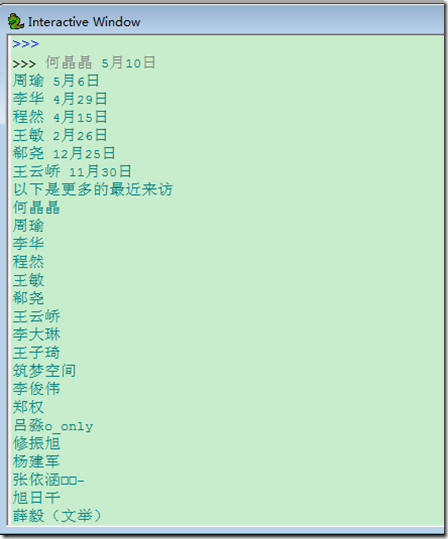
以下通过访问人人网来获取首页中的最近来访问,然后再访问查看更多的来访来读取更多的最近来访
更多的来访就是以带session的访问http://www.renren.com/myfoot.do
|
1
2
3
4
5
6
7
8
9
10
11
12
13
14
15
16
17
18
19
20
21
22
23
24
25
26
27
28
29
|
#coding:utf-8import requestsimport reuser = {'email':'email','password':'pass'}s = requests.Session()r = s.post(url,data = user)html = r.textvisit = []first = re.compile(r'</span><span class="time-tip first-tip"><span class="tip-content">(.*?)</span>')second = re.compile(r'</span><span class="time-tip"><span class="tip-content">(.*?)</span>')third = re.compile(r'</span><span class="time-tip last-second-tip"><span class="tip-content">(.*?)</span>')last = re.compile(r'</span><span class="time-tip last-tip"><span class="tip-content">(.*?)</span>')visit.extend(first.findall(html))visit.extend(second.findall(html))visit.extend(third.findall(html))visit.extend(last.findall(html))for i in visit: print iprint '以下是更多的最近来访'fm = re.compile(r'"name":"(.*?)"')visitmore = fm.findall(vm.text)for i in visitmore: print i |
python的requests初步使用的更多相关文章
- Python爬虫之使用Fiddler+Postman+Python的requests模块爬取各国国旗
介绍 本篇博客将会介绍一个Python爬虫,用来爬取各个国家的国旗,主要的目标是为了展示如何在Python的requests模块中使用POST方法来爬取网页内容. 为了知道POST方法所需要传 ...
- Python——安装requests第三方库
使用pip安装 在cmd下cd到这个目录下C:\Python27\Scripts,然后执行pip install requests 在cmd 命令行执行 E: 进入e盘 cd Python\pr ...
- 关于Python ,requests的小技巧
版权声明:本文为博主原创文章,未经博主允许不得转载. https://blog.csdn.net/xie_0723/article/details/52790786 关于 Python Request ...
- Python之Requests的高级用法
# 高级用法 本篇文档涵盖了Requests的一些更加高级的特性. ## 会话对象 会话对象让你能够跨请求保持某些参数.它也会在同一个Session实例发出的所有请求之间保持cookies. 会话对象 ...
- python的requests快速上手、高级用法和身份认证
https://blog.csdn.net/qq_25134989/article/details/78800209 快速上手 迫不及待了吗?本页内容为如何入门 Requests 提供了很好的指引.其 ...
- Python 安装requests和MySQLdb
Python 安装requests和MySQLdb 2017年10月02日 0.系统版本 0.1 查看系统版本 [root@localhost ~]# uname -a Linux localhost ...
- 【转】使用Python的Requests库进行web接口测试
原文地址:使用Python的Requests库进行web接口测试 1.Requests简介 Requests 是使用 Apache2 Licensed 许可证的 HTTP 库.用 Python 编写, ...
- 转来的——python webdriver自动化测试初步印象——转来的
python webdriver自动化测试初步印象 以下示例演示启动firefox,浏览google.com,搜索Cheese,等待搜索结果,然后打印出搜索结果页的标题 from selenium i ...
- Python+Unittest+Requests+PyMysql+HTMLReport 接口自动化框架
整体框架使用的是:Python+Unittest+Requests+PyMysql+HTMLReport 多线程并发模式 主要依赖模块 Unittest.Requests.PyMysql.HTMLR ...
随机推荐
- spring jpa data笔记
tomcat启动Maven项目的时候总抛出这样的错误: Error creating bean with name 'org.springframework.boot.autoconfigure.or ...
- 洛谷——P3395 路障
P3395 路障 题目背景 此题约为NOIP提高组Day1T1难度. 题目描述 B君站在一个n*n的棋盘上.最开始,B君站在(1,1)这个点,他要走到(n,n)这个点. B君每秒可以向上下左右的某个方 ...
- Paint Fence -- LeetCode
There is a fence with n posts, each post can be painted with one of the k colors. You have to paint ...
- tiny4412 串口驱动分析七 --- log打印的几个阶段之内核启动阶段(earlyprintk)
作者:彭东林 邮箱:pengdonglin137@163.com 开发板:tiny4412ADK+S700 4GB Flash 主机:Wind7 64位 虚拟机:Vmware+Ubuntu12_04 ...
- Overview of iOS Crash Reporting Tools: Part 2/2
Thanks for joining me for the second part of this two-part series on crash reporting services! The f ...
- 【报错】spring boot启动 报错 找不到实体类Not a managed type: class com.pisen.cloud.luna.feign.ten.beans.SysUser
Caused by: java.lang.IllegalArgumentException: Not a managed type: class com.pisen.cloud.luna.feign. ...
- [置顶]
kubernetes资源类型--RC和RS
Replication Controller(RC) RC是K8S中的另一个核心概念,应用托管在K8S后,K8S需要保证应用能够持续运行,这是RC的工作内容. 主要功能 确保pod数量:RC用来管理正 ...
- [转载]DLL劫持生成器 源码开放(纯WINDOWS SDK)+ 实例分析
本菜最近学习了什么DLL注入啊,hook啊(r3)的相关技术,觉得很好玩,于是深入发现还有DLL劫持这种东西觉得挺好玩的,加上最近看到各种木马分析报告中都还有发现有利用白加黑的现象.于是自己想找几个来 ...
- 《Linux性能及调优指南》----1.1 Linux进程管理
翻译:飞哥 ( http://hi.baidu.com/imlidapeng ) 版权所有,尊重他人劳动成果,转载时请注明作者和原始出处及本声明. 原文名称:<Linux Performance ...
- leetcode 题解:Merge Sorted Array(两个已排序数组归并)
题目: Given two sorted integer arrays A and B, merge B into A as one sorted array. Note:You may assume ...