
Gitlab忘记root用户密码解决办法
一、Gitlab忘记root用户密码,重置用户密码和查看用户ID号方法
1、Gitlab查看用户id号的方法
1)方法1:通过api接口查询
接口查询地址:http://gitlab的url/api/v4/users?username=用户名
比如查看gitlab的root用户id
在浏览器页面里直接访问"http://172.16.60.237/api/v4/users?username=root"
或者
在linux终端命令行里直接通过curl命令进行访问
[root@localhost ~]# curl http://172.16.60.237/api/v4/users?username=root

[{"id":1,"name":"Administrator","username":"root","state":"active","avatar_url":"https://www.gravatar.com/avatar/e64c7d89f26bd1972efa854d13d7dd61?s=80\u0026d=identicon","web_url":"http://gitlab.example.com/root"}]
2)方法2:进入gitlab数据库查询
[root@localhost ~]# gitlab-rails dbconsole

psql (10.9)

Type "help" for help.

gitlabhq_production=> \l

                                             List of databases

        Name         |    Owner    | Encoding |   Collate   |    Ctype    |        Access privileges

---------------------+-------------+----------+-------------+-------------+---------------------------------

 gitlabhq_production | gitlab      | UTF8     | en_US.UTF-8 | en_US.UTF-8 |

 postgres            | gitlab-psql | UTF8     | en_US.UTF-8 | en_US.UTF-8 |

 template0           | gitlab-psql | UTF8     | en_US.UTF-8 | en_US.UTF-8 | =c/"gitlab-psql"               +

                     |             |          |             |             | "gitlab-psql"=CTc/"gitlab-psql"

 template1           | gitlab-psql | UTF8     | en_US.UTF-8 | en_US.UTF-8 | =c/"gitlab-psql"               +

                     |             |          |             |             | "gitlab-psql"=CTc/"gitlab-psql"

(4 rows)

## 连接数据库

gitlabhq_production=> \c gitlabhq_production

You are now connected to database "gitlabhq_production" as user "gitlab".

gitlabhq_production=> select id,name,username from users;

 id |     name      | username

----+---------------+----------

  1 | Administrator | root

(1 row)

## 查找账户id

gitlabhq_production=> select id from users where username = 'root';

 id

----

  1

(1 row)

==============================================================================================
2、忘记Gitlab的root用户密码的重置方法
如果忘记了Gitlab的root用户密码,则可以在服务器上面直接修改数据:
[root@localhost ~]# gitlab-rails console production      #然后以此执行下面命令(需要提前查询用户的id号)

...> user = User.where(id: 1).first

...> user.password = 'secret_pass'

...> user.password_confirmation = 'secret_pass'

...> user.save!
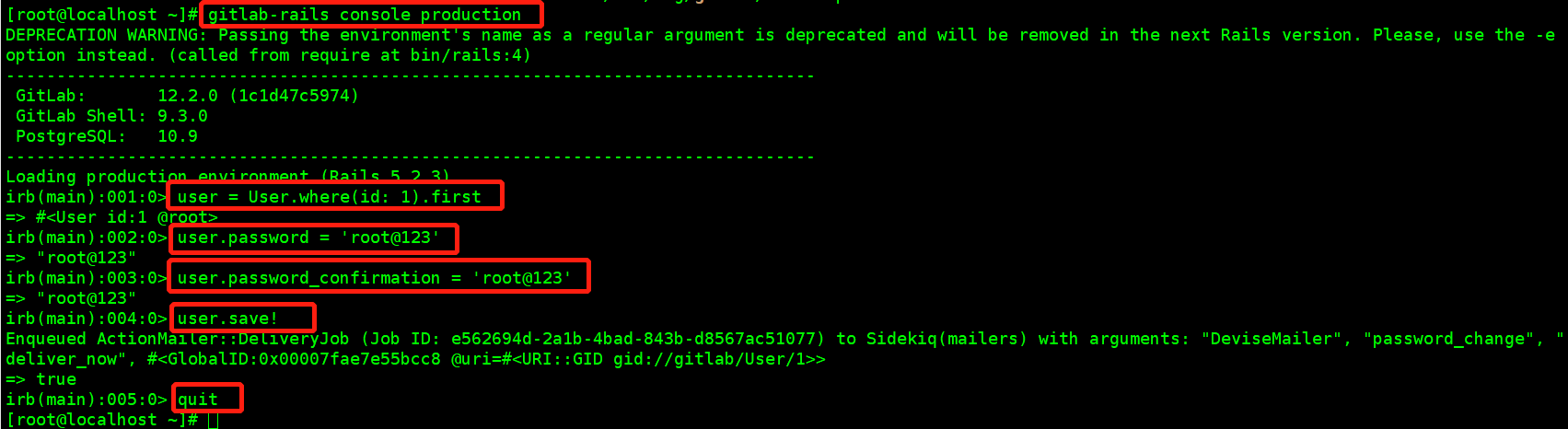
例如重置root用户密码为root@123,root用户id为1
[root@localhost ~]# gitlab-rails console production

DEPRECATION WARNING: Passing the environment's name as a regular argument is deprecated and will be removed in the next Rails version. Please, use the -eoption instead. (called from require at bin/rails:4)

--------------------------------------------------------------------------------

 GitLab:       12.2.0 (1c1d47c5974)

 GitLab Shell: 9.3.0

 PostgreSQL:   10.9

--------------------------------------------------------------------------------

Loading production environment (Rails 5.2.3)

irb(main):001:0> user = User.where(id: 1).first

=> #<User id:1 @root>

irb(main):002:0> user.password = 'root@123'

=> "root@123"

irb(main):003:0> user.password_confirmation = 'root@123'

=> "root@123"

irb(main):004:0> user.save!

Enqueued ActionMailer::DeliveryJob (Job ID: e562694d-2a1b-4bad-843b-d8567ac51077) to Sidekiq(mailers) with arguments: "DeviseMailer", "password_change", "deliver_now", #<GlobalID:0x00007fae7e55bcc8 @uri=#<URI::GID gid://gitlab/User/1>>

=> true

irb(main):005:0> quit
-----------------------------------------------------------书山有路勤为径,学海无涯苦作舟-------------------------------------------------------------
Gitlab忘记root用户密码解决办法的更多相关文章
- CentOS忘记普通用户密码解决办法
普通用户忘记密码 1.使用root用户登录系统,找到/etc/shadow文件. 2.找到用户名开头的那一行,例如我的用户名为pds,,以冒号为分割符,红色部分是密码加密部分 pds:$1$Civop ...
- GitLab修改root用户密码
GitLab是一个私有的Git仓库,具有较好的项目管理和用户管理能力.对于普通用户而言,通过系统的重置密码,接受邮件即可解决,可是GitLab的管理员账号,缺省的邮箱是一个不存在的邮箱地址,所以没有办 ...
- mysql忘记帐号密码 解决办法
首先关闭mysql 使用命令行启动mysql(一般要找到mysql.ini文件) 在windows上mysql.ini文件可以通过查看当前mysql进程参数查看到,具体方法点此 在启动mysql命令行 ...
- Linux 忘记root登录密码解决方法
很多朋友经常会忘记Linux系统的root密码,linux系统忘记root密码的情况该怎么办呢?重新安装系统吗?当然不用!进入单用户模式更改一下root密码即可. 步骤如下: 重启linux系统 3 ...
- MySQL忘记root用户密码修改方法
一般来说在MySQL修改用户密码有好几种方法: 1.修改自己的密码可用: set password=password('123456'); 2.修改其它用户的密码可用: set password fo ...
- Linux忘记root登录密码解决方法
有时候由于长时间米有登录linux系统,等需要用的时候突然忘记root密码,怎么办?下面简单介绍解决方法. redhat 和 centos 6.5 可以,7.0以上未测 在系统重启后,不停地按”e”键 ...
- CentOS忘记用户名或者密码解决办法
方法一:如果用户名和密码都忘记了,可以用以下这个方法找回:(和第二种大步骤差不多,需注意3,4步) 1. 在出现grub画面时,用上下键选中你平时启动linux的那一项,然后按e键 2. 再次用上下键 ...
- mysql忘记root用户密码找回步骤
修改或找回root密码步骤1.修改MySQL的登录设置: # vi /etc/my.cnf 在[mysqld]的段中加上一句:skip-grant-tables 保存并且退出vi. 2.重新启动mys ...
- 利用lnmp一键安装的php环境忘记mysql,root用户密码解决方法
1.cd /lnmp1.5/tools/ 2.sh reset_mysql_root_password.sh 这样,即可完成修改!
随机推荐
- cursor pin s和cursor pin s wait on x
1.cursor pin s是一个共享锁,一般情况下是因为发生在SQL短时间内大量执行 案例:在生产库中,突然出现大量的cursor pin s的等待,询问是否有动作后,同事说有编译存储过程(被误导了 ...
- 优化太多的if-else
来源java小当家 第1种方法:提前return,减少else判断 1 // 1.优化前 2 private int handlerPre1(boolean flag) { 3 if(flag){ 4 ...
- 阅读lodash源码之旅数组方法篇-compact和concat
鲁迅说过:只有阅读过优秀库源码的人,才能配的上是真正的勇士. compact 创建一个新数组,包含原数组中所有的非假值元素.例如false, null,0, "", undefin ...
- Linux内核分析_课程学习总结报告
请您根据本课程所学内容总结梳理出一个精简的Linux系统概念模型,最大程度统摄整顿本课程及相关的知识信息,模型应该是逻辑上可以运转的.自洽的,并举例某一两个具体例子(比如读写文件.分配内存.使用I/O ...
- MySQL简介及安装 mysql Ver 14.14 Distrib 5.7.28
1.MySQL简介 1.数据库产品演变 第一代数据库架构: RDBMS 关系型数据库时代 : 合的时代 代表产品 :Oracle .MSSQL .MySQL.SQL server 第二代数据库架构:拆 ...
- 权限管理3-整合Spring Security
一.Spring Security介绍 1.框架介绍 Spring 是一个非常流行和成功的 Java 应用开发框架.Spring Security 基于 Spring 框架,提供了一套 Web 应用安 ...
- JS实现计算器,带三角函数,根号
极简主义网页计算器. 实现了按键特效,可响应键盘按键,实时显示计算结果. 可切换模式,拓展高级功能,包括根号.三角函数.括号等. 效果如下: 代码如下: html: <!DOCTYPE html ...
- pycharm2021永久激活
Pycharm破解版地址: 链接: https://pan.baidu.com/s/1dEkzKRFMaeNjWF4h7y2TdQ 提取码: eqr3 Anaconda地址:版本是python3.6 ...
- 使用Redis有序集合实现投票排行榜系统
https://mp.weixin.qq.com/s/GcPF8jte8Nzi4Ae0jojXuQ 先说最简单的排行榜.其实之前我们有个用于投票的系统,但是他没有用有序集合,他是这样做的:用redis ...
- mac或linux常见命令
1. 用某个软件打开某文件,如subline text: https://blog.csdn.net/Cinderella_hou/article/details/82392139 如果想使用subl ...