
如何使用irealtime.js实现一个基于websocket的同步画板
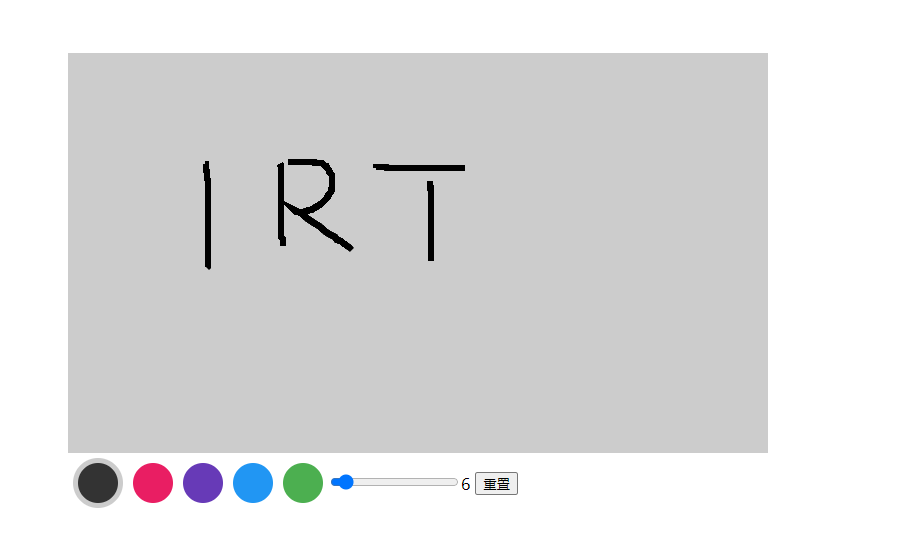
同步画板演示
同时打开2个tab,分别在画布上写下任意内容,观察演示结果,同时可设置画笔颜色及线条宽度。演示地址
初始化画布
<canvas id="drawBoard" width="700" height="400"></canvas>
   this.canvas = document.getElementById("drawBoard");

   this.ctx = this.canvas.getContext("2d");

   this.stage_info = this.canvas.getBoundingClientRect(); //初始化舞台信息

   this.path = { //初始化路径

      beginX: 0,

      beginY: 0,

      endX: 0,

      endY: 0,

    };

   this.ctx.lineWidth = this.size;//初始化线条宽度
加载irealtime.js
irealtime.js 是一个第三方websocket实时消息推送服务jssdk,可用于快速搭建安全可靠高并发的web实时通讯体系,同时支持多语言开发且兼容绝大多数主流浏览器, 了解更多
- 引入irealtime.js
npm i irealtime --save
- 初始化irealtime
import IRealTime from "irealtime";

this.irealtime = new IRealTime({

  host: "hk.irealtime.cn",

  appkey: "your appkey", //如何获取appkey: https://irealtime.cn/docs/get_account_and_appkey.html

  onConnected: function () {

    console.log("连接成功...");

  },

  onDisconnected: function () {

    console.log("连接断开...");

  },

  onConnectFailed: function (error) {

    console.log("连接失败...", error);

  },

});
- 订阅消息
  this.irealtime.subscribe({

      channels: ["mychannel"],

      onMessage: (data) => {

        this.syncPath(data.message); //通过irealtime将绘画内容同步到其他客户端

      },

      onSuccess: function () {},

      onFailed: function () {},

    });
- 发布消息
    publish(msg) {

      this.irealtime.publish({

        channel: "mychannel",

        message: msg,

        onSuccess: function (data) {

          console.log("success:", data);

        },

        onFailed: function (error) {

          console.log("failed:", error);

        },

      });

    },
开始绘画
- 绑定鼠标事件
  draw() {

      let that = this;

      this.canvas.onmousedown = (e) => {

        that.ctx.beginPath();

        that.path.beginX = e.pageX - that.stage_info.left;

        that.path.beginY = e.pageY - that.stage_info.top;

        that.ctx.moveTo(that.path.beginX, that.path.beginY);

        that.isDraw = true;//isDraw 是否开始绘画

        this.publish(  //发送mousedown消息给其他客户端

          JSON.stringify({

            type: "mousedown",

            path: this.path,

          })

        );

      };

      this.canvas.onmousemove = (e) => {

        if (that.isDraw) {

          that.drawing(e); //按下并移动鼠标开始绘画

        }

      };

      this.canvas.onmouseup = () => {

        that.isDraw = false;

        this.publish(   //发送stop消息给其他客户端

          JSON.stringify({

            type: "stop",

            path: this.path,

          })

        );

      };

    },
- 绘画动作
    drawing(e) {

      this.path.endX = e.pageX - this.stage_info.left;

      this.path.endY = e.pageY - this.stage_info.top;

      this.ctx.lineTo(this.path.endX, this.path.endY);

      this.ctx.stroke();

      let data = {

        type: "draw",

        size: this.size,

        current: this.current,

        path: this.path,

      };

      this.publish(JSON.stringify(data));//将当前绘画路径、线条宽度、当前颜色等信息发送给其他客户端

    },
- 同步绘画信息
通过不同类型的消息,判断客户端需要做的操作
  syncPath(data) {

      const { type, size, current, path } = JSON.parse(data);

      if (type === "changeColor") { //改变颜色

        this.current = current;

        this.ctx.strokeStyle = this.palette[this.current];

        return;

      }

      if (type === "changeSize") { //改变线条宽度

        this.size = size;

        this.ctx.lineWidth = this.size;

        return;

      }

      if (type == "clear") {  //清空画布

        this.ctx.clearRect(0, 0, this.canvas.width, this.canvas.height);

        return;

      }

      if (this.path.beginX != path.beginX) { //防止重复

        if (type === "mousedown") {

          this.ctx.beginPath();

          this.ctx.moveTo(path.beginX, path.beginY);

          this.isDraw = 1;

        } else if (type === "draw" && this.isDraw === 1) {

          this.ctx.lineTo(path.endX, path.endY);

          this.ctx.stroke();

        }

      }

      if (type === "stop") {//停止绘画

        this.isDraw = 0;

      }

    },
总结
本文通过使用irealtime.js的两个简单api(subscribe|publish)便实现了基于websocket的消息发布及订阅,开发者无需过多关注websocket服务端操作,可直接使用irealtime api开发基于websocket的应用,如需了解更多内容,请直接访问https://irealtime.cn/
如何使用irealtime.js实现一个基于websocket的同步画板的更多相关文章
- JS实现一个基于对象的链表
JS实现一个基于对象的链表 /*JS实现一个基于对象的链表*/ function Node(element){ this.element = element;//节点存储的元素 this.next = ...
- 推荐一个 基于 WebSocket 和 Redis 的 即时通信 开源项目
项目地址 : https://github.com/2881099/im 大家可以和 SignalR 比较看看 , 如何 ? ^^ ^^ ^^ 这是一个 网友 写的 , 他还写了 ...
- Ext JS学习第十六天 事件机制event(一) DotNet进阶系列(持续更新) 第一节:.Net版基于WebSocket的聊天室样例 第十五节:深入理解async和await的作用及各种适用场景和用法 第十五节:深入理解async和await的作用及各种适用场景和用法 前端自动化准备和详细配置(NVM、NPM/CNPM、NodeJs、NRM、WebPack、Gulp/Grunt、G
code&monkey Ext JS学习第十六天 事件机制event(一) 此文用来记录学习笔记: 休息了好几天,从今天开始继续保持更新,鞭策自己学习 今天我们来说一说什么是事件,对于事件 ...
- 高效简易开发基于websocket 的通讯应用
websocket的主要是为了解决在web上应用长连接进行灵活的通讯应用而产生,但websocket本身只是一个基础协议,对于消息上还不算灵活,毕竟websocket只提供文本和二进制流这种基础数据格 ...
- 基于WebSocket和SpringBoot的群聊天室
引入 普通请求-响应方式:例如Servlet中HttpServletRequest和HttpServletResponse相互配合先接受请求.解析数据,再发出响应,处理完成后连接便断开了,没有数据的实 ...
- 使用JMeter测试基于WebSocket协议的服务
使用JMeter测试基于WebSocket协议的服务 :first-child{margin-top:0!important}img.plugin{box-shadow:0 1px 3px rgba( ...
- 基于websocket实现的一个简单的聊天室
本文是基于websocket写的一个简单的聊天室的例子,可以实现简单的群聊和私聊.是基于websocket的注解方式编写的.(有一个小的缺陷,如果用户名是中文,会乱码,不知如何处理,如有人知道,请告知 ...
- RSuite 一个基于 React.js 的 Web 组件库
RSuite http://rsuite.github.io RSuite 是一个基于 React.js 开发的 Web 组件库,参考 Bootstrap 设计,提供其中常用组件,支持响应式布局. 我 ...
- 基于docker+reveal.js搭建一个属于自己的在线ppt网站
前言 最近热衷于Docker,由于这段时间使用Docker来折腾自己的服务器,越来越感觉这是一种及其被应该推广的技术,因此想在公司内部也做一次技术分享.当然,如果只是做的PPT,我就不写这文章了.既然 ...
随机推荐
- Neo4j 导入 Nebula Graph 的实践总结
摘要: 主要介绍如何通过官方 ETL 工具 Exchange 将业务线上数据从 Neo4j 直接导入到 Nebula Graph 以及在导入过程中遇到的问题和优化方法. 本文首发于 Nebula 论坛 ...
- .Net微服务实战之必须得面对的分布式问题
系列文章 .Net微服务实战之技术选型篇 .Net微服务实战之技术架构分层篇 .Net微服务实战之DevOps篇 .Net微服务实战之负载均衡(上) .Net微服务实战之CI/CD .Net微服务实战 ...
- Pytest(13)命令行参数--tb的使用
前言 pytest 使用命令行执行用例的时候,有些用例执行失败的时候,屏幕上会出现一大堆的报错内容,不方便快速查看是哪些用例失败. --tb=style 参数可以设置报错的时候回溯打印内容,可以设置参 ...
- HanLP 下载和配置
方式一.Maven 为了方便用户,特提供内置了数据包的Portable版,只需在pom.xml加入: <dependency> <groupId>com.hankcs</ ...
- 【uva 1610】Party Games(算法效率--构造 dfs)
题意:有一个N个字符串(N≤1000,N为偶数)的集合,要求找一个长度最短的字符串(可不在集合内)S,使得集合中恰好一半的串小于等于S,另一半大于S.如果有多解,要求输出字典序最小的解. 解法:本来我 ...
- java中static修改成员变量和函数和其他使用
一.通过static修饰的成员变量初始化只会初始化一次 //静态变量初始化只会初始化一次 public class zuishuai { public static void main(String[ ...
- linux环境下使用jmeter进行分布式测试
1.前言 熟练使用jmeter进行性能测试的工程师都知道,jmeter的客户端性能是有点差的.这会导致一个问题,其客户端的性能损耗会干扰到性能测试的结果,而且当线程数/并发大到一定程度时,客户端性能会 ...
- cmder设置方法
一.添加鼠标右键 Cmder.exe /REGISTER ALL 二.添加系统环境变量 我的电脑 > 右键属性 > 高级系统设置 > 环境变量 > 系统变量,在path中添加 ...
- Linux-字符处理命令
目录 1.sort(排序) 2.uniq(不相邻的两行重复不会去除) 3.cut(取列,截取字段) 4.wc(统计行.单词.字符数) 1.sort(排序) 选项: -t # 指定分隔符 -k # 指定 ...
- 2.API的理解和使用
标题 : 2.API的理解和使用 目录 : Redis 序号 : 2 zset的成员是唯一的,但分数(score)却可以重复. 有序集合的内部编码 1.ziplist(压缩列表):当有序集合的 ...