
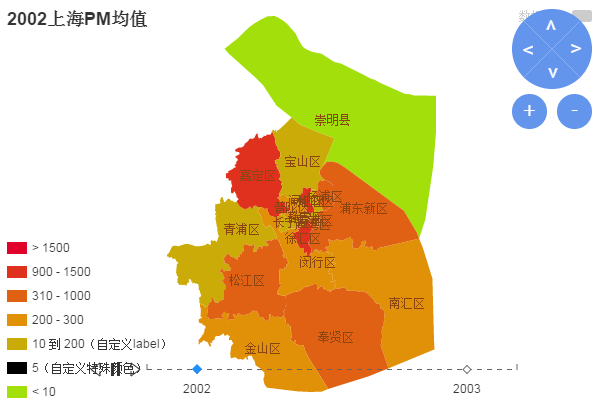
echarts实现上海地域PM值(map、timeline)
<!doctype html>

<html>

<head>

    <meta charset="utf-8">

    <title>echarts图形插件使用</title>

<script src="jquery.min.js"></script>

<script src="http://s1.bdstatic.com/r/www/cache/ecom/esl/2-0-8/esl.js"></script>

 </head>

<body>

    <div id="main" style="height:400px;"></div>

    <script type="text/javascript">

    // 路径配置

        require.config({

             packages: [{

            name: 'echarts',

            location: 'echarts/src',

            main: 'echarts'},

        {name: 'zrender',

            location: 'echarts/zrender/src', // zrender与echarts在同一级目录

            main: 'zrender'

        }

    ]

        });

        require(

            [

                'echarts',

                'echarts/chart/map' // 使用柱状图就加载bar模块,按需加载

            ],

             function (echarts) {

                 var myChart = echarts.init(document.getElementById('main'));

                var option = {

                    timeline:{

                        data:[

                            '2002-01-01','2003-01-01'

                        ],

                        label : {

                            formatter : function(s) {

                                return s.slice(0, 4);

                            }

                        },

                        autoPlay : true,

                        playInterval : 1000

                    },

            options:[

            {

                title: {

            text : '上海地图',

            subtext : '-。-'

        },

        tooltip : {

            trigger: 'item',

            formatter: function(a){

                return a[2];

            }

        },

        legend: {

            orient: 'vertical',

            x:'right',

            data:['数据名称']

        },

        dataRange: {

        x: 'left',

        y: 'bottom',

        splitList: [

            {start: 1500},

            {start: 900, end: 1500},

            {start: 310, end: 1000},

            {start: 200, end: 300},

            {start: 10, end: 200, label: '10 到 200(自定义label)'},

            {start: 5, end: 5, label: '5(自定义特殊颜色)', color: 'black'},

            {end: 10}

        ],

        color: ['#E0022B', '#E09107', '#A3E00B']

         },

         roamController: {

            show: true,

            x: 'right',

            mapTypeControl: {

                '上海': true

            }

        },

        title : {'text':'2002上海PM均值'},

        series : [

            {

                type:'map',

                mapType: '上海',

                //'selectedMode' : 'single',

                selectedMode : 'single',

                itemStyle:{

                    normal:{label:{show:true}},

                    emphasis:{label:{show:true}}

                },

                'data': [{name: '崇明县',value: Math.round(Math.random()*1000)},

            {name: '宝山区',value: Math.round(Math.random()*1000)},

            {name: '嘉定区',value: Math.round(Math.random()*1000)},

            {name: '青浦区',value: Math.round(Math.random()*1000)},

            {name: '杨浦区',value: Math.round(Math.random()*1000)},

            {name: '虹口区',value: Math.round(Math.random()*1000)},

            {name: '闸北区',value: Math.round(Math.random()*1000)},

            {name: '普陀区',value: Math.round(Math.random()*1000)},

            {name: '静安区',value: Math.round(Math.random()*1000)},

            {name: '黄浦区',value: Math.round(Math.random()*1000)},

            {name: '卢湾区',value: Math.round(Math.random()*1000)},

            {name: '长宁区',value: Math.round(Math.random()*1000)},

            {name: '徐汇区',value: Math.round(Math.random()*1000)},

            {name: '浦东新区',value: Math.round(Math.random()*1000)},

            {name: '松江区',value: Math.round(Math.random()*1000)},

            {name: '闵行区',value: Math.round(Math.random()*1000)},

            {name: '金山区',value: Math.round(Math.random()*1000)},

            {name: '奉贤区',value: Math.round(Math.random()*1000)},

            {name: '南汇区',value: Math.round(Math.random()*1000)}]

            }

        ]

        },

        {

            title : {'text':'2003上海PM均值'},

            series : [

                {'data': [{name: '崇明县',value: Math.round(Math.random()*1000)},

            {name: '宝山区',value: Math.round(Math.random()*1000)},

            {name: '嘉定区',value: Math.round(Math.random()*1000)},

            {name: '青浦区',value: Math.round(Math.random()*1000)},

            {name: '杨浦区',value: Math.round(Math.random()*1000)},

            {name: '虹口区',value: Math.round(Math.random()*1000)},

            {name: '闸北区',value: Math.round(Math.random()*1000)},

            {name: '普陀区',value: Math.round(Math.random()*1000)},

            {name: '静安区',value: Math.round(Math.random()*1000)},

            {name: '黄浦区',value: Math.round(Math.random()*1000)},

            {name: '卢湾区',value: Math.round(Math.random()*1000)},

            {name: '长宁区',value: Math.round(Math.random()*1000)},

            {name: '徐汇区',value: Math.round(Math.random()*1000)},

            {name: '浦东新区',value: Math.round(Math.random()*1000)},

            {name: '松江区',value: Math.round(Math.random()*1000)},

            {name: '闵行区',value: Math.round(Math.random()*1000)},

            {name: '金山区',value: Math.round(Math.random()*1000)},

            {name: '奉贤区',value: Math.round(Math.random()*1000)},

            {name: '南汇区',value: Math.round(Math.random()*1000)}]}

            ]

        }

        ]

            };

                myChart.setOption(option);

            }

    );

    </script>

</body>

</html>
echarts实现上海地域PM值(map、timeline)的更多相关文章
- MyBatis查询,返回值Map或List<Map>
一.返回值Map 1.mapper.xml <select id="selectUserMapLimitOne" resultType="java.util.Has ...
- Map获取键值,Map的几种遍历方法
Map 类提供了一个称为entrySet()的方法,这个方法返回一个Map.Entry实例化后的对象集.接着,Map.Entry类提供了一个 getKey()方法和一个getValue()方法,Map ...
- 三角形的优雅值(map和哈希表)
给你 n 个三角形,每个三角形有一个优雅值,然后给出一个询问,每次询问一个三角形,求与询问的三角形,相似的三角形中的优雅值最大是多少.★数据输入第一行输入包括 n 一个数字,接下来 n 行,每行四个整 ...
- map(froeach改变值,map生成新数组)
http://www.365mini.com/page/jquery-map.htm <input id="n1" name="uid" type=&qu ...
- 获取Echarts的DataZoom的起始值
创建DataZoom拖动事件 myChart.on(ecConfig.EVENT.DATA_ZOOM, eConsole); //事件名, 相关联的方法名 var ecConfig = requi ...
- Map获取键值,Map的几种遍历方法 (转载)
Map类提供了一个称为entrySet()的方法,这个方法返回一个Map.Entry实例化后的对象集.接着,Map.Entry类提供了一个getKey()方法和一个getValue()方法,Map.E ...
- 我为什么选择使用Go语言?
谢孟军:EGO会员.GopherChina组织者.<Go Web编程>一书的作者,专注Golang技术架构.本文来自EGO会员群分享,入群方式见文末 在这里我主要想和大家分享一些Go和我个 ...
- 取出List<Map<String,Object>>里面Map的key:value值
1.取出Map其中一个属性的值 Map map = new HashMap(); map.put("key1", "value1"); map.put(&quo ...
- Map和List集合嵌套取值
遍历List的方法: List<User> list = new ArrayList();list = userMapper.getUserList();//从数据库取得list值for( ...
随机推荐
- css单位和值
css需要单位来度量.内含整数.小数.百分数的情况,很多条件下支持正负的情况,当然是有限制的了.百分数基本是相对于自身.或是父或是祖先元素的某个属性值. 颜色 颜色的表示分为:命名颜色 ...
- JBOSS javax.naming.NameNotFoundException: xxx not bound
当出现JOBSS部署EJB xxx not bound 请查看ejb.jar 是否打包完全正常,是不是缺配置文件,一般是缺少配置文件或者打包不正确.
- Qt5 多显示器获取不同显示器的分辨率和位置的方法
Qt5 多显示器获取不同显示器的分辨率和位置的方法 先放官方文档链接:QDesktopWidget - Qt5 Reference 之前一直在用被我乱搞后的ShadowPlayer作为默认播放器,后来 ...
- 给Extjs的GridPanel增加“合计”行(转)
再Google,找到一个看似写的比较好的 http://www.cnblogs.com/over140/archive/2009/05/06/1449892.html 期间主要部分也是借鉴官方论坛上的 ...
- Java split方法源码分析
Java split方法源码分析 public String[] split(CharSequence input [, int limit]) { int index = 0; // 指针 bool ...
- php中__autoload()方法详解
[导读] PHP在魔术函数__autoload()方法出现以前,如果你要在一个程序文件中实例化100个对象,那么你必须用include或者require包含进来100个类文件,或者你把这100个类定义 ...
- Python 自学笔记(二)第一个程序 Hello World
一 打印 Hello world 1,输入 Python “Hello world” 即可 2,脚本文件输出Hello World 在命令行(cmd),输入 python 文件路径+文件名 3,为什么 ...
- IO-04. 混合类型数据格式化输入
/** *A4-IO-04. 混合类型数据格式化输入 *C语言实现 *测试已通过 */ #include "stdio.h" int main() { float m1,m2; i ...
- PixelFormat 图像颜色的数据格式
PixelFormat: (指定图像中每个像素的颜色数据的格式) Delphi 微软 ...
- Codeforces 286E
#include <cstdio> #include <cmath> #include <cstring> #include <algorithm> # ...