
C#_会员管理系统:开发二(会员资料管理界面的‘增删改查’)
会员资料管理界面:
新建一个窗体,窗体界面和控件如下:
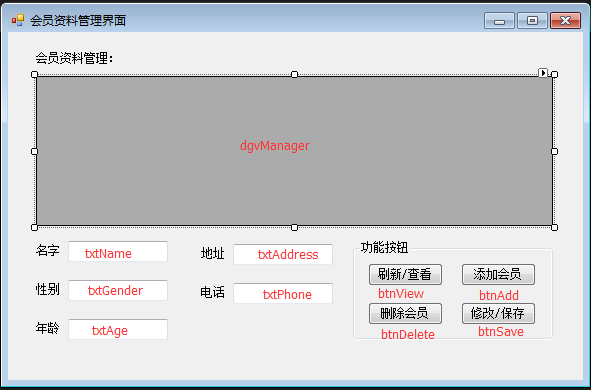
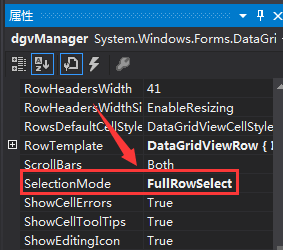
窗体中的控件dgvManager更改FullRowSelect属性(点击选中效果)为:FullRowSelect
会员资料管理界面窗体的详细代码:
 using System;

 using System.Collections.Generic;

 using System.ComponentModel;

 using System.Configuration;

 using System.Data;

 using System.Data.SqlClient;

 using System.Drawing;

 using System.Linq;

 using System.Text;

 using System.Threading.Tasks;

 using System.Windows.Forms;

 namespace 会员管理系统

 {

     public partial class VipManager : Form

     {

         public VipManager()

         {

             InitializeComponent();

         }

         //连接字符串 获取配置文件里的连接路径,多次需要调用,放在外面方便

         static string connStr = ConfigurationManager.ConnectionStrings["str"].ConnectionString;

         //窗体运行自动加载

         private void VipManager_Load(object sender, EventArgs e)

         {

             //刷新数据

             Refresh();

         }

         //写一个刷新数据的方法(跟查看数据一样)

         public void Refresh(bool isAdded = false)

         {

             //查询数据库字符串

             string sql = String.Format("select vId '{0}',vName '{1}',vGender '{2}',vAge '{3}',vAddress '{4}',vPhone '{5}' from VipInformation", "编号", "名字", "性别", "年龄", "地址", "电话");

             //连接数据库对象

             SqlConnection conn = new SqlConnection(connStr);

             //操作数据库对象

             SqlCommand cmd = new SqlCommand(sql, conn);

             //创建表对象

             System.Data.DataTable dt = new System.Data.DataTable();

             //创建数据库填充操作对象(语句)

             SqlDataAdapter sda = new SqlDataAdapter(cmd);

             //把数据填充进dt表中

             sda.Fill(dt);

             //指定dgvManager控件的数据源:dt

             dgvManager.DataSource = dt;

             //if (isAdded)

             //{

             //    if (dt.Rows.Count > 0)

             //        dgvManager.Rows[0].Selected = false;

             //    dgvManager.Rows[dt.Rows.Count - 1].Selected = true;

             //}

         }

         //刷新数据界面

         private void btnView_Click(object sender, EventArgs e)

         {

             //刷新数据

             Refresh();

         }

         //添加数据

         private void btnAdd_Click(object sender, EventArgs e)

         {

             //判断文本框是否为空,提示数据完整性

             if (txtName.Text == "" || txtGender.Text == "" || txtAge.Text == "" || txtAddress.Text == "" || txtPhone.Text == "")

             {

                 MessageBox.Show("数据不能为空,请填写齐全");

                 return;

             }

             //插入数据库字符串

             string sql = string.Format("insert into VipInformation values('{0}','{1}',{2},'{3}','{4}')",txtName.Text.Trim(),txtGender.Text.Trim(),txtAge.Text.Trim(),txtAddress.Text.Trim(),txtPhone.Text.Trim());

             //连接数据库对象

             SqlConnection conn = new SqlConnection(connStr);

             //操作数据库对象

             SqlCommand cmd = new SqlCommand(sql, conn);

             //创建表对象

             System.Data.DataTable dt = new DataTable();

             //创建数据库填充操作对象(语句)

             SqlDataAdapter sda = new SqlDataAdapter(cmd);

             //把数据填充进dt表中

             sda.Fill(dt);

             //指定dgvManager控件的数据源:dt

             dgvManager.DataSource = dt;

             //刷新数据

             Refresh();

         }

         //删除数据

         private void btnDelete_Click(object sender, EventArgs e)

         {

             //使用sql删除语句,where 1=1 就是没有条件,等于全部数据删除

             string sql = "delete from VipInformation where 1=1";

             //如果选中某行则执行

             if (dgvManager.CurrentRow.Selected)

             {

                 sql = sql + " and vid=" + Convert.ToInt32(dgvManager.CurrentRow.Cells[].Value.ToString());

             }

             int n = ;

             //创建连接数据库对象

             SqlConnection conn = new SqlConnection(connStr);

             //创建操作数据库对象

             SqlCommand cmd = new SqlCommand(sql, conn);

             //打开数据库

             conn.Open();

             //取得ExecuteNonQuery返回的受影响行数,无影响则为0

             n = cmd.ExecuteNonQuery();

             if (n == )

             {

                 MessageBox.Show("删除操作失败!不存在的ID");

                 conn.Close();

                 return;

             }

             else if (n > )

             {

                 MessageBox.Show("删除操作成功!");

             }

             //关闭数据库连接

             conn.Close();

             //刷新数据界面

             Refresh();

         }

         //修改数据

         private void btnSave_Click(object sender, EventArgs e)

         {

             if (txtName.Text == "" || txtGender.Text == "" || txtAge.Text == "" || txtAddress.Text == "" || txtPhone.Text == "")

             {

                 MessageBox.Show("所提供的数据不完整,请填写完整数据");

                 return;

             }

             int n = ;

             //更新SQL语句

             string sqlupdate = "update VipInformation set vName='" + txtName.Text + "',vgender='" + txtGender.Text + "',vage=" + txtAge.Text + ",vaddress='" + txtAddress.Text + "',vphone='" + txtPhone.Text + "' where vid='" + dgvManager.CurrentRow.Cells[].Value.ToString() + "'";

             SqlConnection conn = new SqlConnection(connStr);

             SqlCommand cmd = new SqlCommand(sqlupdate, conn);

             conn.Open();

             n = cmd.ExecuteNonQuery();

             if (n == )

             {

                 MessageBox.Show("修改操作失败!");

                 conn.Close();

                 return;

             }

             else if (n > )

             {

                 MessageBox.Show("修改操作成功!");

             }

             conn.Close();

             Refresh();

         }

         //点击dgvManager在文本框上显示

         private void dgvManager_CellContentClick(object sender, DataGridViewCellEventArgs e)

         {

             txtName.Text = dgvManager.CurrentRow.Cells[].Value.ToString();

             txtGender.Text = dgvManager.CurrentRow.Cells[].Value.ToString();

             txtAge.Text = dgvManager.CurrentRow.Cells[].Value.ToString();

             txtAddress.Text = dgvManager.CurrentRow.Cells[].Value.ToString();

             txtPhone.Text = dgvManager.CurrentRow.Cells[].Value.ToString();

         }

     }

 }
之前登录窗体的代码增加代码:
                             if (pwd == txtPwd.Text)

                             {

                                 //说明在该账户下 密码正确, 系统登录成功

                                 MessageBox.Show("登录成功,正在进入主界面......");

                                 //***************新增代码***************

                                 //创建新的会员资料管理界面窗体并显示,同时把登录界面隐藏

                                 VipManager vm=new VipManager();

                                 vm.Show();

                                 this.Hide();

                                 //***************新增代码***************

                             }

                             else

                             {

                                 //密码错误

                                 MessageBox.Show("密码错误,请重新输入");

                                 txtPwd.Text = "";

                             }
登录窗体的详细代码:
 using System;

 using System.Collections.Generic;

 using System.ComponentModel;

 using System.Configuration;

 using System.Data;

 using System.Drawing;

 using System.Linq;

 using System.Text;

 using System.Threading.Tasks;

 using System.Windows.Forms;

 using System.Data.SqlClient;

 namespace 会员管理系统

 {

     public partial class VIPLogin : Form

     {

         public VIPLogin()

         {

             InitializeComponent();

         }

         //用于连接配置文件App.config

         string connStr = ConfigurationManager.ConnectionStrings["str"].ConnectionString;

         //登录按钮

         private void btnLogin_Click(object sender, EventArgs e)

         {

             //连接数据库语句

             using(SqlConnection con=new SqlConnection(connStr))

             {

                 //操作数据库语句

                 string sql = "select vuserpwd from vipaccount where vUserName='" + txtName.Text + "'";

                 using(SqlCommand cmd=new SqlCommand(sql,con))

                 {

                     //打开数据库

                     con.Open();

                     //使用 SqlDataReader 来 读取数据库

                     using (SqlDataReader sdr = cmd.ExecuteReader())

                     {

                         //SqlDataReader 在数据库中为 从第1条数据开始 一条一条往下读

                         if (sdr.Read()) //如果读取账户成功(文本框中的用户名在数据库中存在)

                         {

                             //则将第1条 密码 赋给 字符串pwd  ,并且依次往后读取 所有的密码

                             //Trim()方法为移除字符串前后的空白

                             string pwd = sdr.GetString().Trim();

                             //如果 文本框中输入的密码 ==数据库中的密码

                             if (pwd == txtPwd.Text)

                             {

                                 //说明在该账户下 密码正确, 系统登录成功

                                 MessageBox.Show("登录成功,正在进入主界面......");

                                 //***************新增代码***************

                                 //创建新的会员资料管理界面窗体并显示,同时把登录界面隐藏

                                 VipManager vm=new VipManager();

                                 vm.Show();

                                 this.Hide();

                                 //***************新增代码***************

                             }

                             else

                             {

                                 //密码错误

                                 MessageBox.Show("密码错误,请重新输入");

                                 txtPwd.Text = "";

                             }

                         }

                         else

                         {

                             //用户名错误

                             MessageBox.Show("用户名错误,请重新输入!");

                             txtName.Text = "";

                         }

                     }

                 }

             }

         }

     }

 }
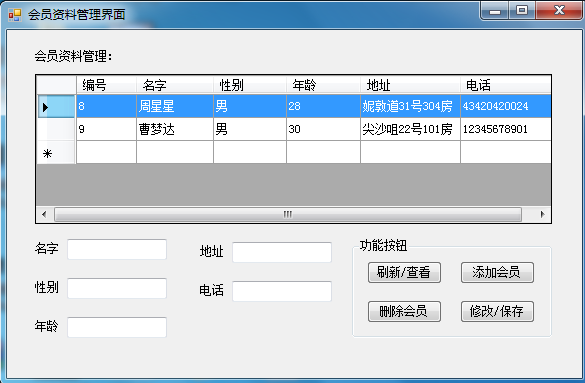
运行效果:
C#_会员管理系统:开发二(会员资料管理界面的‘增删改查’)的更多相关文章
- 【共享单车】—— React后台管理系统开发手记:员工管理之增删改查
前言:以下内容基于React全家桶+AntD实战课程的学习实践过程记录.最终成果github地址:https://github.com/66Web/react-antd-manager,欢迎star. ...
- 基于SpringBoot开发一个Restful服务,实现增删改查功能
前言 在去年的时候,在各种渠道中略微的了解了SpringBoot,在开发web项目的时候是如何的方便.快捷.但是当时并没有认真的去学习下,毕竟感觉自己在Struts和SpringMVC都用得不太熟练. ...
- MySQL数据库(二)-数据库的增删改查
简介: 以下是MySQL最基本的增删改查语句.在进行“增删改查”的操作之前,先建立一个包含数据表student的数据库,新建表grade(具体操作可以见上一篇). 一."增"-添加数据 1.1 为表中 ...
- EF6 学习笔记(二):操练 CRUD 增删改查
EF6学习笔记总目录 ASP.NET MVC5 及 EF6 学习笔记 - (目录整理) 接上篇: EF6 学习笔记(一):Code First 方式生成数据库及初始化数据库实际操作 本篇原文链接: I ...
- Web API开发实例——对产品Product进行增删改查
1.WebApi是什么 ASP.NET Web API 是一种框架,用于轻松构建可以由多种客户端(包括浏览器和移动设备)访问的 HTTP 服务.ASP.NET Web API 是一种用于在 .NET ...
- MongoDB(二)-- Java API 实现增删改查
一.下载jar包 http://central.maven.org/maven2/org/mongodb/mongo-java-driver/ 二.代码实现 package com.xbq.mongo ...
- SQL学习(二)SQL基础的增删改查
在测试时使用数据库时,用的比较多的就是增删改查SQL了. 一.增加(insert into ...values) 用于向表中插入新记录 1.不指定列(表示:依次插入所有列的值) insert into ...
- Python全栈开发记录_第二篇(文件操作及三级菜单栏增删改查)
python3文件读写操作(本篇代码大约100行) f = open(xxx.txt, "r", encoding="utf-8") 不写“r”(只读)默认是只 ...
- Mysql学习笔记(二)对表结构的增删改查
有将近一个星期都没有更新mysql了.相反linux的东西倒是学习不少.可能我个人情感上对linux更感兴趣一点.但mysql我也不烦,只是一旦将精力投入到了一样事情上去,就很难将精力分散去搞其他的东 ...
随机推荐
- linux查看和设置系统时间 hwclock && date
http://www.linuxso.com/command/hwclock.html查看时间{1. date查看系统时钟, hwclock查看硬件时钟hwclock && date ...
- Spring 之 控制反转(IoC), 依赖注入(DI)和面向切面(AOP)
关于依赖注入, 这篇博文写的非常简单易懂. https://github.com/android-cn/blog/tree/master/java/dependency-injection 此外, 博 ...
- nodebeginer
最近对node开始感兴趣,知乎上朴灵推荐入门书籍,goddy翻译的node beginner. 貌似大家对深入浅出node.js评价都不错,以后可以考虑入手看看. 一口气看完了node beginne ...
- IE 弹出框处理经验
//各屏幕弹出窗样式 // 1366*768var style_1366x768 = "dialogWidth:950px;dialogHeight:650px;help:no;center ...
- 4.PHP 教程_PHP 变量
PHP 变量 变量是用于存储信息的"容器": <?php $x = 5; $y = 6; $z = $x + $y; echo $z; ?> 与代数相似 x=5 y=6 ...
- psycopg2接口的基本用法
转载自:http://zhiwei.li/text/2012/02/05/psycopg2接口的基本用法/ 与其他实现了DB API 2.0协议的其他数据库用户基本一致. import psycopg ...
- CentOS5.4下安装codeblocks 12.11
centos6.3下安装codeblock简单多了,这些开源的软件也都在不断进步.原来装过codeblocks10.05,忘了,这次安装又花了我半天时间,最后总算搞定. 先是安装了wxGTK-2.8. ...
- 循环-10. 求序列前N项和(15)
#include<iostream>#include<iomanip>using namespace std;int main(){ double i,n,t,a,b; ...
- JS 引用
var arr1=[1,2,3,4]; var arr2=arr1; arr2.push(5); console.log(arr1);//和arr2一样 console.log(arr1==arr2) ...
- 【图文教程】用“iz3d”软件将您的游戏打造为红蓝3D游戏。
iz3d是一款能将普通3D游戏转换为红蓝3D游戏的软件.基本上支持所有游戏,或许没用过的人会认为这只是类似于播放器中的一个小功能,将平面图形做成“伪3D”红蓝效果. 实际上不是的,游戏与平面图的结构不 ...