
python模块学习(四)
re模块
就其本质而言,正则表达式(或 RE)是一种小型的、高度专业化的编程语言,(在Python中)它内嵌在Python中,并通过 re 模块实现。正则表达式模式被编译成一系列的字节码,然后由用 C 编写的匹配引擎执行。
字符匹配(普通字符,元字符):
普通字符:大多数字符和字母都会和自身匹配
re.findall('alvin','yuanaleSxalexwupeiqi')['alvin']元字符: . ^ $ * + ? { } [ ] | ( ) \
元字符之. ^ $ * + ? { }
import reret=re.findall('a..in','helloalvin')print(ret)#['alvin']

ret=re.findall('^a...n','alvinhelloawwwn')print(ret)#['alvin']

ret=re.findall('a...n$','alvinhelloawwwn')print(ret)#['awwwn']

ret=re.findall('a...n$','alvinhelloawwwn')print(ret)#['awwwn']

ret=re.findall('abc*','abcccc')#贪婪匹配[0,+oo]  print(ret)#['abcccc']

ret=re.findall('abc+','abccc')#[1,+oo]print(ret)#['abccc']

ret=re.findall('abc?','abccc')#[0,1]print(ret)#['abc']

ret=re.findall('abc{1,4}','abccc')print(ret)#['abccc'] 贪婪匹配
注意:前面的*,+,?等都是贪婪匹配,也就是尽可能匹配,后面加?号使其变成惰性匹配
ret=re.findall('abc*?','abcccccc')print(ret)#['ab']元字符之字符集[]:
#--------------------------------------------字符集[]ret=re.findall('a[bc]d','acd')print(ret)#['acd']

ret=re.findall('[a-z]','acd')print(ret)#['a', 'c', 'd']

ret=re.findall('[.*+]','a.cd+')print(ret)#['.', '+']

#在字符集里有功能的符号: - ^ \

ret=re.findall('[1-9]','45dha3')print(ret)#['4', '5', '3']

ret=re.findall('[^ab]','45bdha3')print(ret)#['4', '5', 'd', 'h', '3']

ret=re.findall('[\d]','45bdha3')print(ret)#['4', '5', '3']
元字符之转义符\
反斜杠后边跟元字符去除特殊功能,比如\.
反斜杠后边跟普通字符实现特殊功能,比如\d
\d  匹配任何十进制数;它相当于类 [0-9]。\D 匹配任何非数字字符;它相当于类 [^0-9]。\s  匹配任何空白字符;它相当于类 [ \t\n\r\f\v]。\S 匹配任何非空白字符;它相当于类 [^ \t\n\r\f\v]。\w 匹配任何字母数字字符;它相当于类 [a-zA-Z0-9_]。\W 匹配任何非字母数字字符;它相当于类 [^a-zA-Z0-9_]\b  匹配一个特殊字符边界,比如空格 ,&,#等

ret=re.findall('I\b','I am LIST')print(ret)#[]ret=re.findall(r'I\b','I am LIST')print(ret)#['I']
现在我们聊一聊\,先看下面两个匹配:
#-----------------------------eg1:import reret=re.findall('c\l','abc\le')print(ret)#[]ret=re.findall('c\\l','abc\le')print(ret)#[]ret=re.findall('c\\\\l','abc\le')print(ret)#['c\\l']ret=re.findall(r'c\\l','abc\le')print(ret)#['c\\l']

#-----------------------------eg2:#之所以选择\b是因为\b在ASCII表中是有意义的m = re.findall('\bblow', 'blow')print(m)m = re.findall(r'\bblow', 'blow')print(m)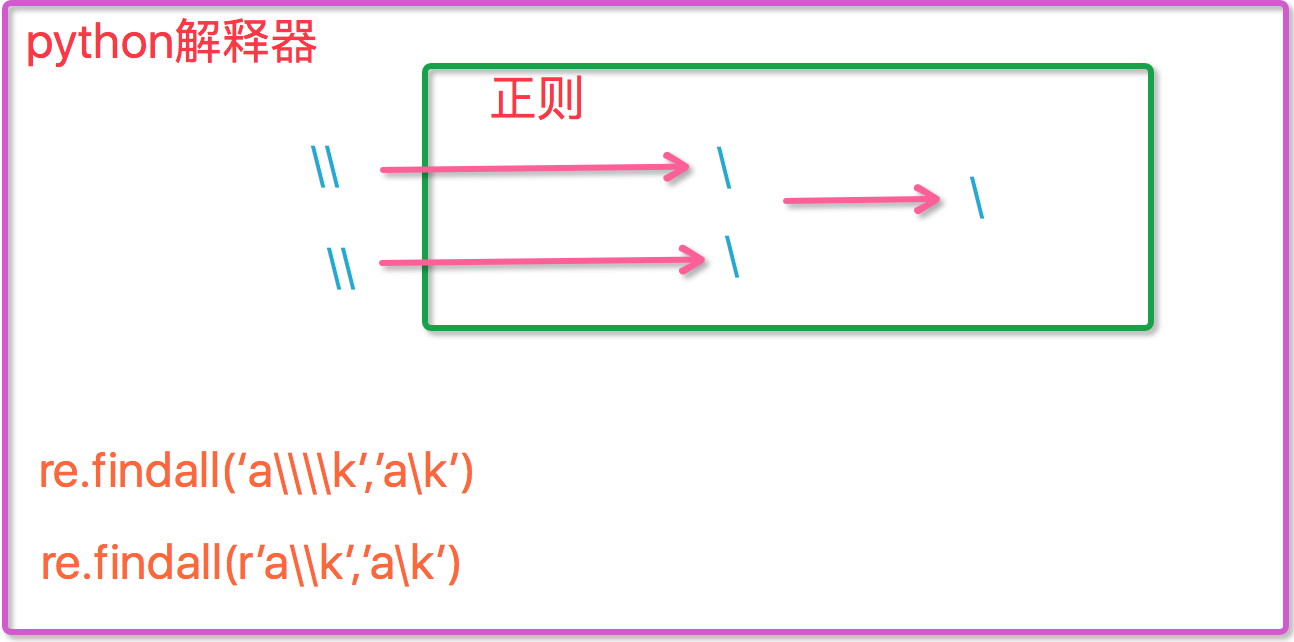
元字符之分组()
m = re.findall(r'(ad)+', 'add')print(m)

ret=re.search('(?P<id>\d{2})/(?P<name>\w{3})','23/com')print(ret.group())#23/comprint(ret.group('id'))#23
元字符之|
ret=re.search('(ab)|\d','rabhdg8sd')print(ret.group())#abre模块下的常用方法
import re#1re.findall('a','alvin yuan') #返回所有满足匹配条件的结果,放在列表里#2re.search('a','alvin yuan').group() #函数会在字符串内查找模式匹配,只到找到第一个匹配然后返回一个包含匹配信息的对象,该对象可以通过调用group()方法得到匹配的字符串,如果字符串没有匹配,则返回None。#3re.match('a','abc').group() #同search,不过尽在字符串开始处进行匹配#4ret=re.split('[ab]','abcd') #先按'a'分割得到''和'bcd',在对''和'bcd'分别按'b'分割print(ret)#['', '', 'cd']#5ret=re.sub('\d','abc','alvin5yuan6',1)print(ret)#alvinabcyuan6ret=re.subn('\d','abc','alvin5yuan6')print(ret)#('alvinabcyuanabc', 2) #6obj=re.compile('\d{3}')ret=obj.search('abc123eeee')print(ret.group())#123import reret=re.finditer('\d','ds3sy4784a')print(ret) #<callable_iterator object at 0x10195f940>print(next(ret).group())print(next(ret).group())注意:
import re

ret=re.findall('www.(baidu|oldboy).com','www.oldboy.com')print(ret)#['oldboy']     这是因为findall会优先把匹配结果组里内容返回,如果想要匹配结果,取消权限即可ret=re.findall('www.(?:baidu|oldboy).com','www.oldboy.com')print(ret)#['www.oldboy.com']
补充1:
import reprint(re.findall("<(?P<tag_name>\w+)>\w+</(?P=tag_name)>","<h1>hello</h1>"))print(re.search("<(?P<tag_name>\w+)>\w+</(?P=tag_name)>","<h1>hello</h1>"))print(re.search(r"<(\w+)>\w+</\1>","<h1>hello</h1>"))补充2:
#匹配出所有的整数import re#ret=re.findall(r"\d+{0}]","1-2*(60+(-40.35/5)-(-4*3))")ret=re.findall(r"-?\d+\.\d*|(-?\d+)","1-2*(60+(-40.35/5)-(-4*3))")ret.remove("")print(ret)
识别图中二维码,领取python全套视频资料
python模块学习(四)的更多相关文章
- 【转】Python模块学习 - fnmatch & glob
[转]Python模块学习 - fnmatch & glob 介绍 fnmatch 和 glob 模块都是用来做字符串匹配文件名的标准库. fnmatch模块 大部分情况下使用字符串匹配查找特 ...
- 【目录】Python模块学习系列
目录:Python模块学习笔记 1.Python模块学习 - Paramiko - 主机管理 2.Python模块学习 - Fileinput - 读取文件 3.Python模块学习 - Confi ...
- Python模块学习filecmp文件比较
Python模块学习filecmp文件比较 filecmp模块用于比较文件及文件夹的内容,它是一个轻量级的工具,使用非常简单.python标准库还提供了difflib模块用于比较文件的内容.关于dif ...
- Python基础学习四
Python基础学习四 1.内置函数 help()函数:用于查看内置函数的用途. help(abs) isinstance()函数:用于判断变量类型. isinstance(x,(int,float) ...
- 解惑Python模块学习,该如何着手操作...
Python模块 晚上和朋友聊天,说到公司要求精兵计划,全员都要有编程能力.然后C.Java.Python-对于零基础入门的,当然是选择Python的人较多了.可朋友说他只是看了简单的语法,可pyth ...
- python模块学习第 0000 题
将你的 QQ 头像(或者微博头像)右上角加上红色的数字,类似于微信未读信息数量那种提示效果. 类似于图中效果: 好可爱>%<! 题目来源:https://github.com/Yixiao ...
- Python模块学习:logging 日志记录
原文出处: DarkBull 许多应用程序中都会有日志模块,用于记录系统在运行过程中的一些关键信息,以便于对系统的运行状况进行跟踪.在.NET平台中,有非常著名的第三方开源日志组件log4net ...
- Python模块学习
6. Modules If you quit from the Python interpreter and enter it again, the definitions you have made ...
- 扩展Python模块系列(四)----引用计数问题的处理
承接上文,发现在使用Python C/C++ API扩展Python模块时,总要在各种各样的地方考虑到引用计数问题,稍不留神可能会导致扩展的模块存在内存泄漏.引用计数问题是C语言扩展Python模块最 ...
随机推荐
- JS的同步加载、异步加载
在使用js展开式菜单时,发现只有加载完页面包含的js文件时,展开菜单才能折叠起来. 查找了一下原因:是因为js页面加载使用的是同步模式,又称阻塞模式,会阻止浏览器的后续处理,停止后续的解析,只有当当前 ...
- 第四天 ThinkPHP手把手高速拼接站点(四)
6月6日,晴天."熟梅天气豆生蛾.一见榴花感慨多. 芒种积阴凝雨润,菖蒲修剪莫蹉跎. " 九.后台编写-续-1 1.改动admin/Tpl/Login/index.html 自己改 ...
- Failed to load http://localhost:8080/team.php: Request header field x-jwt-header is not allowed by Access-Control-Allow-Headers in preflight response.
axios 加入header之后,请求出现 Failed to load http://localhost:8080/team.php: Request header field x-jwt-head ...
- IIS如何添加m3u8流媒体类型
m3u8,mime类型填写: application/x-mpegURL. ts ,mime类型填写: video/MP2T
- VmWare下安装CentOS6
为什么选择CentOS ? 1. 主流: 目前的Linux操作系统主要应用于生产环境,主流企业级Linux系统仍旧是RedHat或者CentOS 2. 免费: RedHat 和CentOS差别不大,C ...
- memcached 命令行举例
1.启动Memcache 常用参数 memcached 1.4.3 -p <num> 设置端口号(默认不设置为: 11211) -U <num> UDP监听端口 (默 ...
- atitit.taskService 任务管理器的设计 v1
atitit.taskService 任务管理器的设计 v1 任务管理器的点 Sametime_exe_count Per task sleepMillSec Timeout_secs 作者:: 绰号 ...
- 23:LVS客户端配置脚本案例
[root@web03 scripts]# cat prevent_arp.sh #!/bin/bash lo_ip=$(ip a s lo|grep "10.0.0.1[3]/32&quo ...
- Linux 后台任务
1 我想把updatedb命令(用于重新建立整盘索引的命令)放在后台运行. # updatedb & [1] 23336 注释:在所要执行的命令后面加上空格,再加上&符号即可实现后台执 ...
- 搞IT的技术人员为什么会如此苦逼
http://www.cnblogs.com/springmvc-hibernate/archive/2012/05/10/2493733.html ————————————————————————— ...