
Angular4中利用promise异步加载gojs
GoJS是一个实现交互类图表(比如流程图,树图,关系图,力导图等等)的JS库
gojs提供了angular的基本例子,不过是离线版
https://github.com/NorthwoodsSoftware/GoJS/tree/master/projects/angular-basic
下图是运行结果。上面是可拖动的,下面显示当前图表的结构
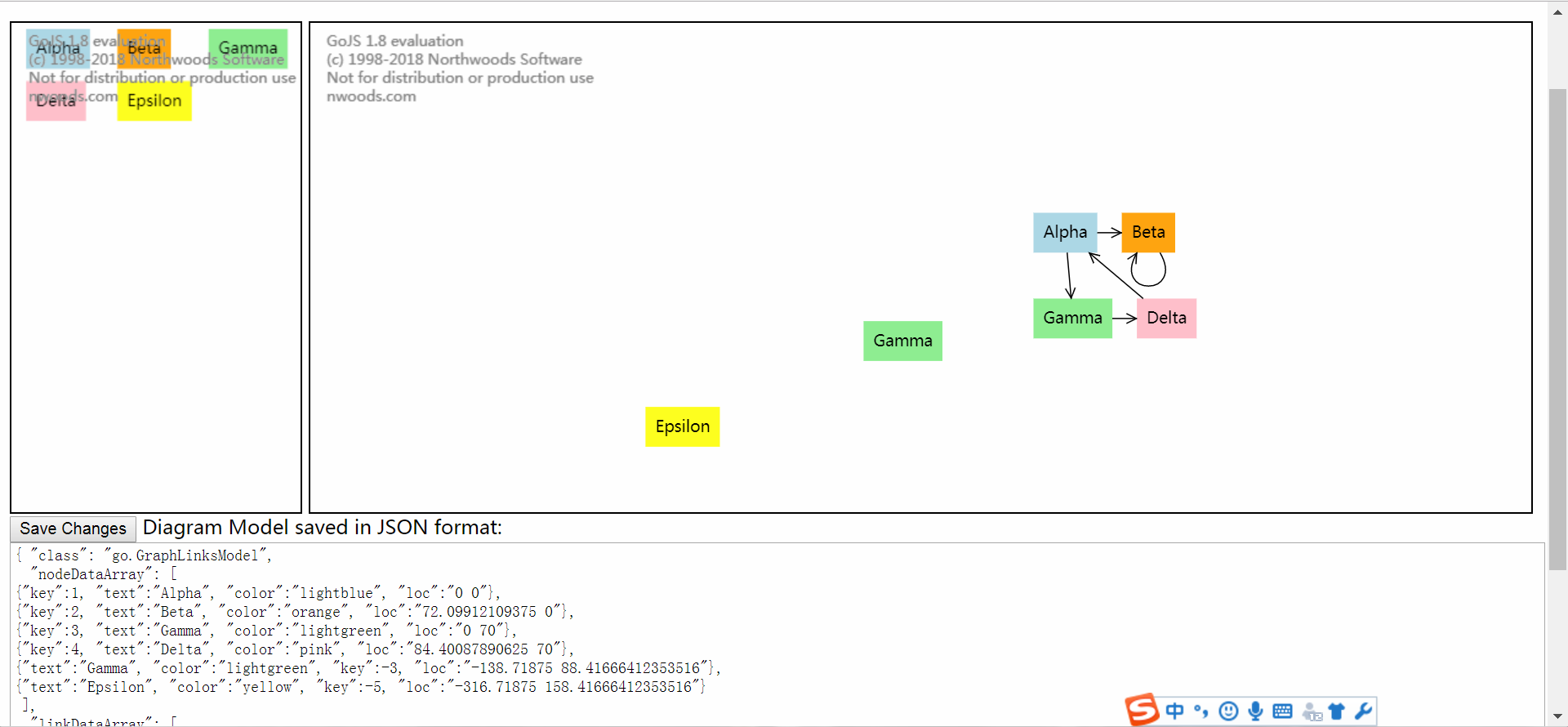
一。首先完成上面可拖动的部分
diagram-editor
diagram-editor.component.ts
constructor中完成初始化图表的基本属性如颜色等
this.getModel();从服务器获得列表
this.networkService.getModelText().then(r => { console.log(r); this.createModel(JSON.stringify(r)); });
r => { } r是获得的数据,括号里面可以添加对数据进行的操作(可以加函数),我获取数据就是完整的json格式的gojs图表,直接string化传给model它就可以识别了,图表格式如下
{ "class": "go.GraphLinksModel",

  "nodeDataArray": [

{"key":1, "text":"Alpha", "color":"lightblue", "loc":"0 0"},

{"key":2, "text":"Beta", "color":"orange", "loc":"72.09912109375 0"},

{"key":3, "text":"Gamma", "color":"lightgreen", "loc":"0 70"},

{"key":4, "text":"Delta", "color":"pink", "loc":"84.40087890625 70"},

{"text":"Gamma", "color":"lightgreen", "key":-3, "loc":"-138.71875 88.41666412353516"},

{"text":"Epsilon", "color":"yellow", "key":-5, "loc":"-316.71875 158.41666412353516"}

 ],

  "linkDataArray": [

{"from":1, "to":2},

{"from":1, "to":3},

{"from":2, "to":2},

{"from":3, "to":4},

{"from":4, "to":1}

 ]}
然后调用函数createModel,用gojs自带函数go.Model.fromJson显示表格,这样可以实现异步加载图表。
onSave()保存图表到服务器
import { Component, OnInit, ViewChild, ElementRef, Input, Output, EventEmitter, AfterContentInit } from '@angular/core';

import * as go from 'gojs';

import { NetworkService } from '../network.service';

import { Observable } from 'rxjs/observable';

import { catchError, map, tap } from 'rxjs/operators';

import { interval  } from 'rxjs/observable/interval';

import {passBoolean} from 'protractor/built/util';

@Component({

  selector: 'app-diagram-editor',

  templateUrl: './diagram-editor.component.html',

  styleUrls: ['./diagram-editor.component.css']

})

export class DiagramEditorComponent implements OnInit {

  private diagram: go.Diagram = new go.Diagram();

  private palette: go.Palette = new go.Palette();

  @ViewChild('diagramDiv')

  private diagramRef: ElementRef;

  @ViewChild('paletteDiv')

  private paletteRef: ElementRef;

  @Input()

  get model(): go.Model { return this.diagram.model; }

  set model(val: go.Model) { this.diagram.model = val; }

  @Output()

  nodeSelected = new EventEmitter<go.Node|null>();

  @Output()

  modelChanged = new EventEmitter<go.ChangedEvent>();

  constructor(private networkService: NetworkService) {

    this.getModel();

    const $ = go.GraphObject.make;

    this.diagram = new go.Diagram();

    this.diagram.initialContentAlignment = go.Spot.Center;

    this.diagram.allowDrop = true;  // necessary for dragging from Palette

    this.diagram.undoManager.isEnabled = true;

    this.diagram.addDiagramListener("ChangedSelection",

      e => {

        const node = e.diagram.selection.first();

        this.nodeSelected.emit(node instanceof go.Node ? node : null);

      });

    this.diagram.addModelChangedListener(e => e.isTransactionFinished && this.modelChanged.emit(e));

    this.diagram.nodeTemplate =

      $(go.Node, "Auto",

        new go.Binding("location", "loc", go.Point.parse).makeTwoWay(go.Point.stringify),

        $(go.Shape,

          {

            fill: "white", strokeWidth: 0,

            portId: "", cursor: "pointer",

            // allow many kinds of links

            fromLinkable: true, toLinkable: true,

            fromLinkableSelfNode: true, toLinkableSelfNode: true,

            fromLinkableDuplicates: true, toLinkableDuplicates: true

          },

          new go.Binding("fill", "color")),

        $(go.TextBlock,

          { margin: 8, editable: true },

          new go.Binding("text").makeTwoWay())

      );

    this.diagram.linkTemplate =

      $(go.Link,

        // allow relinking

        { relinkableFrom: true, relinkableTo: true },

        $(go.Shape),

        $(go.Shape, { toArrow: "OpenTriangle" })

      );

    this.palette = new go.Palette();

    this.palette.nodeTemplateMap = this.diagram.nodeTemplateMap;

    // initialize contents of Palette

    this.palette.model.nodeDataArray =

      [

        { text: "Alpha", color: "lightblue" },

        { text: "Beta", color: "orange" },

        { text: "Gamma", color: "lightgreen" },

        { text: "Delta", color: "pink" },

        { text: "Epsilon", color: "yellow" }

      ];

  }

  ngOnInit() {

    this.diagram.div = this.diagramRef.nativeElement;

    this.palette.div = this.paletteRef.nativeElement;

  }

  getModel(): void {

         this.networkService.getModelText().then(r => { console.log(r); this.createModel(JSON.stringify(r)); });

}

createModel(a: string ): void {

  this.model = go.Model.fromJson(a);

}

  onSave(): void {

    this.networkService.saveModel(this.diagram.model.toJson()).subscribe();

  }

}
diagram-editor.component.html
<div class="diagramsPanel">

  <div #paletteDiv class="paletteDiv"></div>

  <div #diagramDiv class="diagramDiv"></div>

  <div>

  <button (click)="onSave()">Save Changes</button>

  Diagram Model saved in JSON format:

  </div>

  <div>

  <textarea *ngIf="model" style="width:100%;height:300px">

{{model.toJson()}}

</textarea>

  </div>

</div>
二。下半部分显示json字符串:
import { Component, OnInit, ViewChild, ElementRef, Input, Output, EventEmitter } from '@angular/core';

import * as go from 'gojs';

@Component({

  selector: 'app-diagram-detail',

  templateUrl: './diagram-detail.component.html',

  styleUrls: ['./diagram-detail.component.css']

})

export class DiagramDetailComponent implements OnInit {

  @Input() node: go.Node;

  @Input() data: any;

  constructor() { }

  ngOnInit() {

  }

  showDetails(node: go.Node | null) {

    this.node = node;

    if (node) {

      // copy the editable properties into a separate Object

      this.data = {

        text: node.data.text,

        color: node.data.color

      };

    } else {

      this.data = null;

    }

  }

}
diagram-detail.component.html
<div *ngIf="node">

<form *ngIf="node" #form="ngForm" (ngSubmit)="onCommitDetails()">

  Node Details:

  <div><label>Key: </label>{{node.key}}</div>

  <div><label>Text: </label><input [(ngModel)]="data.text" name="text"></div>

  <div><label>Color: </label><input [(ngModel)]="data.color" name="color"></div>

  <div><label>Location: </label>{{node.location.x.toFixed(2)}}, {{node.location.y.toFixed(2)}}</div>

  <div><label># Links: </label>{{node.linksConnected.count}}</div>

</form>

</div>
三。与服务器通信,用了promise,可以实现异步传输,使用rxjs库需要具体说明路径,有部分冗余代码,不懂得可以看看angular官方文档http部分
network.service.ts
import { Injectable } from '@angular/core';

import { Observable } from 'rxjs/Observable';

import { HttpClient, HttpHeaders, HttpClientModule } from '@angular/common/http';

import { of } from 'rxjs/observable/of';

import { catchError, map, tap , retry } from 'rxjs/operators';

import 'rxjs/add/operator/toPromise';

import { MessageService } from './message.service';

import {promise} from 'selenium-webdriver';

const httpOptions = {

  //headers: new HttpHeaders({ 'Content-Type': 'application/json' })

  headers: new HttpHeaders({'Content-Type': 'application/x-www-form-urlencoded'})

};

@Injectable()

export class NetworkService {

  public API = '//localhost:8888';

  private getModelUrl = this.API + '/gojs/get';  // URL to web api

  private saveModelUrl = this.API + '/gojs/save';

  constructor(private http: HttpClient,

              private messageService: MessageService) { }

  // getModel(): Observable<string> {

  //   const url = `${this.getModelUrl}`;

  //   return this.http.get<string>(url).pipe(

  //    catchError(this.handleError<string>(`getModel`))

  //   );

  // }

  /** GET: get the model on the server */

  getModelText(): Promise<any> {

    // The Observable returned by get() is of type Observable<string>

    // because a text response was specified.

    // There's no need to pass a <string> type parameter to get().

    return this.http.get(this.getModelUrl).toPromise().catch(this.handleError());

  }

  /** PUT: update the model on the server */

  saveModel (data: string): Observable<any> {

    // return this.http.post(this.saveModelUrl, data, httpOptions).pipe(

    //   catchError(this.handleError<any>('saveModel'))

    // );

    const body = {model: data};

    this.http.post(this.saveModelUrl,

      'model=' + data, httpOptions).subscribe(model => {

      console.log(data);

    });

    return null;

  }

  /**

   * Handle Http operation that failed.

   * Let the app continue.

   * @param operation - name of the operation that failed

   * @param result - optional value to return as the observable result

   */

  private handleError<T> (operation = 'operation', result?: T) {

    return (error: any): Observable<T> => {

      // TODO: send the error to remote logging infrastructure

      console.error(error); // log to console instead

      // TODO: better job of transforming error for user consumption

      this.log(`${operation} failed: ${error.message}`);

      // Let the app keep running by returning an empty result.

      return of(result as T);

    };

  }

  /** Log a HeroService message with the MessageService */

  private log(message: string) {

    this.messageService.add('NetworkService: ' + message);

  }

}
message.service.ts没什么大用
import { Injectable } from '@angular/core';

@Injectable()

export class MessageService {

  messages: string[] = [];

  add(message: string) {

    this.messages.push(message);

  }

  clear() {

    this.messages = [];

  }

}
服务器和angular位于不同端口,添加以下代码,否则不允许访问,这里用的服务器是springboot,服务器就比较简单了,不再细说
import org.springframework.context.annotation.Configuration;

import org.springframework.web.servlet.config.annotation.CorsRegistry;

import org.springframework.web.servlet.config.annotation.WebMvcConfigurerAdapter;

@Configuration

public class CorsConfig extends WebMvcConfigurerAdapter {

    @Override

    public void addCorsMappings(CorsRegistry registry) {

        registry.addMapping("/**")

                .allowedOrigins("*")

                .allowCredentials(true)

                .allowedMethods("GET", "POST", "DELETE", "PUT")

                .maxAge(3600);

    }

}
Angular4中利用promise异步加载gojs的更多相关文章
- 简单的ListView中item图片异步加载
前言: 在android开发当中,从目标地址获取图片往往都是采用异步加载的方法.当完全加载完图片后在进行显示,也有些是直接将加载的图片一点一点的显示出来. 这两个区别只是对流的处理不同而已.现 ...
- Android中图片的异步加载
转: 1. 为什么要异步加载图片 下载图片比较费时,先显示文字部分,让加载图片的过程在后台,以提升用户体验 2. SoftReference的作用 栈内存—引用 堆内存—对象 Eg: Object ...
- Android新浪微博客户端(七)——ListView中的图片异步加载、缓存
原文出自:方杰|http://fangjie.info/?p=193转载请注明出处 最终效果演示:http://fangjie.sinaapp.com/?page_id=54 该项目代码已经放到git ...
- vue-awesome-swiper中的数据异步加载
<template> <div> //第一个轮播 加了v-if 判断,可以实现 loop 轮循 <swiper v-if="gglist.length>1 ...
- 小程序中使用ECharts 异步加载数据
官网例子都是同步的,怎么引入及同步demo请移步官网 <view class="container"> <ec-canvas id="mychart-d ...
- Vue中router路由异步加载组件-优化性能
何时使用异步加载组件 当首页app.js文件太大时,可以拆分组件异步加载,如果app.js文件很小时,不建议使用异步加载组件,因为异步加载组件时每次都要发送一个HTTP请求,这样的代价远比首页一次性加 ...
- WinForm中使用BackgroundWorker异步加载数据并使用进度条
在WinForm程序中,有时会因为加载大量数据导致UI界面假死,这种情况对于用户来说是非常不友好的.因此,在加载大量数据的情况下,首先应该将数据加载放在另一线程中进行,这样保证了UI界面的响应:其次可 ...
- 微信小程序中使用ECharts 异步加载数据 实现图表
<!--pages/bar/index.wxml--> <view class="container"> <ec-canvas id="my ...
- MVC4中EasyUI Tree异步加载JSON数据生成树
1,首先构造tree接受的格式化数据结构MODEL /// <summary> /// 定义EasyUI树的相关数据,方便控制器生成Json数据进行传递 /// </summar ...
随机推荐
- oracle-12514 or 12520 监听程序无法为请求的服务器类型找到可用的处理程序
(转自:http://blog.csdn.net/wshl1234567/article/details/8003154) 在项目过程中,测试程序的时候数据库经常报错,经过几天的判断和分析,发现一个规 ...
- php压缩文件帮助类
<?php /* File name: /include/zip.php Author: Horace 2009/04/15 */ class PHPZip{ var $dirInfo = ar ...
- Flask中的session ,自定义实现 session机制, 和 flask-session组件
session 是基于cookie实现, 保存在服务端的键值对(形式为 {随机字符串:'xxxxxx'}), 同时在浏览器中的cookie中也对应一相同的随机字符串,用来再次请求的 时候验证: 注意 ...
- Qt之格栅布局(QGridLayout)
简述 QGridLayout:格栅布局,也被称作网格布局(多行多列). 栅格布局将位于其中的窗口部件放入一个网状的栅格之中.QGridLayout需要将提供给它的空间划分成的行和列,并把每个窗口部件插 ...
- 请求URL中有body怎么使用jmeter进行接口测试
业务场景: 微信内免费领取激活码 1.点击“免费领取”按钮调取的接口 2.URL如下 https://yxyapi2.drcuiyutao.com/yxy-api-gateway/api/json/v ...
- prefixfree.min.js 的用途
简单而言,这东西就是自动加前缀的,在link中,或是style中,或是dom元素的style中书写CSS3 code,或是jQuery .css()方法此脚本会自动补上需要的前缀,让响应的浏览器支持该 ...
- 基于Photon 的 PUN+ 如何自动实现RPC呼叫的.
基于Photon 的 PUN+ 如何自动实现RPC呼叫的. 简单说函数标记成 RPC 类型的. void Hello() { Debug.Log("Hello"); PhotonV ...
- 人生苦短之我用Python篇(线程/进程、threading模块:全局解释器锁gil/信号量/Event、)
线程: 有时被称为轻量级进程(Lightweight Process,LWP),是程序执行流的最小单元.是一串指令的集合.线程是程序中一个单一的顺序控制流程.进程内一个相对独立的.可调度的执行单元,是 ...
- Cisco DHCP 配置要点
实验拓扑图:IOU5/6/7模拟主机 IOU1为DHCP服务器 IOU2为DHCP中继器 IOU3/4为局域网内的交换机 在IOU1中配置DHCP配置 IOU2作为DHCP中继,在E0/0.10和E0 ...
- ubuntu 添加新硬盘
查看硬盘: # fdisk -l ... Disk /dev/sdb: 274.9 GB, 274877906944 bytes 255 heads, 63 sectors/track, 33418 ...