
HCNA调整RIP的运行版本
1、拓扑图
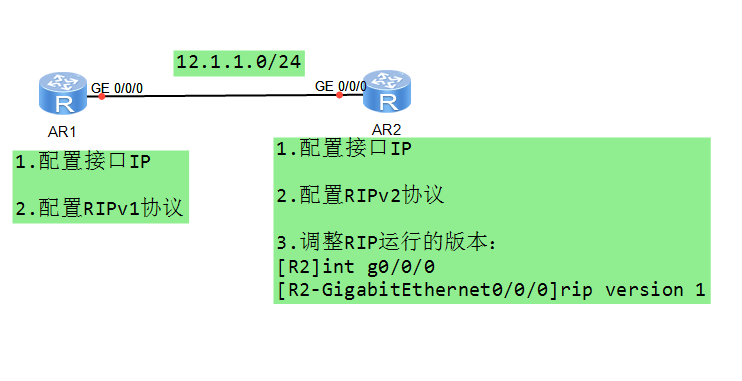
2、实验配置
R1配置RIPv1
md5加密认证
 Please press enter to start cmd line!

 ################################################################################

 ################

 <Huawei>

 Dec   ::-: Huawei %%01IFPDT//IF_STATE(l)[]:Interface GigabitEt

 hernet0// has turned into UP state.

 <Huawei>sys

 Enter system view, return user view with Ctrl+Z.

 [Huawei]sysname R1

 [R1]int

 [R1]interface g0//

 [R1-GigabitEthernet0//]ip add 12.1.1.1

 [R1-GigabitEthernet0//]

 Dec   ::-: R1 %%01IFNET//LINK_STATE(l)[]:The line protocol IP

 on the interface GigabitEthernet0// has entered the UP state.

 [R1-GigabitEthernet0//]q

 [R1]rip

 [R1-rip-]net

 [R1-rip-]network 12.0.0.0

 [R1-rip-]

 [R1-rip-]tim

 [R1-rip-]timers rip

 [R1-rip-]timers rip

 [R1-rip-]q

 [R1]int

 [R1]interface g0//

 [R1-GigabitEthernet0//]rip au

 [R1-GigabitEthernet0//]rip authentication-mode md

 [R1-GigabitEthernet0//]rip authentication-mode md5 no

 [R1-GigabitEthernet0//]rip authentication-mode md5 nonstandard ci

 [R1-GigabitEthernet0//]rip authentication-mode md5 nonstandard cipher huawei

 [R1-GigabitEthernet0//]q

 [R1]dis rip

 Public VPN-instance

     RIP process :

        RIP version   :

        Preference    :

        Checkzero     : Enabled

        Default-cost  :

        Summary       : Enabled

        Host-route    : Enabled

        Maximum number of balanced paths :

        Update time   :  sec              Age time :  sec

        Garbage-collect time :  sec

        Graceful restart  : Disabled

        BFD               : Disabled

        Silent-interfaces : None

        Default-route : Disabled

        Verify-source : Enabled

        Networks :

        12.0.0.0

        Configured peers             : None

        Number of routes in database :

        Number of interfaces enabled :

        Triggered updates sent       :

        Number of route changes      :

        Number of replies to queries :

        Number of routes in ADV DB   :

   Total count for  process :

        Number of routes in database :

        Number of interfaces enabled :

        Number of routes sendable in a periodic update :

        Number of routes sent in last periodic update :

 [R1]
R2配置RIPv2
The device is running!

####

<Huawei>

  Please check whether system data has been changed, and save data in time

  Configuration console time out, please press any key to log on

<Huawei>sys

Enter system view, return user view with Ctrl+Z.

[Huawei]sysn R2

[R2]int

[R2]interface g0//

[R2-GigabitEthernet0//]ip add 12.1.1.2

[R2-GigabitEthernet0//]

Dec   ::-: R2 %%01IFNET//LINK_STATE(l)[]:The line protocol IP

on the interface GigabitEthernet0// has entered the UP state.

[R2-GigabitEthernet0//]rip a

[R2-GigabitEthernet0//]rip authentication-mode mid

[R2-GigabitEthernet0//]rip authentication-mode mid

[R2-GigabitEthernet0//]rip authentication-mode md

[R2-GigabitEthernet0//]rip authentication-mode md5 no

[R2-GigabitEthernet0//]rip authentication-mode md5 nonstandard ci

[R2-GigabitEthernet0//]rip authentication-mode md5 nonstandard cipher huawei

[R2-GigabitEthernet0//]q

[R2]rip

[R2-rip-]versio

[R2-rip-]version

[R2-rip-]networ

[R2-rip-]network 12.0.0.0

[R2-rip-]tim

[R2-rip-]timers ri

[R2-rip-]timers rip

[R2-rip-]q

[R2]ping 12.1.1.1

  PING 12.1.1.1:   data bytes, press CTRL_C to break

    Reply from 12.1.1.1: bytes= Sequence= ttl= time= ms

    Reply from 12.1.1.1: bytes= Sequence= ttl= time= ms

    Reply from 12.1.1.1: bytes= Sequence= ttl= time= ms

    Reply from 12.1.1.1: bytes= Sequence= ttl= time= ms

    Reply from 12.1.1.1: bytes= Sequence= ttl= time= ms

  --- 12.1.1.1 ping statistics ---

     packet(s) transmitted

     packet(s) received

    0.00% packet loss

    round-trip min/avg/max = // ms

[R2]dis rip

Public VPN-instance

    RIP process :

       RIP version   :

       Preference    :

       Checkzero     : Enabled

       Default-cost  :

       Summary       : Enabled

       Host-route    : Enabled

       Maximum number of balanced paths :

       Update time   :  sec              Age time :  sec

       Garbage-collect time :  sec

       Graceful restart  : Disabled

       BFD               : Disabled

       Silent-interfaces : None

       Default-route : Disabled

       Verify-source : Enabled

       Networks :

       12.0.0.0

       Configured peers             : None

       Number of routes in database :

       Number of interfaces enabled :

       Triggered updates sent       :

       Number of route changes      :

       Number of replies to queries :

       Number of routes in ADV DB   :

  Total count for  process :

       Number of routes in database :

       Number of interfaces enabled :

       Number of routes sendable in a periodic update :

       Number of routes sent in last periodic update :

[R2]

[R2]

[R2]
4、 调整RIP运行版本
R2添加网段
[R2]int

[R2]interface lo0

[R2-LoopBack0]ip add 13.1.1.1

[R2-LoopBack0]lo1

              ^

Error: Unrecognized command found at '^' position.

[R2-LoopBack0]int lo1

[R2-LoopBack1]ip add 13.1.2.1

[R2-LoopBack1]int lo2

[R2-LoopBack2]14.1.1.1

              ^

Error: Unrecognized command found at '^' position.

[R2-LoopBack2]ip add 14.1.1.1

[R2-LoopBack2]q

[R2]q

<R2>dis ip rou

<R2>dis ip routing-table

Route Flags: R - relay, D - download to fib

------------------------------------------------------------------------------

Routing Tables: Public

         Destinations :        Routes :

Destination/Mask    Proto   Pre  Cost      Flags NextHop         Interface

       12.1.1.0/  Direct                 D   12.1.1.2        GigabitEthernet

//

       12.1.1.2/  Direct                 D   127.0.0.1       GigabitEthernet

//

     12.1.1.255/  Direct                 D   127.0.0.1       GigabitEthernet

//

       13.1.1.0/  Direct                 D   13.1.1.1        LoopBack0

       13.1.1.1/  Direct                 D   127.0.0.1       LoopBack0

     13.1.1.255/  Direct                 D   127.0.0.1       LoopBack0

       13.1.2.0/  Direct                 D   13.1.2.1        LoopBack1

       13.1.2.1/  Direct                 D   127.0.0.1       LoopBack1

     13.1.2.255/  Direct                 D   127.0.0.1       LoopBack1

       14.1.1.0/  Direct                 D   14.1.1.1        LoopBack2

       14.1.1.1/  Direct                 D   127.0.0.1       LoopBack2

     14.1.1.255/  Direct                 D   127.0.0.1       LoopBack2

      127.0.0.0/   Direct                 D   127.0.0.1       InLoopBack0

      127.0.0.1/  Direct                 D   127.0.0.1       InLoopBack0

127.255.255.255/  Direct                 D   127.0.0.1       InLoopBack0

255.255.255.255/  Direct                 D   127.0.0.1       InLoopBack0

[R2]rip
[R2]rip
[R2-rip-1]ne
[R2-rip-1]network 13.0.0.0
[R2-rip-1]net
[R2-rip-1]network 14.0.0.0
[R2-rip-1]q
[R2]dis ip rou
[R2]dis ip routing-table
Route Flags: R - relay, D - download to fib
------------------------------------------------------------------------------
Routing Tables: Public
         Destinations : 16       Routes : 16

Destination/Mask    Proto   Pre  Cost      Flags NextHop         Interface

       12.1.1.0/24  Direct  0    0           D   12.1.1.2        GigabitEthernet
0/0/0
       12.1.1.2/32  Direct  0    0           D   127.0.0.1       GigabitEthernet
0/0/0
     12.1.1.255/32  Direct  0    0           D   127.0.0.1       GigabitEthernet
0/0/0
       13.1.1.0/24  Direct  0    0           D   13.1.1.1        LoopBack0
       13.1.1.1/32  Direct  0    0           D   127.0.0.1       LoopBack0
     13.1.1.255/32  Direct  0    0           D   127.0.0.1       LoopBack0
       13.1.2.0/24  Direct  0    0           D   13.1.2.1        LoopBack1
       13.1.2.1/32  Direct  0    0           D   127.0.0.1       LoopBack1
     13.1.2.255/32  Direct  0    0           D   127.0.0.1       LoopBack1
       14.1.1.0/24  Direct  0    0           D   14.1.1.1        LoopBack2
       14.1.1.1/32  Direct  0    0           D   127.0.0.1       LoopBack2
     14.1.1.255/32  Direct  0    0           D   127.0.0.1       LoopBack2
      127.0.0.0/8   Direct  0    0           D   127.0.0.1       InLoopBack0
      127.0.0.1/32  Direct  0    0           D   127.0.0.1       InLoopBack0
127.255.255.255/32  Direct  0    0           D   127.0.0.1       InLoopBack0
255.255.255.255/32  Direct  0    0           D   127.0.0.1       InLoopBack0

[R2]dis ip int br
*down: administratively down
^down: standby
(l): loopback
(s): spoofing
The number of interface that is UP in Physical is 5
The number of interface that is DOWN in Physical is 2
The number of interface that is UP in Protocol is 5
The number of interface that is DOWN in Protocol is 2

Interface                         IP Address/Mask      Physical   Protocol
GigabitEthernet0/0/0              12.1.1.2/24          up         up
GigabitEthernet0/0/1              unassigned           down       down
GigabitEthernet0/0/2              unassigned           down       down
LoopBack0                         13.1.1.1/24          up         up(s)
LoopBack1                         13.1.2.1/24          up         up(s)
LoopBack2                         14.1.1.1/24          up         up(s)
NULL0                             unassigned           up         up(s)
R2 调整rip运行版本
Configuration console exit, please press any key to log on

<R2>sys

Enter system view, return user view with Ctrl+Z.

[R2]int g0//

[R2-GigabitEthernet0//]rip versi

[R2-GigabitEthernet0//]rip version

[R2-GigabitEthernet0//]
在R1查看路由
<R1>dis ip routing-table

Route Flags: R - relay, D - download to fib

------------------------------------------------------------------------------

Routing Tables: Public

         Destinations :         Routes :

Destination/Mask    Proto   Pre  Cost      Flags NextHop         Interface

       12.1.1.0/  Direct                 D   12.1.1.1        GigabitEthernet

//

       12.1.1.1/  Direct                 D   127.0.0.1       GigabitEthernet

//

     12.1.1.255/  Direct                 D   127.0.0.1       GigabitEthernet

//

       13.0.0.0/   RIP                  D   12.1.1.2        GigabitEthernet

//

       14.0.0.0/   RIP                  D   12.1.1.2        GigabitEthernet

//

      127.0.0.0/   Direct                 D   127.0.0.1       InLoopBack0

      127.0.0.1/  Direct                 D   127.0.0.1       InLoopBack0

127.255.255.255/  Direct                 D   127.0.0.1       InLoopBack0

255.255.255.255/  Direct                 D   127.0.0.1       InLoopBack0

<R1>
同理也可以调整R1端口运行RIPv2,以适应R2
HCNA调整RIP的运行版本的更多相关文章
- 如何快速切换Python运行版本,如何选择Python版本
想必在学习Python时会面临选择Python2.X或者是Python3.X的问题. 我在电脑上不同位置下载安装了不同版本 的Python,当我在学习时,不管是需要哪一个版本才能运行都无所谓,相应的快 ...
- HCNA-RIP定时器
1.拓扑图 2. 1.RIP有哪些定时器?三种:更新定时器.老化定时器.垃圾回收定时器 2.RIP的定时器有哪些作用?更新定时器(30s):运行RIP的路由器会以30s为周期,向邻居发送RIP路由.老 ...
- ios 编译版本 最低版本 运行版本 动态链接库
if ([[UIDevice currentDevice].systemVersion floatValue] >= 10.0) 运行环境判断: #if __IPHONE_OS_VERSION_ ...
- [Asp.Net Core] Blazor Server Side 扩展用途 - 配合CEF来制作带浏览器核心的客户端软件 (二) 可运行版本
前言 大概3个星期之前立项, 要做一个 CEF+Blazor+WinForms 三合一到同一个进程的客户端模板. 这个东西在五一的时候做出了原型, 然后慢慢修正, 在5天之前就上传到github了. ...
- Java微信扫描支付模式二Demo ,整合官网直接运行版本
概述 场景介绍 用户使用微信“扫一扫”扫描二维码后,获取商品支付信息,引导用户完成支付. 详细 代码下载:http://www.demodashi.com/demo/13880.html 一.相关配置 ...
- 网站配置新的YII2可运行版本
1. config 中的 gitignore 先将 -local 加入版本库 2. 将 runtime 目录添加写权限 3. 将web目录的asset 添加写的权限 4.
- Go语言GOMAXPROCS(调整并发的运行性能)
在 Go语言程序运行时(runtime)实现了一个小型的任务调度器.这套调度器的工作原理类似于操作系统调度线程,Go 程序调度器可以高效地将 CPU 资源分配给每一个任务.传统逻辑中,开发者需要维护线 ...
- 感觉总结了一切python常见知识点,可直接运行版本
#encoding=utf-8#http://python.jobbole.com/85231/#作用域a=1def A(a): a=2 print 'A:',a def B(): print 'B: ...
- 【VIP视频网站项目】VIP视频网站项目v1.0.3版本发布啦(程序一键安装+电影后台自动抓取+代码结构调整)
在线体验地址:http://vip.52tech.tech/ GIthub源码:https://github.com/xiugangzhang/vip.github.io 项目预览 主页面 登录页面 ...
随机推荐
- Wscript的popup
Dim WSHShell Set WSHShell = WScript.CreateObject("WScript.Shell") WshSHell.popup "枚举主 ...
- 1128 N Queens Puzzle (20 分)
The "eight queens puzzle" is the problem of placing eight chess queens on an 8 chessboard ...
- python3初探
官方网站:https://www.python.org/ 类库大全:https://pypi.python.org/pypi 基础类库:https://docs.python.org/3/libr ...
- [转]实例化SqlParameter时,如果是字符型,一定要指定size属性
转自:http://bbs.csdn.net/topics/380155255 以前在实例化SqlParameter时,通常都是用下面的语句,没有设置size属性: new SqlParameter( ...
- 最强json解析工具
[原]http://blog.csdn.net/xiaoguomumu/article/details/75255629 感觉上面的链接所说,需要传一个T进去,也就是先要构造T,感觉麻烦 可以不这样做 ...
- JAVA 利用反射自定义数据层框架
之前的随笔一直都在介绍c#,主要公司最近的业务都是做桌面程序,那么目前c#中的WPF肯定是我做桌面程序的不二之选,做了半年的WPF,也基本摸清了c#写代码的套路和规则(本人之前是两年多的JAVA开发者 ...
- [Activator- HelloAkka] Define our Messages
An Actor does not have a public API in terms of methods that you can invoke. Instead its public API ...
- java读取excel(只是读取)
最近做项目需要读取excel,在网上找了几个,都需要下载各种jar,下载好之后还是不能用,而且还分(xls xlsx)这两种格式, 最后找到个这个,不需要下载jar包,格式通吃,不过只是简单的读取 ...
- Js内存泄漏的几种情况
想解决内存泄露问题,必须知道什么是内存泄露,什么情况下出现内存泄露,才能在遇到问题时,逐个排除.这里只讨论那些不经意间的内存泄露. 一.什么是内存泄露 内存泄露是指一块被分配的内存既不能使用,又不能回 ...
- windows下openssl config failed
老大让我们去学学webpack, 我在一开始就遇到了坎, 调侃自己"webpack从入门到放弃", 在windows下, 报错是"openssl config faile ...