
【spring】spring boot中使用@EnableTransactionManagement 以后,spring mvc接收前台ajax的post方法传过来的参数,使用@RequestBody接收不到参数
在启动类上添加了注解:
@EnableTransactionManagement,
postMan测试接口,以这种方式传递参数:

测试结果:
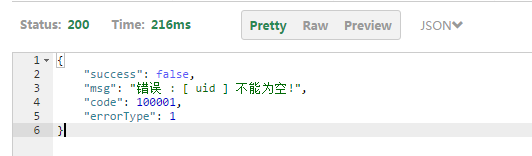
接收不到参数
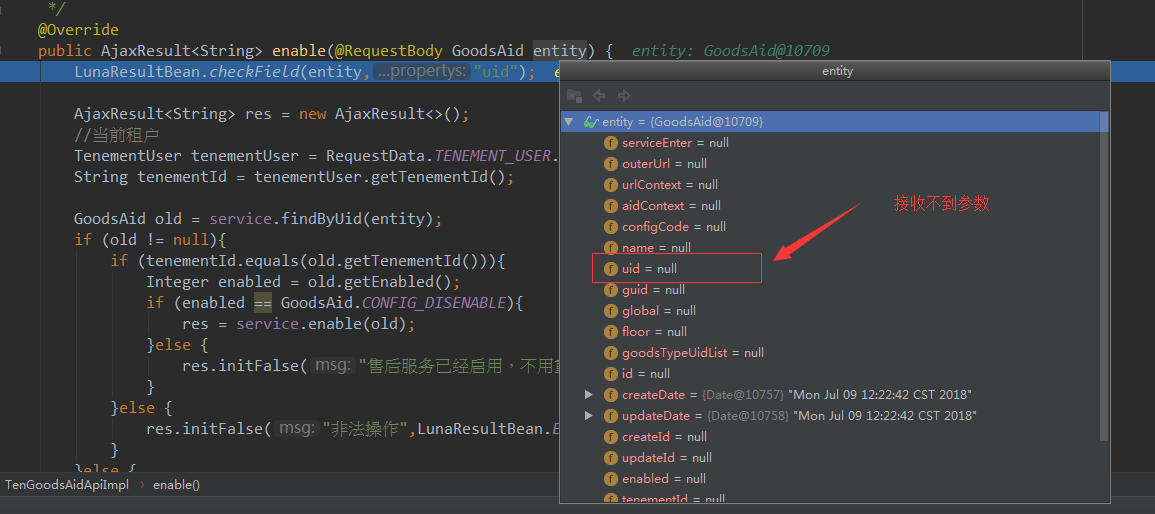
问题解决:
原因:是因为 这个项目中的Controller层 其实是有一层接口层,一层实现层。
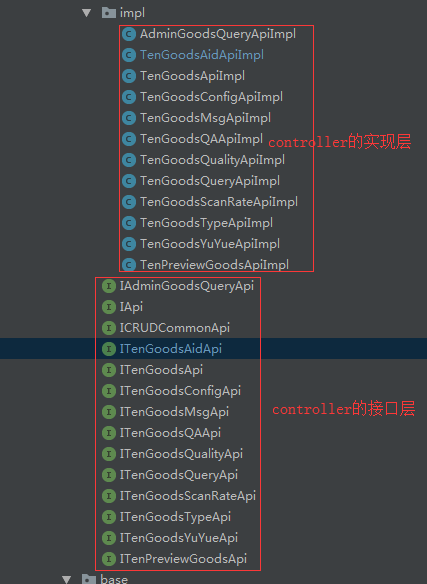
其实controller层不应该有接口层,而直接就是 实现层。
像上面这种有接口层,又有实现层的设计,会导致在启动类添加了@EnableTransactionManagement注解之后,导致
接口层:
package com.pisen.cloud.luna.ms.goods.api;

import com.pisen.cloud.luna.core.result.AjaxResult;

import com.pisen.cloud.luna.core.result.PageResult;

import com.pisen.cloud.luna.ms.goods.base.domain.GoodsAid;

import com.pisen.cloud.luna.ms.goods.base.domain.GoodsAidLog;

import org.springframework.web.bind.annotation.RequestBody;

import org.springframework.web.bind.annotation.RequestMapping;

import org.springframework.web.bind.annotation.RequestMethod;

@RequestMapping("/ten/goodsAid")

public interface ITenGoodsAidApi extends ICRUDCommonApi<GoodsAid> {

    /**

     * 售后服务的更新操作

     *

     * 注意地址!!!!!!是 updated

     *

     * 服务未启用-->可以修改商品分类和 服务信息

     * 服务已启用-->不可以修改商品分类  可以修改服务信息

     *

     * @param entity

     * @return

     */

    @RequestMapping(value = "/updated",method = RequestMethod.POST)

    AjaxResult<GoodsAid> updated(GoodsAid entity);

    /**

     * 启用售后辅助服务配置

     *

     * 启用以后不能再禁用或者删除

     *

     * 所以禁用操作不提供

     * @param aid

     * @return

     */

    @RequestMapping(value = "/enable",method = RequestMethod.POST)

    AjaxResult<String> enable(GoodsAid aid);

    /**

     * 分页查询 售后服务日志

     *

     * @param entity

     *            实例对象

     * @return 标准返回对象

     */

    @RequestMapping(value = "/log/pageFind", method = RequestMethod.GET)

    PageResult<GoodsAidLog> pageFind(@RequestBody GoodsAidLog entity) ;

    /**

     * 新增实例 售后服务日志

     *

     * @param entity

     *            实例对象

     * @return 标准返回对象

     */

    @RequestMapping(value = "/log/insert", method = RequestMethod.POST)

    public AjaxResult<GoodsAidLog> insert(@RequestBody GoodsAidLog entity);

}
实现层:
package com.pisen.cloud.luna.ms.goods.api.impl;

import com.pisen.cloud.luna.core.reqmodal.RequestData;

import com.pisen.cloud.luna.core.result.AjaxResult;

import com.pisen.cloud.luna.core.result.LunaResultBean;

import com.pisen.cloud.luna.core.result.PageResult;

import com.pisen.cloud.luna.core.utils.LunaIDUtil;

import com.pisen.cloud.luna.core.utils.TenementUser;

import com.pisen.cloud.luna.ms.goods.api.ITenGoodsAidApi;

import com.pisen.cloud.luna.ms.goods.base.domain.GoodsAid;

import com.pisen.cloud.luna.ms.goods.base.domain.GoodsAidLog;

import com.pisen.cloud.luna.ms.goods.base.domain.GoodsBindConfigMapping;

import com.pisen.cloud.luna.ms.goods.base.service.GoodsAidService;

import com.pisen.cloud.luna.ms.goods.base.service.GoodsBindConfigMappingService;

import org.aspectj.weaver.loadtime.Aj;

import org.springframework.beans.factory.annotation.Autowired;

import org.springframework.data.domain.Page;

import org.springframework.web.bind.annotation.RequestBody;

import org.springframework.web.bind.annotation.RestController;

import java.util.List;

@RestController

public class TenGoodsAidApiImpl implements ITenGoodsAidApi {

    @Autowired

    GoodsAidService service;

    @Autowired

    GoodsBindConfigMappingService bindConfigMappingService;

    /**

     * 新增  售后辅助服务

     *

     * 默认新增服务是禁用的

     *

     * serviceEnter 保存 即以  常量,常量 字符串保存即可

     * 例如: 1,2,3,4  或  1,3,5

     * @param entity

     *            实例对象

     * @return

     */

    @Override

    public AjaxResult<GoodsAid> insert(@RequestBody GoodsAid entity) {

        LunaResultBean.checkField(entity,"name","floor","goodsTypeUidList",

                "serviceEnter","outerUrl","urlContext");

        AjaxResult<GoodsAid> res = new AjaxResult<>();

        //初始化 对象

        entity.initInsertData();

        //如果全局字段传入 则采用传入值  否则 默认非全局

        entity.setGlobal(entity.getGlobal()  == null ? GoodsAid.NOT_GLOBAL : entity.getGlobal());

        entity.setUid(LunaIDUtil.uid());

        GoodsAid save = service.save(entity);

        if (save != null){

            res.initTrue(save);

        }else {

            res.initFalse("保存失败",LunaResultBean.ERROR_BUSINESS);

        }

        return res;

    }

    @Override

    public AjaxResult<GoodsAid> update(GoodsAid entity) {

        return null;

    }

    /**

     * 售后服务的更新操作

     *

     * 注意地址!!!!!!是 updated

     *

     * 服务未启用-->可以修改商品分类和 服务信息

     * 服务已启用-->不可以修改商品分类  可以修改服务信息

     *

     * @param entity

     * @return

     */

    @Override

    public AjaxResult<GoodsAid> updated(@RequestBody GoodsAid entity) {

        LunaResultBean.checkField(entity,"uid","name","floor","goodsTypeUidList","serviceEnter","outerUrl","urlContext");

        AjaxResult<GoodsAid> res = new AjaxResult<>();

        List<String> goodsTypeUid = entity.getGoodsTypeUidList();

        GoodsAid old = service.findByUid(entity);

        if (old != null){

            String uid = entity.getUid();

            Integer enabled = old.getEnabled();

            //验证标志 标志是否禁用状态 或 启用状态下 商品分类一致

            boolean flag = false;

            if (GoodsAid.CONFIG_DISENABLE == enabled){

                //服务 禁用状态

                flag = true;

            }else {

                //服务 启用状态

                //查找售后服务绑定的原商品分类

                List<String> oldTypeList = service.findGoodsTypeUidsByConfigUid(uid);

                if (oldTypeList != null){

                    if (bindConfigMappingService.chechDiff(oldTypeList,goodsTypeUid)){

                        flag = true;

                    }else {

                        res.initFalse("服务已经启用,不能更改商品分类",LunaResultBean.ERROR_BUSINESS);

                    }

                }else {

                    res.initFalse("原售后服务未绑定任何商品分类,属于非法服务",LunaResultBean.ERROR_BUSINESS);

                }

            }

            //验证通过

            if (flag){

                entity.initUpdateData();

                GoodsAid update = service.update(entity);

                if (update != null){

                    res.initTrue(update);

                }else {

                    res.initFalse("更新失败",LunaResultBean.ERROR_BUSINESS);

                }

            }

        }else {

            res.initFalse("售后服务不存在",LunaResultBean.ERROR_BUSINESS);

        }

        return res;

    }

    /**

     *删除  售后辅助服务

     *

     * 注意 启用以后的服务就不能禁用或删除了

     *      启用之前的服务 可以删除

     * @param entity

     *            实例对象

     * @return

     */

    @Override

    public AjaxResult<GoodsAid> delete(@RequestBody  GoodsAid entity) {

        LunaResultBean.checkField(entity,"uid");

        AjaxResult<GoodsAid> res = new AjaxResult<>();

        //当前租户

        TenementUser tenementUser = RequestData.TENEMENT_USER.get();

        String tenementId = tenementUser.getTenementId();

        GoodsAid old = service.findByUid(entity);

        if (old != null){

            if (tenementId.equals(old.getTenementId())){

                if (old.getEnabled() == GoodsAid.CONFIG_DISENABLE){

                    boolean flag = service.delete(entity);

                    if (flag){

                        res.initTrue(entity);

                    }else {

                        res.initFalse("刪除失敗",LunaResultBean.ERROR_BUSINESS);

                    }

                }else {

                    res.initFalse("售后服务已启用,不能刪除",LunaResultBean.ERROR_BUSINESS);

                }

            }else {

                res.initFalse("非法操作",LunaResultBean.ERROR_BUSINESS);

            }

        }else {

            res.initFalse("售后服务不存在",LunaResultBean.ERROR_BUSINESS);

        }

        return res;

    }

    /**

     * 分页查询 【售后辅助服务】

     *

     * @param entity

     *            实例对象

     * @return 标准返回对象

     */

    @Override

    public PageResult<GoodsAid> pageFind(GoodsAid entity) {

        //当前租户

        TenementUser tenementUser = RequestData.TENEMENT_USER.get();

        String tenementId = tenementUser.getTenementId();

        entity.setTenementId(tenementId);

        Page<GoodsAid> page = service.pageFind(entity);

        PageResult<GoodsAid> res = new PageResult<>();

        res.initTrue(page.getTotalElements(),page.getContent());

        return res;

    }

    /**

     * 根据 售后字段  获取信息

     * @param entity

     *            实例对象

     * @return

     */

    @Override

    public AjaxResult<List<GoodsAid>> find(GoodsAid entity) {

        return null;

    }

    /**

     * 启用接口

     * 注意 启用以后 就不能禁用了

     *

     * 所以没有禁用接口和禁用操作

     * @param entity

     * @return

     */

    @Override

    public AjaxResult<String> enable(@RequestBody GoodsAid entity) {

        LunaResultBean.checkField(entity,"uid");

        AjaxResult<String> res = new AjaxResult<>();

        //当前租户

        TenementUser tenementUser = RequestData.TENEMENT_USER.get();

        String tenementId = tenementUser.getTenementId();

        GoodsAid old = service.findByUid(entity);

        if (old != null){

            if (tenementId.equals(old.getTenementId())){

                Integer enabled = old.getEnabled();

                if (enabled == GoodsAid.CONFIG_DISENABLE){

                    String result = service.enable(old);

                    if (result.equals("启用成功")){

                        res.initTrue(result);

                    }else {

                        res.initFalse(result,LunaResultBean.ERROR_BUSINESS);

                    }

                }else {

                    res.initFalse("售后服务已经启用,不用重复启用",LunaResultBean.ERROR_BUSINESS);

                }

            }else {

                res.initFalse("非法操作",LunaResultBean.ERROR_BUSINESS);

            }

        }else {

            res.initFalse("售后服务不存在",LunaResultBean.ERROR_BUSINESS);

        }

        return res;

    }

    /**

     * 分页查询 【售后服务日志】注意 是 日志接口

     *

     * 注意接口地址

     * /ten/goodsAid/log/pageFind

     * @param entity

     *            实例对象

     * @return 标准返回对象

     */

    @Override

    public PageResult<GoodsAidLog> pageFind(GoodsAidLog entity) {

        //当前租户

        TenementUser tenementUser = RequestData.TENEMENT_USER.get();

        String tenementId = tenementUser.getTenementId();

        entity.setTenementId(tenementId);

        Page<GoodsAidLog> page = service.pageFindLog(entity);

        PageResult<GoodsAidLog> res = new PageResult<>();

        res.initTrue(page.getTotalElements(),page.getContent());

        return res;

    }

    /**

     * 新增实例 【售后服务日志】注意 是 日志接口

     * 注意接口地址!!!!!!!!!

     * /ten/goodsAid/log/insert

     *

     * 日志记录只是做保存

     * @param entity

     *            实例对象

     * @return 标准返回对象

     */

    @Override

    public AjaxResult<GoodsAidLog> insert(@RequestBody GoodsAidLog entity) {

        LunaResultBean.checkField(entity,"goodsAidUid","memberId","securityCode","goodsId");

        AjaxResult<GoodsAidLog> res = new AjaxResult<>();

        // 当前租户

        TenementUser tenementUser = RequestData.TENEMENT_USER.get();

        String tid = tenementUser.getTenementId();

        entity.setUid(LunaIDUtil.uid());

        entity.setTenementId(tid);

        GoodsAidLog result = service.saveLog(entity);

        if (result != null){

            res.initTrue(result);

        }else {

            res.initFalse("售后服务日志保存失败",LunaResultBean.ERROR_BUSINESS);

        }

        return res;

    }

}
这样的设计
导致 @RestController 注解写在实现层并不能被解析到!!!!!!!
这也就导致了最上面的问题,命名 controller的实现方法 POST请求的加了@RequestBody ,前台也传值了,但就是不能接收到值!!!
【spring】spring boot中使用@EnableTransactionManagement 以后,spring mvc接收前台ajax的post方法传过来的参数,使用@RequestBody接收不到参数的更多相关文章
- Spring Boot中普通类获取Spring容器中的Bean
我们知道如果我们要在一个类使用spring提供的bean对象,我们需要把这个类注入到spring容器中,交给spring容器进行管理,但是在实际当中,我们往往会碰到在一个普通的Java类中,自己动手n ...
- 在spring的过滤器中注入实体类(@autowire会失效可使用这个方法)
转载:难得可贵的好文章 https://blog.csdn.net/chl191623691/article/details/78657638 首先,本文 绝对是好文!不止本文,作者的文章都是很经 ...
- spring 接收前台ajax传来的参数的几个方法
知识补充 JSON.stringify(), 将value(Object,Array,String,Number...)序列化为JSON字符串JSON.parse(), 将JSON数据解析为js原生值 ...
- Spring Boot中使用Swagger2构建强大的RESTful API文档
由于Spring Boot能够快速开发.便捷部署等特性,相信有很大一部分Spring Boot的用户会用来构建RESTful API.而我们构建RESTful API的目的通常都是由于多终端的原因,这 ...
- Dubbo在Spring和Spring Boot中的使用
一.在Spring中使用Dubbo 1.Maven依赖 <dependency> <groupId>com.alibaba</groupId> <artifa ...
- Spring Boot 中的静态资源到底要放在哪里?
当我们使用 SpringMVC 框架时,静态资源会被拦截,需要添加额外配置,之前老有小伙伴在微信上问松哥Spring Boot 中的静态资源加载问题:"松哥,我的HTML页面好像没有样式?& ...
- Spring Boot中使用Swagger2自动构建API文档
由于Spring Boot能够快速开发.便捷部署等特性,相信有很大一部分Spring Boot的用户会用来构建RESTful API.而我们构建RESTful API的目的通常都是由于多终端的原因,这 ...
- Spring Boot中使用Swagger2构建RESTful API文档
在开发rest api的时候,为了减少与其他团队平时开发期间的频繁沟通成本,传统做法我们会创建一份RESTful API文档来记录所有接口细节,然而这样的做法有以下几个问题: 1.由于接口众多,并且细 ...
- Spring Boot 中使用 Swagger2 构建强大的 RESTful API 文档
项目现状:由于前后端分离,没有很好的前后端合作工具. 由于接口众多,并且细节复杂(需要考虑不同的HTTP请求类型.HTTP头部信息.HTTP请求内容等),高质量地创建这份文档本身就是件非常吃力的事,下 ...
随机推荐
- bzoj2811 [Apio2012]Guard
传送门:http://www.lydsy.com/JudgeOnline/problem.php?id=2811 [题解] 首先我们先把没看到忍者的段去掉,可以用线段树做. 如果剩下的就是K,那么特判 ...
- [bzoj4765]普通计算姬——分块
Brief Description 给定一棵n个节点的带权树,节点编号为1到n,以root为根,设sum[p]表示以点p为根的这棵子树中所有节点的权 值和.支持下列两种操作: 1 给定两个整数u,v, ...
- bzoj 1192 二进制
原题传送门http://www.lydsy.com/JudgeOnline/problem.php?id=1192 继续刷水题,二进制思想 //By BLADEVIL var x :longint; ...
- wiki 2490 导弹拦截塔
2013-09-23 21:16 二分答案+匈牙利判断 对于每一个时间,我们重新建一张二分图,由于每个塔可能打多次,所以要拆点, 对于每个拆的点的可行飞行距离为(mid-t1)-(ll-1)*(t1+ ...
- busybox syslog介绍
busybox中提供了一个syslog. 配置日志处理规则 可通过设置/etc/syslog.conf具体配置不同log的处理规则,以下的简单配置,将log全部写到/var/log/messages和 ...
- GUI自动化模块化实现方式
效率为王:脚本与数据的解耦 + Page Object模型 1.数据驱动:实现了“测试脚本和数据的解耦”,数据驱动测试的数据文件中不仅可以包含测试输入数据,还可以包含测试验证结果数据,甚至可以包含测试 ...
- HashMap/Hashtable/ConcurrentHashMap区别
HashMap:每个隔间都没锁门,有人想上厕所,管理员指给他一个隔间,里面没人的话正常用,里面有人的话把这个人赶出来然后用. 优点,每个人进来不耽误都能用:缺点,每一个上厕所的人都有被中途赶出来的危险 ...
- 网站js埋点
js埋点 1.埋点作用: 页面埋点的作用:其实就是用于流量分析.而流量的意思,包含了很多:页面浏览数(PV).独立访问者数量(UV).IP.页面停留时间.页面操作时间.页面访问次数.按钮点击次数.文 ...
- Selenium2+python自动化56-unittest之断言(assert)【转载】
前言 在测试用例中,执行完测试用例后,最后一步是判断测试结果是pass还是fail,自动化测试脚本里面一般把这种生成测试结果的方法称为断言(assert). 用unittest组件测试用例的时候,断言 ...
- 第一篇:Hello World
Hello World RabbitMQ是一个消息代理:它接受和转发消息.你可以把它想象成一个邮局:当你把邮件放在邮箱里时,你可以确定邮差先生最终会把邮件发送给你的收件人.在这个比喻中,RabbitM ...