
Springboot WebSocket例子
Springboot整合WebSocket
1.application.properties
#设置服务端口号

server.port=8080

#thymeleaf配置

#是否启用模板缓存。

spring.thymeleaf.cache=false

#是否为Web框架启用Thymeleaf视图解析。

spring.thymeleaf.enabled=true

#在SpringEL表达式中启用SpringEL编译器。

spring.thymeleaf.enable-spring-el-compiler=true

#模板文件编码。

spring.thymeleaf.encoding=UTF-8

#要应用于模板的模板模式。另请参见Thymeleaf的TemplateMode枚举。

spring.thymeleaf.mode=HTML5

#在构建URL时添加前缀以查看名称的前缀。

spring.thymeleaf.prefix=classpath:/templates/

#Content-Type写入HTTP响应的值。

spring.thymeleaf.servlet.content-type=text/html

#在构建URL时附加到视图名称的后缀。

spring.thymeleaf.suffix=.html
2.pom.xml
<?xml version="1.0" encoding="UTF-8"?>

<project xmlns="http://maven.apache.org/POM/4.0.0" xmlns:xsi="http://www.w3.org/2001/XMLSchema-instance"

    xsi:schemaLocation="http://maven.apache.org/POM/4.0.0 http://maven.apache.org/xsd/maven-4.0.0.xsd">

    <modelVersion>4.0.0</modelVersion>

    <groupId>com.szw.learn</groupId>

    <artifactId>websocket_01</artifactId>

    <version>0.0.1-SNAPSHOT</version>

    <parent>

        <groupId>org.springframework.boot</groupId>

        <artifactId>spring-boot-starter-parent</artifactId>

        <version>1.5.16.RELEASE</version>

    </parent>

    <properties>

        <project.build.sourceEncoding>UTF-8</project.build.sourceEncoding>

        <project.reporting.outputEncoding>UTF-8</project.reporting.outputEncoding>

        <java.version>1.8</java.version>

        <maven.test.skip>true</maven.test.skip>

        <skipTests>true</skipTests>

        <start-class>com.szw.learn.Websocket01Application</start-class>

    </properties>

    <dependencies>

        <!-- 使用web启动器 -->

        <dependency>

            <groupId>org.springframework.boot</groupId>

            <artifactId>spring-boot-starter-web</artifactId>

        </dependency>

        <!-- 测试 -->

        <dependency>

            <groupId>org.springframework.boot</groupId>

            <artifactId>spring-boot-starter-test</artifactId>

            <scope>test</scope>

        </dependency>

        <!-- 模板引擎 -->

        <dependency>

            <groupId>org.springframework.boot</groupId>

            <artifactId>spring-boot-starter-thymeleaf</artifactId>

        </dependency>

        <!-- websocket -->

        <dependency>

            <groupId>org.springframework.boot</groupId>

            <artifactId>spring-boot-starter-websocket</artifactId>

        </dependency>

    </dependencies>

    <repositories>

        <repository>

            <id>nexus-aliyun</id>

            <name>Nexus aliyun</name>

            <url>http://maven.aliyun.com/nexus/content/groups/public</url>

            <releases>

                <enabled>true</enabled>

            </releases>

            <snapshots>

                <enabled>false</enabled>

            </snapshots>

        </repository>

    </repositories>

    <pluginRepositories>

        <pluginRepository>

            <id>nexus-aliyun</id>

            <name>Nexus aliyun</name>

            <url>http://maven.aliyun.com/nexus/content/groups/public</url>

            <releases>

                <enabled>true</enabled>

            </releases>

            <snapshots>

                <enabled>false</enabled>

            </snapshots>

        </pluginRepository>

    </pluginRepositories>

    <build>

        <plugins>

            <!-- 要将源码放上去,需要加入这个插件 -->

            <plugin>

                <groupId>org.apache.maven.plugins</groupId>

                <artifactId>maven-source-plugin</artifactId>

                <configuration>

                    <attach>true</attach>

                </configuration>

                <executions>

                    <execution>

                        <phase>compile</phase>

                        <goals>

                            <goal>jar</goal>

                        </goals>

                    </execution>

                </executions>

            </plugin>

            <!-- 打包 -->

            <plugin>

                <groupId>org.springframework.boot</groupId>

                <artifactId>spring-boot-maven-plugin</artifactId>

                <configuration>

                    <fork>true</fork>

                </configuration>

            </plugin>

        </plugins>

    </build>

</project>
3.ServerEndpointExporter注册
package com.szw.learn.websocket;

import org.springframework.context.annotation.Bean;

import org.springframework.context.annotation.Configuration;

import org.springframework.web.socket.server.standard.ServerEndpointExporter;

@Configuration

public class WebsocketConfig {

    /**

     * <br>描 述:    @Endpoint注解的websocket交给ServerEndpointExporter自动注册管理

     * @return

     */

    @Bean

    public ServerEndpointExporter serverEndpointExporter(){

        return new ServerEndpointExporter();

    }

}
4.WebsocketEndpoint长连接端点
package com.szw.learn.websocket;

import java.io.IOException;

import java.util.concurrent.CopyOnWriteArraySet;

import javax.websocket.OnClose;

import javax.websocket.OnError;

import javax.websocket.OnMessage;

import javax.websocket.OnOpen;

import javax.websocket.Session;

import javax.websocket.server.ServerEndpoint;

import org.springframework.stereotype.Component;

/**

 *@ServerEndpoint(value="/websocket")value值必须以/开路

 *备注:@ServerEndpoint注解类不支持使用@Autowire

 */

@Component

@ServerEndpoint(value="/websocket")

public class WebsocketEndpoint {

    //存放该服务器该ws的所有连接。用处:比如向所有连接该ws的用户发送通知消息。

    private static CopyOnWriteArraySet<WebsocketEndpoint> sessions = new CopyOnWriteArraySet<>();

    private Session session;

    @OnOpen

    public void onOpen(Session session){

        System.out.println("java websocket:打开连接");

        this.session = session;

        sessions.add(this);

    }

    @OnClose

    public void onClose(Session session){

        System.out.println("java websocket:关闭连接");

        sessions.remove(this);

    }

    @OnMessage

    public void onMessage(Session session,String message) throws IOException{

        System.out.println("java websocket 收到消息:"+message);

        session.getBasicRemote().sendText("后台接收到您发的消息:"+message);

    }

    @OnError

    public void onError(Session session,Throwable error){

        System.out.println("java websocket 出现错误");

    }

    public Session getSession() {

        return session;

    }

    public void setSession(Session session) {

        this.session = session;

    }

}
5.index.html用户端
<!doctype html>

<html xmlns:th="http://www.thymeleaf.org">

<head>

<meta charset="utf-8"></meta>

<title>websocket</title>

</head>

<body>

    hello websocket<br/>

    <input id="input_id" type="text" /><button onclick="sendMessage()">发送</button>    <button onclick="closeWebsocket()">关闭</button>

    <div id="message_id"></div>

</body>

<script type="text/javascript">

    document.getElementById('input_id').focus();

    var websocket = null;

    //当前浏览前是否支持websocket

    if("WebSocket" in window){

        var url = "ws://127.0.0.1:8080/websocket";

        websocket = new WebSocket(url);

    }else{

        alert("浏览器不支持websocket");

    }

    websocket.onopen = function(event){

        setMessage("打开连接");

    }

    websocket.onclose = function(event){

        setMessage("关闭连接");

    }

    websocket.onmessage = function(event){

        setMessage(event.data);

    }

    websocket.onerror = function(event){

        setMessage("连接异常");

    }

    //监听窗口关闭事件,当窗口关闭时,主动去关闭websocket连接,防止连接还没断开就关闭窗口,server端会抛异常。

    window.onbeforeunload = function(){

        closeWebsocket();

    }

    //关闭websocket

    function closeWebsocket(){

        //3代表已经关闭

        if(3!=websocket.readyState){

            websocket.close();

        }else{

            alert("websocket之前已经关闭");

        }

    }

    //将消息显示在网页上

    function setMessage(message){

        document.getElementById('message_id').innerHTML += message + '<br/>';

    }

    //发送消息

    function sendMessage(){

        //1代表正在连接

        if(1==websocket.readyState){

            var message = document.getElementById('input_id').value;

            setMessage(message);

            websocket.send(message);

        }else{

            alert("websocket未连接");

        }

        document.getElementById('input_id').value="";

        document.getElementById('input_id').focus();

    }

</script>

</html>
6.WebsocketController测试地址
package com.szw.learn.websocket;

import org.springframework.stereotype.Controller;

import org.springframework.web.bind.annotation.RequestMapping;

import org.springframework.web.servlet.ModelAndView;

@RequestMapping("websocket")

@Controller

public class WebsocketController {

    private static final String INDEX = "websocket/index";

    @RequestMapping("index")

    public ModelAndView index(){

        return new ModelAndView(INDEX);

    }

}
7.Websocket01Application启动类
package com.szw.learn;

import org.springframework.boot.SpringApplication;

import org.springframework.boot.autoconfigure.SpringBootApplication;

@SpringBootApplication

public class Websocket01Application {

    public static void main(String[] args) {

        System.setProperty("spring.devtools.restart.enabled", "false");

        SpringApplication.run(Websocket01Application.class, args);

    }

}
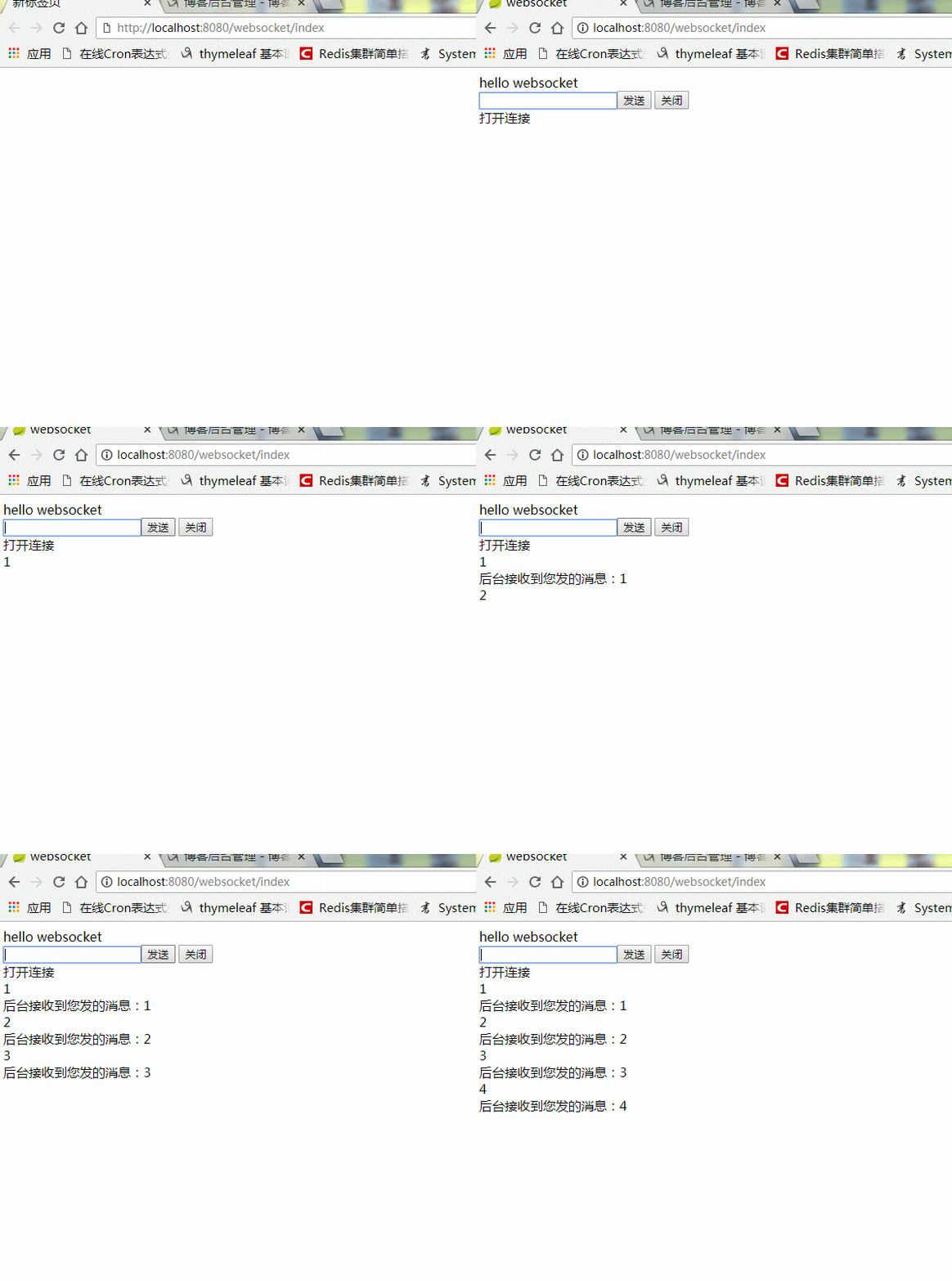
8.测试
Springboot WebSocket例子的更多相关文章
- Springboot+Websocket+JWT实现的即时通讯模块
场景 目前做了一个接口:邀请用户成为某课程的管理员,于是我感觉有能在用户被邀请之后能有个立马通知他本人的机(类似微博.朋友圈被点赞后就有立马能收到通知一样),于是就闲来没事搞了一套. 涉及技术栈 ...
- springboot - websocket实现及原理
本文章包括websocket面试相关问题以及spring boot如何整合webSocket. 参考文档 https://blog.csdn.net/prayallforyou/article/det ...
- SpringBoot+WebSocket
SpringBoot+WebSocket 只需三个步骤 导入依赖 <dependency> <groupId>org.springframework.boot</grou ...
- springboot+websocket+sockjs进行消息推送【基于STOMP协议】
springboot+websocket+sockjs进行消息推送[基于STOMP协议] WebSocket是在HTML5基础上单个TCP连接上进行全双工通讯的协议,只要浏览器和服务器进行一次握手,就 ...
- SpringBoot WebSocket STOMP 广播配置
目录 1. 前言 2. STOMP协议 3. SpringBoot WebSocket集成 3.1 导入websocket包 3.2 配置WebSocket 3.3 对外暴露接口 4. 前端对接测试 ...
- Java Springboot webSocket简单实现,调接口推送消息到客户端socket
Java Springboot webSocket简单实现,调接口推送消息到客户端socket 后台一般作为webSocket服务器,前台作为client.真实场景可能是后台程序在运行时(满足一定条件 ...
- spring boot 初试,springboot入门,springboot helloworld例子
因为项目中使用了spring boot ,之前没接触过,所以写个helloworld玩玩看,当做springboot的一个入门例子.搜索 spring boot.得到官方地址:http://proje ...
- Springboot+websocket+定时器实现消息推送
由于最近有个需求,产品即将到期(不同时间段到期)时给后台用户按角色推送,功能完成之后在此做个小结 1. 在启动类中添加注解@EnableScheduling package com.hsfw.back ...
- springboot+websocket 归纳收集
websocket是h5后的技术,主要实现是一个长连接跟tomcat的comet技术差不多,但websocket是基于web协议的,有更广泛的支持.当然,在处理高并发的情况下,可以结合tomcat的a ...
随机推荐
- github桌面工具commit不了解决
这样发现github上还是空文件, 因为要重新添加过 1. git add -A 添加所有文件 2. git commit -m "xxx" 3. git push -u ...
- diamond源码阅读-diamond-client
读取数据 DiamondManager manager = new DefaultDiamondManager("DEFAULT_GROUP", "zml", ...
- python3----strip lstrip rstrip
Python中的strip用于去除字符串的首位字符,同理,lstrip用于去除左边的字符,rstrip用于去除右边的字符.这三个函数都可传入一个参数,指定要去除的首尾字符.注意的是,传入的是一个字符数 ...
- MySQL的下载及安装
前言:不仅要知其然,还要知所以然 MySQL数据库作为关系型数据库中的佼佼者,因其体积小,速度快,成本低,不仅受到了市场的极大追捧,也受到了广大程序员的青睐.接下来,就给大家说一下,MySQL的下载和 ...
- PHP 可以获取客户端哪些访问信息
php是一种弱类型的程序语言,但是最web的 在程序语言中有系统全局函数: $_SERVER <?php echo "".$_SERVER['PHP_SELF'];#当前正在 ...
- hdu 5452(树链刨分)
看到题目,想了挺长时间,发现不会,然后看着样子像是树上成段操作,所以查了下树链刨分,结果真的就是这个东西... Minimum Cut Time Limit: 3000/2000 MS (Java/O ...
- Linux 并发服务器雏形总结
如下介绍一个并发回射客户端/服务器的雏形,所谓回射:就是客户端输入一条数据,服务器端读取并显示,然后服务器端再把刚读取的信息发送回客户端进行显示.示意图如下: 所谓并发服务器:就是一个服务器可以同时为 ...
- Disable Client Certificate Revocation (CRL) Check on IIS
Disable Client Certificate Revocation (CRL) Check on IIS: REGISTRY : HKLM\SYSTEM\CurrentControlSet\ ...
- Null和Undefined类型
Null和Undefined类型都只有唯一的特殊值,即null和undefined.不过null是关键字而undefined不是. JavaScript把两者定义为相等的,如下代码可以验证: aler ...
- 地址栏输入url按回车之后发生了什么
地址栏输入url按回车之后发生了什么? 1.我们在浏览器中输入网址 2.浏览器到DNS查找域名对应的IP地址 3. 浏览器打开TCP连接(默认端口为80),向该IP的服务器发送一条HTTP请求,如果浏 ...