
iOS-合成图片(长图)
合成图片
- 直接合成图片还是比较简单的,现在的难点是要把,通过文本输入的一些基本数据也合成到一张图片中,如果有多长图片就合成长图。
- 现在的实现方法是,把所有的文本消息格式化,然后绘制到一个UILable中,然后自适应高度,然后把这个控件截取出来一张图片,和拍的照片合成一张图片。
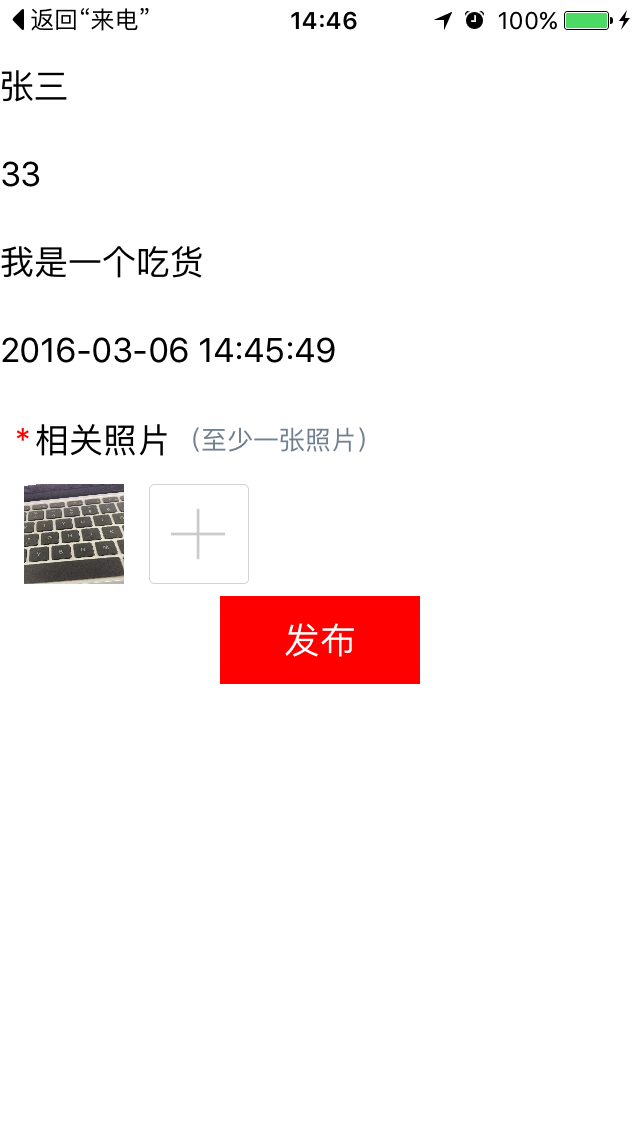
示例界面如下
1、基本信息截图

2、一张图片

3、两张图片

4、三张图片

具体代码
- 首先初始化界面
/// 初始化子控件

- (void)setupViews {

    //

    _nameField = [[UITextField alloc] initWithFrame:CGRectMake(0, 22, ScreenWidth, 44)];

    _nameField.placeholder = @"请输入姓名";

    [self.view addSubview:_nameField];

    _ageField = [[UITextField alloc] initWithFrame:CGRectMake(0, CGRectGetMaxY(_nameField.frame), ScreenWidth, 44)];

    _ageField.placeholder = @"请输入年龄";

    [self.view addSubview:_ageField];

    _infoField = [[UITextField alloc] initWithFrame:CGRectMake(0, CGRectGetMaxY(_ageField.frame), ScreenWidth, 44)];

    _infoField.placeholder = @"请输入简介";

    [self.view addSubview:_infoField];

    _timeField = [[UITextField alloc] initWithFrame:CGRectMake(0,CGRectGetMaxY(_infoField.frame),ScreenWidth, 44)];

    _timeField.text = [self getCurrentDate];

    _timeField.enabled = NO;

    [self.view addSubview:_timeField];

    _collectionView = [[SLQCollectionView alloc] initWithFrame:CGRectMake(0, CGRectGetMaxY(_timeField.frame),ScreenWidth, 100)];

    [_collectionView setTitle:@"相关照片"];

    __weak typeof (self)weakSelf = self;

    _collectionView.heightAndPhotosBlock = ^(CGFloat height,NSArray *photos){

        [weakSelf.photoArr removeAllObjects];

        weakSelf.photoArr = [NSMutableArray arrayWithArray:photos];

    };

    [self.view addSubview:_collectionView];

    _mergePhoto = [[UIButton alloc] initWithFrame:CGRectMake(0, CGRectGetMaxY(_collectionView.frame), 100, 44)];

    [_mergePhoto setTitle:@"发布" forState:UIControlStateNormal];

    _mergePhoto.backgroundColor = [UIColor redColor];

    [_mergePhoto addTarget:self action:@selector(postPhoto) forControlEvents:UIControlEventTouchUpInside];

    [self.view addSubview:_mergePhoto];

    _mergePhoto.center = CGPointMake(ScreenWidth/2, _mergePhoto.center.y);

    _contentLabel = [[UILabel alloc] initWithFrame:CGRectMake(0, 0, ScreenWidth, 200)];

    _contentLabel.hidden = YES;

    [self.view addSubview:_contentLabel];

}
- 发布图片
/// 发布图片

- (void)postPhoto {

    self.postImage = nil;

    NSString *name = self.nameField.text;

    NSString *age = self.ageField.text;

    NSString *info = self.infoField.text;

    NSString *time = self.timeField.text;

    NSString *content = [NSString stringWithFormat:@"姓名:%@\n年龄:%@\n简介:%@\n时间:%@\n相关图片:",name,age,info,time];

    self.contentLabel.numberOfLines = 0;

    self.contentLabel.text = content;

    [self.contentLabel sizeToFit];

    self.contentLabel.hidden = NO;

    [self.contentLabel setNeedsDisplay];

    if (self.photoArr.count) {

        for (NSInteger i = 0 ; i < self.photoArr.count; i ++) {

            self.postImage = [self mergeImages:self.photoArr[i]];

        }

    }

}
- 合成图片
// 获得顶部图片

- (UIImage *)getImageFromView

{

    // 已经合成过一次,就去上次的合成结果

    if(self.postImage) {

        return self.postImage;

    }else

    {

        UIGraphicsBeginImageContextWithOptions(self.contentLabel.frame.size, NO, 0.0);

        //获取图像

        [self.contentLabel.layer renderInContext:UIGraphicsGetCurrentContext()];

        UIImage *image = UIGraphicsGetImageFromCurrentImageContext();

        UIGraphicsEndImageContext();

        self.contentLabel.hidden = YES;

        // 保存图片,需要转换成二进制数据

        [self saveImageToPhotos:image];

        self.contentLabel.hidden = YES;

        self.textImage = image;

        return image;

    }

}

// 获得待合成图片

- (UIImage *)mergeImages:(UIImage *)mergeImage

{

    UIImage *newimage = mergeImage;

    UIImage *postImage = [self getImageFromView];

    // 获取位图上下文

    UIGraphicsBeginImageContextWithOptions(CGSizeMake(ScreenWidth, postImage.size.height + ScreenHeight - self.textImage.size.height), NO, 0.0);

    [newimage drawInRect:CGRectMake(0, postImage.size.height, ScreenWidth, ScreenHeight - self.textImage.size.height)];

    [postImage drawAtPoint:CGPointMake(0,0)];

    // 获取位图

    UIImage *saveimage = UIGraphicsGetImageFromCurrentImageContext();

    // 关闭位图上下文

    UIGraphicsEndImageContext();

    // 保存图片,需要转换成二进制数据

    [self saveImageToPhotos:saveimage];

    return saveimage;

}

- (void)saveImageToPhotos:(UIImage*)savedImage

{

    UIImageWriteToSavedPhotosAlbum(savedImage, self, @selector(image:didFinishSavingWithError:contextInfo:), NULL);

}

// 指定回调方法

- (void)image: (UIImage *) image didFinishSavingWithError: (NSError *) error contextInfo: (void *) contextInfo

{

    NSString *msg = nil ;

    if(error != NULL){

        msg = @"保存图片失败" ;

    }else{

        msg = @"保存图片成功" ;

    }

    UIAlertView *alert = [[UIAlertView alloc] initWithTitle:@"保存图片结果提示"

                                                    message:msg

                                                   delegate:self

                                          cancelButtonTitle:@"确定"

                                          otherButtonTitles:nil];

    [alert show];

}
- 属性声明
#define ScreenHeight [UIScreen mainScreen].bounds.size.height

#define ScreenWidth [UIScreen mainScreen].bounds.size.width

#import "ViewController.h"

#import "SLQCollectionView.h"

@interface ViewController ()

/// UILabel

@property (nonatomic, strong) UILabel *contentLabel;

/// UITextField

@property (nonatomic, strong) UITextField *nameField;

/// UITextField

@property (nonatomic, strong) UITextField *ageField;

/// UITextField

@property (nonatomic, strong) UITextField *infoField;

/// UITextField

@property (nonatomic, strong) UITextField *timeField;

/// SLQCollectionView

@property (nonatomic, strong) SLQCollectionView *collectionView;

/// SLQCollectionView

@property (nonatomic, strong) UIButton *mergePhoto;

/// 图片数组

@property (nonatomic, strong) NSMutableArray *photoArr;

/// 文字图片

@property (nonatomic, strong) UIImage *textImage;

/// 将要保存的图片

@property (nonatomic, strong) UIImage *postImage;

@end
总结
- 合成长图原来也这么简单,哈哈
iOS-合成图片(长图)的更多相关文章
- android 不失真 显示 超高清 图片 长图
韩梦飞沙 韩亚飞 313134555@qq.com yue31313 han_meng_fei_sha 通过计算 位图工厂.选项 对象的 inSamleSize 值 等比压缩 图片. 使用 ...
- iOS - 长按图片识别图中二维码
长按图片识别图中二维码: // 长按图片识别二维码 UILongPressGestureRecognizer *QrCodeTap = [[UILongPressGestureRecognizer a ...
- ios中,长按Webview中的图片
我们所要解决的问题如题目所示:ios中,长按Webview中的图片,将图片保存到本地相册. 解决方案:对load的html网页,执行js注入,通过在webview中执行js代码,来响应点击事件,通过j ...
- ios开发之滑动长图截全屏应用
最近做项目遇到要求截取图片长度超出手机屏幕,即可滑动的长图截屏,这里简单说一下解决思路,下面附带Demo下载地址. ,当我们要截全屏时,将滑动视图的frame以及偏移量记录下来,然后将滑动视图偏移量设 ...
- Vue实现长按图片识别图中二维码
Vue实现长按图片识别图中二维码 思路:要想实现可以识别图片中的二维码,那必定是要将这张图进行上传操作,上传则需要file对象格式.不管是在H5还是APP中,展示的图片都是通过url的方式展示在img ...
- 一个iOS图片选择器的DEMO(实现图片添加,宫格排列,图片长按删除,以及图片替换等功能)
在开发中,经常用到选择多张图片进行上传或作其他处理等等,以下DEMO满足了此功能中的大部分功能,可直接使用到项目中. 主要功能如下: 1,图片九宫格排列(可自动设置) 2,图片长按抖动(仿苹果软件删除 ...
- 谈谈 iOS 中图片的解压缩
原文 对于大多数 iOS 应用来说,图片往往是最占用手机内存的资源之一,同时也是不可或缺的组成部分.将一张图片从磁盘中加载出来,并最终显示到屏幕上,中间其实经过了一系列复杂的处理过程,其中就包括了对图 ...
- 【转】谈谈 iOS 中图片的解压缩
转自:http://blog.leichunfeng.com/blog/2017/02/20/talking-about-the-decompression-of-the-image-in-ios/ ...
- web实时长图实践--摘抄
背景简介 全民K歌专辑发布新玩法,传统宣传专辑战绩的流程,从获取数据,到制作海报,到传播,周期长运营成本高,如何快速分享战绩进行荣誉感的传播成为一个亟待解决的问题. 产品:能不能在专辑大事件触发时,自 ...
随机推荐
- DateTime小综合
实现效果: 关键知识: 1>DateTime类的ToString()方法: 2>DateTime类的IsLeapYear(); 3>DateTime类的DaysInMomth(); ...
- javascript dom 操作详解 js加强
js加强操作实现代码. 1 .文档里的每个节点都有属性 nodeName . nodeValue . nodeType nodeName 文本节点的的节点名是 #text , nodeName 是只读 ...
- VirtualBox改变虚拟硬盘位置
原本放虚拟硬盘的位置容量不足,因此将原来的虚拟硬盘放到了一个相对空闲的分区.设置虚拟硬盘位置时出现一点小问题,解决过程记录如下. 1. 将虚拟硬盘复制到目标位置后,假设为“F:\Ubuntu 16.0 ...
- Android学习笔记_67_Android MyCrashHandler 中异常处理 UncaughtExceptionHandler
1.程序中故意抛出异常: public class ExceptionActivity extends Activity { String str; @Override public void onC ...
- Android学习笔记_24_多媒体MediaPlayer对象之音乐播放器与SoundPool声音池
一.MediaPlayer对象常用方法介绍: MediaPlayer mediaPlayer = new MediaPlayer(); if (mediaPlayer.isPlaying()) { m ...
- Laravel5 打印SQL
在src/Illuminate/Database/Connection.php里打印SQL默认是关闭的,见https://github.com/laravel/framework/commit/e0a ...
- 自己做的HTML
<html> <body background="http://img1.imgtn.bdimg.com/it/u=821335874,2927998559&fm= ...
- 跨交换机的VLAN划分实验
实验涉及命令以及知识补充 大部分命令和上一篇相同,本篇介绍不同的收获. 上一篇链接: https://www.cnblogs.com/Coeus-P/p/9122462.html 退出命令 ctrl+ ...
- Oracle 手工创建awr快照,获取报告
Oracle 的自动化工具都是通过后台的进程调用相关的函数实现,而Oracle也允许用户通过包来手工调用这些函数,显然这样增加了工具的安全性,也提高了可操作性,使得DBA可以更灵活的使用这些函数来满足 ...
- Ajax 跨域的几种解决方案
作者:黄轩链接:http://www.zhihu.com/question/19618769/answer/38934786来源:知乎著作权归作者所有.商业转载请联系作者获得授权,非商业转载请注明出处 ...