
Developing crm service based on apache cxf
1 数据库环境搭建
创建数据库boscrm
执行脚本:
脚本内容:
/*

Navicat MySQL Data Transfer

Source Server         : root

Source Server Version : 50022

Source Host           : localhost:3306

Source Database       : crm

Target Server Type    : MYSQL

Target Server Version : 50022

File Encoding         : 65001

Date: 2015-04-19 17:46:45

*/

SET FOREIGN_KEY_CHECKS=0;

-- ----------------------------

-- Table structure for `t_customer`

-- ----------------------------

DROP TABLE IF EXISTS `t_customer`;

CREATE TABLE `t_customer` (

  `id` int(11) NOT NULL auto_increment,

  `name` varchar(255) default NULL,

  `station` varchar(255) default NULL,

  `telephone` varchar(255) default NULL,

  `address` varchar(255) default NULL,

  `decidedzone_id` varchar(255) default NULL,

  PRIMARY KEY  (`id`)

) ENGINE=InnoDB DEFAULT CHARSET=utf8;

-- ----------------------------

-- Records of t_customer

-- ----------------------------

INSERT INTO `t_customer` VALUES ('', '张三', '百度', '', '北京市西城区长安街100号', null);

INSERT INTO `t_customer` VALUES ('', '李四', '哇哈哈', '', '上海市虹桥区南京路250号', null);

INSERT INTO `t_customer` VALUES ('', '王五', '搜狗', '', '天津市河北区中山路30号', null);

INSERT INTO `t_customer` VALUES ('', '赵六', '联想', '', '石家庄市桥西区和平路10号', null);

INSERT INTO `t_customer` VALUES ('', '小白', '测试空间', '', '内蒙古自治区呼和浩特市和平路100号', null);

INSERT INTO `t_customer` VALUES ('', '小黑', '联想', '', '天津市南开区红旗路20号', null);

INSERT INTO `t_customer` VALUES ('', '小花', '百度', '', '北京市东城区王府井大街20号', null);

INSERT INTO `t_customer` VALUES ('', '小李', '长城', '', '北京市昌平区建材城西路100号', null);

2 web 项目环境搭建
第一步: 创建动态 web 项目
第二步: 导入 CXF 相关 jar
第三步: 配置 web.xml
<?xml version="1.0" encoding="UTF-8"?>

<web-app xmlns:xsi="http://www.w3.org/2001/XMLSchema-instance" xmlns="http://java.sun.com/xml/ns/javaee" xsi:schemaLocation="http://java.sun.com/xml/ns/javaee http://java.sun.com/xml/ns/javaee/web-app_2_5.xsd" id="WebApp_ID" version="2.5">

  <display-name>bos-crm</display-name>

  <!-- 配置文件位置的配置  -->

  <context-param>

    <param-name>contextConfigLocation</param-name>

    <param-value>classpath:cxf.xml</param-value>

  </context-param>

  <!-- 配置spring容器随web项目的启动而启动 -->

  <listener>

      <listener-class>org.springframework.web.context.ContextLoaderListener</listener-class>

  </listener>

  <!-- 配置 CXF 框架提供的 Servlet -->

  <!-- 配置了spring容器监听之后,这里就不需要在配置初始化参数告诉配置文件位置 -->

  <servlet>

      <servlet-name>cxf</servlet-name>

      <servlet-class>org.apache.cxf.transport.servlet.CXFServlet</servlet-class>

  </servlet>

  <servlet-mapping>

      <servlet-name>cxf</servlet-name>

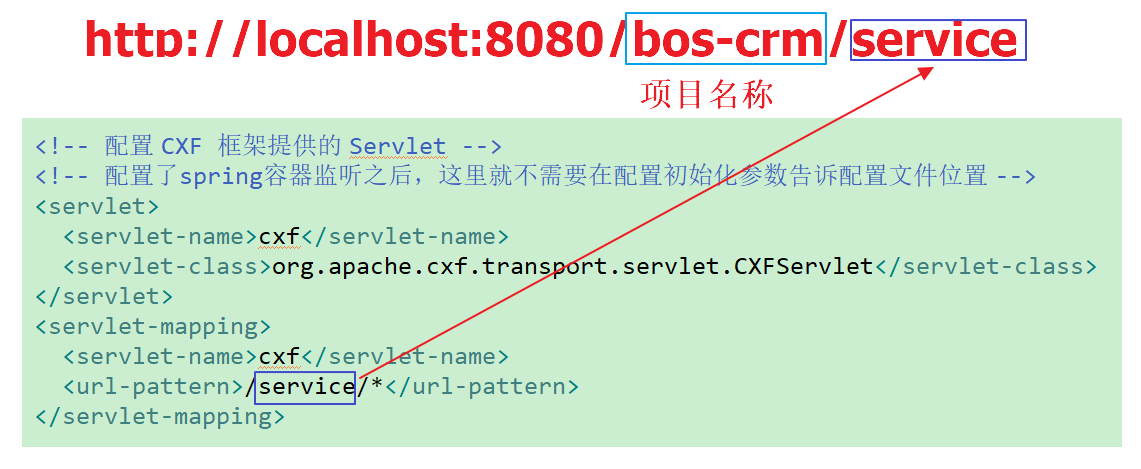
      <url-pattern>/service/*</url-pattern>

  </servlet-mapping>

  <welcome-file-list>

    <welcome-file>index.html</welcome-file>

    <welcome-file>index.htm</welcome-file>

    <welcome-file>index.jsp</welcome-file>

    <welcome-file>default.html</welcome-file>

    <welcome-file>default.htm</welcome-file>

    <welcome-file>default.jsp</welcome-file>

  </welcome-file-list>

</web-app>
第四步: 创建Customer实体类
针对 t_customer 表创建一个 Customer 客户实体类
package com.test.entity;

public class Customer {

    private Integer id;

    private String name;

    private String station;

    private String telephone;

    private String address;

    private String decidedzone_id;

    public Customer() {

    }

    public Customer(Integer id, String name, String station, String telephone, String address, String decidedzone_id) {

        this.id = id;

        this.name = name;

        this.station = station;

        this.telephone = telephone;

        this.address = address;

        this.decidedzone_id = decidedzone_id;

    }

    public Integer getId() {

        return id;

    }

    public void setId(Integer id) {

        this.id = id;

    }

    public String getName() {

        return name;

    }

    public void setName(String name) {

        this.name = name;

    }

    public String getStation() {

        return station;

    }

    public void setStation(String station) {

        this.station = station;

    }

    public String getTelephone() {

        return telephone;

    }

    public void setTelephone(String telephone) {

        this.telephone = telephone;

    }

    public String getAddress() {

        return address;

    }

    public void setAddress(String address) {

        this.address = address;

    }

    public String getDecidedzone_id() {

        return decidedzone_id;

    }

    public void setDecidedzone_id(String decidedzone_id) {

        this.decidedzone_id = decidedzone_id;

    }

}
decidedzone_id:逻辑外键。 两张表在不同的库里面。
t_customer表在boscrm库中,decidedzone在bos库中
第五步: 开发一个接口和实现类
package com.test.service;

import java.util.List;

import javax.jws.WebService;

import com.test.entity.Customer;

@WebService

public interface ICustomerService {

    public abstract List<Customer> findAll();

}
package com.test.service;

import java.sql.ResultSet;

import java.sql.SQLException;

import java.util.List;

import org.springframework.jdbc.core.JdbcTemplate;

import org.springframework.jdbc.core.RowMapper;

import org.springframework.transaction.annotation.Transactional;

import com.test.entity.Customer;

@Transactional

public class CustomerServiceImpl implements ICustomerService {

    private JdbcTemplate jdbcTemplate;

    public void setJdbcTemplate(JdbcTemplate jdbcTemplate){

        this.jdbcTemplate = jdbcTemplate;

    }

    @Override

    public List<Customer> findAll() {

        String sql = "select * from t_customer";

        List<Customer> list = jdbcTemplate.query(sql, new RowMapper<Customer>(){

            @Override

            public Customer mapRow(ResultSet rs, int arg1) throws SQLException {

                Integer id = rs.getInt("id"); //根据字段名称从结果集中获取对应的值

                String name = rs.getString("name");

                String station = rs.getString("station");

                String telephone = rs.getString("telephone");

                String address = rs.getString("address");

                String decidedzone_id = rs.getString("decidedzone_id");

                return new Customer(id, name, station, telephone, address, decidedzone_id);

            }

        });

        return list;

    }

}
Spring 注解和配置文件可以混合使用。
第六步: 在类路径下提供 cxf.xml
<?xml version="1.0" encoding="UTF-8"?>

<beans xmlns="http://www.springframework.org/schema/beans"

xmlns:xsi="http://www.w3.org/2001/XMLSchema-instance"

xmlns:jaxws="http://cxf.apache.org/jaxws"

xmlns:soap="http://cxf.apache.org/bindings/soap"

xmlns:context="http://www.springframework.org/schema/context"

xmlns:aop="http://www.springframework.org/schema/aop"

xmlns:tx="http://www.springframework.org/schema/tx"

xsi:schemaLocation="http://www.springframework.org/schema/beans

                    http://www.springframework.org/schema/beans/spring-beans.xsd

                    http://cxf.apache.org/bindings/soap

                    http://cxf.apache.org/schemas/configuration/soap.xsd

                    http://cxf.apache.org/jaxws

                    http://cxf.apache.org/schemas/jaxws.xsd

                    http://www.springframework.org/schema/context

                    http://www.springframework.org/schema/context/spring-context.xsd

                    http://www.springframework.org/schema/aop

                    http://www.springframework.org/schema/aop/spring-aop.xsd

                    http://www.springframework.org/schema/tx

                    http://www.springframework.org/schema/tx/spring-tx.xsd

                    ">

    <!-- 引入CXF Bean定义如下,早期的版本中使用 -->

    <import resource="classpath:META-INF/cxf/cxf.xml" />

    <import resource="classpath:META-INF/cxf/cxf-extension-soap.xml" />

    <import resource="classpath:META-INF/cxf/cxf-servlet.xml" />

    <!-- 配置数据源 -->

    <bean id="dataSource" class="org.springframework.jdbc.datasource.DriverManagerDataSource">

        <property name="driverClassName" value="com.mysql.jdbc.Driver"/>

        <property name="url" value="jdbc:mysql:///boscrm"/>

        <property name="username" value="root"/>

        <property name="password" value="root"/>

    </bean>

    <!-- 事务管理器 -->

    <bean id="transactionManager" class="org.springframework.jdbc.datasource.DataSourceTransactionManager">

        <property name="dataSource" ref="dataSource"/>

    </bean>

    <!-- 支持事务注解 -->

    <tx:annotation-driven transaction-manager="transactionManager"/>

    <bean name="jdbcTemplate" class="org.springframework.jdbc.core.JdbcTemplate">

        <property name="dataSource" ref="dataSource"/>

    </bean>

    <bean name="customerService" class="com.test.service.CustomerServiceImpl">

        <property name="jdbcTemplate" ref="jdbcTemplate"/>

    </bean>

    <!-- 注册服务 -->

    <jaxws:server id="myService" address="/customer">

        <jaxws:serviceBean>

            <ref bean="customerService"/>

        </jaxws:serviceBean>

    </jaxws:server>

</beans>
3 项目测试
发布项目到tomcat,因为配置spring监听器,所以有问题,启动的时候就会报错。
启动项目之后,在浏览器输入下面的地址即可访问:http://localhost:8080/bos-crm/service
结果如下:点击就可以查看到wsdl文档

wsdl文档完整版如下:

Developing crm service based on apache cxf的更多相关文章
- Apache CXF实现Web Service(5)—— GZIP使用
Apache CXF实现Web Service(5)-- GZIP使用 参考来源: CXF WebService整合Spring Apache CXF实现Web Service(1)--不借助重量级W ...
- Apache CXF多个远程拒绝服务漏洞(CVE-2013-2160)
漏洞版本: Apache Group CXF <= 2.5.10 Apache Group CXF 2.7.4 Apache Group CXF 2.6.7 漏洞描述: BUGTRAQ ID: ...
- JAVAEE——BOS物流项目07:WebService入门、apache CXF入门、基于CXF发布CRM服务
1 学习计划 1.WebService入门 n 什么是WebService n 调用网络上的WebService服务 n SOAP和WSDL概念 n 基于JDK1.7发布一个简单的WebService ...
- Spring 4 集成Apache CXF开发JAX-RS Web Service
什么是JAX-RS 在JSR-311规范中定义,即Java API for RESTful Web Services,一套Java API,用于开发 RESTful风格的Webservice. 工程概 ...
- Apache CXF实现Web Service(4)——Tomcat容器和Spring实现JAX-RS(RESTful) web service
准备 我们仍然使用 Apache CXF实现Web Service(2)——不借助重量级Web容器和Spring实现一个纯的JAX-RS(RESTful) web service 中的代码作为基础,并 ...
- Apache CXF实现Web Service(3)——Tomcat容器和不借助Spring的普通Servlet实现JAX-RS(RESTful) web service
起步 参照这一系列的另外一篇文章: Apache CXF实现Web Service(2)——不借助重量级Web容器和Spring实现一个纯的JAX-RS(RESTful) web service 首先 ...
- Apache CXF实现Web Service(2)——不借助重量级Web容器和Spring实现一个纯的JAX-RS(RESTful) web service
实现目标 http://localhost:9000/rs/roomservice 为入口, http://localhost:9000/rs/roomservice/room为房间列表, http: ...
- Apache CXF实现Web Service(1)——不借助重量级Web容器和Spring实现一个纯的JAX-WS web service
废话少说,先在Eclipse中新建一个Java Project (可以不是WTP的Dynamic Web Project) 选择Java Project 再看pom.xml 我们使用cxf 3.1.4 ...
- 使用Apache CXF和Spring集成创建Web Service(zz)
使用Apache CXF和Spring集成创建Web Service 您的评价: 还行 收藏该经验 1.创建HelloWorld 接口类 查看源码 打印? 1 package ...
随机推荐
- smartUpload上传下载
上传 file_upload_smart_form.jsp文件代码 <%@ page contentType="text/html;charset=gb2312" langu ...
- javaweb分页
package com.aishang.util; //分页 public class Pagemethod { public static int[] getPageArray(int selInd ...
- WinForm中ListView的使用
每一行是一个ListViewItem对象,每一项是一个ListViewSubItem对象 样式 整行选择:this.lvDataSourceSearchHistory.FullRowSelect = ...
- 以太坊系列之十一: 零起步使用remix开发智能合约
一步一步使用remix开发智能合约 最新版的remix(2017-8-3)只能使用在线开发了,已经没有离线版本了,并且好像在线版本要FQ才能访问(自行解决). 1.打开remix 注意地址如果是htt ...
- 三、SpringBoot-application.properties配置文件和application.yml配置文件
其实SpringBoot的配置文件有.properties和.yml两种形式,两种配置文件的效果类似,只不过是格式不同而已,孩儿们可以根据下面这几种张截图,通过对比端口号的配置,以及连接SQLServ ...
- RESTful API概念解析
什么是restful? REST与技术无关,代表的是一种软件架构风格,REST是Representational State Transfer的简称,中文翻译为“表征状态转移”或“表现层状态转化”. ...
- DRF的认证、权限 和 限制
一.概述 认证是将传入请求与一组标识凭据(例如请求来自的用户或其签名的令牌)相关联的机制.然后 权限 和 限制 组件决定是否拒绝这个请求. 简单来说就是: 认证确定了你是谁 权限确定你能不能访问某个接 ...
- 【python跨目录调用】结合自己遇到的问题到解决问题,作个记录
写PO的时候,想把page和case 文件分开存不同的文件夹,但是在调用模块的时候就出现了问题.后来终于解决了,记录下 ---------------------------------------- ...
- 搭建vue环境网站
https://cli.vuejs.org/zh/guide/installation.html 安装成功vue脚手架 安装成功3.4版本 vue + iview项目构建 https://blog.c ...
- gitlab 服务器的搭建与使用全过程(二)
<gitlab操作手册 1.0 > 此手册适用于 Mac 计算机 第一步:根据从管理员得到的用户名和初始密码登陆并修改密码.新密码不得少于8个字符 第二步:在自己的电脑上创建密钥,并提交提 ...