
使用calabash测试开源中国Android客户端
Calabash-android是支持android的UI自动化测试框架,前面已经介绍过《中文Win7下成功安装calabash-android步骤》,这篇博文尝试测试一个真实应用:开源中国客户端。目的是和大家一起学习calabash测试工具。
测试环境与源码准备
先介绍一下oschina.net
<www.oschina.net>

oschina除了有网站,还有三大平台手机客户端:

客户端已经开源!
那么开源可以用来做什么呢?
我正在学用calabash-android,得找到一个合适的待测app,平时手机上开源中国这个app用的蛮顺手了,所以就选它了,在此特别向开源中国的开发工程师致谢!
环境准备:ADT+calabash-android
可以参考:
中文Win7下成功安装calabash-android步骤
下载oschina/android-app源代码
首先到 http://git.oschina.net/oschina/android-app ,
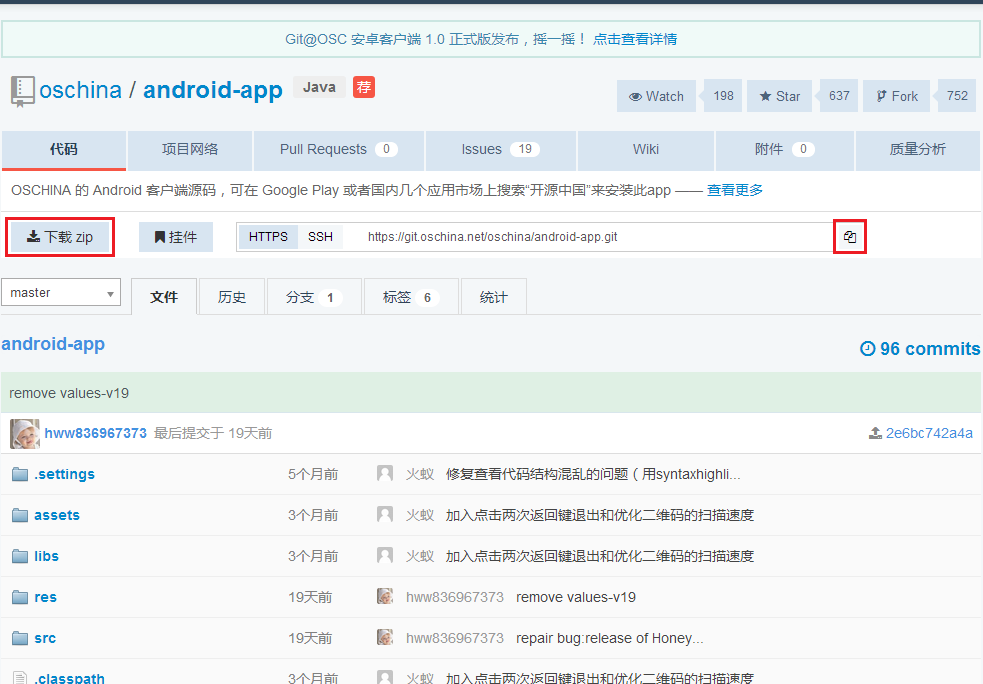
以下两种下载源代码方式的方式都可以:
- 可以直接点击”下载zip“
- 复制git仓库url: https://git.oschina.net/oschina/android-app.git,然后在Eclipse/ADT中打开Windows > Open Perspective > Other... > Get Resporsitory Exploring,clone源代码
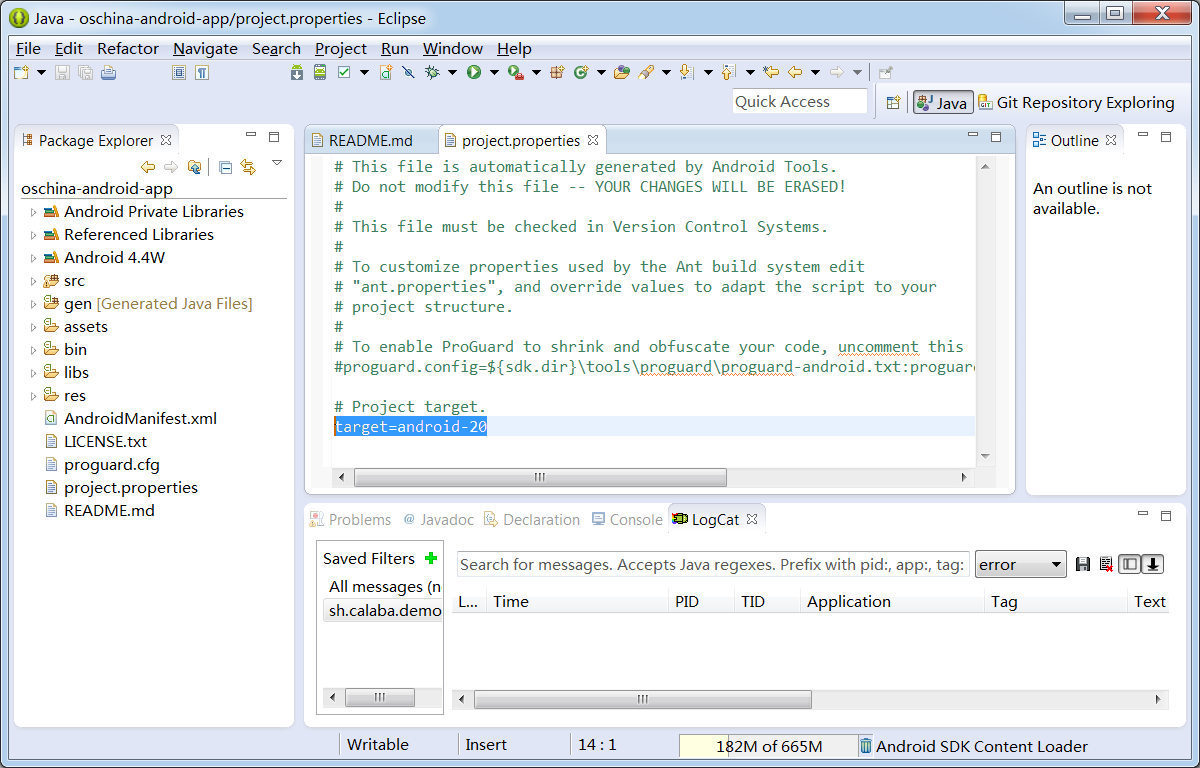
导入到ADT中后,源代码如下:
在adt-bundle-20140702中编译运行oschina/android-app的几个问题
问题1: adt-bundle-20140702的API版本是20,所以要修改project.properties:
target=android-15 改成 target=android-20
问题2: 源代码是使用了已作废的class: android.webkit.CacheManager
oschina-android-app/src/net/oschina/app/AppContext.java中使用了android.webkit.CacheManager
所以要把相关代码禁掉:
61行:
//import android.webkit.CacheManager;
1503到1509行:
//		File file = CacheManager.getCacheFileBaseDir();

//		if (file != null && file.exists() && file.isDirectory()) {

//		    for (File item : file.listFiles()) {

//		    	item.delete();

//		    }

//		    file.delete();

//		}
问题3:Run As Android Application报错:Installation error: INSTALL_FAILED_VERSION_DOWNGRADE
原因是:手机已经装了一个开源中国的1.7.7.0版本,而ADT要下载的是1.7.6.9版本,Android系统不允许安装一个比已安装版本更旧的版本,所以从手机上卸载已有的1.7.7.0版本就可以了。
ADT编译并上传oschina/android-app到手机
Run As Android Application > 选择连接到电脑Usb的手机 > OK

calabash测试步骤
先确认oschina/android-app声明了访问网络的权限
oschina/android-app项目的AndroidManifest.xml中应该如下行:
<uses-permission android:name="android.permission.INTERNET" />
在oschina/android-app根目录中创建calabash目录
在命令行下进入oschina/android-app的源代码根目录:
D:\git\oschina>cd android-app

D:\git\oschina\android-app>dir

 Volume Serial Number is 9823-AB19

 Directory of D:\git\oschina\android-app

2014/09/01  20:26    <DIR>          .

2014/09/01  20:26    <DIR>          ..

2014/09/01  20:21               783 .classpath

2014/09/01  20:21    <DIR>          .git

2014/09/01  20:21                64 .gitignore

2014/09/01  20:21               822 .project

2014/09/01  20:21    <DIR>          .settings

2014/09/01  20:21            10,829 AndroidManifest.xml

2014/09/01  20:21    <DIR>          assets

2014/09/01  20:42    <DIR>          bin

2014/09/01  20:26    <DIR>          gen

2014/09/01  20:21    <DIR>          libs

2014/09/01  20:21            18,092 LICENSE.txt

2014/09/01  20:21             1,424 proguard.cfg

2014/09/01  20:41               563 project.properties

2014/09/01  20:21             4,183 README.md

2014/09/01  20:21    <DIR>          res

2014/09/01  20:21    <DIR>          src

               8 File(s)         36,760 bytes

              10 Dir(s)  133,131,993,088 bytes free

D:\git\oschina\android-app>
创建calabash目录:
D:\git\oschina\android-app>mkdir calabash
创建cucumber skeleton:
D:\git\oschina\android-app>cd calabash

D:\git\oschina\android-app\calabash>calabash-android gen

----------Question----------

I'm about to create a subdirectory called features.

features will contain all your calabash tests.

Please hit return to confirm that's what you want.

---------------------------

----------Info----------

features subdirectory created.

---------------------------

D:\git\oschina\android-app\calabash>dir

 Volume Serial Number is 9823-AB19

 Directory of D:\git\oschina\android-app\calabash

2014/09/01  21:54    <DIR>          .

2014/09/01  21:54    <DIR>          ..

2014/09/01  21:54    <DIR>          features

               0 File(s)              0 bytes

               3 Dir(s)  133,131,988,992 bytes free

D:\git\oschina\android-app\calabash>
编辑 D:\git\oschina\android-app\calabash\features\my_first.feature:
初始内容:
Feature: Login feature

  Scenario: As a valid user I can log into my app

    When I press "Login"

    Then I see "Welcome to coolest app ever"
第一行Feature: XX,第二行 Scenario: YY是给人读的,所以随便填写什么中文英文内容都可以
关键内容是第三行When I press ..和第四行Then I see .., 这是给Cucumber软件识别的。
When后面跟动作语句,Then后面跟内容检查语句
先尝试如下改动:
Feature: 启动开源中国

  Scenario: 启动应用后,能看到软件版本更新信息

    Then I see "软件版本更新"
用 %windir%\system32\cmd.exe /k chcp65001&&ansicon 启动ansicon,
运行calabash-andriod run
D:\git\oschina\android-app\calabash>calabash-android run D:\git\oschina\android-app\bin\oschina-android-app.apk
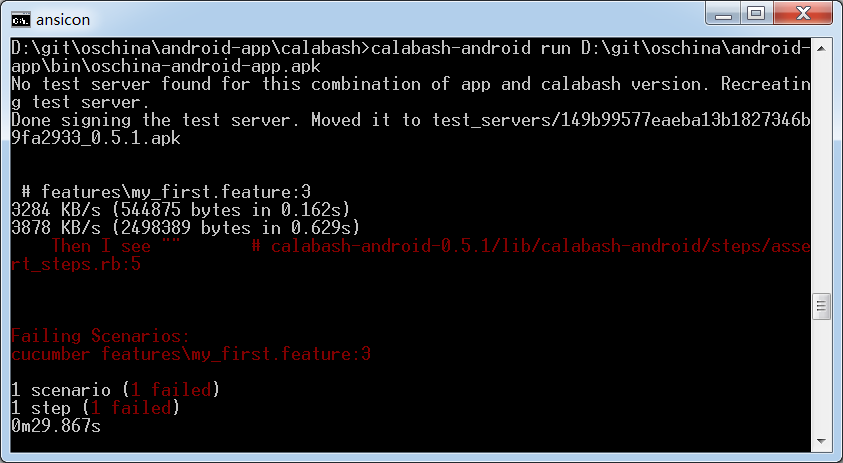
测试失败,原因是Then的默认等待时间只有2秒,开源中国app的启动时间比较长。
ansicon中未能显示中文:"软件版本更新",这个后面补充中有描述。
按照 https://github.com/calabash/calabash-android/blob/master/ruby-gem/lib/calabash-android/canned_steps.md的指导,可以指定等待几秒:
Feature: 启动开源中国

  Scenario: 启动应用后,能看到软件版本更新信息

  	Then I wait for 10 seconds

	Then I see "软件版本更新"

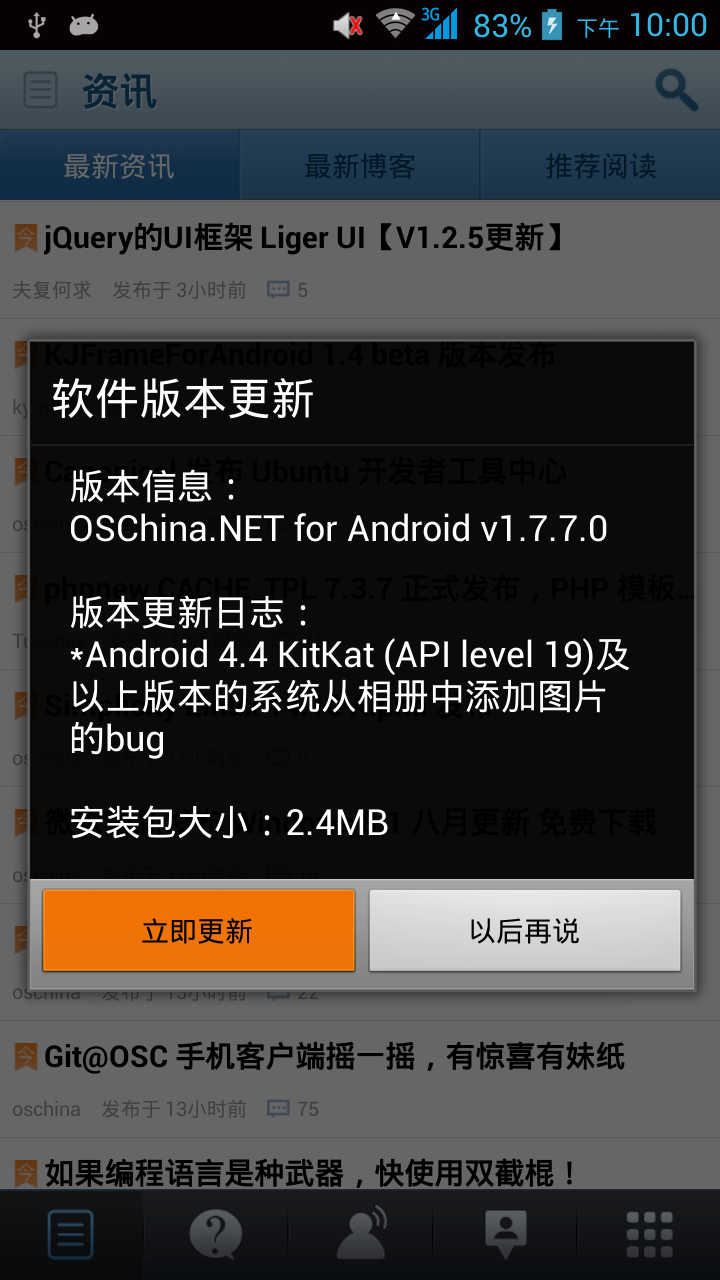
手机上看到的开源中国启动后画面:
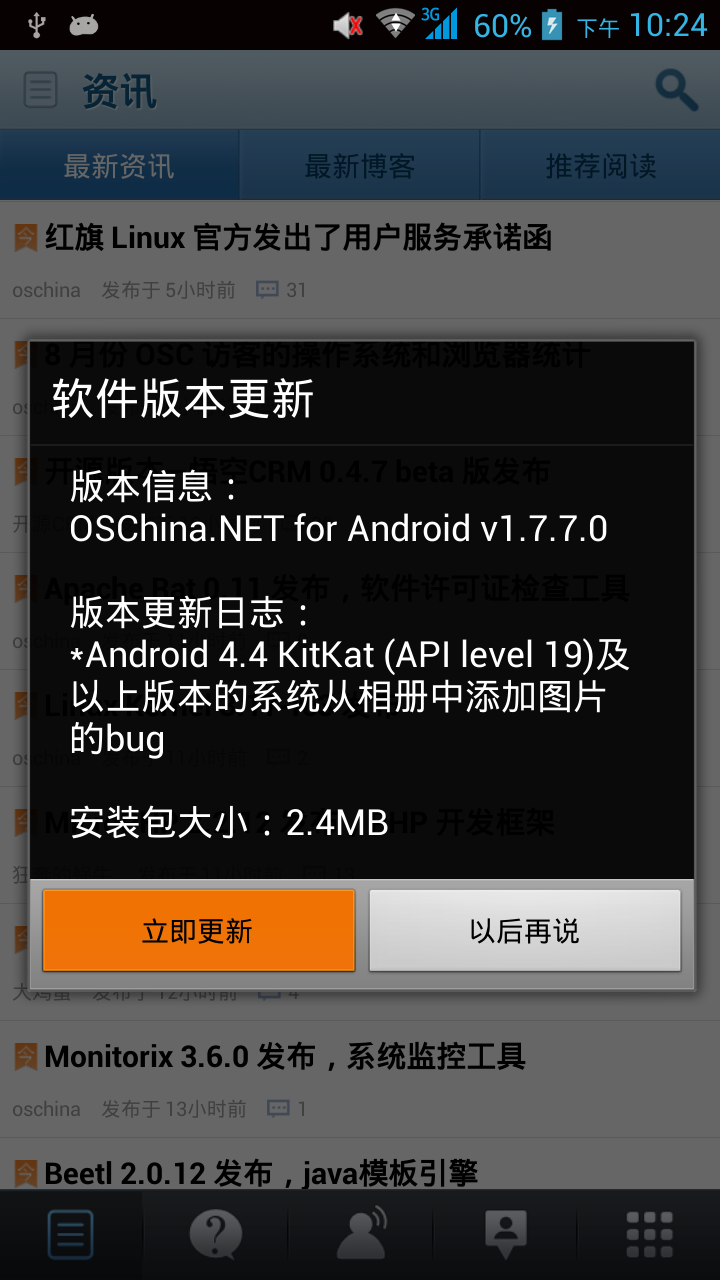
按钮“立即更新”为什么是红色的?以后再解决。
到此步为止,calabash测试开源中国Android客户端的环境已经建立完毕,接下去同学们就可以欢快的尝试canned_steps.md里的各个预定义步骤了。
我也会继续完成这个测试用例,大家一起共同进步!
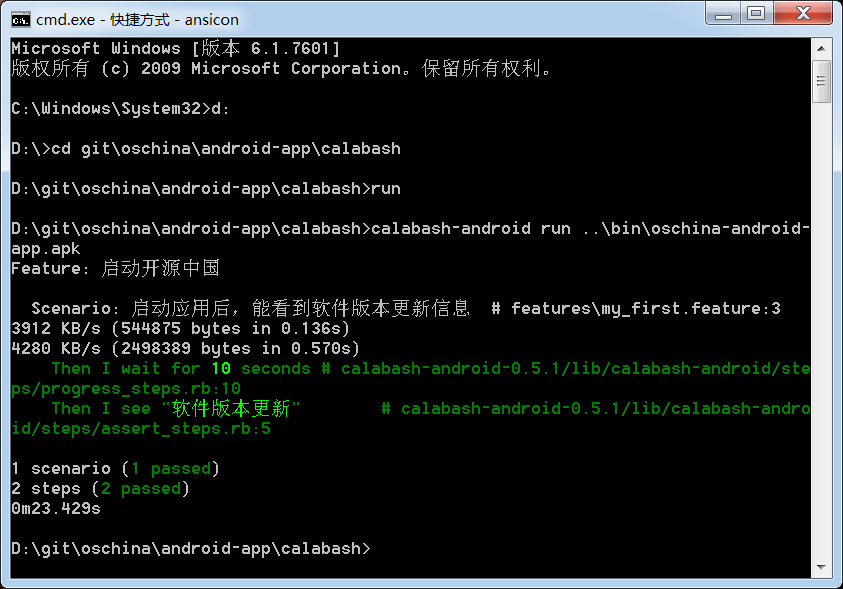
补充解决问题:calabash测试输出中不能显示中文
解决方法:
ansicon启动时,不要用chcp 65001设置为UTF-8编码,
用 %windir%\system32\cmd.exe /k ansicon 启动ansicon,然后运行calabash:
试用calabash预定义指令
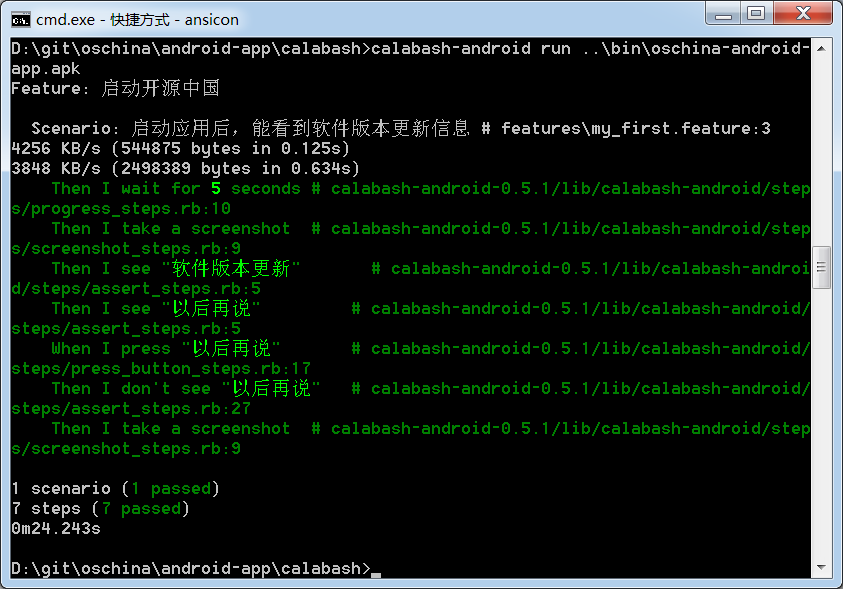
试用 press, don't see, screenshot
运行前,先把D:\git\oschina\android-app\calabash下的screenshot_*.png都删了,避免搞不清楚旧图和新图。
不解释,看脚本和截图:
Feature: 启动开源中国

  Scenario: 启动应用后,能看到软件版本更新信息

    Then I wait for 5 seconds

    Then I take a screenshot

    Then I see "软件版本更新"

    Then I see "以后再说"

    When I press "以后再说"

    Then I don't see "以后再说"

    Then I take a screenshot
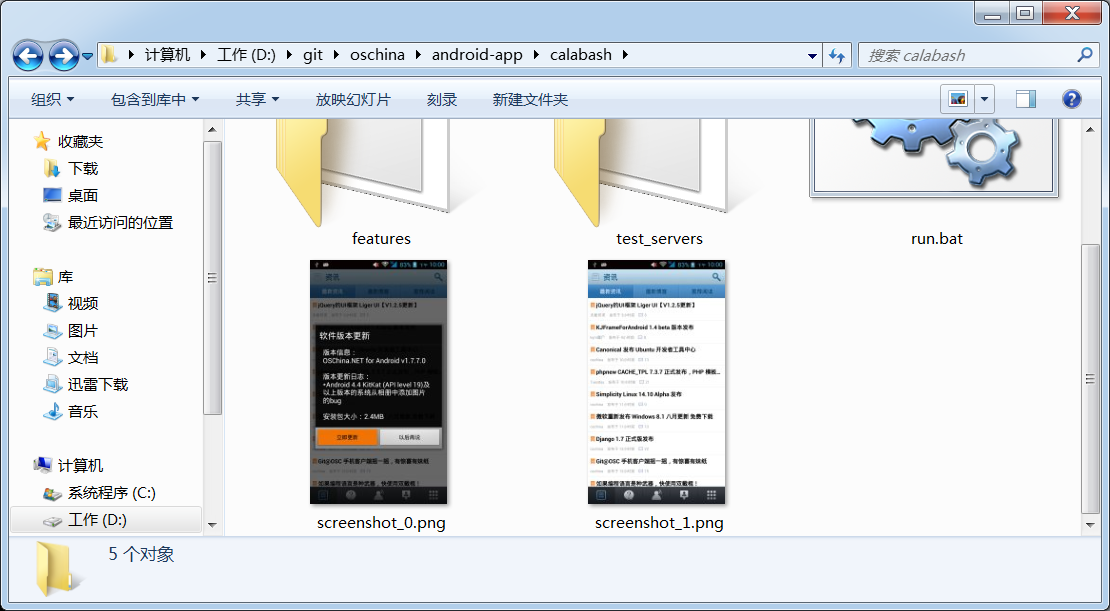
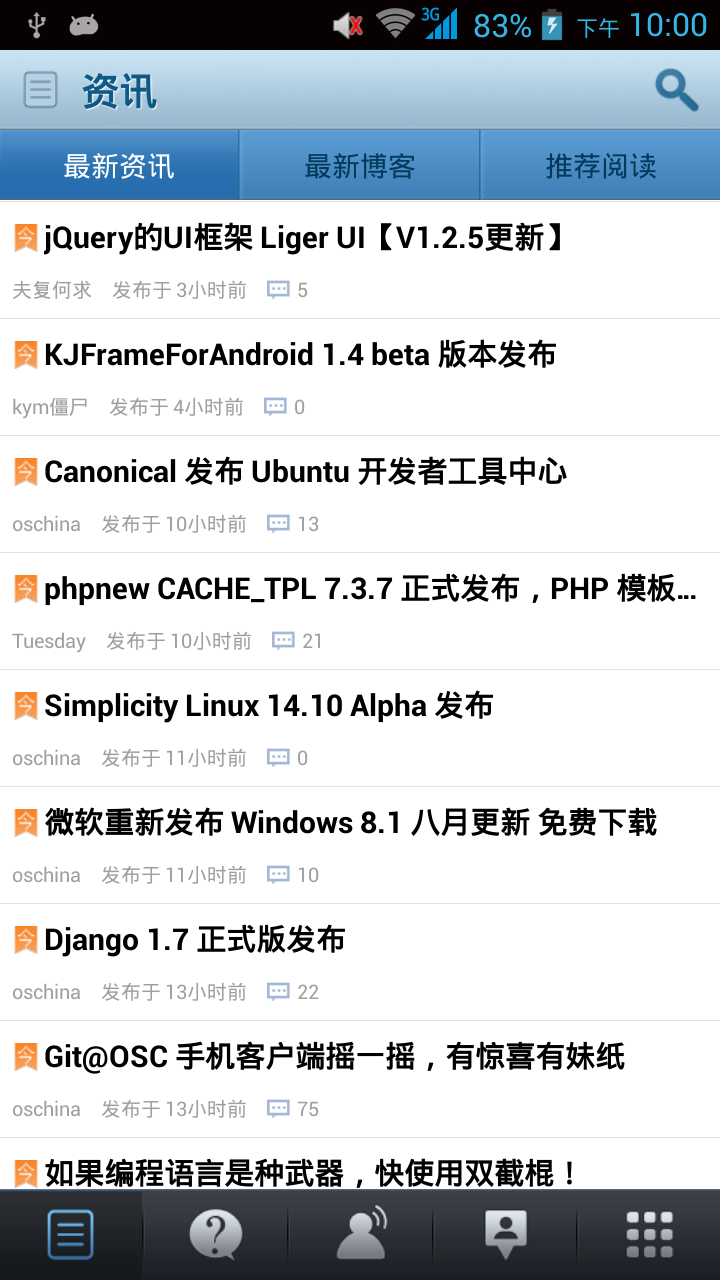
calabash脚本生成的手机截图:
到系统设置中启用左右滑动,为了后面测试手势指令
Feature: 启动开源中国

  Scenario: 启动应用后,能看到软件版本更新信息

    Then I wait for 5 seconds

    Then I see "软件版本更新"

    Then I see "以后再说"

    Then I take a screenshot

    When I press "以后再说"

    Then I don't see "以后再说"

    Then I see "最新资讯"

    Then I take a screenshot

    Then I press the menu key

    Then I see "系统设置"

    Then I take a screenshot

    When I press "系统设置"

    Then I see "已关闭左右滑动"

    Then I take a screenshot

    When I press "已关闭左右滑动"

    Then I see "已启用左右滑动"

    Then I take a screenshot

    Then I go back

    Then I see "最新资讯"

    Then I take a screenshot

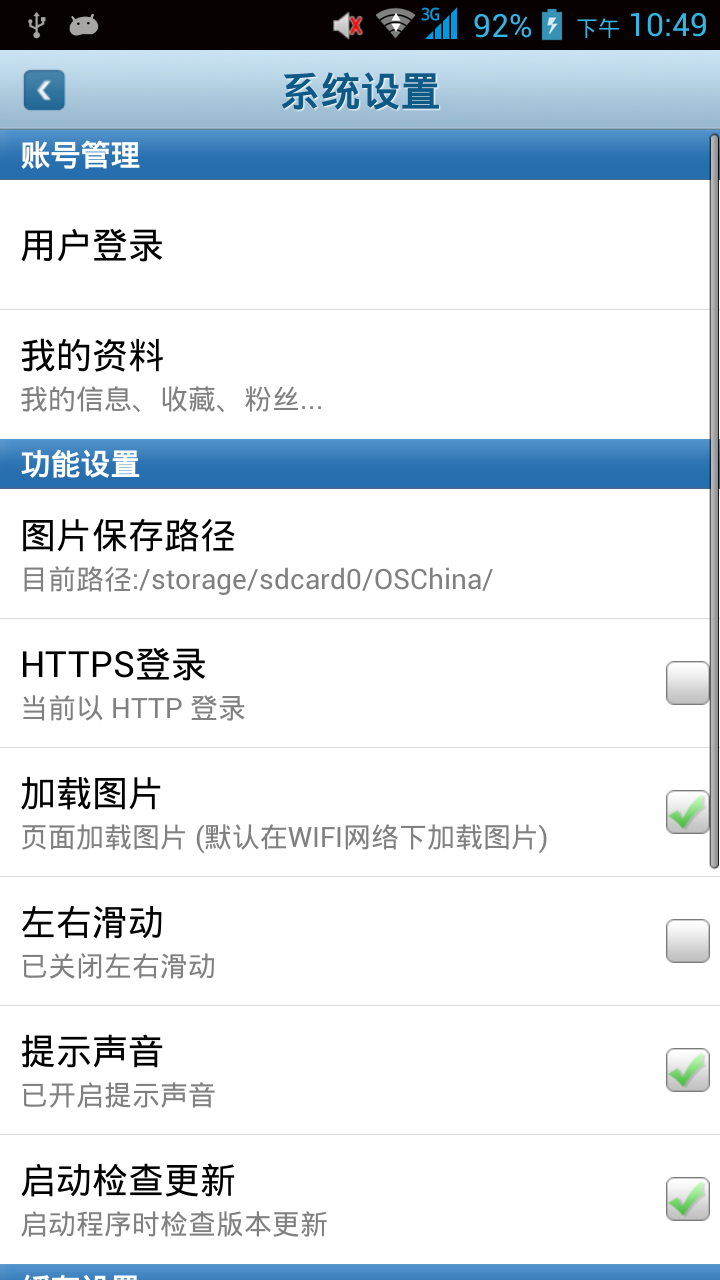
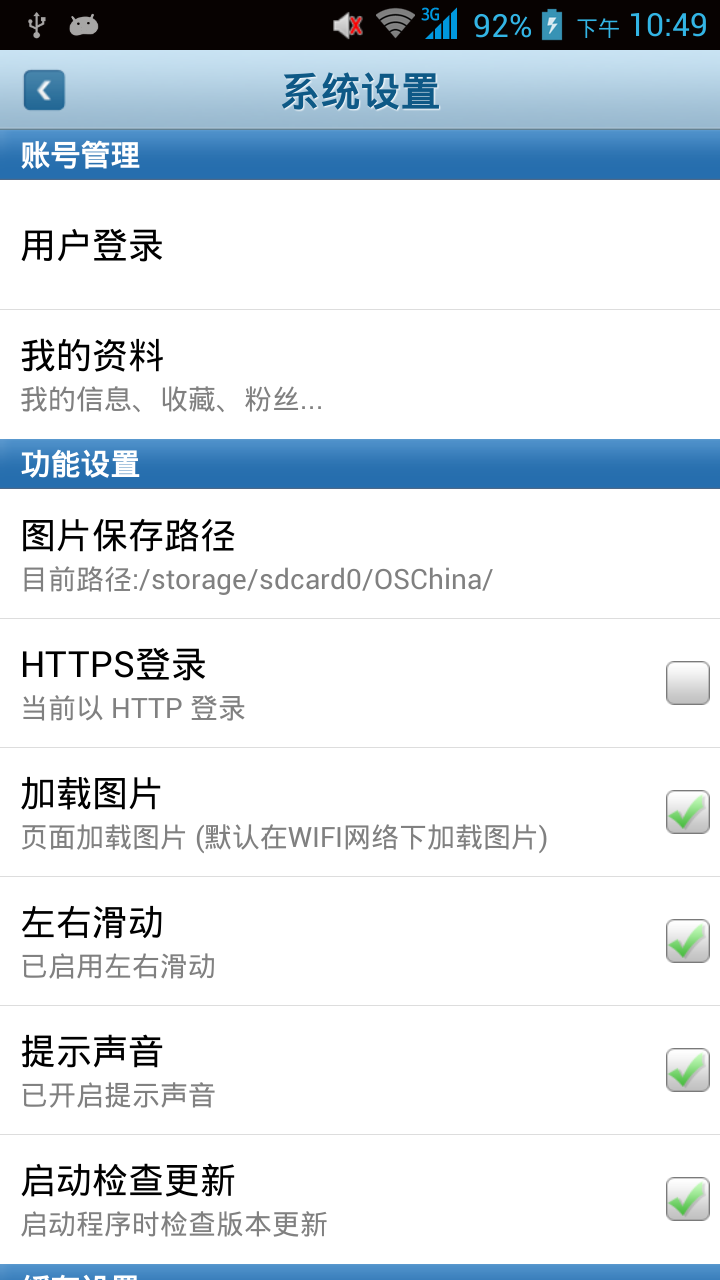
手势:swipe right = 翻看右边的内容
这个right比较难理解,是不是解释为“翻看右边的内容”比较容易记住。
Feature: 启动开源中国
...
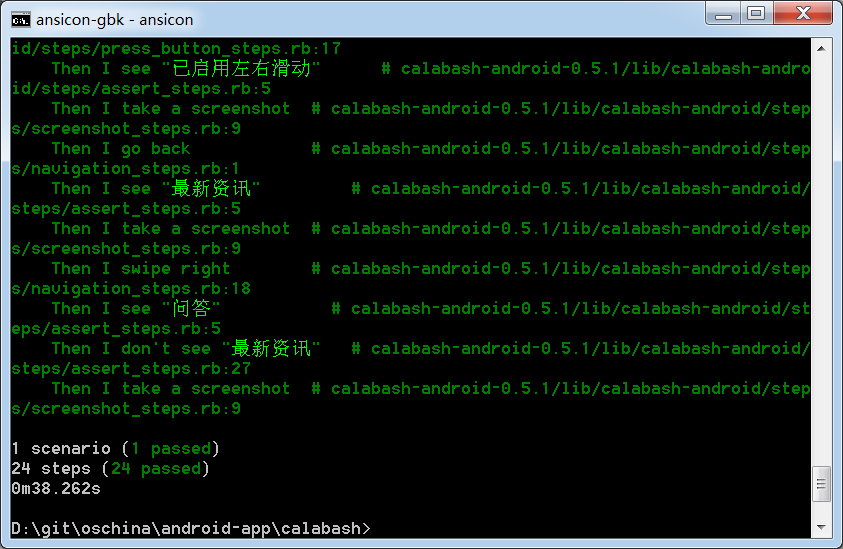
Then I swipe right
Then I see "问答"
Then I don't see "最新资讯"
Then I take a screenshot

scroll up 运行失败
Then I scroll up
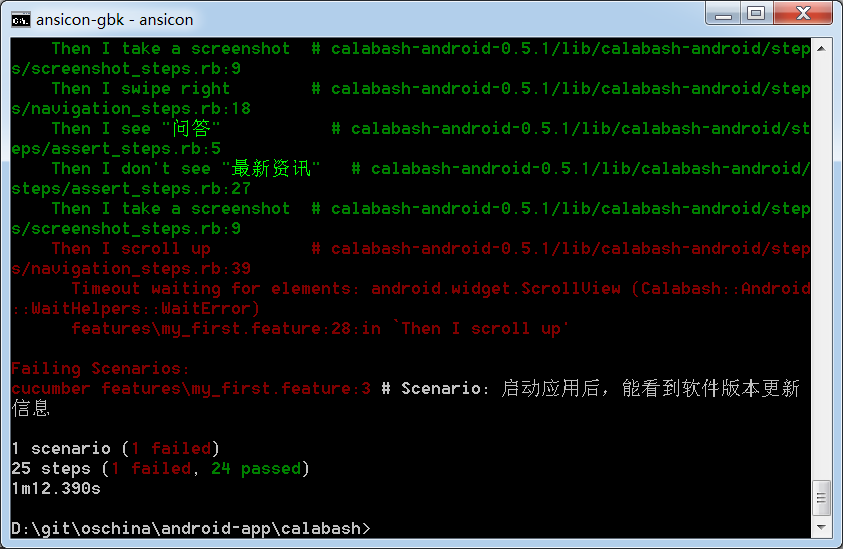
找不到android.widget.ScrollView元素,看样子oschina的可滚动区域不是用标准控件实现的。
通过id找到控件并做相应操作
接下去我要搜索包含"calabash"的博客,
首先要点击首页右上角的放大镜图标:

这个图标上没有text可以识别,所以必须到首页布局文件mail.xml中找到搜索图标的id,
ADT中打开文件:D:\git\oschina\android-app\res\layout\main.xml
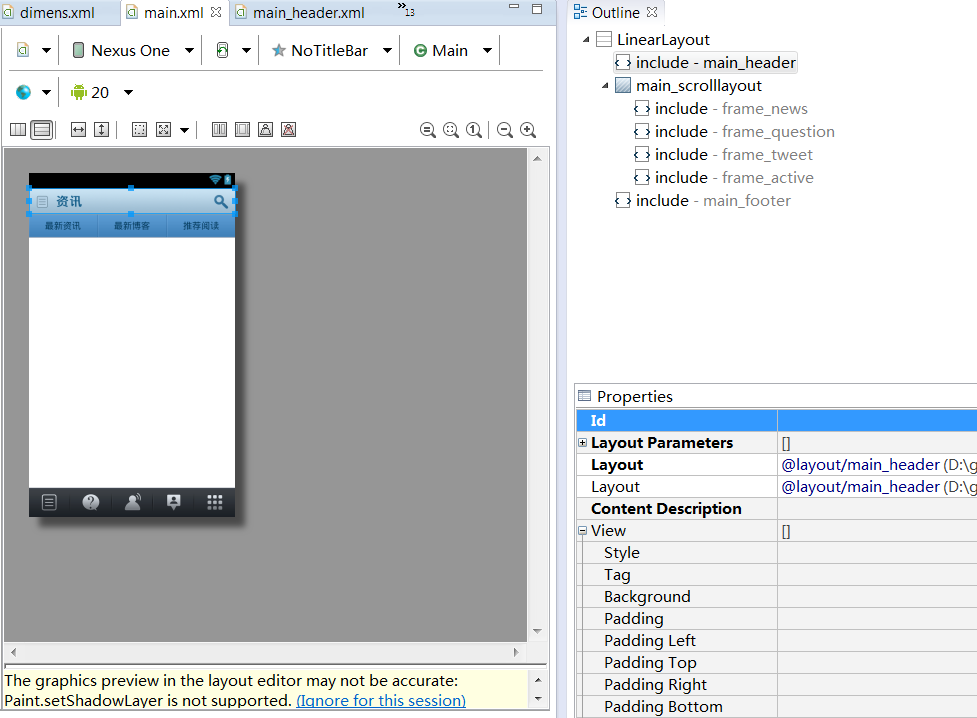
点击搜索图标,右上角的Outline指示搜索图标在main_header.xml中定义。
双击 include-main_header,ADT打开main_header.xml:
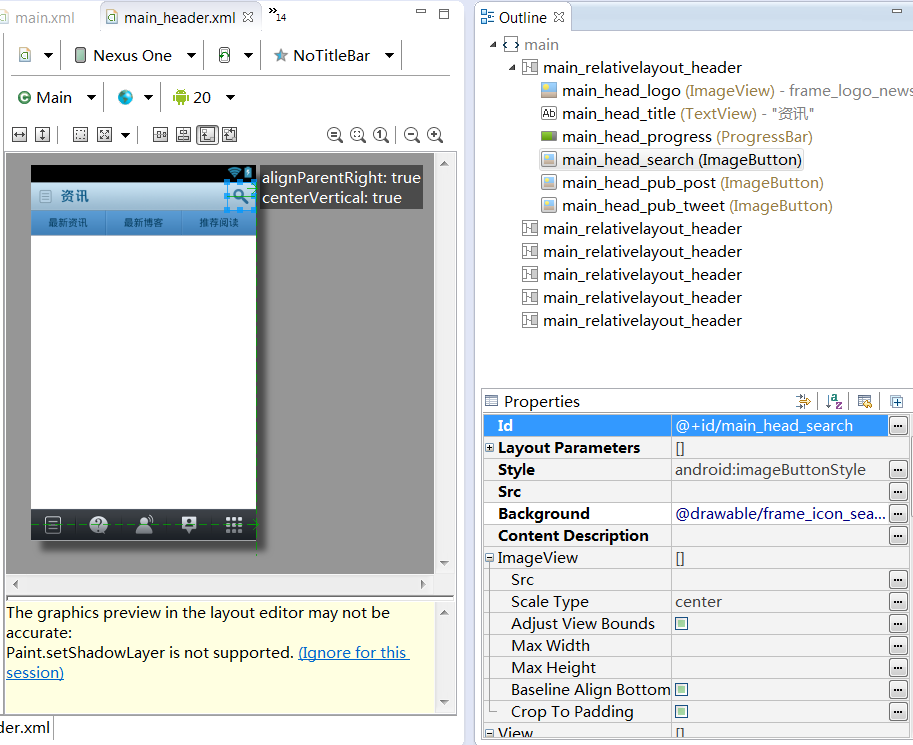
点击搜索图标,右边的Outline和Properties区都指示搜索图标的id是main_head_search,控件类型是:ImageButton
接下去在calabash中可以用id点击搜索图标了:
  Feature: 搜索包含calabash的博客

    Scenario: 启动应用后,能搜到包含calabash的博客

      Then I wait for 5 seconds

      Then I see "软件版本更新"

      Then I see "以后再说"

      Then I take a screenshot

      When I press "以后再说"

      Then I don't see "以后再说"

      Then I see "最新资讯"

      Then I take a screenshot

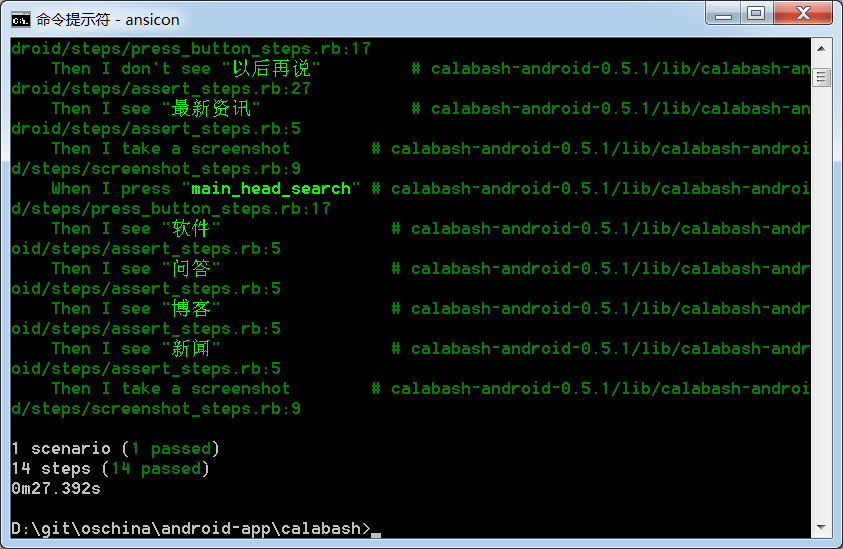
      When I press view with id "main_head_search"

      Then I see "软件"

      Then I see "问答"

      Then I see "博客"

      Then I see "新闻"

      Then I take a screenshot
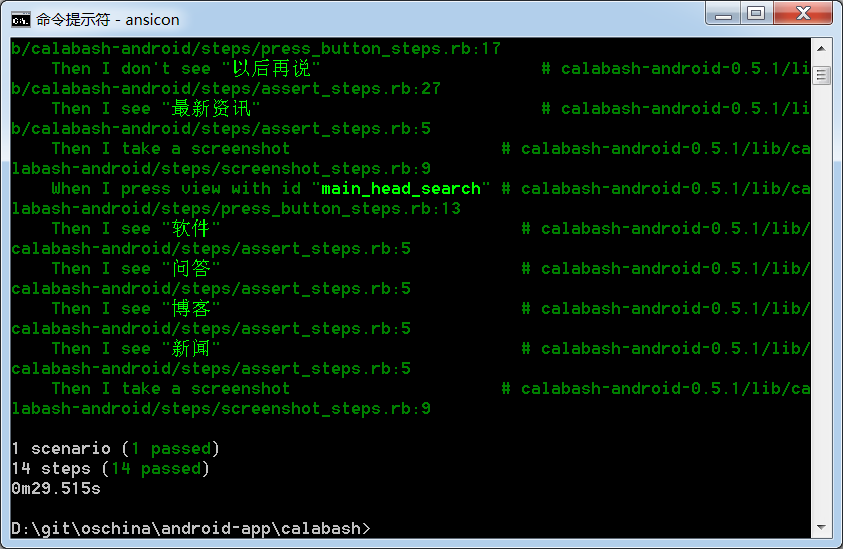

我尝试了把I press view with id "main_head_search" 改成 I press "main_head_search",也能找到该搜索图标。
说明:I press "test/id" 是万能语法,同时支持文本和id定位控件。那我就不用再记住复杂语句I press view with id "main_head_search"了。
输入文本并按回车键搜索
  Feature: 搜索包含calabash的博客

      ...

      When I enter "calabash测试" into input field number 1

      Then I take a screenshot

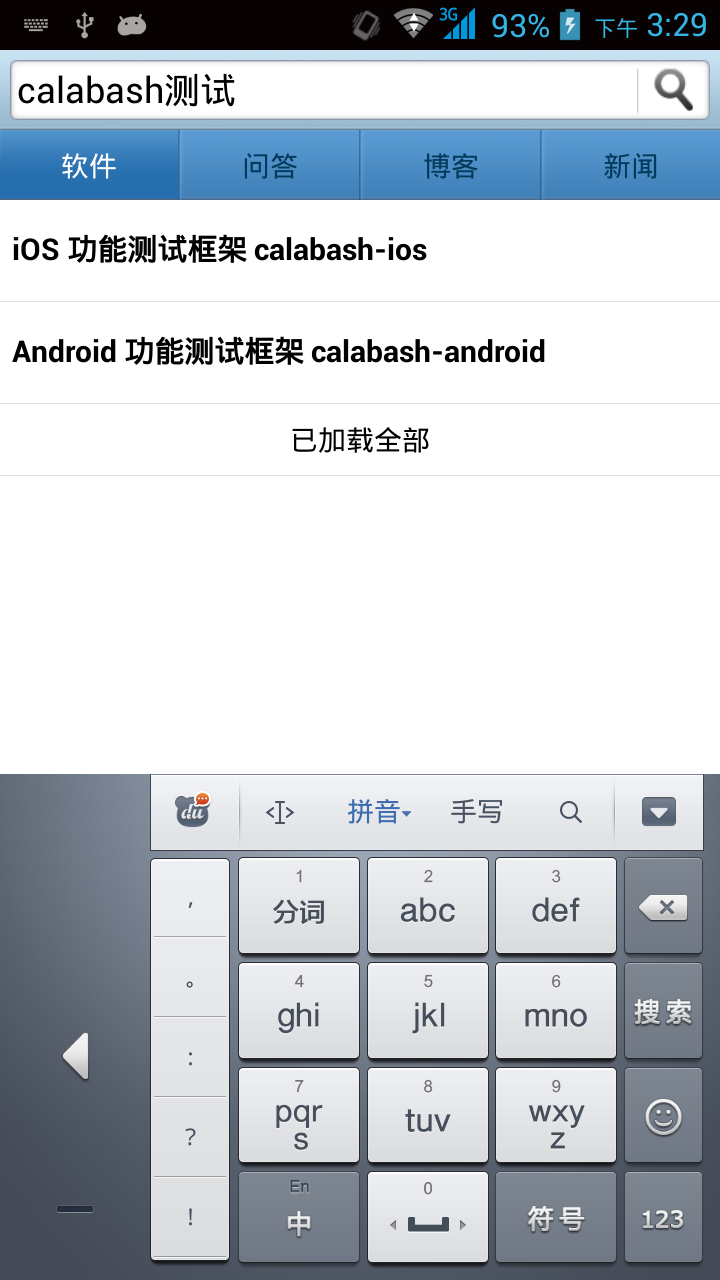
      When I press the enter button

      Then I see "已加载全部"

      Then I take a screenshot
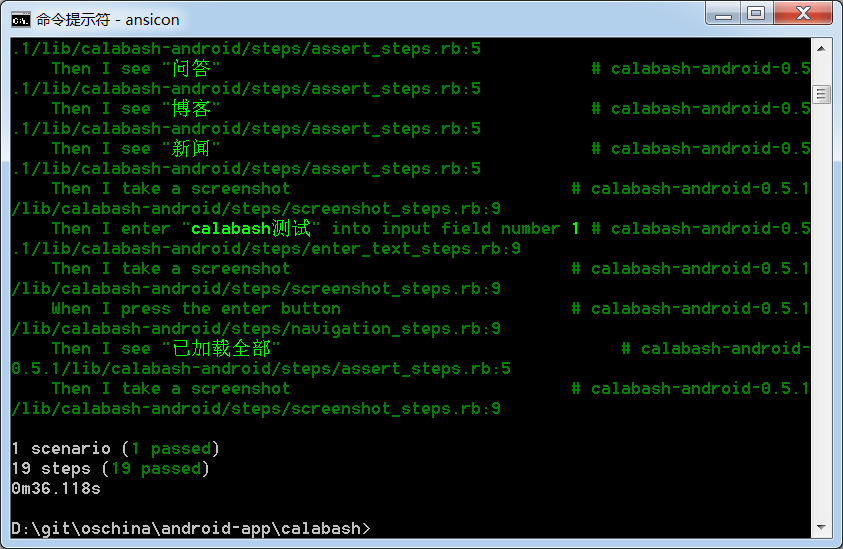
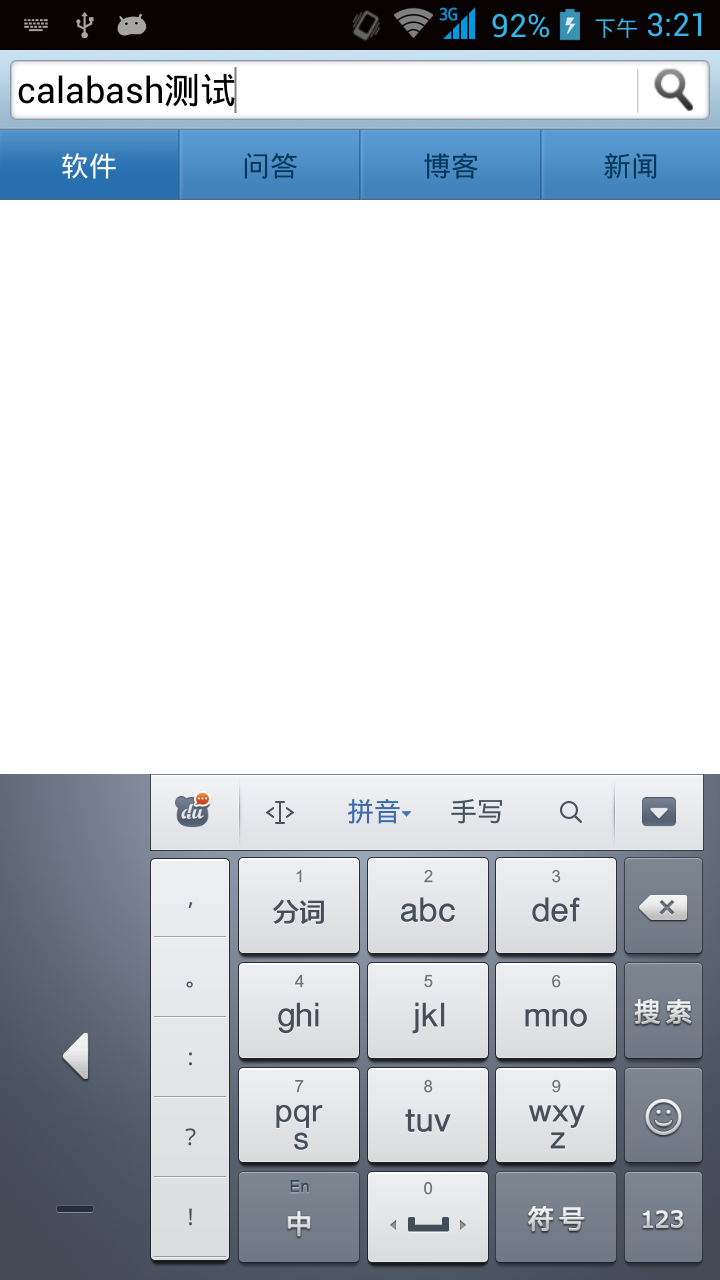
这里的enter button 就是软键盘上的"搜索"键。
注意: 用index查找控件,是从1开始的,而不是像C/Java数组的元素下标那样从0开始。
为了验证index从1开始,下面再尝试登录
  Feature: 登录开源中国

    Scenario: 启动应用后,输入账号和密码能登录开源中国

      Then I wait for 5 seconds

      Then I see "软件版本更新"

      Then I see "以后再说"

      Then I take a screenshot

      When I press "以后再说"

      Then I don't see "以后再说"

      Then I see "最新资讯"

      Then I take a screenshot

      Then I press the menu key

      Then I see "用户登录"

      Then I take a screenshot

      When I press "用户登录"

      Then I see "记住我的登录信息"

      Then I take a screenshot

      When I enter "username" into input field number 1

      And I enter "123456" into input field number 2

      And I press button number 2

      Then I see "登录失败用户名或口令错"

      Then I take a screenshot
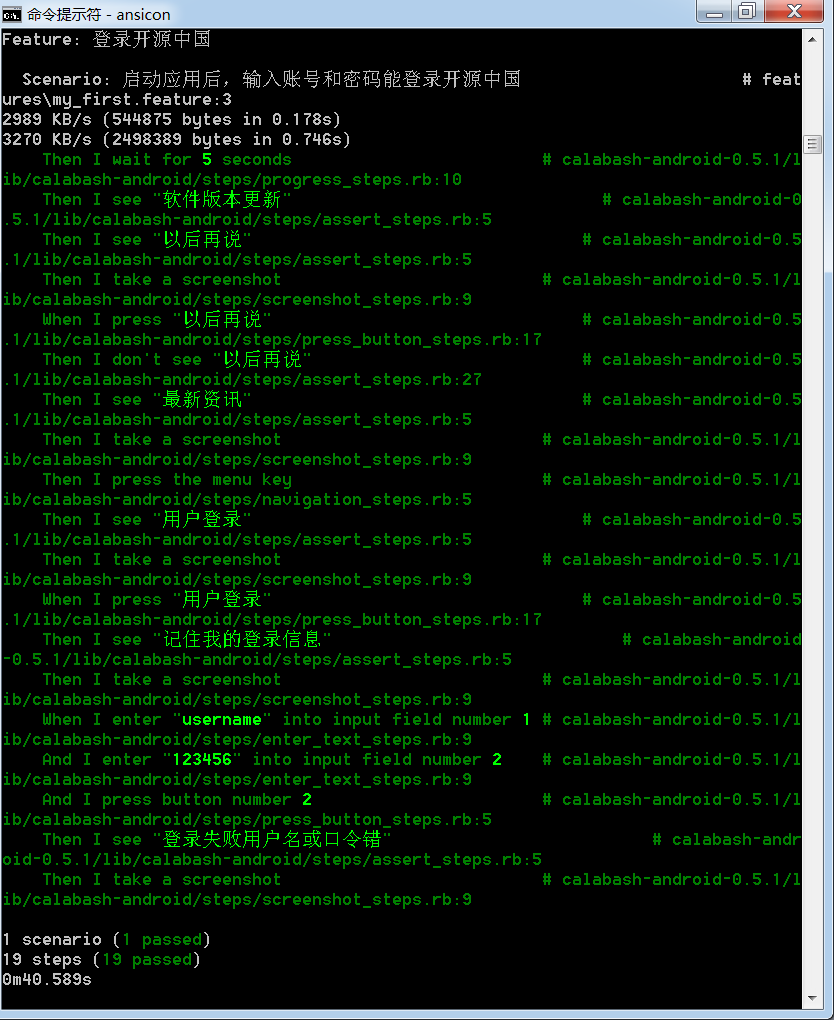
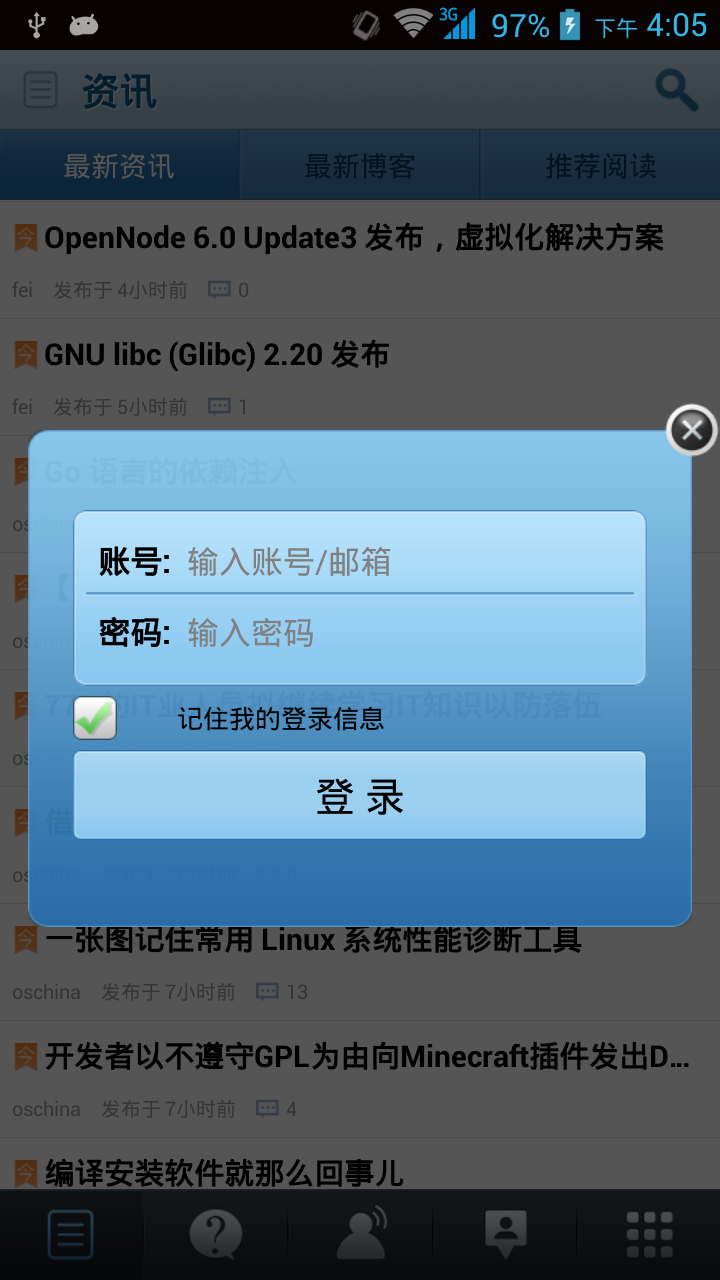

说明:
- 登录窗口中,有两个输入框:"账号"和"密码",index分别是1和2
- 登录窗口中,有两个button:"记住我的登录信息"和"登录",index分别是1和2,checkbox也是button,奇怪吧?
- 尝试
I press "登录"定位登录按钮失败
calabash测试集管理
一个Feature下包含多个Scenario
把 D:\git\oschina\android-app\calabash\features\first.feature 改名为 startup.feature,内容如下:
Feature: 启动开源中国

  Scenario: 首次启动应用后,启用左右滑动

    When I wait up to 5 seconds to see "软件版本更新"

    Then I see "以后再说"

    Then I take a screenshot

    When I press "以后再说"

    Then I don't see "以后再说"

    Then I see "最新资讯"

    Then I take a screenshot

    Then I press the menu key

    Then I see "系统设置"

    Then I take a screenshot

    When I press "系统设置"

    Then I see "已关闭左右滑动"

    And  I see "启动检查更新"

    Then I take a screenshot

    When I press "已关闭左右滑动"

    Then I see "已启用左右滑动"

    When I press "启动检查更新"

    Then I take a screenshot

  Scenario: 第二次启动应用后,往右滑动到"问答"

    When I wait up to 5 seconds to see "最新资讯"

    When I swipe right

    Then I see "问答"

    Then I take a screenshot
本Feature有两个Scenario:
- 第一个在系统设置中启用左右滑动,关闭启动时检查更新
- 第二个往右滑动到“问答”页
需要说明的是:
- 每个Feature在运行前都会退出app,卸载app,重装app,启动app
- 每个Scenario在运行前都会退出app,启动app
I see "启动检查更新"只有在1280x720分辨率的手机上才能看到;854x480的手机上看不到,会运行错误。
一次运行多个Feature文件
按照 http://www.cnblogs.com/puresoul/archive/2011/12/28/2305160.html 的《Cucumber入门之Gherkin》介绍,
一旦我们写好了一个feature文件,我们就可以使用 cucumber命令来运行它。如果cucumber命令后不跟任何东西的话,那么它会执行所有的.feature文件。如果我们只想运行某一个.feature文件,我们可以使用命令cucumber features\feature_name
我现在在目录D:\git\oschina\android-app\calabash\features下有两个feature文件:
D:\git\oschina\android-app\calabash>dir features\*.feature

 驱动器 D 中的卷是 工作

 卷的序列号是 9823-AB19

 D:\git\oschina\android-app\calabash\features 的目录

2014/09/14  21:17               775 login.feature

2014/09/15  21:20               932 startup.feature

               2 个文件          1,707 字节

               0 个目录 131,744,169,984 可用字节
login.feature 和 startup.feature,feature的执行顺序无关紧要,因为每个feature运行时都要重新安装一遍app。
D:\git\oschina\android-app\calabash>calabash-android run ..\bin\oschina-android-app.apk
将执行这两个feature文件。
如果只想执行 startup.feature 文件,要在calabash-android命令后面添加 features\startup.feature :
D:\git\oschina\android-app\calabash>calabash-android run ..\bin\oschina-android-app.apk features\startup.feature
中文Win7环境特别说明:
如果feature文件名是中文的,比如:启动.feature,那么在cmd 中 chcp 65001 后,运行命令:
D:\git\oschina\android-app\calabash>calabash-android run ..\bin\oschina-android-app.apk features\启动.feature
将报错:
invalid byte sequence in UTF-8 (ArgumentError)
中文Win7下中文编码统计:
- 文件名:GBK
- feature文件内容:UTF-8
- cmd:首次测试app或换手机后,UTF-8,feature中的中文显示为空白
- cmd:第二次测试app,GBK,feature中的中文能正确显示
Ubuntu环境下,feature文件名包含中文没有任何问题。
我们看一下calabash-android的命令参数格式:
D:\git\oschina\android-app\calabash>calabash-android

  Usage: calabash-android <command-name> [parameters] [options]

  <command-name> can be one of

    help

      prints more detailed help information.

    gen

      generate a features folder structure.

    setup

      sets up a non-default keystore to use with this test project.

    resign <apk>

      resigns the app with the currently configured keystore.

    build <apk>

      builds the test server that will be used when testing the app.

    run <apk>

      runs Cucumber in the current folder with the enviroment needed.

    version

      prints the gem version

  <options> can be

    -v, --verbose

      Turns on verbose logging
我猜想其中的[parameters]就是指cucumber参数
扩展calabash预定义指令
从环境变量读取测试数据
有一个现实的需求:
如果有一个oschina测试帐号要在多个Feature中使用,
或者我的calabash测试脚本共享给其他人后,他的oschina测试帐号要换成自己的。
如果直接修改Feature文件中的账号和密码,可能要修改多个地方。
所以,设想是否能扩展calabash预定义指令:
Then /^I enter "([^\"]*)" into input field number (\d+)$/ do |text, index|
扩展为支持从环境变量读取输入文本:
Then /^I enter \$([^\$]*) into input field number (\d+)$/ do |text_ev, index|
从文件 D:\ruby-1.9.3-p545-i386-mingw32\lib\ruby\gems\1.9.1\gems\calabash-android-0.5.1\lib\calabash-android\steps\enter_text_steps.rb 中拷贝:
Then /^I enter "([^\"]*)" into input field number (\d+)$/ do |text, index|

  enter_text("android.widget.EditText index:#{index.to_i-1}", text)

end
到 D:\git\oschina\android-app\calabash\features\step_definitions\calabash_steps.rb 中,改动后,如下:
require 'calabash-android/calabash_steps'

Then /^I enter %([^%]*)% into input field number (\d+)$/ do |text_ev, index|

  text = ENV[text_ev]

  enter_text("android.widget.EditText index:#{index.to_i-1}", text)

end

Then /^I enter \$([^\$]*) into input field number (\d+)$/ do |text_ev, index|

  text = ENV[text_ev]

  enter_text("android.widget.EditText index:#{index.to_i-1}", text)

end
这里环境变量支持两种格式:
%test_ev%Windows cmd的格式$test_evLinux Bash的格式
然后运行calabash前,设置环境变量:
D:\git\oschina\android-app\calabash>set td_username_1=username1

D:\git\oschina\android-app\calabash>set td_password_1=123456
上述两条命令也可以放到 testdata.bat 文件中,然后执行testdata.bat:
set td_username_1=username1

set td_password_1=123456
修改 login.feature :
Feature: 登录开源中国

  Scenario: 启动应用后,输入错误的账号和密码不能登录

    Then I wait for 5 seconds

    Then I see "软件版本更新"

    Then I see "以后再说"

    Then I take a screenshot

    When I press "以后再说"

    Then I don't see "以后再说"

    Then I see "最新资讯"

    Then I take a screenshot

    Then I press the menu key

    Then I see "用户登录"

    Then I take a screenshot

    When I press "用户登录"

    Then I see "记住我的登录信息"

    Then I take a screenshot

    When I enter %td_username_1% into input field number 1

    And I enter $td_password_1 into input field number 2

    And I press button number 2

    Then I see "登录失败用户名或口令错"

    Then I take a screenshot
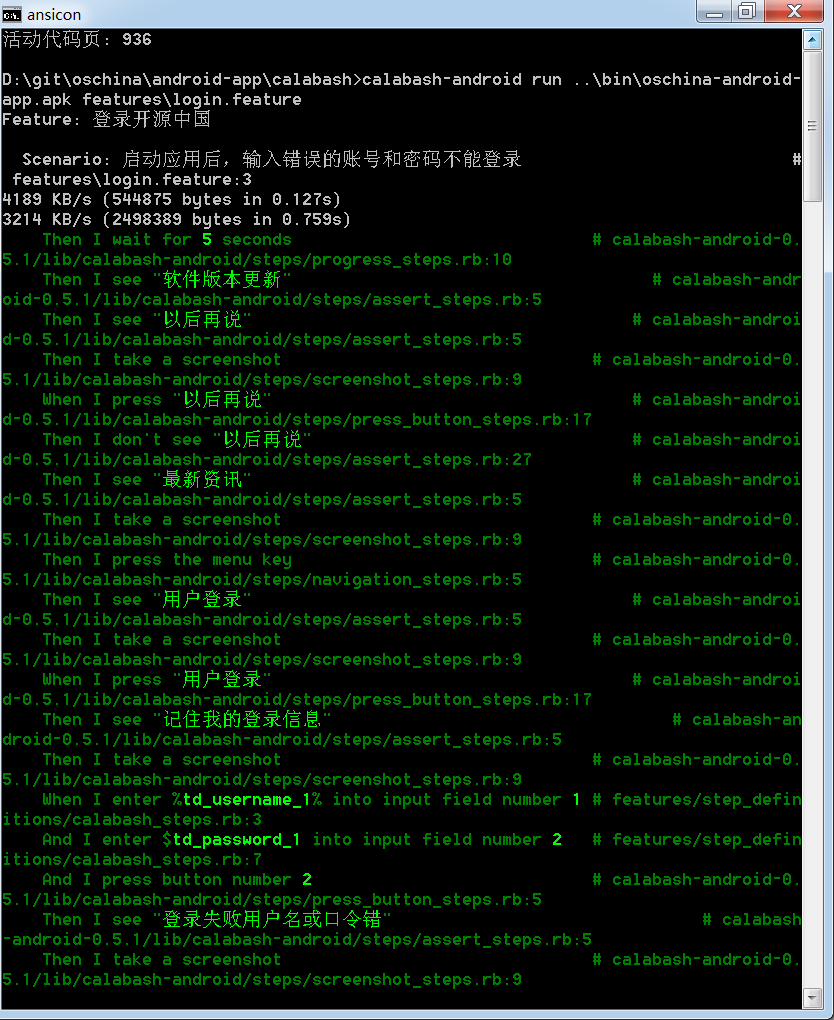
运行calabash:
D:\git\oschina\android-app\calabash>calabash-android run ..\bin\oschina-android-app.apk features\login.feature
为了支持跨平台测试数据维护,可以把环境变量设置放入ruby脚本 testdata.rb 中:
ENV["td_username_1"]="username1"

ENV["td_password_1"]="123456"
在irb中运行calabash:
D:\git\oschina\android-app\calabash>irb

irb(main):001:0> require './testdata.rb'

=> true

irb(main):002:0> ENV["td_username_1"]

=> "username1"

irb(main):003:0>exec('calabash-android run ..\bin\oschina-android-app.apk features\login.feature')
Ruby设置和读取环境变量真是太方便了,执行系统命令也很方便,不需要到处import库,值得深入掌握。
Linux补充:
Linux下可以把测试数据写入testdata.bashrc 中:
export td_username_1="username1"

export td_password_1="123456"
enter_text_steps.rb 文件位置:
/var/lib/gems/1.9.1/gems/calabash-android-0.5.2/lib/calabash-android/steps/enter_text_steps.rb
ruby控制台下使用query查询app当前页面的控件
参考文档:
https://github.com/calabash/calabash-android/wiki/05-Query-Syntax
http://blog.lesspainful.com/2012/12/18/Android-Query/
按照上述文档很容易查询控件的id, 比如启动开源中国后的首页,查询结果:
D:\git\oschina\android-app\calabash>calabash-android console ..\bin\oschina-android-app.apk

irb(main):001:0> reinstall_apps

5168 KB/s (2498389 bytes in 0.472s)

3800 KB/s (544875 bytes in 0.140s)

nil

irb(main):002:0> start_test_server_in_background

nil
启动后首页弹出升级提示对话框:
irb(main):003:0> query('button')
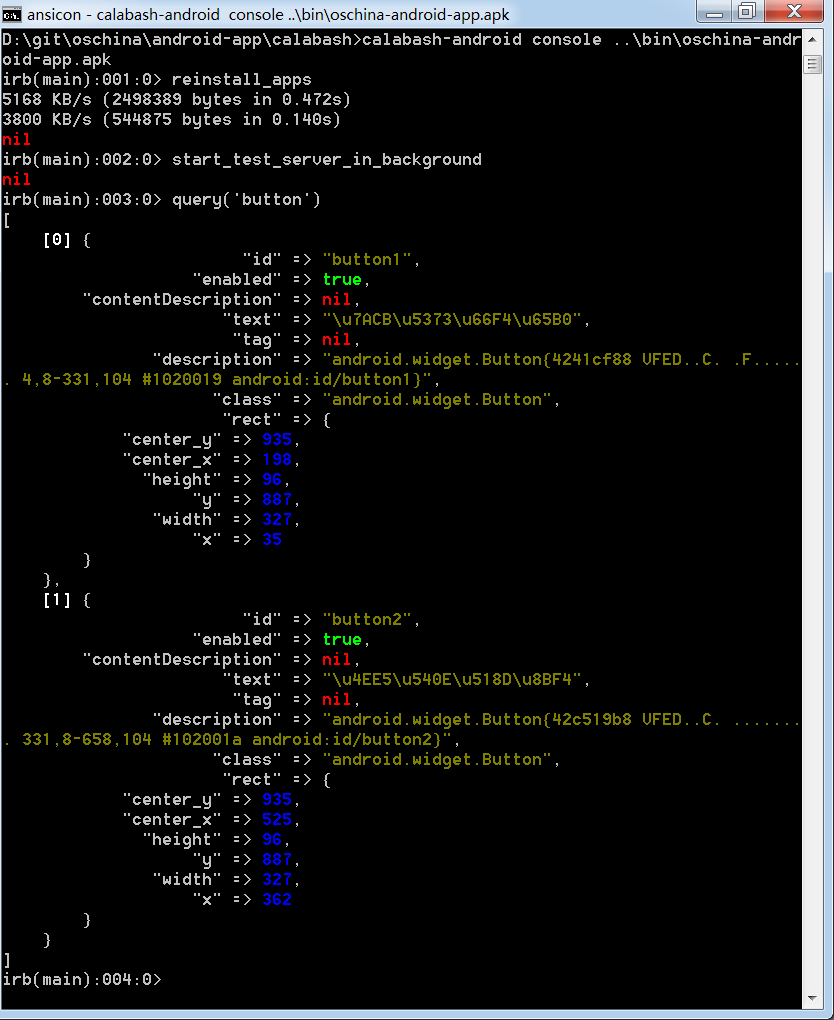
看出问题没有,中文编码问题又来捣乱了:
"text" => "\u7ACB\u5373\u66F4\u65B0", 的中文是"立即更新",这里只能看的是4个中文字
"text" => "\u4EE5\u540E\u518D\u8BF4", 的中文是"以后再说"
又要说人家Ubuntu了,Ubuntu下query结果的中文能直接显示。
在console下还可以点击按钮,
https://github.com/calabash/calabash-android/blob/master/ruby-gem/lib/calabash-android/steps/press_button_steps.rb 中定义了按button编号点击的指令 :
Then /^I press button number (\d+)$/ do |index|

  tap_when_element_exists("android.widget.Button index:#{index.to_i-1}")

end
要选择按钮"以后再说",把 #{index.to_i-1} 代成1, 在console下输入:
tap_when_element_exists("android.widget.Button index:1")
然后按钮"以后再说"被点击,升级提示对话框消失了:
所以,可以放心的在feature文件中加入指令:
Then I press button number 2
下面还希望找到右上角搜索图标的id,在console下输入:
query("*")
总共列出了111个控件,编号从0到110,其中第7个是:
irb(main):008:0> query("*")

[

    ...

    [  7] {

                        "id" => "main_head_search",

                   "enabled" => true,

        "contentDescription" => nil,

                     "class" => "android.widget.ImageButton",

                      "rect" => {

            "center_y" => 90,

            "center_x" => 676,

              "height" => 80,

                   "y" => 50,

               "width" => 80,

                   "x" => 636

        },

    ...

]
根据其坐标(x,y) = (636,50),可以确定就是右上角的搜索按钮,按钮的id是main_head_search。
还可以查询本页面的button:
query("imagebutton")
只有1个查询结果,就是搜索按钮:
irb(main):008:0> query("imagebutton")

[

    [0] {

                        "id" => "main_head_search",

                   "enabled" => true,

        "contentDescription" => nil,

                     "class" => "android.widget.ImageButton",

                      "rect" => {

            "center_y" => 90,

            "center_x" => 676,

              "height" => 80,

                   "y" => 50,

               "width" => 80,

                   "x" => 636

        },

                       "tag" => nil,

               "description" => "android.widget.ImageButton{42a889a0 VFED..C. ..

...... 636,0-716,80 #7f0b00a3 app:id/main_head_search}"

    }

]
接下来可以用两者方式点击搜索按钮,
第一种,对应指令是 Then I press image button number 1:
tap_when_element_exists("android.widget.ImageButton index:0")
第二种,对应指令是 Then I press "main_head_search":
tap_when_element_exists("* marked:'main_head_search'")
使用calabash测试开源中国Android客户端的更多相关文章
- 开源中国iOS客户端学习
开源中国iOS客户端学习 续写前言 <开源中国iOS客户端学习>续写前系列博客 http://blog.csdn.net/column/details/xfzl-kykhd.html ...
- 几个开源XMPP Android客户端简单比较
想做个基于xmpp的即时通讯工具,服务端已经基本成型了.当然需要客户端需要配合,PC端基于spark进行改造,手机端先从Android入手(IOS估计一个人是搞不过来了). 原本Android开发 ...
- 开源的android客户端,ghost网站
https://github.com/TryGhost/Ghost-Android http://docs.ghostchina.com/zh/
- [Android]开源中国源码分析之一---启动界面
开源中国android端版本号:2.4 启动界面: 在AndroidManifest.xml中找到程序的入口, <activity android:name=".AppStart&qu ...
- appium 自动化测试之知乎Android客户端
appium是一个开源框架,相对来说还不算很稳定.转载请注明出处!!!! 前些日子,配置好了appium测试环境,至于环境怎么搭建,参考:http://www.cnblogs.com/tobecraz ...
- android 在线升级借助开源中国App源码
android 在线升级借助开源中国App源码 http://www.cnblogs.com/luomingui/p/3949429.html android 在线升级借助开源中国App源码分析如下: ...
- Android 开源项目 eoe 社区 Android 客户端(转)
本文内容 环境 开源项目 eoe 社区 Android 客户端 本文介绍 eoe 社区 Android 客户端.它是一个开源项目,功能相对简单,采用侧边菜单栏.可以学习一下.点击此处查看 GitHub ...
- linux-mint下搭建android,angularjs,rails,html5开发环境 - qijie29896的个人空间 - 开源中国社区
linux-mint下搭建android,angularjs,rails,html5开发环境 - qijie29896的个人空间 - 开源中国社区 http://blog.csdn.net/orzor ...
- Android 开源项目 eoe 社区 Android 客户端
本文内容 环境 开源项目 eoe 社区 Android 客户端 本文介绍 eoe 社区 Android 客户端.它是一个开源项目,功能相对简单,采用侧边菜单栏.可以学习一下.点击此处查看 GitHub ...
随机推荐
- 【转】 wget 命令用法详解
wget是在Linux下开发的开放源代码的软件,作者是Hrvoje Niksic,后来被移植到包括Windows在内的各个平台上.它有以下功能和特点:(1)支持断点下传功能:这一点,也是网络蚂蚁和Fl ...
- Ubuntu 取消sudo密码
需求:在Ubuntu下装了FQ代理goagent之后,为了goagent能够开机启动.因为goagent需要sudo权限,所以要去掉sudo密码. 要修改的文件位于/etc/sudoers,先备份: ...
- Xamarin.Android 入门之:Listview和adapter
一.引言 不管开发什么软件,列表的使用是必不可少的,而本章我们将学习如何使用Xamarin去实现它,以及如何使用自定义适配器.关于xamarin中listview的基础和适配器可以查看官网https: ...
- jQuery 、js 设置 显示隐藏
小问题 jQuery 操作方式: $("#ddl").parent().attr("style", "display:none"); j ...
- Linux Shell脚本读写XML文件
在Linux下如何用Shell脚本读写XML?现有一个config.xml <?xml version="1.0" encoding="UTF-8"?&g ...
- LE33
MIC5207-3.3YM5 MIC5207-3.3BM5 LE33代码电源管理IC芯片全新原装 http://item.taobao.com/item.htm?spm=a230r.1.14.251. ...
- org/apache/commons/discovery/tools/DiscoverSingleton
是编写的调用web service服务器的客户端程序编译时出错. Exception in thread "main" java.lang.NoClassDefFoundError ...
- fancybox 在打开窗口前 先执行 js脚本,fancybox设置只能通过右上角关闭,fancybox遮罩层关闭
在默认情况下,fancybox点击之后弹出窗口,右上角带有一个XX,但是点击窗口的其他遮罩层或者是其他地方,都是可以关闭fancybox的,有些时候,我们不希望这样关闭,而是只能点击右上角关闭,那么设 ...
- UVA 568 Just the Facts (水)
题意: 求一个数n的阶乘,其往后数第1个不是0的数字是多少. 思路: [1,n]逐个乘,出现后缀0就过滤掉,比如12300就变成123,继续算下去.为解决爆long long问题,将其余一个数mod, ...
- 【C#学习笔记】结构体使用
using System; namespace ConsoleApplication { struct _st { public string name; public int age; } clas ...