
12_CXF入门
【CXF】
Apache CXF = Celtix + Xfire,开始叫 Apache CeltiXfire,后来更名为 Apache CXF 了,以下简称为 CXF。Apache CXF 是一个开源的 web Services 框架,CXF 帮助您构建和开发 web Services ,它支持多种协议,比如:SOAP1.1,1,2、XML/HTTP、RESTful HTTP 或者 CORBA。
CXF是基于SOA总线结构的,依靠Spring完成模块的集成,实现SOA方式。
灵活的部署:可以运行有Tomcat、Jboss、Jetty(内置)、WebLogic上面。
【环境配置】
下载apache-cxf-2.7.18版本

环境变量配置:
CXF_HOME= D:\Program Files\apache-cxf-2.7.18

Path =    %CXF_HOME%\bin;

CLASSPATH=%CXF_HOME%\lib\cxf-manifest.jar
【创建CXF工程流程】
第一步:创建java工程
第二步:将CXF的jar包加入工程
第三步:创建服务接口和服务实现类(创建服务接口和服务类的方法同上篇的描述,编写SEI及SEI的实现)
【第一个CXF程序】
【服务端工程截图】

【WeatherModel.java】
package com.Higgin.ws.pojo;

import java.util.Date;

public class WeatherModel {

    //天气概况

    private String detail;

    //日期

    private Date date;

    //最高温度

    private  int  temperature_max;

    //最低温度

    private int temperature_min;

    //忽略get/set方法

}
【WeatherInterface.java】
注意:CXF开发SEI需要将@WebService注解放在接口中(之前是在接口实现类中)
package com.Higgin.ws.service;

import java.util.List;

import javax.jws.WebParam;

import javax.jws.WebResult;

import javax.jws.WebService;

import javax.xml.ws.BindingType;

import com.Higgin.ws.pojo.WeatherModel;

@WebService(

        targetNamespace="http://weather.Higgin.com/",//指定wsdl的命名空间

        name="WeatherInterface",                    //指定portType的名称

        portName="WeatherInterfacePort",            //指定port的名称

        serviceName="WeatherService"                //服务视图的名称

        //endpointInterface="com.Higgin.ws.service.WeatherInterface" //指定哪个接口中方法要发布成WebService,此时接口中也要加上@WebService注解

)

public interface WeatherInterface {

    public @WebResult(name="result") List<WeatherModel> queryWeather(@WebParam(name="cityName") String cityName);

}
【WeatherInterfaceImpl.java】
package com.Higgin.ws.service;

import java.util.ArrayList;

import java.util.Calendar;

import java.util.Date;

import java.util.List;

import com.Higgin.ws.pojo.WeatherModel;

//这里没有@WebService注解!!!!!

public class WeatherInterfaceImpl implements WeatherInterface{

    @Override

    public List<WeatherModel> queryWeather(String cityName) {

        //构造三天天气

        List<WeatherModel> list =new ArrayList<WeatherModel>();

        Calendar calendar=Calendar.getInstance();

        int day=calendar.get(Calendar.DATE);

        WeatherModel weatherModel_1=new WeatherModel();

        weatherModel_1.setDetail("晴天");

        weatherModel_1.setDate(new Date());

        weatherModel_1.setTemperature_max(10);

        weatherModel_1.setTemperature_min(-10);

        WeatherModel weatherModel_2=new WeatherModel();

        weatherModel_2.setDetail("阴天");

        calendar.set(Calendar.DATE, day+1);

        weatherModel_2.setDate(calendar.getTime());

        weatherModel_2.setTemperature_max(6);

        weatherModel_2.setTemperature_min(-2);

        WeatherModel weatherModel_3=new WeatherModel();

        weatherModel_3.setDetail("晴天");

        calendar.set(Calendar.DATE, day+2);

        weatherModel_3.setDate(calendar.getTime());

        weatherModel_3.setTemperature_max(30);

        weatherModel_3.setTemperature_min(3);

        list.add(weatherModel_1);

        list.add(weatherModel_2);

        list.add(weatherModel_3);

        return list;

    }

}
【WeatherServer.java】发布服务代码
package com.Higgin.ws.service;

import org.apache.cxf.jaxws.JaxWsServerFactoryBean;

public class WeatherServer {

    public static void main(String[] args) {

        //Endpoint.publish("http://127.0.0.1:12345/weather", new WeatherInterfaceImpl());

        //使用jaxWs发布SOAP协议的WebService

        JaxWsServerFactoryBean jaxWsServerFactoryBean=new JaxWsServerFactoryBean();

        //指定WebService地址

        jaxWsServerFactoryBean.setAddress("http://127.0.0.1:12345/weather");

        //指定portType

        jaxWsServerFactoryBean.setServiceClass(WeatherInterface.class);

        //指定服务类对象

        jaxWsServerFactoryBean.setServiceBean(new WeatherInterfaceImpl());

        //发布服务

        jaxWsServerFactoryBean.create();

    }

}
【运行服务代码之后,使用Wsimport生成客户端代码,并导入客户端】
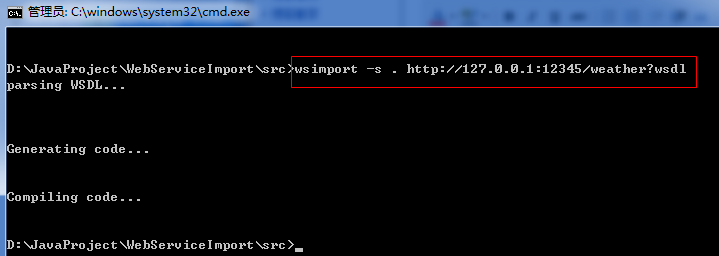
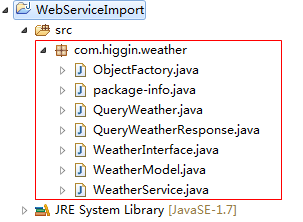
【客户端工程截图】

【WeatherClient.java】
package com.higgin.weather.client;

import java.text.SimpleDateFormat;

import java.util.Date;

import java.util.List;

import org.apache.cxf.jaxws.JaxWsProxyFactoryBean;

import com.higgin.weather.WeatherInterface;

import com.higgin.weather.WeatherModel;

public class WeatherClient {

    public static void main(String[] args) {

        //jaxWsProxyFactoryBean调用WebService服务端

        JaxWsProxyFactoryBean jaxWsProxyFactoryBean=new JaxWsProxyFactoryBean();

        //调用地址

        jaxWsProxyFactoryBean.setAddress("http://127.0.0.1:12345/weather?wsdl");

        //设置portType

        jaxWsProxyFactoryBean.setServiceClass(WeatherInterface.class);

        //创建portType

        WeatherInterface weatherInterface=(WeatherInterface) jaxWsProxyFactoryBean.create();

        //调用portType方法

        List<WeatherModel> list=weatherInterface.queryWeather("杭州");

        for(WeatherModel weatherModel:list){

            System.out.println(weatherModel.getDetail());

            Date date=weatherModel.getDate().toGregorianCalendar().getTime();

            System.out.println(new SimpleDateFormat("yyyy-MM-dd").format(date));

            System.out.println(weatherModel.getTemperatureMax());

            System.out.println(weatherModel.getTemperatureMin());

        }

    }

}
【运行结果】

12_CXF入门的更多相关文章
- Angular2入门系列教程7-HTTP(一)-使用Angular2自带的http进行网络请求
上一篇:Angular2入门系列教程6-路由(二)-使用多层级路由并在在路由中传递复杂参数 感觉这篇不是很好写,因为涉及到网络请求,如果采用真实的网络请求,这个例子大家拿到手估计还要自己写一个web ...
- ABP入门系列(1)——学习Abp框架之实操演练
作为.Net工地搬砖长工一名,一直致力于挖坑(Bug)填坑(Debug),但技术却不见长进.也曾热情于新技术的学习,憧憬过成为技术大拿.从前端到后端,从bootstrap到javascript,从py ...
- Oracle分析函数入门
一.Oracle分析函数入门 分析函数是什么?分析函数是Oracle专门用于解决复杂报表统计需求的功能强大的函数,它可以在数据中进行分组然后计算基于组的某种统计值,并且每一组的每一行都可以返回一个统计 ...
- Angular2入门系列教程6-路由(二)-使用多层级路由并在在路由中传递复杂参数
上一篇:Angular2入门系列教程5-路由(一)-使用简单的路由并在在路由中传递参数 之前介绍了简单的路由以及传参,这篇文章我们将要学习复杂一些的路由以及传递其他附加参数.一个好的路由系统可以使我们 ...
- Angular2入门系列教程5-路由(一)-使用简单的路由并在在路由中传递参数
上一篇:Angular2入门系列教程-服务 上一篇文章我们将Angular2的数据服务分离出来,学习了Angular2的依赖注入,这篇文章我们将要学习Angualr2的路由 为了编写样式方便,我们这篇 ...
- Angular2入门系列教程4-服务
上一篇文章 Angular2入门系列教程-多个组件,主从关系 在编程中,我们通常会将数据提供单独分离出来,以免在编写程序的过程中反复复制粘贴数据请求的代码 Angular2中提供了依赖注入的概念,使得 ...
- wepack+sass+vue 入门教程(三)
十一.安装sass文件转换为css需要的相关依赖包 npm install --save-dev sass-loader style-loader css-loader loader的作用是辅助web ...
- wepack+sass+vue 入门教程(二)
六.新建webpack配置文件 webpack.config.js 文件整体框架内容如下,后续会详细说明每个配置项的配置 webpack.config.js直接放在项目demo目录下 module.e ...
- wepack+sass+vue 入门教程(一)
一.安装node.js node.js是基础,必须先安装.而且最新版的node.js,已经集成了npm. 下载地址 node安装,一路按默认即可. 二.全局安装webpack npm install ...
随机推荐
- DataTable 基本转换简单实例
var query = from dt in tblProduct.AsEnumerable() where dt.Field<string>("StockNo") = ...
- redis优化优秀文选
Redis是一个单线程的内存数据库.下载地址如下:http://download.redis.io/releases/redis-2.8.11.tar.gz在Redis的src目录运行make命令,然 ...
- python(6)
python(6) 6.1 面向对象编程:OOP相信学过编程的就会了解它有多重要了.当然c什么的就算了 实际上面向对象就是把对象拥有的数据和方法封装在对象里面,由对象调用. 面向对象最重要的是类 ...
- Android真机抓屏- Android Screen Monitor
一般运行Android应用程序有两种方式一种是设置Android虚拟设备模拟器,通过Android Virtual Manger进行管理,一种是插入USB数据线直接真机上进行调试,但是如果电脑配置比 ...
- POJ 1273 || HDU 1532 Drainage Ditches (最大流模型)
Drainage DitchesHal Burch Time Limit 1000 ms Memory Limit 65536 kb description Every time it rains o ...
- Eclipse 开发WEB项目所遇问题 WebContent WebRoot
原文:http://blog.sina.com.cn/s/blog_525960510100jo0j.html 最近在做Web 项目时,新建了一个WEB 项目,如webdemo,eclipse默认的b ...
- paip.mysql备份慢的解决
paip.mysql备份慢的解决.txt 作者Attilax , EMAIL:1466519819@qq.com 来源:attilax的专栏 地址:http://blog.csdn.net/att ...
- #define和预编译指令
今天再总结一点#define和预处理指令的使用. 预处理过程扫描源代码,对其进行初步的转换,产生新的源代码提供给编译器.可见预处理过程先于编译器对源代码进行处理. 预处理指令是以#开头的代码行,#后是 ...
- 文件I/O(不带缓冲)之read函数
调用read函数从打开文件中读数据. #include <unistd.h> ssize_t read( int filedes, void *buf, size_t nbytest ); ...
- 常用免费的WebServices地址
天气预报Web服务,数据来源于中国气象局 公用事业http://www.webxml.com.cn/WebServices/WeatherWebService.asmx 中国股票行情分时走势预览缩略图 ...