
lucene4入门(1)
欢迎转载http://www.cnblogs.com/shizhongtao/p/3440325.html
lucene你可以理解为一种数据库,他是全文搜索的一种引擎。
1.首先去官网download最新的jar包,我下载的是4.5版本的,当然你也可以使用maven来下载,
2.新建项目,并把lucene-core-4.5.1.jar加入到项目中,其他需要的分词器等jar包,可以用的时候加入就可以。因为是入门创建java project就可以了。
3.lucene中主要分为三部分,分别是索引部分、分词部分、搜索部分。
- 索引部分:可以理解像字典中前面的查找索引
- 分词部分:就是将内容进行拆分,比如“我是好人”,这个词我们怎么去分词。“我”,“好人”,“人”等。
- 搜索部分:就是如何去查找了。
4.创建索引,因为lucene的最近的升级都是不兼容升级,编写代码时候一定写清版本号。
 import java.io.File;

 import java.io.IOException;

 import org.apache.lucene.analysis.Analyzer;

 import org.apache.lucene.analysis.standard.StandardAnalyzer;

 import org.apache.lucene.document.Document;

 import org.apache.lucene.document.Field.Store;

 import org.apache.lucene.document.StringField;

 import org.apache.lucene.index.IndexWriter;

 import org.apache.lucene.index.IndexWriterConfig;

 import org.apache.lucene.store.Directory;

 import org.apache.lucene.store.FSDirectory;

 import org.apache.lucene.util.Version;

 /**

  * @author bingyulei

  *

  */

 public class HelloLucene

 {

     /**

      *  建立索引

      */

     public void createIndex(String indexWriterPath){

         // 创建directory

         Directory directory=null;

         // 创建indexwriter

          Analyzer analyzer=new StandardAnalyzer(Version.LUCENE_45);//设置标准分词器 ,默认是一元分词

          IndexWriterConfig iwc=new IndexWriterConfig(Version.LUCENE_45, analyzer);//设置IndexWriterConfig

          IndexWriter writer=null;

              try

             {

                  directory=    FSDirectory.open(new File(indexWriterPath));//打开存放索引的路径

                 writer=new IndexWriter(directory, iwc);

                 // 创建Document对象

                  Document doc=new Document();

                 //为document添加field

                     doc.add(new StringField("id", "1", Store.YES));//存储

                     doc.add(new StringField("name", "hello", Store.YES));//存储

                     doc.add(new StringField("content", "hello world!", Store.YES));//存储

                     //通过IndexWriter添加文档

                     writer.addDocument(doc);

                     writer.commit();//提交数据

                     System.out.println("添加成功");

             } catch (IOException e)

             {

                 // TODO Auto-generated catch block

                 e.printStackTrace();

             }

     }

 }
5.然后测试代码
 public class HelloLuceneTest

 {

     @Test

     public void test(){

         HelloLucene test=new HelloLucene();

         test.createIndex("D:\\lucene\\index");

     }

 }
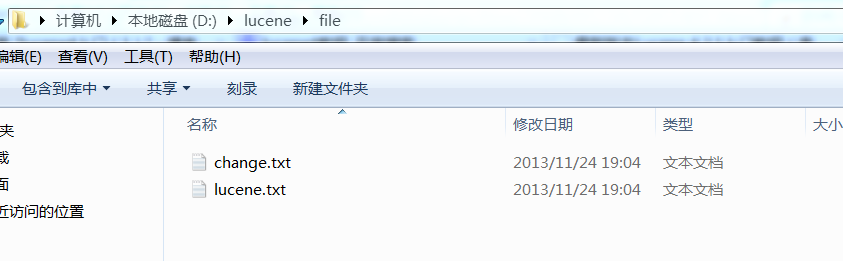
6.如果想要把电脑的文件假如索引,简单文档的话可以这样写。下图是文件
java代码:
 package com.bing.test;

 import java.io.File;

 import java.io.FileNotFoundException;

 import java.io.FileReader;

 import java.io.IOException;

 import org.apache.lucene.analysis.Analyzer;

 import org.apache.lucene.analysis.standard.StandardAnalyzer;

 import org.apache.lucene.document.Document;

 import org.apache.lucene.document.Field.Store;

 import org.apache.lucene.document.FieldType;

 import org.apache.lucene.document.StringField;

 import org.apache.lucene.document.TextField;

 import org.apache.lucene.index.IndexWriter;

 import org.apache.lucene.index.IndexWriterConfig;

 import org.apache.lucene.store.Directory;

 import org.apache.lucene.store.FSDirectory;

 import org.apache.lucene.store.RAMDirectory;

 import org.apache.lucene.util.Version;

 /**

  * @author bingyulei

  *

  */

 public class HelloLucene

 {

     Directory directory = null;

     Document doc;

     IndexWriter writer = null;

     /**

      *

      * @param indexWriterPath 索引创建路径

      * @param filePath 读取文件路径

      */

     public void createIndex(String indexWriterPath, String filePath)

     {

         // 创建indexwriter

         Analyzer analyzer = new StandardAnalyzer(Version.LUCENE_45);// 设置标准分词器

                                                                     // ,默认是一元分词

         IndexWriterConfig iwc = new IndexWriterConfig(Version.LUCENE_45,

                 analyzer);// 设置IndexWriterConfig

         try

         {

             // 创建directory

             //directory=RAMDirectory();//创建在内存中

             //创建在硬盘上

             directory = FSDirectory.open(new File(indexWriterPath));// 打开存放索引的路径

             writer = new IndexWriter(directory, iwc);

             // 为document添加field

             addFile(writer,filePath);

             System.out.println("添加成功");

         } catch (IOException e)

         {

             // TODO Auto-generated catch block

             e.printStackTrace();

         }

     }

     private void addFile(IndexWriter writer,String filePath)

     {

         File f = new File(filePath);

         FieldType ft = new FieldType();

         ft.setIndexed(true);//索引

         ft.setStored(true);//存储,数据量比较大,一般都是不鼓励存储,放在索引文件中会把索引文件撑大

         ft.setTokenized(true);

         for (File file : f.listFiles())

         {

             try

             {

                 // 创建Document对象

                 doc = new Document();

                 //doc.add(new Field("content", new FileReader(file), ft));

                 doc.add(new TextField("content",new FileReader(file)));// 这个方法默认的Store的属性是NO

                 doc.add(new TextField("filename",file.getName(),Store.YES));

                 doc.add(new StringField("path", file.getPath(), Store.YES));

                 //添加文档

                 writer.addDocument(doc);

                 writer.commit();// 提交数据

             } catch (FileNotFoundException e)

             {

                 // TODO Auto-generated catch block

                 e.printStackTrace();

             } catch (IOException e)

             {

                 // TODO Auto-generated catch block

                 e.printStackTrace();

             }

         }

     }

 }
测试代码:
 package com.bing.test;

 import org.junit.Test;

 public class HelloLuceneTest

 {

     @Test

     public void test(){

         HelloLucene test=new HelloLucene();

         test.createIndex("D:\\lucene\\index","D:\\lucene\\file");

     }

 }
lucene4入门(1)的更多相关文章
- lucene4入门(3)琐记
欢迎转载http://www.cnblogs.com/shizhongtao/p/3440486.html <--这个是lucene4.6的api下载地址,格式是chm的.需要的人可以下载htt ...
- lucene4入门(2)搜索
欢迎转载http://www.cnblogs.com/shizhongtao/p/3440479.html 接着上一篇,这里继续搜索,对于搜索和创建一样,首先你要确定搜索位置,然后用规定的类来读取.还 ...
- java课程设计团队博客《基于学院的搜索引擎》
JAVA课程设计 基于学院网站的搜索引擎 对学院网站用爬虫进行抓取.建索(需要中文分词).排序(可选).搜索.数据摘要高亮.分页显示.Web界面. 一.团队介绍 学号 班级 姓名 简介 2016211 ...
- Lucene4.3入门
辞职交接期间无聊看了一下搜索引擎,java社区比较火的当然是Lucene,想写一个简单的小例子,在网上找了些资料,不过都不是4.3的,自己看了一下. 下载地址:http://lucene.apache ...
- [全文检索]Lucene基础入门.
本打算直接来学习Solr, 现在先把Lucene的只是捋一遍. 本文内容: 1. 搜索引擎的发展史 2. Lucene入门 3. Lucene的API详解 4. 索引调优 5. Lucene搜索结果排 ...
- Lucene基础(一)--入门
Lucene介绍 lucene的介绍,这里引用百度百科的介绍Lucene是apache软件基金会4 jakarta项目组的一个子项目,是一个开放源代码的全文检索引擎工具包,即它不是一个完整的全文检索引 ...
- Lucene全文检索入门使用
一. 什么是全文检索 全文检索是计算机程序通过扫描文章中的每一个词,对每一个词建立一个索引,指明该词在文章中出现的次数和位置.当用户查询时根据建立的索引查找,类似于通过字典的检索字表查字的过程 全文检 ...
- ElasticSearch入门介绍之安装部署(二)
散仙,在上篇文章对ElasticSearch整体入门作了个介绍,那么本篇我们来看下,如何安装,部署es,以及如何安装es的几个比较常用的插件. es的安装和部署,是非常简单方便的,至少这一点散仙在es ...
- Angular2入门系列教程7-HTTP(一)-使用Angular2自带的http进行网络请求
上一篇:Angular2入门系列教程6-路由(二)-使用多层级路由并在在路由中传递复杂参数 感觉这篇不是很好写,因为涉及到网络请求,如果采用真实的网络请求,这个例子大家拿到手估计还要自己写一个web ...
随机推荐
- material-dialogs
https://github.com/afollestad/material-dialogs
- Keeplived 配制图解
http://blog.csdn.net/tantexian/article/details/50056229
- 初探Linux进程管理机制
转至:http://ixdba.blog.51cto.com/2895551/543737 一 .进程的概念和分类1.进程的概念 Linux是一个多用户多任务的操作系统.多用户是指多个用户可以在同一时 ...
- Android之自定义AlertDialog无法监听控件
参考:http://www.cnblogs.com/511mr/archive/2011/10/21/2220253.html 要做一个自定义的弹出框,以前都是用一个Activity来实现,总觉得不是 ...
- 自动监控主从MySQL同步的SHELL脚本
代码如下: #!/bin/bash #check MySQL_Slave Status #crontab time 00:10 MYSQLPORT=`netstat -na|grep "LI ...
- python学习笔记(三)--条件语句
Python 条件语句 Python条件语句是通过一条或多条语句的执行结果(True或者False)来决定执行的代码块. Python 编程中 if 语句用于控制程序的执行,基本形式为: if 判断条 ...
- 几个常用myeclipse快捷键
Ctrl + D:直接删除光标所在行 Alt + ↑:向上移动光标所在行 Alt + ↓:向下移动光标所在行 Ctrl + Alt + ↑:直接向上复制光标所在行内容 Ctrl + Alt + ↓:直 ...
- Cheap CK100 1024 tokens NXP FIX Chip on Eobd2
CK100 is a well-known and cost-effective key programmer for many cars. Some said it is a must for bo ...
- css笔记03:伪类first-child
1. 匹配第一个 <p> 元素 在下面的例子中,选择器匹配作为任何元素的第一个子元素的 p 元素: <html> <head> <style type=&qu ...
- oracle pl/sql简介、块、过程
pl/sql语言是oracle在sql上扩展的语言.1 过程.函数.触发器是在pl/sql编写2 过程.函数.触发器是在oracle中3 pl/sql的语句可以在java中直接调用 简单介绍 在sql ...