
lucene4入门(1)
欢迎转载http://www.cnblogs.com/shizhongtao/p/3440325.html
lucene你可以理解为一种数据库,他是全文搜索的一种引擎。
1.首先去官网download最新的jar包,我下载的是4.5版本的,当然你也可以使用maven来下载,
2.新建项目,并把lucene-core-4.5.1.jar加入到项目中,其他需要的分词器等jar包,可以用的时候加入就可以。因为是入门创建java project就可以了。
3.lucene中主要分为三部分,分别是索引部分、分词部分、搜索部分。
- 索引部分:可以理解像字典中前面的查找索引
- 分词部分:就是将内容进行拆分,比如“我是好人”,这个词我们怎么去分词。“我”,“好人”,“人”等。
- 搜索部分:就是如何去查找了。
4.创建索引,因为lucene的最近的升级都是不兼容升级,编写代码时候一定写清版本号。
 import java.io.File;

 import java.io.IOException;

 import org.apache.lucene.analysis.Analyzer;

 import org.apache.lucene.analysis.standard.StandardAnalyzer;

 import org.apache.lucene.document.Document;

 import org.apache.lucene.document.Field.Store;

 import org.apache.lucene.document.StringField;

 import org.apache.lucene.index.IndexWriter;

 import org.apache.lucene.index.IndexWriterConfig;

 import org.apache.lucene.store.Directory;

 import org.apache.lucene.store.FSDirectory;

 import org.apache.lucene.util.Version;

 /**

  * @author bingyulei

  *

  */

 public class HelloLucene

 {

     /**

      *  建立索引

      */

     public void createIndex(String indexWriterPath){

         // 创建directory

         Directory directory=null;

         // 创建indexwriter

          Analyzer analyzer=new StandardAnalyzer(Version.LUCENE_45);//设置标准分词器 ,默认是一元分词

          IndexWriterConfig iwc=new IndexWriterConfig(Version.LUCENE_45, analyzer);//设置IndexWriterConfig

          IndexWriter writer=null;

              try

             {

                  directory=    FSDirectory.open(new File(indexWriterPath));//打开存放索引的路径

                 writer=new IndexWriter(directory, iwc);

                 // 创建Document对象

                  Document doc=new Document();

                 //为document添加field

                     doc.add(new StringField("id", "1", Store.YES));//存储

                     doc.add(new StringField("name", "hello", Store.YES));//存储

                     doc.add(new StringField("content", "hello world!", Store.YES));//存储

                     //通过IndexWriter添加文档

                     writer.addDocument(doc);

                     writer.commit();//提交数据

                     System.out.println("添加成功");

             } catch (IOException e)

             {

                 // TODO Auto-generated catch block

                 e.printStackTrace();

             }

     }

 }
5.然后测试代码
 public class HelloLuceneTest

 {

     @Test

     public void test(){

         HelloLucene test=new HelloLucene();

         test.createIndex("D:\\lucene\\index");

     }

 }
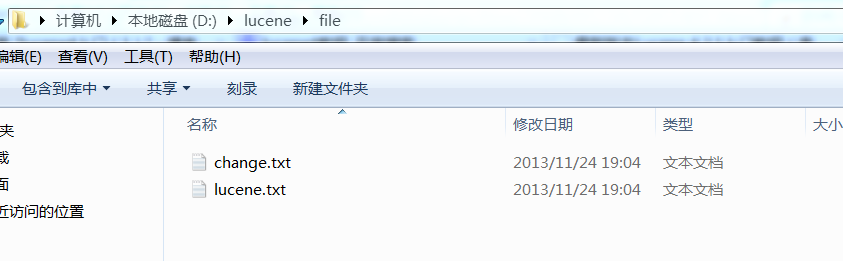
6.如果想要把电脑的文件假如索引,简单文档的话可以这样写。下图是文件
java代码:
 package com.bing.test;

 import java.io.File;

 import java.io.FileNotFoundException;

 import java.io.FileReader;

 import java.io.IOException;

 import org.apache.lucene.analysis.Analyzer;

 import org.apache.lucene.analysis.standard.StandardAnalyzer;

 import org.apache.lucene.document.Document;

 import org.apache.lucene.document.Field.Store;

 import org.apache.lucene.document.FieldType;

 import org.apache.lucene.document.StringField;

 import org.apache.lucene.document.TextField;

 import org.apache.lucene.index.IndexWriter;

 import org.apache.lucene.index.IndexWriterConfig;

 import org.apache.lucene.store.Directory;

 import org.apache.lucene.store.FSDirectory;

 import org.apache.lucene.store.RAMDirectory;

 import org.apache.lucene.util.Version;

 /**

  * @author bingyulei

  *

  */

 public class HelloLucene

 {

     Directory directory = null;

     Document doc;

     IndexWriter writer = null;

     /**

      *

      * @param indexWriterPath 索引创建路径

      * @param filePath 读取文件路径

      */

     public void createIndex(String indexWriterPath, String filePath)

     {

         // 创建indexwriter

         Analyzer analyzer = new StandardAnalyzer(Version.LUCENE_45);// 设置标准分词器

                                                                     // ,默认是一元分词

         IndexWriterConfig iwc = new IndexWriterConfig(Version.LUCENE_45,

                 analyzer);// 设置IndexWriterConfig

         try

         {

             // 创建directory

             //directory=RAMDirectory();//创建在内存中

             //创建在硬盘上

             directory = FSDirectory.open(new File(indexWriterPath));// 打开存放索引的路径

             writer = new IndexWriter(directory, iwc);

             // 为document添加field

             addFile(writer,filePath);

             System.out.println("添加成功");

         } catch (IOException e)

         {

             // TODO Auto-generated catch block

             e.printStackTrace();

         }

     }

     private void addFile(IndexWriter writer,String filePath)

     {

         File f = new File(filePath);

         FieldType ft = new FieldType();

         ft.setIndexed(true);//索引

         ft.setStored(true);//存储,数据量比较大,一般都是不鼓励存储,放在索引文件中会把索引文件撑大

         ft.setTokenized(true);

         for (File file : f.listFiles())

         {

             try

             {

                 // 创建Document对象

                 doc = new Document();

                 //doc.add(new Field("content", new FileReader(file), ft));

                 doc.add(new TextField("content",new FileReader(file)));// 这个方法默认的Store的属性是NO

                 doc.add(new TextField("filename",file.getName(),Store.YES));

                 doc.add(new StringField("path", file.getPath(), Store.YES));

                 //添加文档

                 writer.addDocument(doc);

                 writer.commit();// 提交数据

             } catch (FileNotFoundException e)

             {

                 // TODO Auto-generated catch block

                 e.printStackTrace();

             } catch (IOException e)

             {

                 // TODO Auto-generated catch block

                 e.printStackTrace();

             }

         }

     }

 }
测试代码:
 package com.bing.test;

 import org.junit.Test;

 public class HelloLuceneTest

 {

     @Test

     public void test(){

         HelloLucene test=new HelloLucene();

         test.createIndex("D:\\lucene\\index","D:\\lucene\\file");

     }

 }
lucene4入门(1)的更多相关文章
- lucene4入门(3)琐记
欢迎转载http://www.cnblogs.com/shizhongtao/p/3440486.html <--这个是lucene4.6的api下载地址,格式是chm的.需要的人可以下载htt ...
- lucene4入门(2)搜索
欢迎转载http://www.cnblogs.com/shizhongtao/p/3440479.html 接着上一篇,这里继续搜索,对于搜索和创建一样,首先你要确定搜索位置,然后用规定的类来读取.还 ...
- java课程设计团队博客《基于学院的搜索引擎》
JAVA课程设计 基于学院网站的搜索引擎 对学院网站用爬虫进行抓取.建索(需要中文分词).排序(可选).搜索.数据摘要高亮.分页显示.Web界面. 一.团队介绍 学号 班级 姓名 简介 2016211 ...
- Lucene4.3入门
辞职交接期间无聊看了一下搜索引擎,java社区比较火的当然是Lucene,想写一个简单的小例子,在网上找了些资料,不过都不是4.3的,自己看了一下. 下载地址:http://lucene.apache ...
- [全文检索]Lucene基础入门.
本打算直接来学习Solr, 现在先把Lucene的只是捋一遍. 本文内容: 1. 搜索引擎的发展史 2. Lucene入门 3. Lucene的API详解 4. 索引调优 5. Lucene搜索结果排 ...
- Lucene基础(一)--入门
Lucene介绍 lucene的介绍,这里引用百度百科的介绍Lucene是apache软件基金会4 jakarta项目组的一个子项目,是一个开放源代码的全文检索引擎工具包,即它不是一个完整的全文检索引 ...
- Lucene全文检索入门使用
一. 什么是全文检索 全文检索是计算机程序通过扫描文章中的每一个词,对每一个词建立一个索引,指明该词在文章中出现的次数和位置.当用户查询时根据建立的索引查找,类似于通过字典的检索字表查字的过程 全文检 ...
- ElasticSearch入门介绍之安装部署(二)
散仙,在上篇文章对ElasticSearch整体入门作了个介绍,那么本篇我们来看下,如何安装,部署es,以及如何安装es的几个比较常用的插件. es的安装和部署,是非常简单方便的,至少这一点散仙在es ...
- Angular2入门系列教程7-HTTP(一)-使用Angular2自带的http进行网络请求
上一篇:Angular2入门系列教程6-路由(二)-使用多层级路由并在在路由中传递复杂参数 感觉这篇不是很好写,因为涉及到网络请求,如果采用真实的网络请求,这个例子大家拿到手估计还要自己写一个web ...
随机推荐
- 调用webservice查询手机号码归属地信息
Web Services是由企业发布的完成其特定商务需求的在线应用服务,其他公司或应用软件能够通过Internet来访问并使用这项在线服务.在这里我们使用soap协议往webservice发送信息,然 ...
- php版DES
class DES { var $key; var $iv; //偏移量 function DES( $key, $iv=0 ) { //key长度8例如:1234abcd $this->key ...
- Jordan Lecture Note-10: Kernel Principal Components Analysis (KPCA).
Kernel Principal Components Analysis PCA实际上就是对原坐标进行正交变换,使得变换后的坐标之间相互无关,并且尽可能保留多的信息.但PCA所做的是线性变换,对于某些 ...
- 实例源码--Android时钟源码
下载源码 技术要点: 1.Android自定义时钟控件 2.源码带有非常详细的中文注释 ...... 详细介绍: 1.Android自定义时钟控件 通过继承视图继承类View进行自定义控制,实 ...
- 使用Loadrunner进行接口测试
在工作中很多时候都需要进行接口测试,如果只是进行接口的功能测试这个很简单,两种类型: 1.如果是基于get的直接使用浏览器进行访问,查看服务器返回的数据是否正确就行, 2.如果是基于post的可以接触 ...
- C#面向对象(一) 封装
一.什么叫做面向对象封装? 封装的概念:隐藏对象的属性和实现细节,仅对外公开接口,控制在程序中属性的读取和修改的访问级别. 二.面向对象封装有什么好处(为什么要封装)? 封装的目的:是增强安全性和简化 ...
- C - Minimum Inversion Number
Description The inversion number of a given number sequence a1, a2, ..., an is the number of pairs ( ...
- 前端必会html知识整理
1.浏览器内核: 1.ie:trident(三叉戟)内核 2.firefox:gecko(壁虎)内核 3.safari:webkit(浏览器核心)内核 ...
- 配置hibernate出现的错误一
问题:2011-04-18 11:35:46,734 ERROR [org.hibernate.tool.hbm2ddl.SchemaUpdate] - could not complete sche ...
- java 操作sqllite的数据库
介绍 sqllite是一个小型数据库,不依赖于数据库服务器,操作它可以像操作本地的文本文件一样.在Android中是用来存储数据到本地的,java中可能也会有用到sqllite需要. 详细 sqlli ...