
【Spring-web】RestTemplate源码学习
前言
这种开发内容除了业务逻辑,剩下的基本都是套路代码,而Spring从3.0版本开始,为我们提供了封装好的访问HTTP的模板代码RestTemplate。
RestTemplate 类说明
/**

 * <strong>Spring's central class for synchronous client-side HTTP access.</strong>

 * It simplifies communication with HTTP servers, and enforces RESTful principles.

 * It handles HTTP connections, leaving application code to provide URLs

 * (with possible template variables) and extract results.

 *

 * <p><strong>Note:</strong> by default the RestTemplate relies on standard JDK

 * facilities to establish HTTP connections. You can switch to use a different

 * HTTP library such as Apache HttpComponents, Netty, and OkHttp through the

 * {@link #setRequestFactory} property.

 *

 * <p>The main entry points of this template are the methods named after the six main HTTP methods:

 * <table>

 * <tr><th>HTTP method</th><th>RestTemplate methods</th></tr>

 * <tr><td>DELETE</td><td>{@link #delete}</td></tr>

 * <tr><td>GET</td><td>{@link #getForObject}</td></tr>

 * <tr><td></td><td>{@link #getForEntity}</td></tr>

 * <tr><td>HEAD</td><td>{@link #headForHeaders}</td></tr>

 * <tr><td>OPTIONS</td><td>{@link #optionsForAllow}</td></tr>

 * <tr><td>POST</td><td>{@link #postForLocation}</td></tr>

 * <tr><td></td><td>{@link #postForObject}</td></tr>

 * <tr><td>PUT</td><td>{@link #put}</td></tr>

 * <tr><td>any</td><td>{@link #exchange}</td></tr>

 * <tr><td></td><td>{@link #execute}</td></tr> </table>

 *

 * <p>In addition the {@code exchange} and {@code execute} methods are generalized versions of

 * the above methods and can be used to support additional, less frequent combinations (e.g.

 * HTTP PATCH, HTTP PUT with response body, etc.). Note however that the underlying HTTP

 * library used must also support the desired combination.

 *

 * <p>For each HTTP method there are three variants: two accept a URI template string

 * and URI variables (array or map) while a third accepts a {@link URI}.

 * Note that for URI templates it is assumed encoding is necessary, e.g.

 * {@code restTemplate.getForObject("http://example.com/hotel list")} becomes

 * {@code "http://example.com/hotel%20list"}. This also means if the URI template

 * or URI variables are already encoded, double encoding will occur, e.g.

 * {@code http://example.com/hotel%20list} becomes

 * {@code http://example.com/hotel%2520list}). To avoid that use a {@code URI} method

 * variant to provide (or re-use) a previously encoded URI. To prepare such an URI

 * with full control over encoding, consider using

 * {@link org.springframework.web.util.UriComponentsBuilder}.

 *

 * <p>Internally the template uses {@link HttpMessageConverter} instances to

 * convert HTTP messages to and from POJOs. Converters for the main mime types

 * are registered by default but you can also register additional converters

 * via {@link #setMessageConverters}.

 *

 * <p>This template uses a

 * {@link org.springframework.http.client.SimpleClientHttpRequestFactory} and a

 * {@link DefaultResponseErrorHandler} as default strategies for creating HTTP

 * connections or handling HTTP errors, respectively. These defaults can be overridden

 * through {@link #setRequestFactory} and {@link #setErrorHandler} respectively.

 *

 * @author Arjen Poutsma

 * @author Brian Clozel

 * @author Roy Clarkson

 * @author Juergen Hoeller

 * @since 3.0

 * @see HttpMessageConverter

 * @see RequestCallback

 * @see ResponseExtractor

 * @see ResponseErrorHandler

 * @see AsyncRestTemplate

 */
Java Doc

补充说明:
重载的3个方法怎么选择呢?建议选择URL参数类型为String的那个两个方法。因为当这个参数是一个非URI格式的,需要进行转换,而URI的构造函数会抛出一个检查异常URISyntaxException,该异常必须捕获。另外两个重载方法则避免了捕获异常,所以上面表格中推荐的方法的第一个参数都是String类型。
简单例子
package com.practice;

import java.net.URLEncoder;

import java.util.HashMap;

import java.util.Map;

import junit.framework.TestCase;

import net.sf.json.JSONObject;

import org.junit.Before;

import org.junit.Test;

import org.springframework.http.HttpEntity;

import org.springframework.http.ResponseEntity;

import org.springframework.util.LinkedMultiValueMap;

import org.springframework.util.MultiValueMap;

import org.springframework.web.client.RestTemplate;

public class RestTemplateTest extends TestCase {

    RestTemplate restTpl;

    @Before

    public void setUp() {

        restTpl = new RestTemplate();

    }

    @Test

    public void testGet() {

        Map<String, Object> paramsMap = new HashMap<String, Object>();

        paramsMap.put("cityCode", "xxxxxxxxxx");

        paramsMap.put("key", "xxxxxxxxxxxxxxxxxxxxx");

        String url = "http://xxx.xxx.xxx.xxx:8080/xxx/xxxx?xxxx&config=xxx&cityCode={cityCode}&key={key}";

        String respStr = restTpl.getForObject(url, String.class, paramsMap);

        System.out.println(respStr);

        JSONObject respJson = restTpl.getForObject(url, JSONObject.class, paramsMap);

        System.out.println(respJson);

    }

    @Test

    public void testPost() throws Exception {

        String posturl = "http://xxx.xxx.xxx.xxx:8080/xxxx/xxxx/xxxxx";

        JSONObject metadata = new JSONObject();

        metadata.put("dddddd", "xxxxx");

        metadata.put("ssssss", "xxxxxx");

        metadata.put("flag", true);

        JSONObject paramsJson = new JSONObject();

        paramsJson.put("mmmmm", "mmm");

        paramsJson.put("nnnnn", "nnn");

        paramsJson.put("password", "xxxxxxxxxxx");

        paramsJson.put("metadata", metadata);

        String params = "RequestJson=" + URLEncoder.encode(paramsJson.toString(), "utf-8");

        MultiValueMap<String, String> headers = new LinkedMultiValueMap<String, String>();

        headers.add("Content-Type", "application/x-www-form-urlencoded; charset=UTF-8");

        HttpEntity<Object> hpEntity = new HttpEntity<Object>(params, headers);

        ResponseEntity<String> respEntity = restTpl.postForEntity(posturl, hpEntity, String.class);

        System.out.println(respEntity);

    }

}
然而,就是这么简单的几行代码还不断出错~~~~~~~


疑问解答
RestTemplate中是如何处理请求头信息的呢?
以GET方法为例,getForObject()方法中有这么一句【RequestCallback requestCallback = acceptHeaderRequestCallback(responseType);】

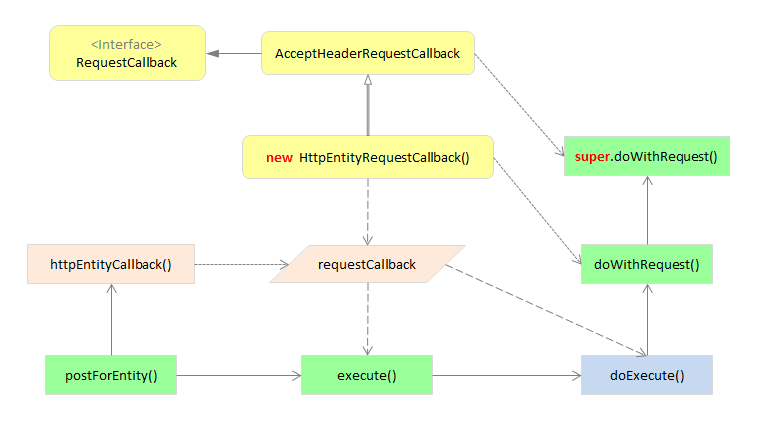
这里为什么使用内部类呢?
复习下内部类的作用:
【Spring-web】RestTemplate源码学习的更多相关文章
- spring源码学习(三)--spring循环引用源码学习
在spring中,是支持单实例bean的循环引用(循环依赖)的,循环依赖,简单而言,就是A类中注入了B类,B类中注入了A类,首先贴出我的代码示例 @Component public class Add ...
- 捋一捋Spring Web的源码思路
Servlet前提 Java规定了Servlet Container为每一个web app创建一个Servlet Context:而Servlet Context中又包含了诸多Servlet -- 其 ...
- 【Spring-web】RestTemplate源码学习——梳理内部实现过程
2016-12-28 by 安静的下雪天 http://www.cnblogs.com/quiet-snowy-day/p/6228198.html 提示:使用手机浏览时请注意,图多费流量. 本篇 ...
- 【目录】Spring 源码学习
[目录]Spring 源码学习 jwfy 关注 2018.01.31 19:57* 字数 896 阅读 152评论 0喜欢 9 用来记录自己学习spring源码的一些心得和体会以及相关功能的实现原理, ...
- spring源码学习——spring整体架构和设计理念
Spring是在Rod Johnson的<Expert One-On-One J2EE Development and Design >的基础上衍生而来的.主要目的是通过使用基本的java ...
- Spring5.0源码学习系列之Spring AOP简述
前言介绍 附录:Spring源码学习专栏 在前面章节的学习中,我们对Spring框架的IOC实现源码有了一定的了解,接着本文继续学习Springframework一个核心的技术点AOP技术. 在学习S ...
- Spring源码学习笔记12——总结篇,IOC,Bean的生命周期,三大扩展点
Spring源码学习笔记12--总结篇,IOC,Bean的生命周期,三大扩展点 参考了Spring 官网文档 https://docs.spring.io/spring-framework/docs/ ...
- SpringBoot源码学习1——SpringBoot自动装配源码解析+Spring如何处理配置类的
系列文章目录和关于我 一丶什么是SpringBoot自动装配 SpringBoot通过SPI的机制,在我们程序员引入一些starter之后,扫描外部引用 jar 包中的META-INF/spring. ...
- spring源码学习之路---深入AOP(终)
作者:zuoxiaolong8810(左潇龙),转载请注明出处,特别说明:本博文来自博主原博客,为保证新博客中博文的完整性,特复制到此留存,如需转载请注明新博客地址即可. 上一章和各位一起看了一下sp ...
随机推荐
- content内网,会显示内容,没有内容可地址存在就是这个情况
漏洞地址:http://note.youdao.com/memory/?url=http://www.wooyun.org(如需登录,请注册登录) 正文预览的地方会读取URL地址的<meta n ...
- 通过html和css做出下拉导航栏的效果
通过观察了百度的首页,对于更多产品一栏,觉得可以不涉及JS便可写出下拉导航栏的效果 1.先设计出大体的框架 <div class="nav"> <ul> & ...
- JPEG文件结构
JPEG文件由八个部分组成,每个部分的标记字节为两个,首字节固定为:0xFF,当然,准许在其前面再填充多个0xFF,以最后一个为准.下面为各部分的名称和第二个标记字节的数值,用ultraedit的16 ...
- Mac上开启Web服务
$ sudo apachectl start$ httpd -v /Library/WebServer/Documents
- .NET 4.5.1 预览版新特性
上个月的微软Build大会上宣布了.NET 4.5.1的推出,Heydarian的这个演讲题为".NET开发中的新内容",涵盖了.NET Framework中一些重要的新特性. H ...
- 阿里聚安全受邀参加SFDC安全大会,分享互联网业务面临问题和安全创新实践
现今,技术引领的商业变革已无缝渗透入我们的日常生活,「技术改变生活」的开发者们被推向了创新浪潮的顶端.国内知名的开发者技术社区 SegmentFault 至今已有四年多了,自技术问答开始,他们已经发展 ...
- 利用Hexo搭建个人博客-环境搭建篇
我是一个爱写博客进行总结分享的人.然而,有着热爱写博客并且深知写博客好处的我,却没有好好的把这个习惯坚持下来.如今毕业已经一年多了吧,每一次与师弟师妹们聊天,我总会意味深长的建议他们,一定要定期梳理总 ...
- Azure SQL Database (20) 使用SQL Server 2016 Upgrade Advisor
<Windows Azure Platform 系列文章目录> Azure SQL Database (19) Stretch Database 概览 Azure SQL Da ...
- 为CentOS7(文字界面操作)系统安装gnome图形界面程序
1.安装gnome sudo yum groupinstall "GNOME Desktop" "Graphical Administration Tools" ...
- SQL Server 内存和Paging
一,内存term VAS:Virtual Address Space,是App能够申请访问的最大地址空间. Physical Memory:对SQL Server 来说,频繁访问的数据对象长时间驻留在 ...