
SpringBoot系列:Spring Boot使用模板引擎FreeMarker
一、Java模板引擎
模板引擎(这里特指用于Web开发的模板引擎)是为了使用户界面与业务数据(内容)分离而产生的,它可以生成特定格式的文档,用于网站的模板引擎就会生成一个标准的HTML文档。
在java中,主要的模板引擎有JSP、Thymeleaf、FreeMarker、
Velocity等。
虽然随着前后端分离的崛起和流行,模板引擎已遭受到冷落,但不少旧项目依然使用java的模板引擎渲染界面,而偶尔自己写一些练手项目,使用模板引擎也比起前后端分离要来的快速。
本系列会分别讲解SpringBoot怎么集成JSP、Thymeleaf和FreeMarker,至于Velocity,高版本的SpringBoot已经不支持Velocity了,这里也就不进行讲解了。
而这一篇,主要讲解Spring Boot如何集成FreeMarker。
一、Spring Boot集成FreeMarker
首先我们要引入依赖,除了核心的web依赖外,只需引入freemarker的statrer即可。
<dependency>

    <groupId>org.springframework.boot</groupId>

    <artifactId>spring-boot-starter-web</artifactId>

</dependency>

<!--freemarker依赖-->

<dependency>

    <groupId>org.springframework.boot</groupId>

    <artifactId>spring-boot-starter-freemarker</artifactId>

</dependency>
然后就是配置文件了。主要配置spring.freemarker节点下的视图文件目录template-loader-path以及文件后缀suffix,如果是本地开发,cache可以设置为false关闭缓存,避免修改文件后需要重新启动服务。
server:

  port: 10900

spring:

  profiles:

    active: dev

  freemarker:

    enabled: true #是否启用freemarker

    template-loader-path: classpath:/templates/ #设定模板的加载路径,多个以逗号分隔

    suffix: .ftl #设定模板的后缀

    content-type: text/html

    check-template-location: true #是否检查模板位置是否存在

    cache: false #是否启用模板缓存

    charset: UTF-8 #模板编码

    #一些常用配置

    allow-request-override: false #是否允许HttpServletRequest属性覆盖(隐藏)控制器生成的同名模型属性

    allow-session-override: false #是否允许HttpSession属性覆盖(隐藏)控制器生成的同名模型属性

    expose-request-attributes: false #设定所有request的属性在merge到模板的时候,是否要都添加到model中

    expose-session-attributes: false #是否在merge模板的时候,将HttpSession属性都添加到model中

    expose-spring-macro-helpers: true #设定是否以springMacroRequestContext的形式暴露RequestContext给Spring’s macro library使用

    prefer-file-system-access: true #是否优先从文件系统加载template,以支持热加载,默认为true
然后resoucres目录下新建templates目录,分别新建了hello.ftl和mv.ftl文件。
<h3>hello freemarker</h3>
<!DOCTYPE html>

<html lang="en">

    <h3>mv freemarker</h3>

    <span>I'm ${name} from mv method</span>

</html>
这里主要讲解如何集成FreeMarker,不对FreeMarker语法做过多的讲解,所以仅仅提供了两个简单的html文件作为演示。
接着再创建Controller类路由页面,该类十分简单,跳转hello页面,以及携带name=imyang跳转mv页面。
@Controller

@RequestMapping("index")

public class IndexApi {

    @RequestMapping("/hello")

    public String hello(){

        return "hello";

    }

    @RequestMapping("/mv")

    public ModelAndView mv(){

        ModelAndView mv = new ModelAndView("mv");

        mv.addObject("name","yanger");

        return mv;

    }

}
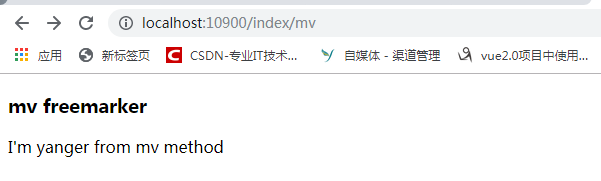
启动项目,分别访问http://localhost:10900/index/hello和http://localhost:10900/index/mv,可以看到已经可以展示页面信息了。
源码地址:https://github.com/imyanger/springboot-project/tree/master/p19-springboot-freemarker
SpringBoot系列:Spring Boot使用模板引擎FreeMarker的更多相关文章
- Spring Boot整合模板引擎freemarker
jsp本质是servlet,渲染都在服务器,freemarker模板引擎也是在服务器端渲染. 项目结构 引入依赖pom.xml <!-- 引入 freemarker 模板依赖 --> &l ...
- springboot系列四、配置模板引擎、配置热部署
一.配置模板引擎 在之前所见到的信息显示发现都是以 Rest 风格进行显示,但是很明显在实际的开发之中,所有数据的显示最终都应该交由页面完成,但是这个页面并不是*.jsp 页面,而是普通的*.html ...
- spring boot: freemarket模板引擎
spring boot: freemarket模板引擎 freemarket模板引擎,可以和thymeleaf模板引擎共存 pom.xml引入 <!-- Freemarket --> &l ...
- SpringBoot系列之集成jsp模板引擎
目录 1.模板引擎简介 2.环境准备 4.源码原理简介 SpringBoot系列之集成jsp模板引擎 @ 1.模板引擎简介 引用百度百科的模板引擎解释: 模板引擎(这里特指用于Web开发的模板引擎)是 ...
- spring boot: thymeleaf模板引擎使用
spring boot: thymeleaf模板引擎使用 在pom.xml加入thymeleaf模板依赖 <!-- 添加thymeleaf的依赖 --> <dependency> ...
- SpringBoot系列:Spring Boot使用模板引擎Thymeleaf
一.Java模板引擎 模板引擎(这里特指用于Web开发的模板引擎)是为了使用户界面与业务数据(内容)分离而产生的,它可以生成特定格式的文档,用于网站的模板引擎就会生成一个标准的HTML文档. 在jav ...
- SpringBoot系列:Spring Boot使用模板引擎JSP
一.Java模板引擎 模板引擎(这里特指用于Web开发的模板引擎)是为了使用户界面与业务数据(内容)分离而产生的,它可以生成特定格式的文档,用于网站的模板引擎就会生成一个标准的HTML文档. 在jav ...
- Spring Boot整合模板引擎jsp
jsp也算是一种模板引擎吧.整合jsp前,先说一下运行SpringBoot项目的几种方式 1. 运行SpringBoot项目的几种方式 1.1 使用内嵌Tomcat运行项目 在IDE中右键运行启动类, ...
- Spring Boot Thymeleaf 模板引擎的使用
Spring Boot 中可以支持很多模板引擎,Thymeleaf 是 Spring Boot 官方推荐使用的模板引擎,虽然在社区 Thymeleaf 的性能被许多人所吐糟,但这仍然不影响大量的开发人 ...
随机推荐
- lightoj 1125 - Divisible Group Sums (dp)
Given a list of N numbers you will be allowed to choose any M of them. So you can choose in NCM ways ...
- Gym 100851 题解
A: Adjustment Office 题意:在一个n*n的矩阵,每个格子的的价值为 (x+y), 现在有操作取一行的值,或者一列的值之后输出这个和, 并且把这些格子上的值归0. 题解:模拟, 分成 ...
- CF 988E Divisibility by 25 思维 第十二
Divisibility by 25 time limit per test 1 second memory limit per test 256 megabytes input standard i ...
- vue基础技术点列表(一)
一. vue编写需要注意的细节1.vue初始化实例时使用首字母大写,在添加全局配置时也要首字母大写(如添加组件Vue.component("",{template:"&q ...
- Ubuntu hadoop配置之修改主机名
1.查看主机名的方法 方法1: 在终端输入hostname 方法2: 提示符 liuhongyang@ubuntu:~$ liuhongyang:用户名 ubuntu: 主机名 ~: ...
- System类入门学习
System类 System类代表系统,系统级的很多属性和控制方法都放置在该类的内部.该类位于java.lang包.其包含一些有用的字段和方法,不能被实例化 system中包含了in.out和err三 ...
- spring mvc Response header content type
Xml代码 <bean class ="org.springframework.web.servlet.mvc.annotation.AnnotationMethodHandlerAd ...
- Nginx 配置Https转发http、 websocket
系统启动Nginx后,报 [emerg] bind() to 0.0.0.0:XXXX failed (13: Permission denied)错误的处理方式,分为两种: 第一种:端口小于1024 ...
- android studio连接雷电模拟器 【AS 模拟器】
⭐ 我的网站: www.mengyingjie.com ⭐ Android studio 怎么连接安卓模拟器呢,跟着下面的步骤即可 (以雷电模拟器为例,其他模拟器类似) 一.下载模拟器 下载安装完雷电 ...
- [C++]invalid initialization of non-const reference of type 'std::__cxx11::string& {aka std::__cxx11::basi
解决方法:在参数前面加一个cosnt或者把引用符号去掉