
原生js复制粘贴上传图片前后台代码,兼容firebox,chrome, ie11,亲测有效
需求:粘贴上传图片,截图工具,右键粘贴,或者ctrl+v粘贴
方法1:可直接套用富文本框的图片上传功能,完成复制粘贴
缺点:麻烦,样式难控制
方法2:用原生js完成,以下案例基于此,样式请自己动手调整
用js完成请注意收下几点:
1、前端传回去给后台是base64流,后台要将接收的base64转换成图片保存,记住不是二进制流,是base64位

2、editorWenban是可编辑的文本框,用以复制粘贴图片,tar_box是用来曾现图片的
前端代码如下:
<!DOCTYPE html>

<html lang="UTF-8">

<head>

    <meta charset="UTF-8">

    <title>测试测试</title>

</head>

<style>

    body {

        display: -webkit-flex;

        display: flex;

        -webkit-justify-content: center;

        justify-content: center;

    }

    #tar_box {

        width: 500px;

        height: 500px;

        border: 1px solid red;

    }

    #editorWenban img{

        display: none;

    }

    #tar_box img{

        width: 120px;

        height: 120px;

        margin:20px;

        border: 1px solid #5a7710;

    }

</style>

<body>

<div contenteditable style="width: 100px;height: 100px; border:1px solid" id="editorWenban">

</div>

<div id="tar_box">

    <!--<img src="" style=""/>-->

</div>

<script>

    document.addEventListener('paste', function (event) {

        console.log(event)

        var isChrome = false;

        if ( event.clipboardData || event.originalEvent ) {

            //not for ie11  某些chrome版本使用的是event.originalEvent

            var clipboardData = (event.clipboardData || event.originalEvent.clipboardData);

            if ( clipboardData.items ) {

                // for chrome

                var  items = clipboardData.items,

                    len = items.length,

                    blob = null;

                isChrome = true;

                //items.length比较有意思,初步判断是根据mime类型来的,即有几种mime类型,长度就是几(待验证)

                //如果粘贴纯文本,那么len=1,如果粘贴网页图片,len=2, items[0].type = 'text/plain', items[1].type = 'image/*'

                //如果使用截图工具粘贴图片,len=1, items[0].type = 'image/png'

                //如果粘贴纯文本+HTML,len=2, items[0].type = 'text/plain', items[1].type = 'text/html'

                // console.log('len:' + len);

                // console.log(items[0]);

                // console.log(items[1]);

                // console.log( 'items[0] kind:', items[0].kind );

                // console.log( 'items[0] MIME type:', items[0].type );

                // console.log( 'items[1] kind:', items[1].kind );

                // console.log( 'items[1] MIME type:', items[1].type );

                //阻止默认行为即不让剪贴板内容在div中显示出来

                event.preventDefault();

                //在items里找粘贴的image,据上面分析,需要循环

                for (var i = 0; i < len; i++) {

                    if (items[i].type.indexOf("image") !== -1) {

                        // console.log(items[i]);

                        // console.log( typeof (items[i]));

                        //getAsFile() 此方法只是living standard firefox ie11 并不支持

                        blob = items[i].getAsFile();

                    }

                }

                if ( blob !== null ) {

                    var reader = new FileReader();

                    reader.onload = function (event) {

                        // event.target.result 即为图片的Base64编码字符串

                        var base64_str = event.target.result

                        //可以在这里写上传逻辑 直接将base64编码的字符串上传(可以尝试传入blob对象,看看后台程序能否解析)

                        uploadImgFromPaste(base64_str, 'paste', isChrome);

                    }

                    reader.readAsDataURL(blob);

                }

            } else {

                //for firefox

                setTimeout(function () {

                    //设置setTimeout的原因是为了保证图片先插入到div里,然后去获取值

                    var imgList = document.querySelectorAll('#editorWenban img'),

                        len = imgList.length,

                        src_str = '',

                        i;

                    for ( i = 0; i < len; i ++ ) {

                        if ( imgList[i].className !== 'my_img' ) {

                            //如果是截图那么src_str就是base64 如果是复制的其他网页图片那么src_str就是此图片在别人服务器的地址

                            src_str = imgList[i].src;

                        }

                    }

                    uploadImgFromPaste(src_str, 'paste', isChrome);

                    //var box = document.getElementById("#editorWenban");

                    //找到子元素

                    //var img=document.getElementsByTagName("#editorWenban img");

                    //console.log("imgimgimgimg",img)

                    //box.removeChild(img);

                }, 1);

            }

        } else {

            //for ie11

            setTimeout(function () {

                //document.getElementById("#editorWenban")

                var imgList = document.querySelectorAll('#editorWenban img'),

                    len = imgList.length,

                    src_str = '',

                    i;

                for ( i = 0; i < len; i ++ ) {

                    if ( imgList[i].className !== 'my_img' ) {

                        src_str = imgList[i].src;

                    }

                }

                uploadImgFromPaste(src_str, 'paste', isChrome);

            }, 1);

        }

    })

    function uploadImgFromPaste (file, type, isChrome) {

        console.log("file=============",file)

        var formData = new FormData();

        formData.append('imgByte', file);

        formData.append('submission-type', type);

        var xhr = new XMLHttpRequest();

        xhr.open('POST', 'http://127.0.0.1:8555/weChatHandleTask/saveToImgByStr',true);

        xhr.onload = function () {

            if ( xhr.readyState === 4 ) {

                if ( xhr.status === 200 ) {

                    var data = xhr.responseText;

                    var tarBox = document.getElementById('tar_box');

                    var img = document.createElement('img');

                    img.className = 'my_img';

                    img.src = 'http://127.0.0.1:8555/test/'+data;

                    //ie不生效,所以直接在样式中测试

                    img.style = 'width: 120px; height: 120px; margin:20px;border: 1px solid #5a7710;';

                    tarBox.appendChild(img);

                } else {

                    console.log( xhr.statusText );

                }

            };

        };

        xhr.onerror = function (e) {

            console.log( xhr.statusText );

        }

        xhr.send(formData);

    }

</script>

</body>

</html>
后台代码是springboot写的,如下:
/**

     * 将接收的base64转换成图片保存

     *

     * @param imgByte

     * base64数据

     * @param cardNum

     * 号码

     * @return 成功返回图片保存路径,失败返回false

     */

    @RequestMapping("/saveToImgByStr")

    @ResponseBody

    public Object saveToImgByStr(String imgByte, String cardNum, HttpServletRequest request, HttpServletResponse response) throws IOException {

        System.out.println("imgByte====="+imgByte);

        String destDir = "F:\\ScgStaticPath\\test";

        if(imgByte.indexOf("data:image/png;base64") > -1){

            imgByte=imgByte.replaceAll("data:image/png;base64,","");

            BASE64Decoder decoder =  new BASE64Decoder();

            byte[] imageByte = null;

            try{

                imageByte = decoder.decodeBuffer(imgByte);

                for (int i = 0; i < imageByte.length; ++i) {

                    // 调整异常数据

                    if (imageByte[i] < 0) {

                        imageByte[i] += 256;

                    }

                }

            } catch (Exception e) {

                e.printStackTrace();

            }

            if (imageByte.length>0) {

                try {

                    //获取文件上传的真实路径

                    //String uploadPath = request.getSession().getServletContext().getRealPath("/");

                    SimpleDateFormat fmt = new SimpleDateFormat("yyyyMMdd");

                    String createNewDirStr = fmt.format(new Date());

                    //保存文件的路径

                    String filepath = destDir + File.separator + createNewDirStr;

                    File destfile = new File (filepath);

                    if (!destfile.exists()) {

                        destfile.mkdirs();

                    }

                    //文件新名称

                    String fileNameNew = getFileNameNew() + ".png";

                    File f = new File(destfile.getAbsoluteFile() + File.separator + fileNameNew);

                    // 将字符串转换成二进制,用于显示图片

                    // 将上面生成的图片格式字符串 imgStr,还原成图片显示

                    InputStream in = new ByteArrayInputStream(imageByte);

                    FileOutputStream fos = new FileOutputStream(f);

                    // BufferedOutputStream bos = new BufferedOutputStream(fos);

                    byte[] buf = new byte[1024];

                    int length;

                    length = in.read(buf, 0, buf.length);

                    while (length != -1) {

                        fos.write(buf,0,length);

                        length = in.read(buf);

                    }

                    fos.flush();

                    fos.close();

                    in.close();

                    //String lastpath = filepath + File.separator + fileNameNew;

                    String lastpath = createNewDirStr + File.separator + fileNameNew;

                    System.out.println("返回图片路径:" + lastpath);

                    return lastpath;

                } catch (Exception e) {

                    e.printStackTrace();

                } finally {

                }

            }

        }else{

            ServletInputStream inputStream = request.getInputStream();

            //获取文件上传的真实路径

            //String uploadPath = request.getSession().getServletContext().getRealPath("/");

            SimpleDateFormat fmt = new SimpleDateFormat("yyyyMMdd");

            String createNewDirStr = fmt.format(new Date());

            //保存文件的路径

            String filepath = destDir + File.separator + createNewDirStr;

            File destfile = new File( filepath);

            if (!destfile.exists()) {

                destfile.mkdirs();

            }

            //文件新名称

            String fileNameNew = getFileNameNew() + ".png";

            File f = new File(destfile.getAbsoluteFile() + File.separator + fileNameNew);

            if (!f.exists()) {

                OutputStream os = new FileOutputStream(f);

                BufferedOutputStream bos = new BufferedOutputStream(os);

                byte[] buf = new byte[1024];

                int length;

                length = inputStream.read(buf, 0, buf.length);

                while (length != -1) {

                    bos.write(buf, 0, length);

                    length = inputStream.read(buf);

                }

                bos.close();

                os.close();

                inputStream.close();

                //String lastpath = filepath + File.separator + fileNameNew;

                String lastpath = createNewDirStr + File.separator + fileNameNew;

                System.out.println("返回图片路径:" + lastpath);

                return lastpath;

            }

        }

        return false;

    }

    /**

     * 为文件重新命名,命名规则为当前系统时间毫秒数

     *

     * @return string

     */

    private String getFileNameNew() {

        SimpleDateFormat fmt = new SimpleDateFormat("yyyyMMddHHmmssSSS");

        return fmt.format(new Date());

    }

    /**

     * 以当前日期为名,创建新文件夹

     *

     * @return

     */

    private String createNewDir() {

        SimpleDateFormat fmt = new SimpleDateFormat("yyyyMMdd");

        return fmt.format(new Date());

    }
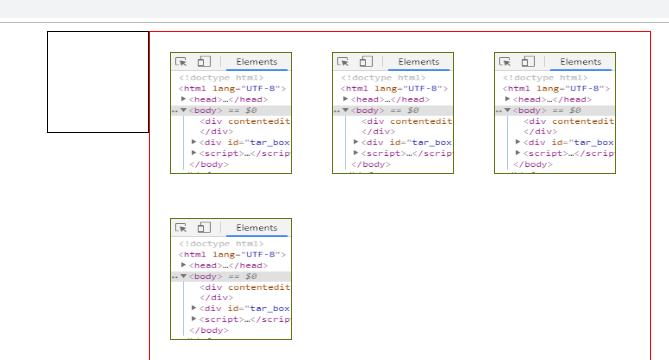
测试完成效果图:
原生js复制粘贴上传图片前后台代码,兼容firebox,chrome, ie11,亲测有效的更多相关文章
- 让微信内置浏览器兼容clipboard.js 复制粘贴 ios 安卓
<!--js copy事件--><script type="text/javascript" src="/static/js/clipboard.min ...
- 原生JS实现购物车结算功能代码+zepto版
html <!DOCTYPE html PUBLIC "-//W3C//DTD XHTML 1.0 Transitional//EN" "http://www.w3 ...
- 设为首页 和 收藏本站js代码 兼容IE,chrome,ff
设为首页 和 收藏本站js代码 兼容IE,chrome,ff //设为首页 function SetHome(obj,url){ try{ obj.style.behavior='url(#defau ...
- 基于原生js的返回顶部组件,兼容主流浏览器
基于原生js的返回顶部插件,兼容IE8及以上.FF.chrome等主流浏览器. js文件中封装了getScrollTop()和changeScrollTop()函数分别用于获取滚动条滚动的高度和修改滚 ...
- js 复制粘贴功能记录
最近工作中需要在前端页面中使用代码完成剪贴板的读写,网上搜索了下相应的资料,记录下... 这个功能有两个办法一个是js方式,一个是使用flash 一.JS方法 1.复制 首先复制的过程分为两步曲,无论 ...
- js本地图片预览代码兼容所有浏览器
html代码 <div id="divPreview" style="width: 160px; height: 170px"><img id ...
- 黄聪:原生js的音频播放器,兼容pc端和移动端(原创)
更新时间:2018/9/3 下午1:32:54 更新说明:添加音乐的loop设置和ended事件监听 loop为ture的时候不执行ended事件 1 2 3 4 5 6 7 8 9 10 11 12 ...
- mybatis自动生成代码插件mybatis-generator使用流程(亲测可用)
mybatis-generator是一款在使用mybatis框架时,自动生成model,dao和mapper的工具,很大程度上减少了业务开发人员的手动编码时间 坐着在idea上用maven构建spri ...
- JS input文本框禁用右键和复制粘贴功能的代码
代码如下: function click(e) { if (document.all) { ||||) { oncontextmenu='return false'; } } if (document ...
随机推荐
- Linux 7开机自启项查看并设置
在Linux6中查看及设置开机自启信息是使用chkconfig命令,Linux7中此命令已经被替代,接下来我们就来研究下Linux7中的区别所在. chkconfig --list Note: T ...
- 利用keytool、openssl生成证书文件
转载请标明出处:http://blog.csdn.net/shensky711/article/details/52225073 本文出自: [HansChen的博客] 用openssl指令逐步生成各 ...
- 个人收藏--未整理—C# 上传下载文件
Winform下载文件 /// <summary> /// 下载文件 /// </summary> /// <param name="URL"> ...
- maven本地仓库路径和修改
1.本地仓库,顾名思义,就是Maven在本地存储构件的地方. 注:maven的本地仓库,在安装maven后并不会创建,它是在第一次执行maven命令的时候才被创建 maven本地仓库的默认位置:无论是 ...
- 程序员的算法课(17)-常用的图算法:深度优先(DFS)
版权声明:本文为博主原创文章,遵循CC 4.0 BY-SA版权协议,转载请附上原文出处链接和本声明. 本文链接:https://blog.csdn.net/m0_37609579/article/de ...
- jsp中标签的序号问题
采用ststus.count进行序号的显示,但是设置了分页之后会出现点击下一页之后第二页的序号还是从1开始排序的,有时候并不方便,所以本文章针对带有分页的序号进行设置: <c:forEach i ...
- 申请SSL证书
1.为什么需要申请SSL证书呢? 因为之前公司网站是通过http访问的,现在要通过https方式访问,前面多了一个s,那就需要SSL证书,用https方式访问的,会加密用户上传和下载的数据,使访问更加 ...
- GO富集分析示例【华为云技术分享】
版权声明:本文为博主原创文章,遵循CC 4.0 BY-SA版权协议,转载请附上原文出处链接和本声明. 本文链接:https://blog.csdn.net/devcloud/article/detai ...
- 机器学习笔记(九)---- 集成学习(ensemble learning)【华为云技术分享】
集成学习不是一种具体的算法,而是在机器学习中为了提升预测精度而采取的一种或多种策略.其原理是通过构建多个弱监督模型并使用一定策略得到一个更好更全面的强监督模型.集成学习简单的示例图如下: 通过训练得到 ...
- springcloud集成kafka
项目名称:布控预警 水平拆分出来的项目,作为一个单独的可以对外提供服务的项目 项目设计:springcloud,可以集成各个不同平台的一个作为对外提供的微服务项目 项目功能:实现各个平台和本平台之间的 ...