
SpringBoot系列——加载自定义配置文件
前言
SpringBoot启动时默认加载bootstrap.properties或bootstrap.yml(这两个优先级最高)、application.properties或application.yml,如果我们配置了spring.profiles,同时会加载对应的application-{profile}.properties或application-{profile}.yml,profile为对应的环境变量,比如dev,如果没有配置,则会加载profile=default的配置文件
虽然说配置项都写在同一个配置文件没有问题,但我们仍然希望能分开写,这样比较清晰,比如eureka的配置写在eureka.properties,数据库相关的配置写在datasource.properties等等,因此就需要设置加载外部配置文件
更多关于配置项信息请看官网:https://docs.spring.io/spring-boot/docs/2.1.0.RELEASE/reference/htmlsingle/#boot-features-external-config
本文记录SpringBoot加载自定义配置文件的两个方法
两种方法
方法一
直接在具体的类上面使用注解加载
比如当你在ServiceAImpl需要使用到xxx.properties时
//手动加载自定义配置文件

@PropertySource(value = {

        "classpath:xxx.properties",

}, encoding = "utf-8")

@Service

public class ServiceAImpl{

    @Value("${cn.huanzi.qch.xxx}")

    private String xxx;

}
如果你需要在更早一点引入,则可以在启动类上进行引入
//手动加载自定义配置文件

@PropertySource(value = {

        "classpath:xxx.properties",

        "classpath:yyy.properties",

        "classpath:zzz.yml",

}, encoding = "utf-8")

@Component

@SpringBootApplication

public class SpringbootLoadmyprofilesApplication {

    public static void main(String[] args) {

        SpringApplication.run(SpringbootLoadmyprofilesApplication.class, args);

    }

    @Value("${cn.huanzi.qch.xxx}")

    private String xxx;

    @Value("${cn.huanzi.qch.yyy}")

    private String yyy;

    @Value("${cn.huanzi.qch.zzz}")

    private String zzz;

    @Bean

    void index(){

        System.out.println(xxx);

        System.out.println(yyy);

        System.out.println(zzz);

    }

}
如果我们只是在业务中需要用到自定义配置文件的值,这样引入并没有什么问题,但外部配置是一些启动项,SpringBoot官网并不推荐我们这样干

虽然在@SpringBootApplication上使用@PropertySource似乎是在环境中加载自定义资源的一种方便而简单的方法,但我们不推荐使用它,因为SpringBoot在刷新应用程序上下文之前就准备好了环境。使用@PropertySource定义的任何键都加载得太晚,无法对自动配置产生任何影响。
这种情况下需要采用第二种方法
方法二
自定义环境处理类,在启动之前定制环境或应用程序上下文,
Customize the Environment or ApplicationContext Before It Starts:https://docs.spring.io/spring-boot/docs/2.1.0.RELEASE/reference/htmlsingle/#howto-customize-the-environment-or-application-context

官网还提供了一个列子:
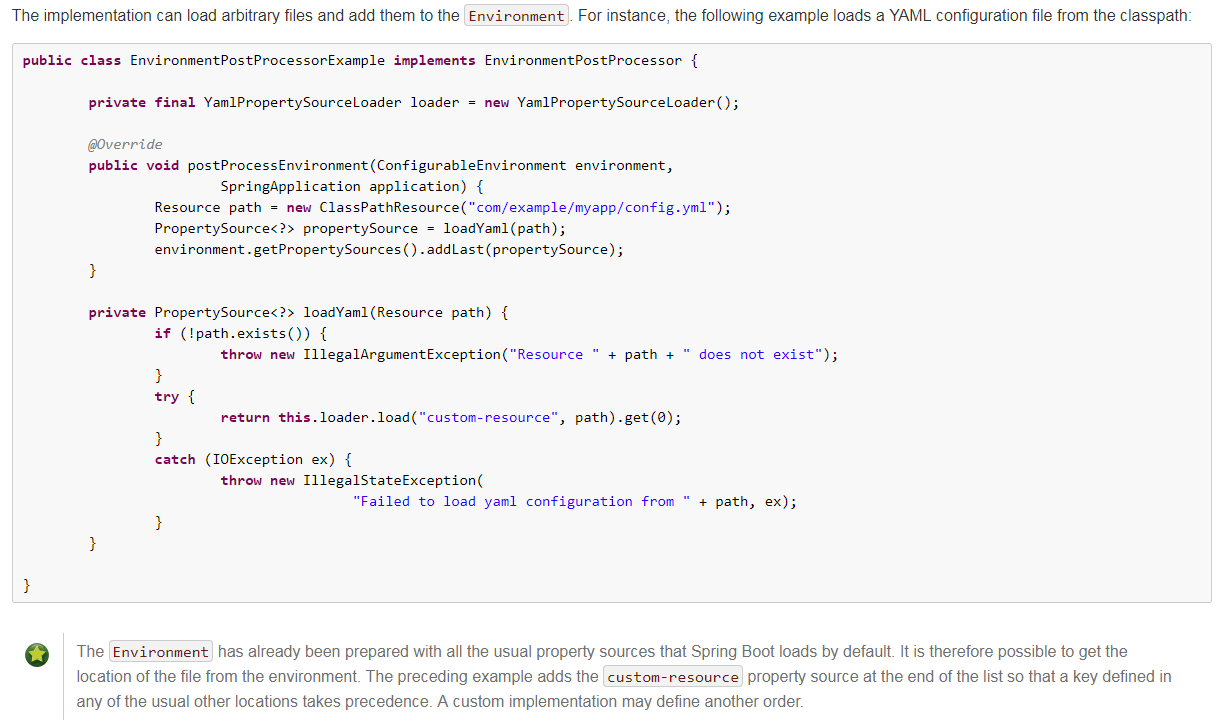
我们也来写一个自定义环境处理,在运行SpringApplication之前加载任意配置文件到Environment环境中
package cn.huanzi.qch.springbootloadmyprofiles;

import org.springframework.boot.SpringApplication;

import org.springframework.boot.env.EnvironmentPostProcessor;

import org.springframework.core.env.ConfigurableEnvironment;

import org.springframework.core.env.PropertiesPropertySource;

import org.springframework.core.env.PropertySource;

import org.springframework.core.io.ClassPathResource;

import org.springframework.core.io.Resource;

import java.io.IOException;

import java.util.Properties;

/**

 自定义环境处理,在运行SpringApplication之前加载任意配置文件到Environment环境中

 */

public class MyEnvironmentPostProcessor implements EnvironmentPostProcessor {

    //Properties对象

    private final Properties properties = new Properties();

    @Override

    public void postProcessEnvironment(ConfigurableEnvironment environment,SpringApplication application) {

        //自定义配置文件

        String[] profiles = {

                "xxx.properties",

                "yyy.properties",

                "zzz.yml",

        };

        //循环添加

        for (String profile : profiles) {

            //从classpath路径下面查找文件

            Resource resource = new ClassPathResource(profile);

            //加载成PropertySource对象,并添加到Environment环境中

            environment.getPropertySources().addLast(loadProfiles(resource));

        }

    }

    //加载单个配置文件

    private PropertySource<?> loadProfiles(Resource resource) {

        if (!resource.exists()) {

            throw new IllegalArgumentException("资源" + resource + "不存在");

        }

        try {

            //从输入流中加载一个Properties对象

            properties.load(resource.getInputStream());

            return new PropertiesPropertySource(resource.getFilename(), properties);

        }catch (IOException ex) {

            throw new IllegalStateException("加载配置文件失败" + resource, ex);

        }

    }

}
并且在META-INF/spring.factories中
#启用我们的自定义环境处理类

org.springframework.boot.env.EnvironmentPostProcessor=cn.huanzi.qch.springbootloadmyprofiles.MyEnvironmentPostProcessor
简单测试
先看一下我们的工程结构

xxx、yyy、zzz里面就只有一个值(yyy、zzz就对应改成yyy、zzz)
cn.huanzi.qch.xxx=this is xxx
如果不手动加载自定义配置文件,启动将会报错

因为我们这里不是启动项,方法一、方法二启动效果都差不多

后记
部分代码参考:https://www.jianshu.com/p/7ab1a62b04ed?from=timeline
代码开源
代码已经开源、托管到我的GitHub、码云:
GitHub:https://github.com/huanzi-qch/springBoot
码云:https://gitee.com/huanzi-qch/springBoot
SpringBoot系列——加载自定义配置文件的更多相关文章
- SpringBoot之加载自定义配置文件
SpringBoot默认加载配置文件名为:application.properties和application.yml,如果需要使用自定义的配置文件,则通过@PropertySource注解指定. J ...
- SpringBoot启动加载yml配置文件出现编码格式错误
Caused by: org.yaml.snakeyaml.error.YAMLException: java.nio.charset.MalformedInputException: Input l ...
- spring-boot 如何加载rsources下面的自定义配置文件
spring-boot 如何加载resources下面的自定义配置文件 https://segmentfault.com/q/1010000006828771?_ea=1144561
- springboot加载外部配置文件
网上搜集和整理如下(自己已验证过) 1. war包在tomcat中加载外部配置文件 war包运行在独立tomcat下时,如何加载war包外部配置application.properties,以达到每次 ...
- SpringBoot加载子模块配置文件的方法
这两天开始学习SpringBoot框架,按照官方的文档,很轻易地就把单模块的项目启动了,但在使用maven搭建多模块的时候遇到了子模块配置文件没有加载的问题 项目架构是这样的 zero |-ws |- ...
- Springboot默认加载application.yml原理以及扩展
Springboot默认加载application.yml原理以及扩展 SpringApplication.run(...)默认会加载classpath下的application.yml或applic ...
- [Yii2.0] 以Yii 2.0风格加载自定义类或命名空间 [配置使用Yii2 autoloader]
Yii 2.0最显著的特征之一就是引入了命名空间,因此对于自定义类的引入方式也同之前有所不同.这篇文章讨论一下如何利用Yii 2.0的自动加载机制,向系统中引入自定义类和命名空间.本文旨在抛砖引玉,如 ...
- selenium启动Chrome时,加载用户配置文件
selenium启动Chrome时,加载用户配置文件 Selenium操作浏览器是不加载任何配置的,网上找了半天,关于Firefox加载配置的多点,Chrome资料很少,下面是关于加载Chrome ...
- 基于.net 的加载自定义配置-误操作
有时候 需要 将程序加载自定义的配置文件,除了自己写解析xml文件.内置的ConfigutionManager对象 是个不错的选项. 按照 app.config 的方式,做一个副本.然后从你的配置文件 ...
随机推荐
- twemproxy架构分析——剖析twemproxy代码前编
twemproxy背景 在业务量剧增的今天,单台高速缓存服务器已经无法满足业务的需求, 而相较于大容量SSD数据存储方案,缓存具备速度和成本优势,但也存在数据安全性的挑战.为此搭建一个高速缓存服务器集 ...
- delphi xe 之路(14)使用FireMonkeyStyle(一共30篇)
FireMonkey使用Style来控制控件的显示方式. 每个控件都有一个StyleLookup属性,FireMonkey就是通过控件的这个属性来在当前窗体的StyleBook控件中查找匹配的Styl ...
- linux的各个子系统
Linux基本的子系统主要有CPU.Memory.IO.Network. 在这些子系统中,它们之间相互之间高度依赖.不论什么一个子系统的高负载都会引起其它子系统出现故障. 比如: 大量的页调入请求对内 ...
- 三:Java之Applet
首先我要说的是Applet是一种应用程序,它是一种由JAVA编写的小应用程序,通常这样的应用程序都像他的名字一样,是一个非常小的程序,或许有些朋友就会问了,那么它是用来干什么的呢?JAVA程序就是JA ...
- Codeforces Beta Round #7--D. Palindrome Degree(Manacer)
题目:http://blog.csdn.net/winddreams/article/details/44218961 求出每一个点为中心的最长字符串,推断该串是不是从开头的回文串. #include ...
- CMMI能力成熟度模型集成的过程域
什么是CMMI CMMI全称是Capability Maturity Model Integration, 即能力成熟度模型集成,是由美国国防部(Office of the Secretary of ...
- sql语句计算出每个月的天数
原文:sql语句计算出每个月的天数 从当前月-11个月开始,到当前月为止,用一个sql语句计算出每个月的天数. SELECT TO_CHAR(ADD_MONTHS(SYSDATE,-LEVEL+1 ...
- NS2网络模拟(2)-丢包率
1: #NS2_有线部分\LossRate.awk 2: 3: BEGIN { 4: #Initialize the variable 5: Lost = 0; #the Sum of Lost pa ...
- 经典数字图像处理(matlab 实现)
Ivan Selesnick(Software) Sparsity / Total variation / Denoising Software - Michael Elad's Personal P ...
- Matlab随笔之模拟退火算法
问题描述: 我方有一个基地,经度和纬度为( 70,40).假设我方飞机的速度为 1000 公里/小时. 我方派一架飞机从基地出发,侦察完敌方所有目标,再返回原来的基地.在敌方每一目 标点的侦察时间不计 ...