
FCC---CSS Flexbox: Add Flex Superpowers to the Tweet Embed
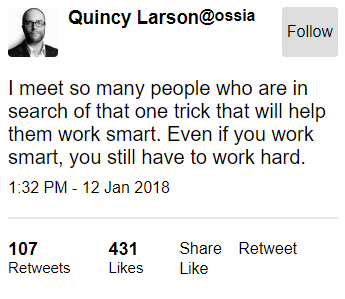
To the right is the tweet embed that will be used as the practical example.
Some of the elements would look better with a different layout.
The last challenge demonstrated display: flex.
Here you'll add it to several components in the tweet embed to start adjusting their positioning.
Add the CSS property display: flex to all of the following items - note that the selectors are already set up in the CSS:
header, the header's .profile-name, the header's .follow-btn, the header's h3 and h4, the footer, and the footer's .stats.
<style>

  body {

    font-family: Arial, sans-serif;

  }

  header {

    display: flex;

  }

  header .profile-thumbnail {

    width: 50px;

    height: 50px;

    border-radius: 4px;

  }

  header .profile-name {

    display: flex;

    margin-left: 10px;

  }

  header .follow-btn {

    display: flex;

    margin: 0 0 0 auto;

  }

  header .follow-btn button {

    border: 0;

    border-radius: 3px;

    padding: 5px;

  }

  header h3, header h4 {

    display: flex;

    margin: 0;

  }

  #inner p {

    margin-bottom: 10px;

    font-size: 20px;

  }

  #inner hr {

    margin: 20px 0;

    border-style: solid;

    opacity: 0.1;

  }

  footer {

    display: flex;

  }

  footer .stats {

    display: flex;

    font-size: 15px;

  }

  footer .stats strong {

    font-size: 18px;

  }

  footer .stats .likes {

    margin-left: 10px;

  }

  footer .cta {

    margin-left: auto;

  }

  footer .cta button {

    border: 0;

    background: transparent;

  }

</style>

<header>

  <img src="https://freecodecamp.s3.amazonaws.com/quincy-twitter-photo.jpg" alt="Quincy Larson's profile picture" class="profile-thumbnail">

  <div class="profile-name">

    <h3>Quincy Larson</h3>

    <h4>@ossia</h4>

  </div>

  <div class="follow-btn">

    <button>Follow</button>

  </div>

</header>

<div id="inner">

  <p>I meet so many people who are in search of that one trick that will help them work smart. Even if you work smart, you still have to work hard.</p>

  <span class="date">1:32 PM - 12 Jan 2018</span>

  <hr>

</div>

<footer>

  <div class="stats">

    <div class="Retweets">

      <strong>107</strong> Retweets

    </div>

    <div class="likes">

      <strong>431</strong> Likes

    </div>

  </div>

  <div class="cta">

    <button class="share-btn">Share</button>

    <button class="retweet-btn">Retweet</button>

    <button class="like-btn">Like</button>

  </div>

</footer>
FCC---CSS Flexbox: Add Flex Superpowers to the Tweet Embed的更多相关文章
- CSS Flexbox 学习指南、工具与框架
Flexbox 是一种更有效的布局方式,它能更好的分配容器空间,并控制项目的对齐.虽然,掌握它的理论有些复杂,但幸运的是,我们可以借助开放的网络来学习并逐步掌握它. 在本文中,我们整合了一些最佳的 F ...
- css flexbox 弹性布局
flexbox 即css flexible box layout. ie9及以下不支持flexbox. flex详细规范(https://www.w3.org/TR/css-flexbox/) 为什么 ...
- CSS Flexbox 弹性盒子模型
CSS Flexbox 弹性盒子模型 设置元素样式为 display: flex 或 display: inline-flex, 让元素变成flex容器, 从而可以通过flex模式布局它的子元素. f ...
- CSS3 flexbox 布局 ---- flex项目属性介绍
现在介绍用在flex项目上的css 属性,html结构还是用ul, li 结构,不过内容改成1,2,3, 样式的话,直接把给 ul 设display:flex 变成flex 容器,默认主轴的方向为水平 ...
- FCC---CSS Flexbox: Apply the flex-direction Property to Create a Column in the Tweet Embed
The tweet embed header and footer used the flex-direction property earlier with a row value. Similar ...
- FCC---CSS Flexbox: Apply the flex-direction Property to Create Rows in the Tweet Embed
The header and footer in the tweet embed example have child items that could be arranged as rows usi ...
- Flex布局(CSS Flexbox)
参考:Flex 布局语法教程 Flex布局是什么? Flex是Flexible Box的缩写,意为”弹性布局”,用来为盒状模型提供最大的灵活性. 任何一个容器都可以指定为Flex布局 注意:设为Fle ...
- CSS3 flexbox 布局 ---- flex 容器属性介绍
flexbox布局是CSS3中新增的属性,它可以很轻松地帮我们解决掉一些常见的布局问题,比如导航栏. 我们用普通的方法写导航栏,通常会在ul, li 结构写好后,让li 元素左浮动,然后再给ul 清浮 ...
- CSS#Flex-box, border-size, onresize() event, Media Queries
Flexbox Pseudo-classes box-sizing: border-box HTML DOM event resize() @media Queries: 根据一些css条件,触发一 ...
随机推荐
- 【HUAWEI Mate30】抽奖啦!华为IoT新福利上线!
华为云OceanConnect IoT云服务包括应用管理.设备管理.系统管理等能力,实现统一安全的网络接入.各种终端的灵活适配.海量数据的采集分析,从而实现新价值的创造. 华为云OceanConnec ...
- KETTLE实现复杂的流程
KETTLE是一款将数据从来源端经过抽取(extract).转换(transform).加载(load)至目的端的非常好用的一款ETL工具.学会它,对于跨数据库的表处理或者定时生成文本,excel等常 ...
- 在一个数组中,除了两个数外,其余数都是两两成对出现,找出这两个数,要求时间复杂度O(n),空间复杂度O(1)
题目:在一个数组中,除了两个数外,其余数都是两两成对出现,找出这两个数,要求时间复杂度O(n),空间复杂度O(1) 分析:这道题考察位操作:异或(^),按位与(&),移位操作(>> ...
- iOS开发-CoreMotion框架
转自: CoreMotion是一个专门处理Motion的框架,其中包含了两个部分 加速度计和陀螺仪,在iOS4之前加速度计是由 UIAccelerometer 类 来负责采集数据,现在一般都是用Cor ...
- ios开发之block的使用,及注意事项
转自:http://my.oschina.net/u/1432769/blog/390401 Block作为C语言的扩展,并不是高新技术,和其他语言的闭包或lambda表达式是一回事.需要注意的是由于 ...
- MongoDB第三天(正则,管道,聚合,字符串,算术,日期,java连接MongoDB)
部分正则表达式: i:忽略大小写 m:多行查找 x:设置 x 选项后,正则表达式中的非转义的空白字符将被忽略. s:允许点字符(即.)匹配包括换行符在内的所有字符. w:匹配包括下划线的任何单词字 ...
- maven与ecplise的整合
Maven 概念: Maven 使用项目对象模型(POM)的概念,可以通过一小段描述信息来管理项目的构建,报告和文档的软件项目管理工具. Maven 除了以程序构建能力为特色之外,还提供高级项目管理工 ...
- Linux中sed基础
sed是一种流编辑器,它是文本处理中非常重要的工具,能够完美的配合正则表达式使用,功能不同凡响.处理时,把当前处理的行存储在临时缓冲区中,称为"模式空间"(pattern spac ...
- bash单引号嵌套
转自:https://blog.jysoftware.com/2015/12/bash-%E6%80%8E%E4%B9%88%E5%81%9A%E5%8D%95%E5%BC%95%E5%8F%B7%E ...
- art-template循环无法显示出数据
art-template循环遍历无法显示数据原因 1.语法问题:循环语句导致的问题 2.插件问题: 用标准语法时循环数据如果引入第一个插件,会导致数据显示不出来只有引入第二个插件才可循环出数据 用原生 ...