
itext转html为pdf遇到的问题
记录一下使用itext将html文件转为pdf文件遇到的一些问题
1、中文不显示
原因:itext默认不支持中文
解决方法:引入中文字体
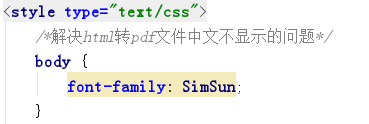
需要注意的是在java代码中设置好中文字体后,还需要在html引用该字体,否则不会起效果。

2、css不起作用
原因:css文件使用的是相对路径
解决方法:将相对路径改为绝对路径或者将css写在html文件内部
3、html内容转换为pdf后,内容显示不全
原因:
解决方法:在html文件中设定纸张大小,如A4纸张@page{size:a4}
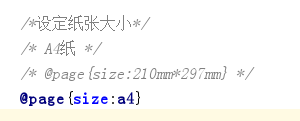
具体请参考以下代码
首先在pom.xml文件中引入itext相关jar包
<!--itext-->

<dependency>

    <groupId>com.itextpdf</groupId>

    <artifactId>itext-asian</artifactId>

    <version>5.2.0</version>

</dependency>

<dependency>

    <groupId>org.xhtmlrenderer</groupId>

    <artifactId>core-renderer</artifactId>

    <version>R8</version>

</dependency>
实现将html文件转换为pdf文件代码如下:
package com.lnjecit.util;

import com.lowagie.text.pdf.BaseFont;

import org.slf4j.Logger;

import org.slf4j.LoggerFactory;

import org.springframework.util.ResourceUtils;

import org.xhtmlrenderer.pdf.ITextFontResolver;

import org.xhtmlrenderer.pdf.ITextRenderer;

import java.io.*;

import java.net.MalformedURLException;

/**

 * Pdf处理工具类

 *

 * @author

 * @create 2017-12-18 21:25

 **/

public class PdfUtil {

    protected static Logger logger = LoggerFactory.getLogger(PdfUtil.class);

    /**

     *

     * @param htmlFile html文件存储路径

     * @param pdfFile  生成的pdf文件存储路径

     * @param chineseFontPath 中文字体存储路径

     */

    public static void html2pdf(String htmlFile, String pdfFile, String chineseFontPath)  {

        // step 1

        String url;

        OutputStream os = null;

        try {

            url = new File(htmlFile).toURI().toURL().toString();

            os = new FileOutputStream(pdfFile);

            ITextRenderer renderer = new ITextRenderer();

            renderer.setDocument(url);

            // 解决中文不显示问题

            ITextFontResolver fontResolver = renderer.getFontResolver();

            fontResolver.addFont(chineseFontPath, BaseFont.IDENTITY_H, BaseFont.NOT_EMBEDDED);

            renderer.layout();

            renderer.createPDF(os);

        } catch (MalformedURLException e) {

            logger.warn(e.toString(), e);

        } catch (FileNotFoundException e) {

            logger.warn(e.toString(), e);

        } catch (com.lowagie.text.DocumentException e) {

            logger.warn(e.toString(), e);

        } catch (IOException e) {

            logger.warn(e.toString(), e);

        } finally {

            if(os != null) {

                try {

                    os.close();

                } catch (IOException e) {

                    logger.warn(e.toString(), e);

                }

            }

        }

    }

    public static void main(String[] args) {

        try {

            //html文件路径

            String htmlFilePath = "E:\\projects\\learn\\spring-boot\\springboot-learn\\springboot-learn\\springboot-poi\\src\\main\\resources\\templates\\index.html";

            // 中文字体存储路径

            String chineseFontPath = "E:\\projects\\learn\\spring-boot\\springboot-learn\\springboot-learn\\springboot-poi\\src\\main\\resources\\Fonts\\simsun.ttc";

            // html转pdf

            html2pdf(htmlFilePath,"E:\\projects\\learn\\spring-boot\\springboot-learn\\springboot-learn\\springboot-poi\\src\\main\\resources\\templates\\index.pdf", chineseFontPath);

            System.out.println("转换成功!");

        } catch (Exception e) {

            logger.error("html转换为pdf失败", e);

        }

    }

}
测试的html内容如下:
<!DOCTYPE html>

<html lang="en">

<head>

    <meta http-equiv="Content-Type" content="text/html; charset=utf-8"/>

    <title>认识table表标签</title>

    <style type="text/css">

        /*解决html转pdf文件中文不显示的问题*/

        body {

            font-family: SimSun;

        }

        /*设定纸张大小*/

        /* A4纸 */

        /* @page{size:210mm*297mm} */

        @page{size:a4}

        p {

            color: red;

        }

    </style>

</head>

<body>

    <table border="1px">

        <caption>我的标题</caption>

        <tbody>

        <tr>

            <th>班级</th>

            <th>学生数</th>

            <th>平均成绩</th>

            <th>班级</th>

            <th>学生数</th>

            <th>平均成绩</th>

            <th>班级</th>

            <th>学生数</th>

            <th>平均成绩</th>

        </tr>

        <tr>

            <td>一班</td>

            <td>30</td>

            <td>89</td>

            <td>一班</td>

            <td>30</td>

            <td>89</td>

            <td>一班</td>

            <td>30</td>

            <td>89</td>

        </tr>

        <tr>

            <td>一班</td>

            <td>30</td>

            <td>89</td>

            <td>一班</td>

            <td>30</td>

            <td>89</td>

            <td>一班</td>

            <td>30</td>

            <td>89</td>

        </tr>

        <tr>

            <td>一班</td>

            <td>30</td>

            <td>89</td>

            <td>一班</td>

            <td>30</td>

            <td>89</td>

            <td>一班</td>

            <td>30</td>

            <td>89</td>

        </tr>

        </tbody>

    </table>

    <p>

        《侠客行》<br/>

        年代: 唐 作者: 李白<br/>

        赵客缦胡缨,吴钩霜雪明。银鞍照白马,飒沓如流星。

        十步杀一人,千里不留行。事了拂衣去,深藏身与名。

        闲过信陵饮,脱剑膝前横。将炙啖朱亥,持觞劝侯嬴。

        三杯吐然诺,五岳倒为轻。眼花耳热后,意气素霓生。

        救赵挥金槌,邯郸先震惊。千秋二壮士,煊赫大梁城。

        纵死侠骨香,不惭世上英。谁能书閤下,白首太玄经。

    </p>

</body>

</html>
package com.lnjecit.util;

import com.lowagie.text.pdf.BaseFont;

import org.slf4j.Logger;

import org.slf4j.LoggerFactory;

import org.springframework.util.ResourceUtils;

import org.xhtmlrenderer.pdf.ITextFontResolver;

import org.xhtmlrenderer.pdf.ITextRenderer;

import java.io.*;

import java.net.MalformedURLException;

/**

 * Pdf处理工具类

 *

 * @author

* @create 2017-12-18 21:25

 **/

public class PdfUtil {

    protected static Logger logger = LoggerFactory.getLogger(PdfUtil.class);

    /**

     *

     * @param htmlFile html文件存储路径

     * @param pdfFile  生成的pdf文件存储路径

     * @param chineseFontPath 中文字体存储路径

     */

public static void html2pdf(String htmlFile, String pdfFile, String chineseFontPath)  {

        // step 1

String url;

        OutputStream os = null;

        try {

            url = new File(htmlFile).toURI().toURL().toString();

            os = new FileOutputStream(pdfFile);

            ITextRenderer renderer = new ITextRenderer();

            renderer.setDocument(url);

            // 解决中文不显示问题

ITextFontResolver fontResolver = renderer.getFontResolver();

            fontResolver.addFont(chineseFontPath, BaseFont.IDENTITY_H, BaseFont.NOT_EMBEDDED);

            renderer.layout();

            renderer.createPDF(os);

        } catch (MalformedURLException e) {

            logger.warn(e.toString(), e);

        } catch (FileNotFoundException e) {

            logger.warn(e.toString(), e);

        } catch (com.lowagie.text.DocumentException e) {

            logger.warn(e.toString(), e);

        } catch (IOException e) {

            logger.warn(e.toString(), e);

        } finally {

            if(os != null) {

                try {

                    os.close();

                } catch (IOException e) {

                    logger.warn(e.toString(), e);

                }

            }

        }

    }

    public static void main(String[] args) {

        try {

            //html文件路径

String htmlFilePath = "E:\\projects\\learn\\spring-boot\\springboot-learn\\springboot-learn\\springboot-poi\\src\\main\\resources\\templates\\index.html";

            // 中文字体存储路径

String chineseFontPath = "E:\\projects\\learn\\spring-boot\\springboot-learn\\springboot-learn\\springboot-poi\\src\\main\\resources\\Fonts\\simsun.ttc";

            // html转pdf

html2pdf(htmlFilePath,"E:\\projects\\learn\\spring-boot\\springboot-learn\\springboot-learn\\springboot-poi\\src\\main\\resources\\templates\\index.pdf", chineseFontPath);

            System.out.println("转换成功!");

        } catch (Exception e) {

            logger.error("html转换为pdf失败", e);

        }

    }

}
转换前的html页面效果如下
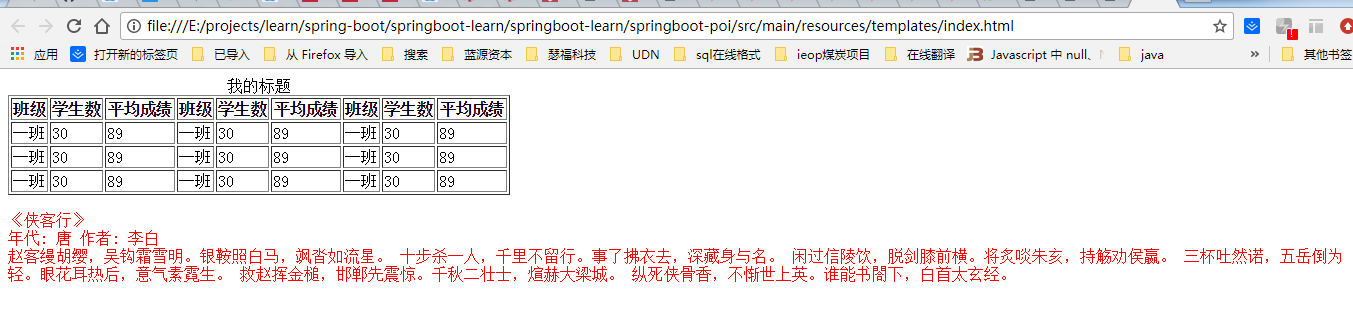
转换后的pdf文件效果如下:

itext转html为pdf遇到的问题的更多相关文章
- iText框架(生成pdf文档)
1.创建一个itext的简单示例 a.导包(pom.xml文件) <dependencies> <dependency> <groupId>com.lowagie& ...
- 用itext合并多个pdf文件【转】【补】
java代码 package c; import java.io.FileOutputStream; import java.io.IOException; import java.util.Arra ...
- Java使用IText(VM模版)导出PDF
Java使用IText(VM模版)导出PDF: public String createPDF(ProjectManageBase projectManageBase) { Map map = new ...
- 【转】Java通过IText导出word和pdf
原帖地址:http://blog.csdn.net/zwx19921215/article/details/34439851 最近做的项目中需要用到把Highcharts图表导出word和pdf的功能 ...
- wkhtmltopdf+itext实现html生成pdf文件的打印下载(适用于linux及windows)
目中遇到个根据html转Java的功能,在java中我们itext可以快速的实现pdf打印下载的功能,在itext中我们一般有以下三中方式实现 配置pdf模板,通过Adobe Acrobat 来设置域 ...
- 利用itext将html转为pdf
亲测代码没有问题,需要注意细节已经标注:需要jar包:iText-2.0.8.jar:core-renderer-R8.jar: core-renderer-R8.jar下载地址:http://cen ...
- Java使用IText(VM模版)导出PDF,IText导出word(二)
===============action=========================== //退款导出word public void exportWordTk() throws IOE ...
- 在spring boot 中使用itext和itextrender生成pdf文件
转载请注明出处 https://www.cnblogs.com/majianming/p/9539376.html 项目中需要对订单生成pdf文件,在第一版本其实已经有了比较满意的pdf文档,但是还是 ...
- 【Java】itext根据模板生成pdf(包括图片和表格)
1.导入需要的jar包:itext-asian-5.2.0.jar itextpdf-5.5.11.jar. 2.新建word文档,创建模板,将文件另存为pdf,并用Adobe Acrobat DC打 ...
随机推荐
- Java:详解内部类
可以将一个类的定义放在另一个类的定义内部,这就是内部类. 内部类是一个非常有用的特性但又比较难理解使用的特性(鄙人到现在都没有怎么使用过内部类,对内部类也只是略知一二). 第一次见面 内部类我们从外面 ...
- Bootstrap4用法
#Bootstrap4 ## 网格系统- .col- 针对所有设备- .col-sm- 平板 - 屏幕宽度等于或大于 576px- .col-md- 桌面显示器 - 屏幕宽度等于或大于 768px)- ...
- 引用外部静态库(.a文件)时或打包.a时,Category方法无法调用。崩溃
我的这个是MJRefresh,学习打.a包Terminating app due to uncaught exception 'NSInvalidArgumentException', reason: ...
- adb常用命令(手机测试)
ADB安装与常用命令详解 一.ADB意义 adb的全称为Android Debug Bridge,就是起到 ...
- Ubuntu 安装Google浏览器
Ubuntu自带的浏览器是火狐浏览器,使用的时候多多少少有些不方便,这里安装Googel浏览器. 下载 可以到 Ubuntu chrome去下载安装包. 安装 首先到下载的根目录 cd ~/Downl ...
- (转) Unreal Engine 4 Custom Shaders Tutorial
说明: 1.这里的Custom Shaders 为且仅为 Custom Node的使用和USF的包含.并非全局Shader和Material Shader. 2.原文来源:https://www.ra ...
- BZOJ 3531 SDOI2014 旅行 树链剖分+线段树动态开点
题目链接:http://www.lydsy.com/JudgeOnline/problem.php?id=3531 题意概述: 给出一棵N个点的树,树上的每个结点有一个颜色和权值,支持以下四种操作: ...
- 常量表达式 & constexpr
[常量表达式] 一个这样的表达式:值不会改变 && 在编译过程中就能够得到计算结果 常见的常量表达式:字面值.用常量表达式初始化的const对象 一个对象是不是常量表达式由它的数据类型 ...
- Mininet简单性能测试
建一个简单的模型,使用一个单交换机,然后链接n个主机形成拓扑,然后对每个链路设置带宽,延迟时间,和丢包率. 这里就选择建一个单交换机和六个主机的作为例子. 创建py脚本生成拓扑:写一个类生成一个单交换 ...
- 最短路径——Dijkstra算法以及二叉堆优化(含证明)
一般最短路径算法习惯性的分为两种:单源最短路径算法和全顶点之间最短路径.前者是计算出从一个点出发,到达所有其余可到达顶点的距离.后者是计算出图中所有点之间的路径距离. 单源最短路径 Dijkstra算 ...