
Selenium2+python自动化57-捕获异常(NoSuchElementException)【转载】
前言
在定位元素的时候,经常会遇到各种异常,为什么会发生这些异常,遇到异常又该如何处理呢?
本篇通过学习selenium的exceptions模块,了解异常发生的原因。
一、发生异常
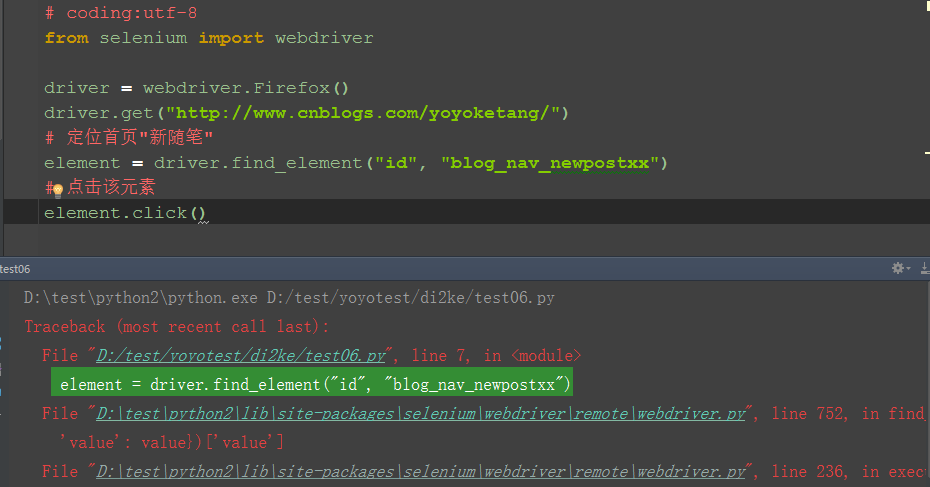
1.打开博客首页,定位“新随笔”元素,此元素id="blog_nav_newpost"
2.为了故意让它定位失败,我在元素属性后面加上xx
3.运行失败后如下图所示,程序在查找元素的这一行发生了中断,不会继续执行click事件了
二、捕获异常
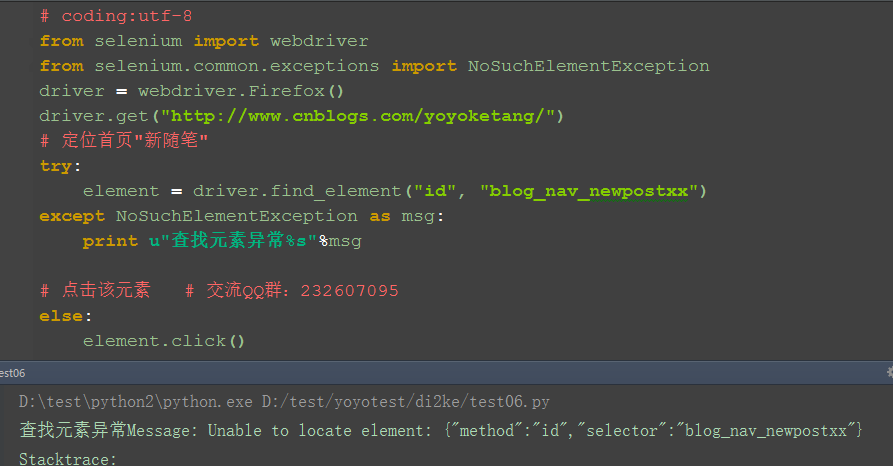
1.为了让程序继续执行,我们可以用try...except...捕获异常。捕获异常后可以打印出异常原因,这样以便于分析异常原因
2.从如下异常内容可以看出,发生异常原因是:NoSuchElementException
selenium.common.exceptions.NoSuchElementException: Message: Unable to locate element: {"method":"id","selector":"blog_nav_newpostxx"}
3.从selenium.common.exceptions 导入 NoSuchElementException类
三、参考代码:
# coding:utf-8
from selenium import webdriver
from selenium.common.exceptions import NoSuchElementException
driver = webdriver.Firefox()
driver.get("http://www.cnblogs.com/yoyoketang/")
# 定位首页"新随笔"
try:
element = driver.find_element("id", "blog_nav_newpostxx")
except NoSuchElementException as msg:
print u"查找元素异常%s"%msg
# 点击该元素 # 交流QQ群:232607095
else:
element.click()
四、selenium常见异常
1.NoSuchElementException:没有找到元素
2.NoSuchFrameException:没有找到iframe
3.NoSuchWindowException:没找到窗口句柄handle
4.NoSuchAttributeException:属性错误
5.NoAlertPresentException:没找到alert弹出框
6.lementNotVisibleException:元素不可见
7.ElementNotSelectableException:元素没有被选中
8.TimeoutException:查找元素超时
五、其它异常与源码
1.在Lib目录下:\Lib\site-packages\selenium\common有兴趣的可以看看
# Licensed to the Software Freedom Conservancy (SFC) under one
# or more contributor license agreements. See the NOTICE file
# distributed with this work for additional information
# regarding copyright ownership. The SFC licenses this file
# to you under the Apache License, Version 2.0 (the
# "License"); you may not use this file except in compliance
# with the License. You may obtain a copy of the License at
#
# http://www.apache.org/licenses/LICENSE-2.0
#
# Unless required by applicable law or agreed to in writing,
# software distributed under the License is distributed on an
# "AS IS" BASIS, WITHOUT WARRANTIES OR CONDITIONS OF ANY
# KIND, either express or implied. See the License for the
# specific language governing permissions and limitations
# under the License.
"""
Exceptions that may happen in all the webdriver code.
"""
class WebDriverException(Exception):
"""
Base webdriver exception.
"""
def __init__(self, msg=None, screen=None, stacktrace=None):
self.msg = msg
self.screen = screen
self.stacktrace = stacktrace
def __str__(self):
exception_msg = "Message: %s\n" % self.msg
if self.screen is not None:
exception_msg += "Screenshot: available via screen\n"
if self.stacktrace is not None:
stacktrace = "\n".join(self.stacktrace)
exception_msg += "Stacktrace:\n%s" % stacktrace
return exception_msg
class ErrorInResponseException(WebDriverException):
"""
Thrown when an error has occurred on the server side.
This may happen when communicating with the firefox extension
or the remote driver server.
"""
def __init__(self, response, msg):
WebDriverException.__init__(self, msg)
self.response = response
class InvalidSwitchToTargetException(WebDriverException):
"""
Thrown when frame or window target to be switched doesn't exist.
"""
pass
class NoSuchFrameException(InvalidSwitchToTargetException):
"""
Thrown when frame target to be switched doesn't exist.
"""
pass
class NoSuchWindowException(InvalidSwitchToTargetException):
"""
Thrown when window target to be switched doesn't exist.
To find the current set of active window handles, you can get a list
of the active window handles in the following way::
print driver.window_handles
"""
pass
class NoSuchElementException(WebDriverException):
"""
Thrown when element could not be found.
If you encounter this exception, you may want to check the following:
* Check your selector used in your find_by...
* Element may not yet be on the screen at the time of the find operation,
(webpage is still loading) see selenium.webdriver.support.wait.WebDriverWait()
for how to write a wait wrapper to wait for an element to appear.
"""
pass
class NoSuchAttributeException(WebDriverException):
"""
Thrown when the attribute of element could not be found.
You may want to check if the attribute exists in the particular browser you are
testing against. Some browsers may have different property names for the same
property. (IE8's .innerText vs. Firefox .textContent)
"""
pass
class StaleElementReferenceException(WebDriverException):
"""
Thrown when a reference to an element is now "stale".
Stale means the element no longer appears on the DOM of the page.
Possible causes of StaleElementReferenceException include, but not limited to:
* You are no longer on the same page, or the page may have refreshed since the element
was located.
* The element may have been removed and re-added to the screen, since it was located.
Such as an element being relocated.
This can happen typically with a javascript framework when values are updated and the
node is rebuilt.
* Element may have been inside an iframe or another context which was refreshed.
"""
pass
class InvalidElementStateException(WebDriverException):
"""
"""
pass
class UnexpectedAlertPresentException(WebDriverException):
"""
Thrown when an unexpected alert is appeared.
Usually raised when when an expected modal is blocking webdriver form executing any
more commands.
"""
def __init__(self, msg=None, screen=None, stacktrace=None, alert_text=None):
super(UnexpectedAlertPresentException, self).__init__(msg, screen, stacktrace)
self.alert_text = alert_text
def __str__(self):
return "Alert Text: %s\n%s" % (self.alert_text, super(UnexpectedAlertPresentException, self).__str__())
class NoAlertPresentException(WebDriverException):
"""
Thrown when switching to no presented alert.
This can be caused by calling an operation on the Alert() class when an alert is
not yet on the screen.
"""
pass
class ElementNotVisibleException(InvalidElementStateException):
"""
Thrown when an element is present on the DOM, but
it is not visible, and so is not able to be interacted with.
Most commonly encountered when trying to click or read text
of an element that is hidden from view.
"""
pass
class ElementNotSelectableException(InvalidElementStateException):
"""
Thrown when trying to select an unselectable element.
For example, selecting a 'script' element.
"""
pass
class InvalidCookieDomainException(WebDriverException):
"""
Thrown when attempting to add a cookie under a different domain
than the current URL.
"""
pass
class UnableToSetCookieException(WebDriverException):
"""
Thrown when a driver fails to set a cookie.
"""
pass
class RemoteDriverServerException(WebDriverException):
"""
"""
pass
class TimeoutException(WebDriverException):
"""
Thrown when a command does not complete in enough time.
"""
pass
class MoveTargetOutOfBoundsException(WebDriverException):
"""
Thrown when the target provided to the `ActionsChains` move()
method is invalid, i.e. out of document.
"""
pass
class UnexpectedTagNameException(WebDriverException):
"""
Thrown when a support class did not get an expected web element.
"""
pass
class InvalidSelectorException(NoSuchElementException):
"""
Thrown when the selector which is used to find an element does not return
a WebElement. Currently this only happens when the selector is an xpath
expression and it is either syntactically invalid (i.e. it is not a
xpath expression) or the expression does not select WebElements
(e.g. "count(//input)").
"""
pass
class ImeNotAvailableException(WebDriverException):
"""
Thrown when IME support is not available. This exception is thrown for every IME-related
method call if IME support is not available on the machine.
"""
pass
class ImeActivationFailedException(WebDriverException):
"""
Thrown when activating an IME engine has failed.
"""
pass
Selenium2+python自动化57-捕获异常(NoSuchElementException)【转载】的更多相关文章
- Selenium2+python自动化28-table定位【转载】
前言 在web页面中经常会遇到table表格,特别是后台操作页面比较常见.本篇详细讲解table表格如何定位. 一.认识table 1.首先看下table长什么样,如下图,这种网状表格的都是table ...
- Selenium2+python自动化7-xpath定位【转载】
前言 在上一篇简单的介绍了用工具查看目标元素的xpath地址,工具查看比较死板,不够灵活,有时候直接复制粘贴会定位不到.这个时候就需要自己手动的去写xpath了,这一篇详细讲解xpath的一些语法. ...
- Selenium2+python自动化74-jquery定位【转载】
转至博客:上海-悠悠 前言 元素定位可以说是学自动化的小伙伴遇到的一道门槛,学会了定位也就打通了任督二脉,前面分享过selenium的18般武艺,再加上五种js的定位大法. 这些还不够的话,今天再分享 ...
- Selenium2+python自动化69-PhantomJS使用【转载】
前言 PhantomJS是一个没有界面的浏览器,本质上是它其实也就是一个浏览器,只是不在界面上展示. PhantomJS非常适合爬虫方面,很多玩爬虫的都喜欢用这个浏览器. 一.PhantomJS环境准 ...
- Selenium2+python自动化51-unittest简介【转载】
前言 熟悉java的应该都清楚常见的单元测试框架Junit和TestNG,这个招聘的需求上也是经常见到的.python里面也有单元测试框架-unittest,相当于是一个python版的junit. ...
- Selenium2+python自动化4-Pycharm使用【转载】
前言 在写脚本之前,先要找个顺手的写脚本工具.python是一门解释性编程语言,所以一般把写python的工具叫解释器.写python脚本的工具很多,小编这里就不一一列举的,只要自己用着顺手就可以的, ...
- Selenium2+Python自动化-处理浏览器弹窗(转载)
本篇转自博客:上海-小T 原文地址:http://blog.csdn.net/real_tino/article/details/59068827 我们在浏览网页时经常会碰到各种花样的弹窗,在做UI自 ...
- Selenium2+python自动化-gird分布式(转载)
本篇转自博客:上海-小T 原文地址:http://blog.csdn.net/real_tino/article/details/53467406 Selenium grid是用来分布式执行测试用例脚 ...
- Selenium2+python自动化61-Chrome浏览器(chromedriver)【转载】
前言 selenium2启动Chrome浏览器是需要安装驱动包的,但是不同的Chrome浏览器版本号,对应的驱动文件版本号又不一样,如果版本号不匹配,是没法启动起来的. 一.Chrome遇到问题 1. ...
- Selenium2+python自动化20-Excel数据参数化【转载】
前言 问: Python 获取到Excel一列值后怎么用selenium录制的脚本中参数化,比如对登录用户名和密码如何做参数化? 答:可以使用xlrd读取Excel的内容进行参数化.当然为了便于各位小 ...
随机推荐
- BFS实现模板
以如下图的无向图G4为例,进行图的深度优先搜索: 假设从顶点v1出发进行搜索,首先访问v1和v1的邻接点v2和v3,然后依次访问v2的邻接点v4和v5及v3的邻接点v6和v7,最后访问v4的邻接点v8 ...
- MvcMusicStore学习中常出现的一个BUG
BUG描述:var genreModel = storeDB.Genres.Include("Albums").Single(g => g.Name == genre); 前 ...
- pptp协议的工作原理
我的工作机是A,通信网卡是Aeth0, Appp0: 然后我的云主机是B, 通信的网卡是Beth0, Bppp0: 在网卡Bppp0上会不断地很清晰的数据包: 16:40:39.522917 IP 6 ...
- 算法(10)Subarray Sum Equals K
题目:在数组中找到一个子数组,让子数组的和是k. 思路:先发发牢骚,这两天做题是卡到不行哇,前一个题折腾了三天,这个题上午又被卡住,一气之下,中午睡觉,下午去了趟公司,竟然把namespace和cgr ...
- require.js 模块化
什么是模块化? 将若干功能进行封装,以备将来被重复使用. 为什么要前端模块化? 将公共功能进行封装实现复用 灵活解决依赖 解决全局变量污染 如何实现前端模块化? <!DOCTYPE html&g ...
- hibernate笔记(二)
目标: 关联映射(hibernate映射) 1. 集合映射 2. 一对多与多对一映射 (重点) 3. 多对多映射 4. inverse/lazy/cascade 1. 集合映射 开发流程: 需求分析/ ...
- 【bzoj1465/bzoj1045】糖果传递 数论
题目描述 老师准备了一堆糖果, 恰好n个小朋友可以分到数目一样多的糖果. 老师要n个小朋友去拿糖果, 然后围着圆桌坐好, 第1个小朋友的左边是第n个小朋友, 其他第i个小朋友左边是第i-1个小朋友. ...
- SNMP协议介绍
SNMP协议介绍 一.什么是SNMP SNMP:“简单网络管理协议”,用于网络管理的协议.SNMP用于网络设备的管理.SNMP的工作方式:管理员需要向设备获取数据,所以SNMP提供了 “读”操作:管理 ...
- luogu P2764 最小路径覆盖问题
题目描述 给定有向图G=(V,E).设P 是G 的一个简单路(顶点不相交)的集合.如果V 中每个顶点恰好在P 的一条路上,则称P是G 的一个路径覆盖.P 中路径可以从V 的任何一个顶点开始,长度也是任 ...
- number 解题报告
number 题目描述 给定整数 \(m,k\),求出正整数 \(n\) 使得 \(n+1,n+2,-,2n\) 中恰好有 \(m\) 个数在二进制下恰好有 \(k\) 个 \(1\). 有多组数据. ...