
javaee--学生成绩录入与显示--Struts2标签的使用
类Score.java:各课程的成绩及平均成绩
类Student.java:学生姓名、学号及Score类
类ScoreAction.java:将Student类存在一个List对象中, execute()方法根据用户输入的成绩计算每个学生的平均成绩。
页面scores.jsp:完成录入学生信息及考试成绩
页面showScores.jsp:显示已录入的学生成绩及平均成绩
效果如下:

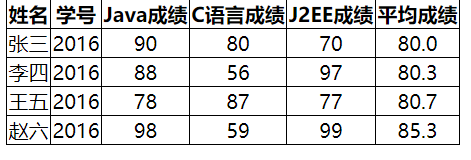
代码如下:
 package javaBean;

 public class Score {

     private int javaScore;

     private int j2eeScore;

     private int ccScore;

     private double aveScore;

     public int getJavaScore() {

         return javaScore;

     }

     public void setJavaScore(int javaScore) {

         this.javaScore = javaScore;

     }

     public int getJ2eeScore() {

         return j2eeScore;

     }

     public void setJ2eeScore(int j2eeScore) {

         this.j2eeScore = j2eeScore;

     }

     public int getCcScore() {

         return ccScore;

     }

     public void setCcScore(int ccScore) {

         this.ccScore = ccScore;

     }

     public double getAveScore() {

         return aveScore;

     }

     public void setAveScore(double aveScore) {

         this.aveScore = aveScore;

     }

 }
Score
 package javaBean;

 public class Student {

     private String name;

     private long number;

     private Score score;

     public String getName() {

         return name;

     }

     public void setName(String name) {

         this.name = name;

     }

     public long getNumber() {

         return number;

     }

     public void setNumber(long number) {

         this.number = number;

     }

     public Score getScore() {

         return score;

     }

     public void setScore(Score score) {

         this.score = score;

     }

 }
Student
 package actions;

 import java.math.BigDecimal;

 import java.util.List;

 import com.opensymphony.xwork2.ActionSupport;

 import javaBean.Score;

 import javaBean.Student;

 public class ScoreAction extends ActionSupport{

     private static final long serialVersionUID = 1L;

     private List<Student> students;

     public List<Student> getStudents() {

         return students;

     }

     public void setStudents(List<Student> students) {

         this.students = students;

     }

     public String execute() throws Exception{

         int size = students.size();

         for(int i=0; i<size; i++){

             Student st = students.get(i);

             Score score = st.getScore();

             double aveScore = (score.getJavaScore() + score.getCcScore() +

                     score.getJ2eeScore()) / 3.0;

             BigDecimal b = new BigDecimal(aveScore);

             aveScore = b.setScale(1, BigDecimal.ROUND_HALF_UP).doubleValue();

             score.setAveScore(aveScore);

         }

         return super.SUCCESS;

     }

 }
ScoreAction
 <%@ page language="java" import="java.util.*" pageEncoding="UTF-8"%>

 <%@ taglib prefix="s" uri="/struts-tags"%>

 <%

     String path = request.getContextPath();

     String basePath = request.getScheme() + "://" + request.getServerName() + ":" + request.getServerPort()

             + path + "/";

 %>

 <!DOCTYPE HTML PUBLIC "-//W3C//DTD HTML 4.01 Transitional//EN">

 <html>

 <head>

 <base href="<%=basePath%>">

 <title>输入学生成绩</title>

 <s:head theme="xhtml" />

 <style type="text/css">

 table {

     border-collapse: collapse;

     border: 1px solid #000;

 }

 th, td {

     border: 1px solid #000;

 }

 </style>

 </head>

 <body>

     <s:form theme="simple" action="showscores" namespace="/"   >

         <table>

             <thead>

                 <tr>

                     <th align="center">姓名</th>

                     <th align="center">学号</th>

                     <th align="center">Java成绩</th>

                     <th align="center">C语言成绩</th>

                     <th align="center">J2EE成绩</th>

                 </tr>

             </thead>

             <tbody>

                 <s:iterator value="new int[4]" status="st">

                     <tr>

                         <td><s:textfield name="%{'students['+#st.index+'].name'}"></s:textfield>

                         </td>

                         <td><s:textfield name="%{'students['+#st.index+'].number'}"></s:textfield>

                         </td>

                         <td><s:textfield

                                 name="%{'students['+#st.index+'].score.javaScore'}"></s:textfield>

                         </td>

                         <td><s:textfield

                                 name="%{'students['+#st.index+'].score.ccScore'}"></s:textfield></td>

                         <td><s:textfield

                                 name="%{'students['+#st.index+'].score.j2eeScore'}"></s:textfield>

                         </td>

                     </tr>

                 </s:iterator>

             </tbody>

         </table>

         <s:submit value="提交"></s:submit>

     </s:form>

 </body>

 </html>
scores.jsp
 <%@ page language="java" import="java.util.*" pageEncoding="UTF-8"%>

 <%@ taglib prefix="s" uri="/struts-tags"%>

 <%

     String path = request.getContextPath();

     String basePath = request.getScheme() + "://" + request.getServerName() + ":" + request.getServerPort()

             + path + "/";

 %>

 <!DOCTYPE HTML PUBLIC "-//W3C//DTD HTML 4.01 Transitional//EN">

 <html>

 <head>

 <base href="<%=basePath%>">

 <title>显示学生信息</title>

 <s:head theme="xhtml" />

 <style type="text/css">

 table {

     border-collapse: collapse;

     border: 1px solid #000;

 }

 th, td {

     border: 1px solid #000;

 }

 </style>

 </head>

 <body>

     <table>

         <thead>

             <tr>

                 <th align="center">姓名</th>

                 <th align="center">学号</th>

                 <th align="center">Java成绩</th>

                 <th align="center">C语言成绩</th>

                 <th align="center">J2EE成绩</th>

                 <th align="center">平均成绩</th>

             </tr>

         </thead>

         <tbody>

             <s:iterator value="students" status="st">

                 <tr>

                     <td align="center"><s:property value="name" /></td>

                     <td align="center"><s:property value="number" /></td>

                     <td align="center"><s:property value="score.javaScore" /></td>

                     <td align="center"><s:property value="score.ccScore" /></td>

                     <td align="center"><s:property value="score.j2eeScore" /></td>

                     <td align="center"><s:property value="score.aveScore" /></td>

                 </tr>

             </s:iterator>

         </tbody>

     </table>

 </body>

 </html>
showScores.jsp
 <action name="scores">

             <result>/scores.jsp</result>

 </action>

 <action name="showscores" class="actions.ScoreAction">

             <result name="success">/showScores.jsp</result>

 </action>
struts.xml
javaee--学生成绩录入与显示--Struts2标签的使用的更多相关文章
- mfc学生成绩录入与查询
1.声明结构体 struct Person{ char name[8]; char yuwen[8]; char math[8];}; 2.成绩录入 在"保存"按钮中实现以下代码 ...
- Java课程设计—学生成绩管理系统(201521123005 杨雪莹)
一.团队课程设计博客链接 学生成绩管理系统 二.个人负责模块或任务说明 学生成绩录入 显示所有学生信息 显示各科平均成绩 显示学生成绩(按降序排序) 三.自己的代码提交记录截图 四.自己负责模块或任务 ...
- struts2官方 中文教程 系列三:使用struts2 标签 tag
避免被爬,先贴上本帖地址:struts2 官方系列教程一:使用struts2 标签 tag http://www.cnblogs.com/linghaoxinpian/p/6901316.html 本 ...
- C项目实践--学生成绩管理系统
1.功能需求分析 学生成绩管理系统是对学生基本信息及成绩的管理.本程序主要实现了对学生的学号.姓名等基本信息以及各项学科成绩进行增加.删除.修改.查询和保存到磁盘文件等操作.主要功能描述如下: (1) ...
- Java学生成绩绩点管理系统
一.考试要求: 1.按照测试内容要求完成程序的设计与编程: 2.建立学号姓名文件夹,如:“信 1805-1 班 20180001 XXX”,将源程序文件保存在文件夹中,压缩成 rar 文件提交. 3. ...
- Java开学测试-学生成绩管理系统
题目: 1.定义 ScoreInformation 类,其中包括七个私有变量(stunumber, name, mathematicsscore, englishiscore,networkscore ...
- java简单学生成绩管理系统
题目要求: 一. 数据结构要求:(5 分) 1.定义 ScoreInformation 类,其中包括七个私有变量(stunumber, name, mathematicsscore, englishi ...
- java学生成绩管理系统
信1805-1 20183590 田庆辉 石家庄铁道大学 2019 年秋季 ...
- Java学生成绩系统
package text; public class helloworld{ private String stunumber; private String name; private double ...
随机推荐
- jgrid相关功能用法记录
1.获取行号var ids = $gridList.jqGrid('getGridParam', 'selarrrow'); //多选,返回选中行号组字符 var ids2 = $gridList.j ...
- VS2017中的附加到进程
vs2017 里加入了IIS Express,所以在web项目执行的时候,在附加进程中找不到端口号了,只能找到PID 但是浏览器的地址栏里还是带有端口的地址:http://localhost:1351 ...
- Py修行路 python基础 (十三)匿名函数 与 内置函数
一.匿名函数 1.定义: 匿名函数顾名思义就是指:是指一类无需定义标识符(函数名)的函数或子程序. 2.语法格式:lambda 参数:表达式 lambda语句中,开头先写关键字lambda,冒号前是 ...
- Arp内网毒化
攻击者:192.168.220.143 受害者:192.168.220.137 默认网关:192.168.220.2 首先,开启IP转发 使用工具Arpspoof进行ARP毒化,把受害者的流量传送给网 ...
- Python多线程-生产者消费者模型
用多线程和队列来实现生产者消费者模型 # -*- coding:utf-8 -*- __author__ = "MuT6 Sch01aR" import threading imp ...
- pcs与crmsh命令比较
一.概念 1.crmsh This project is not part of the GNU Project. Pacemaker command line interface for manag ...
- 第一章 Spring整体架构和环境搭建(待续)
········
- Centos 6.* / 7.*下通过yum安装php7
查看 centos 版本 # cat /etc/centos-release 删除之前的 php 版本 # yum remove php* php-common rpm 安装 Php7 相应的 yum ...
- 使用ReentrantReadWriteLock类
读读共享 类ReentrantReadWriteLock的使用:写写互斥 读写互斥
- leetcode867
vector<vector<int>> transpose(vector<vector<int>>& A) { vector<vector ...