
OC自定义文档头部注释
1、创建文件 IDETemplateMacros.plist
2、向文件里添加内容FILEHEADER

- 具体内容
     // 文 件 名:___FILENAME___

     //

     // 版权所有:___COPYRIGHT___

     // 创 建 者:___FULLUSERNAME___

     // 创建日期:___DATE___.

     // 文档说明:

     // 修 改 人:

     // 修改日期:

     //
3、前往文件夹
- 通过将 IDETemplateMacros.plist 文件放置到不同的目录,其影响的范围也不同:
- 只对当前 Project 指定的用户(username)有影响
.xcodeproj/xcuserdata/[username].xcuserdatad/IDETemplateMacros.plist - 对当前 Project 的所有成员有影响
.xcodeproj/xcshareddata/IDETemplateMacros.plist - 对指定用户的 Workspace 下的 Project 有影响
.xcworkspace/xcuserdata/[username].xcuserdatad/IDETemplateMacros.plist - 对所有成员 Workspace 下的 Project 有影响
.xcworkspace/xcshareddata/IDETemplateMacros.plist - 对 Xcode 所有创建的文件都有影响
~/Library/Developer/Xcode/UserData/IDETemplateMacros.plist
- 只对当前 Project 指定的用户(username)有影响
4、将IDETemplateMacros.plist移动到目录下, 新文件即生效
- 效果图:
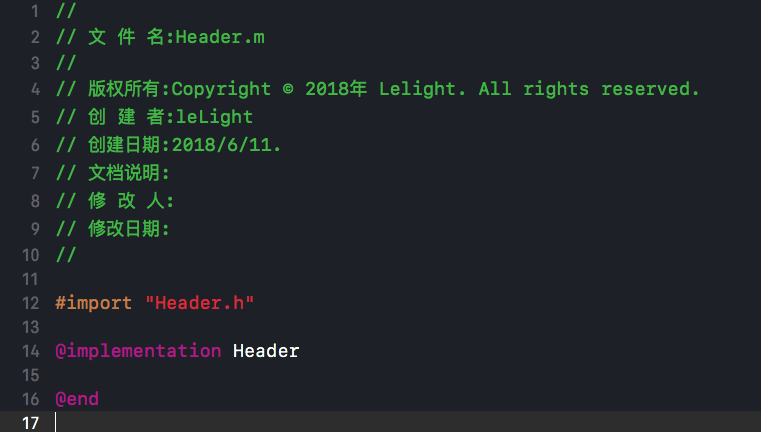
5、官方文档对应内容
COPYRIGHT
A copyright string that uses the company name of the team for the project. If there is no company name, the string is blank.The example shows a copyright string when the company is set to “Apple”.
Copyright © 2018 Apple. All rights reserved.
DATE
The current date.DEFAULTTOOLCHAINSWIFTVERSION
The version of Swift used for the default toolchain.FILEBASENAME
The name of the current file without any extension.FILEBASENAMEASIDENTIFIER
The name of the current file encoded as a C identifier.FILEHEADER
The text placed at the top of every new text file.FILENAME
The full name of the current file.FULLUSERNAME
The full name of the current macOS user.NSHUMANREADABLECOPYRIGHTPLIST
The entry for the human readable copyright string in the Info.plist file of a macOS app target. The value of the macro must include the XML delimiters for the plist. For example, a valid value is:
NSHumanReadableCopyright
Copyright © 2018 Apple, Inc. All rights reserved.
Notice that the value includes a newline.
ORGANIZATIONNAME
The name for your organization that appears in boilerplate text throughout your project folder. The organization name in your project isn’t the same as the organization name that you enter in App Store Connect.PACKAGENAME
The name of the package built by the current scheme.PACKAGENAMEASIDENTIFIER
A C-identifier encoded version of the package name built by the current scheme.PRODUCTNAME
The app name of the product built by the current scheme.PROJECTNAME
The name of the current project.RUNNINGMACOSVERSION
The version of macOS that is running Xcode.TARGETNAME
The name of the current target.TIME
The current time.USERNAME
The login name for the current macOS user.UUID
Returns a unique ID. The first time this macro is used, it generates the ID before returning it. You can use this macro to create multiple unique IDs by using a modifier. Each modifier returns an ID that is unique for that modifier. For example, the first time the UUID:firstPurpose modifier is used, the macro generates and returns a unique ID for that macro and modifier combination. Subsequent uses of the UUID:firstPurpose modifier return the same ID. Adding the UUID:secondPurpose modifier generates and returns a different ID that will be unique to UUID:secondPurpose, and different from the ID for UUID:firstPurpose.WORKSPACENAME
The name of the current workspace. If there is only one project open, then the name of the current project.YEAR
The current year as a four-digit number.
- 苹果传送门:FILEHEADER
OC自定义文档头部注释的更多相关文章
- (转)HTML文档头部信息
原文:http://www.cnblogs.com/sunyunh/archive/2012/07/25/2609199.html HTML(3)HTML文档头部信息 <!DOCTYPE h ...
- 关于文档头部定义和meta元素
<!DOCTYPE html> <html> <head> <meta charset="UTF-8"> <title> ...
- IT兄弟连 HTML5教程 HTML文档头部元素head
HTML头部标记是<head>,主要包括页面的一些基本描述语句,以及CSS和JavaScript,一般都可以定义在头部元素中.它用于包含当前文档的有关信息,例如网页标题和关键字等.通常位于 ...
- IDEA 自定义文件头注释
什么是 IDEA 自定义文件头注释 IDEA 自定义文件头注释指的是创建 Java 类文件时,IDEA 可以自动设置文件头的注释信息,如下: 如何设置 IDEA 自定义文件头注释 打开 File-&g ...
- C#如何给PDF文档添加注释
整理文档时,我们可能会需要在一些或一段文字上添加注释加以说明,那如何以编程的方式实现呢?本文将实例讲述C#中如何使用免费组件给PDF文档添加文本注释,包括自由文本注释.自由文本注释能允许我们自定义它的 ...
- idea 模版之自定义类与方法注释
idea 模版之自定义类与方法注释 很多公司都有要求的代码注释规范,我们每新建类或者方法的时候从新复制粘贴很麻烦,而且容易粘错. 当然自定义模板还可以用到很多地方,比如系统自带的 sout就是syst ...
- SpringBoot(十一):springboot2.0.2下配置mybatis generator环境,并自定义字段/getter/settetr注释
Mybatis Generator是供开发者在mybatis开发时,快速构建mapper xml,mapper类,model类的一个插件工具.它相对来说对开发者是有很大的帮助的,但是它也有不足之处,比 ...
- eclipse中设置自定义文档签名(工具)
今天第一次认真学习eclipse的使用,看到自定义文档签名,步骤如下: 1.点击window->preferences->java->Code Style->Code Tem ...
- Eclipse中设置自定义文档签名
今天第一次认真学习eclipse的使用,看到自定义文档签名,步骤如下: 1.点击window->preferences->java->Code Style->Code Temp ...
随机推荐
- 【linux】下载命令lftp\sftp\wget
sftp sftp(安全文件传输协议)与ftp 有着几乎一样的语法和功能.FTP 为 SSH的一部份,是一种传输档案至 Blogger 伺服器的安全方式.它并不使用ftp守护进程(ftpd或wu-ft ...
- Playbooks 中的错误处理
Topics Playbooks 中的错误处理 忽略错误的命令 控制对失败的定义 覆写更改结果 Ansible 通常默认会确保检测模块和命令的返回码并且会快速失败 – 专注于一个错误除非你另作打算. ...
- 第七章 AOP(待续)
···············
- 在Centos7中安装elasticsearch5.5
在Centos7中安装elasticsearch5.5 第一步:必须要有jre支持 elasticsearch是用Java实现的,跑elasticsearch必须要有jre支持,所以必须先安装jre ...
- leetcode318
public class Solution { public int MaxProduct(string[] words) { ) { ; } int len = words.Length; int[ ...
- REST的含义和RESTful架构入门
REST的含义和RESTful架构入门 提纲 1.REST架构的作用 2.REST和RESTful 3.REST的具体含义 3.1 资源实体 3.2 资源实体的表现层 3.3. 资源实体某一变现层的状 ...
- 如何在Less中使用使用calc
文章转载自 琼台博客:http://www.qttc.net/201409448.html Less的好处不用说大家都知道,确实让写CSS的人不在痛苦了,最近我在Less里加入calc时确发现了有点 ...
- MongoDB简介及基础知识
MongoDB简介 一.MongDB是一个高性能,开源,无模式的文档型NosQL数据库.主要功能特性: 1.文件存储格式BSON(一种json的扩展) 2.模式自由,数据格式不受限了表的结构 3.支持 ...
- 关于 pycharm 安装第三方模块的一些经验
解决pycharm问题:module 'pip' has no attribute 'main' 更新pip之后,Pycharm安装package出现报错:module 'pip' has no at ...
- 第01章 开发准备(对最新版的RN进行了升级)1-4 项目底部导航菜单开发