
OC自定义文档头部注释
1、创建文件 IDETemplateMacros.plist
2、向文件里添加内容FILEHEADER

- 具体内容
     // 文 件 名:___FILENAME___

     //

     // 版权所有:___COPYRIGHT___

     // 创 建 者:___FULLUSERNAME___

     // 创建日期:___DATE___.

     // 文档说明:

     // 修 改 人:

     // 修改日期:

     //
3、前往文件夹
- 通过将 IDETemplateMacros.plist 文件放置到不同的目录,其影响的范围也不同:
- 只对当前 Project 指定的用户(username)有影响
.xcodeproj/xcuserdata/[username].xcuserdatad/IDETemplateMacros.plist - 对当前 Project 的所有成员有影响
.xcodeproj/xcshareddata/IDETemplateMacros.plist - 对指定用户的 Workspace 下的 Project 有影响
.xcworkspace/xcuserdata/[username].xcuserdatad/IDETemplateMacros.plist - 对所有成员 Workspace 下的 Project 有影响
.xcworkspace/xcshareddata/IDETemplateMacros.plist - 对 Xcode 所有创建的文件都有影响
~/Library/Developer/Xcode/UserData/IDETemplateMacros.plist
- 只对当前 Project 指定的用户(username)有影响
4、将IDETemplateMacros.plist移动到目录下, 新文件即生效
- 效果图:
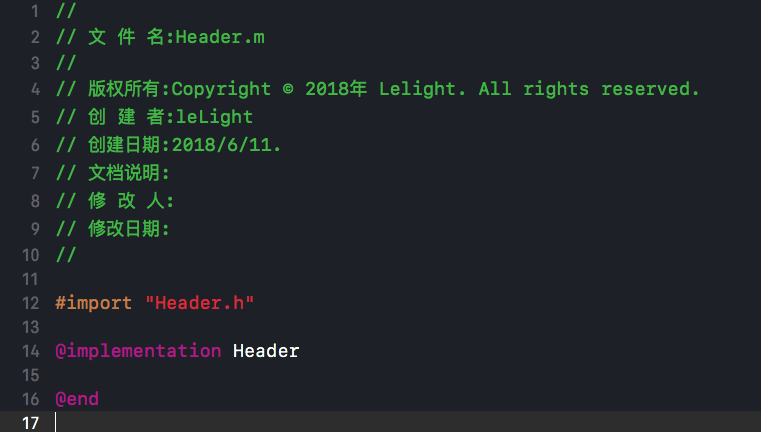
5、官方文档对应内容
COPYRIGHT
A copyright string that uses the company name of the team for the project. If there is no company name, the string is blank.The example shows a copyright string when the company is set to “Apple”.
Copyright © 2018 Apple. All rights reserved.
DATE
The current date.DEFAULTTOOLCHAINSWIFTVERSION
The version of Swift used for the default toolchain.FILEBASENAME
The name of the current file without any extension.FILEBASENAMEASIDENTIFIER
The name of the current file encoded as a C identifier.FILEHEADER
The text placed at the top of every new text file.FILENAME
The full name of the current file.FULLUSERNAME
The full name of the current macOS user.NSHUMANREADABLECOPYRIGHTPLIST
The entry for the human readable copyright string in the Info.plist file of a macOS app target. The value of the macro must include the XML delimiters for the plist. For example, a valid value is:
NSHumanReadableCopyright
Copyright © 2018 Apple, Inc. All rights reserved.
Notice that the value includes a newline.
ORGANIZATIONNAME
The name for your organization that appears in boilerplate text throughout your project folder. The organization name in your project isn’t the same as the organization name that you enter in App Store Connect.PACKAGENAME
The name of the package built by the current scheme.PACKAGENAMEASIDENTIFIER
A C-identifier encoded version of the package name built by the current scheme.PRODUCTNAME
The app name of the product built by the current scheme.PROJECTNAME
The name of the current project.RUNNINGMACOSVERSION
The version of macOS that is running Xcode.TARGETNAME
The name of the current target.TIME
The current time.USERNAME
The login name for the current macOS user.UUID
Returns a unique ID. The first time this macro is used, it generates the ID before returning it. You can use this macro to create multiple unique IDs by using a modifier. Each modifier returns an ID that is unique for that modifier. For example, the first time the UUID:firstPurpose modifier is used, the macro generates and returns a unique ID for that macro and modifier combination. Subsequent uses of the UUID:firstPurpose modifier return the same ID. Adding the UUID:secondPurpose modifier generates and returns a different ID that will be unique to UUID:secondPurpose, and different from the ID for UUID:firstPurpose.WORKSPACENAME
The name of the current workspace. If there is only one project open, then the name of the current project.YEAR
The current year as a four-digit number.
- 苹果传送门:FILEHEADER
OC自定义文档头部注释的更多相关文章
- (转)HTML文档头部信息
原文:http://www.cnblogs.com/sunyunh/archive/2012/07/25/2609199.html HTML(3)HTML文档头部信息 <!DOCTYPE h ...
- 关于文档头部定义和meta元素
<!DOCTYPE html> <html> <head> <meta charset="UTF-8"> <title> ...
- IT兄弟连 HTML5教程 HTML文档头部元素head
HTML头部标记是<head>,主要包括页面的一些基本描述语句,以及CSS和JavaScript,一般都可以定义在头部元素中.它用于包含当前文档的有关信息,例如网页标题和关键字等.通常位于 ...
- IDEA 自定义文件头注释
什么是 IDEA 自定义文件头注释 IDEA 自定义文件头注释指的是创建 Java 类文件时,IDEA 可以自动设置文件头的注释信息,如下: 如何设置 IDEA 自定义文件头注释 打开 File-&g ...
- C#如何给PDF文档添加注释
整理文档时,我们可能会需要在一些或一段文字上添加注释加以说明,那如何以编程的方式实现呢?本文将实例讲述C#中如何使用免费组件给PDF文档添加文本注释,包括自由文本注释.自由文本注释能允许我们自定义它的 ...
- idea 模版之自定义类与方法注释
idea 模版之自定义类与方法注释 很多公司都有要求的代码注释规范,我们每新建类或者方法的时候从新复制粘贴很麻烦,而且容易粘错. 当然自定义模板还可以用到很多地方,比如系统自带的 sout就是syst ...
- SpringBoot(十一):springboot2.0.2下配置mybatis generator环境,并自定义字段/getter/settetr注释
Mybatis Generator是供开发者在mybatis开发时,快速构建mapper xml,mapper类,model类的一个插件工具.它相对来说对开发者是有很大的帮助的,但是它也有不足之处,比 ...
- eclipse中设置自定义文档签名(工具)
今天第一次认真学习eclipse的使用,看到自定义文档签名,步骤如下: 1.点击window->preferences->java->Code Style->Code Tem ...
- Eclipse中设置自定义文档签名
今天第一次认真学习eclipse的使用,看到自定义文档签名,步骤如下: 1.点击window->preferences->java->Code Style->Code Temp ...
随机推荐
- C# 异常内存信息导出Dump文件
背景:很多情况下程序崩溃我们只能看到程序抛出来的异常信息,但是有时候异常信息不清不楚我们处理异常还是一头雾水,这种情况下我们就很希望能有种办法获取程序运行时的内存进行调试,查看其中的变量.参数.方法执 ...
- 升级python到2.7
wget http://python.org/ftp/python/2.7.8/Python-2.7.8.tgz tar zxvf Python-.tgz cd Python- ./configure ...
- python's sixteenth day for me 员工信息表
import os user_dic = { 'username':None, 'password':None, 'login':True } flag = False name_list = ['i ...
- latex 显示中文
中文支持需要cjk-latex,总得来说中文可以使用GB和GBK两种字体,GBK需要从windows下copy *.ttc或*.ttf, GB字体则在linux下就用. 先说支持GB的中文显示,安装以 ...
- Java多线程-线程的同步(同步方法)
线程的同步是保证多线程安全访问竞争资源的一种手段.线程的同步是Java多线程编程的难点,往往开发者搞不清楚什么是竞争资源.什么时候需要考虑同步,怎么同步等等问题,当然,这些问题没有很明确的答案,但有些 ...
- SqlServer数据导入到ORACLE
ORACLE中执行 select * from SYSTEM."employ_epl"
- NODEJS网站
nodejs https://nodejs.org/en/ nodejs官网 http://nodeapi.ucdok.com/#/api/ nodejs手册 https://www.npmjs.co ...
- 【bzoj4296】再见Xor
4269: 再见Xor Time Limit: 10 Sec Memory Limit: 512 MBSubmit: 176 Solved: 107[Submit][Status][Discuss ...
- 581. Shortest Unsorted Continuous Subarray连续数组中的递增异常情况
[抄题]: Given an integer array, you need to find one continuous subarray that if you only sort this su ...
- storm源码分析之任务分配--task assignment
在"storm源码分析之topology提交过程"一文最后,submitTopologyWithOpts函数调用了mk-assignments函数.该函数的主要功能就是进行topo ...