
Telerik UI for ASP.NET Core概要
介绍:不介绍了,刚开始研究。
下载:CSDN或者51cto上都有最新的开发版
安装:默认的安装目录是C:\Program Files (x86)\Progress\Telerik UI for ASP.NET Core <version>
目录结构:
Telerik UI for ASP.NET Core contains the following directories:
js—These are the minified JavaScript files.
styles—The minified CSS files and images used by the themes.
src—The complete JavaScript, CSS, and C# source code. Note that this directory is not available in the trial version.
typescript—The TypeScript definitions for the Kendo combined scripts (kendo.all, kendo.dataviz, kendo.web and kendo.mobile).
vsdoc—The intellisense definitions for the Kendo combined scripts (as the above).
VSExtensions—The extensions for Visual Studio 2015 and 2017.
wrappers\aspnetcore\Binaries\AspNet.Core—Containing the .nupkg NuGet package file.
wrappers\aspnetcore\Examples\AspNet.Core\VS2017—The ASP.NET Core sample application built with Visual Studio 2017.
wrappers\aspnetcore\EditorTemplates\razor—The ready-to-use editor templates based on the Kendo UI widgets.
Telerik UI for ASP.NET Core包含以下目录:
js-这些是压缩的JavaScript文件。
styles - 主题使用的压缩的CSS文件和图像。
src-完整的JavaScript,CSS和C#源代码。 请注意,此目录在试用版中不可用。
typescript-Kendo组合脚本的TypeScript定义(kendo.all,kendo.dataviz,kendo.web和kendo.mobile)。
vsdoc-Kendo组合脚本的智能感知定义(如上所述)。
VSExtensions - Visual Studio 2015和2017的扩展。
wrappers \ aspnetcore \ Binaries \ AspNet.Core-包含.nupkg NuGet包文件。(定义Nuget源时会用到此目录)
wrappers \ aspnetcore \ Examples \ AspNet.Core \ VS2017-使用Visual Studio 2017构建的ASP.NET Core示例应用程序。
wrappers \ aspnetcore \ EditorTemplates \ razor-基于Kendo UI组件的即用型编辑器模板。
重要说明:从 Kendo UI R2 2018 开始不再支持 Visual Studio 2015
升级:
1.使用 NuGet and Bower。
2.手动替换引用和文件。
这里记录第二种方法
手动升级
下载最新版本(或者你需要的版本)
使用所需的框架版本替换与Telerik UI for ASP.NET Core相关的所有脚本,样式和图像(就是把 scripts, styles, and images这几个文件夹的内容替换掉)。
更改对新的Kendo.MVC dll的引用,并验证dll是否引用了正确的ASP.NET Core版本。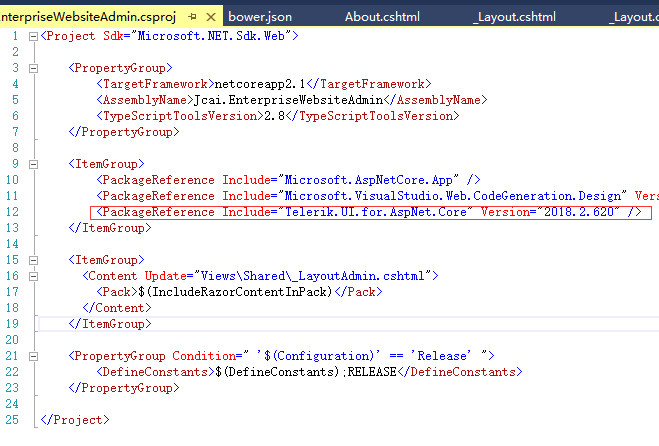
在应用程序中,手动替换任何指向旧Kendo UI资源文件(如脚本和样式)的引用。(就是把引用链接地址都替换成最新的)

不明白的请看英文文档:https://docs.telerik.com/aspnet-core/introduction#distribution-contents
Telerik UI for ASP.NET Core概要的更多相关文章
- 本文演示如何配置ASP.NET Core项目以在Visual Studio(VS)2017中使用Telerik UI for ASP.NET Core。
学习时使用的是VS2017+Core2.1了,不再讨论VS2015和core1.1的东西. 配置ASP.NET Core Web应用程序以使用Telerik UI for ASP.NET Core: ...
- 已知的问题:本文总结了与Telerik UI for ASP.NET Core相关的所有已知问题。
ASP.NET Core Framework 不支持数据表. 有关此限制的更多信息,请参阅dotnet / corefx#1039. 不支持本地化资源. 有关此限制的更多信息,请参阅dotnet / ...
- Telerik UI for ASP.NET AJAX控件汉化方法
Telerik UI for ASP.NET AJAX控件功能十分强大,但原版是英文界面的,不方便一些用户使用. 和.NET的其他控件一样,可以通过资源文件来制作多语言版本. 下面看看安装完成后原始的 ...
- UI控件Telerik UI for ASP.NET MVC全新发布R2 2019 SP1
Telerik UI for ASP.NET MVC拥有使用JavaScript和HTML5构建网站和移动应用所需的70+UI部件,来满足开发者的各种需求,提供无语伦比的开发性能和用户体验.它主要是针 ...
- 界面开发工具集Telerik UI for ASP.NET AJAX发布R2 2019
Telerik UI for ASP.NET AJAX拥有构建ASP.NET AJAX和SharePoint应用程序的80+控件,将为任何浏览器和设备构建Web Forms应用程序的时间缩短一半.Te ...
- ASP.NET Core 运行原理剖析
1. ASP.NET Core 运行原理剖析 1.1. 概述 1.2. 文件配置 1.2.1. Starup文件配置 Configure ConfigureServices 1.2.2. appset ...
- ASP.NET Core 运行原理剖析 (转载)
1.1. 概述 在ASP.NET Core之前,ASP.NET Framework应用程序由IIS加载.Web应用程序的入口点由InetMgr.exe创建并调用托管.以初始化过程中触发HttpAppl ...
- 【翻译】在Visual Studio中使用Asp.Net Core MVC创建你的第一个Web API应用(一)
HTTP is not just for serving up web pages. It's also a powerful platform for building APIs that expo ...
- [转]【翻译】在Visual Studio中使用Asp.Net Core MVC创建你的第一个Web API应用(一)
本文转自:https://www.cnblogs.com/inday/p/6288707.html HTTP is not just for serving up web pages. It’s al ...
随机推荐
- Codeforces 1023 D.Array Restoration-RMQ(ST)区间查询最值 (Codeforces Round #504 (rated, Div. 1 + Div. 2, based on VK Cup 2018 Fi)
D. Array Restoration 这题想一下就会发现是只要两个相同的数之间没有比它小的就可以,就是保存一下数第一次出现和最后一次出现的位置,然后查询一下这个区间就可以,如果有0的话就进行填充. ...
- IActionResult
- 拓扑排序(Topological Order)UVa10305 Ordering Tasks
2016/5/19 17:39:07 拓扑排序,是对有向无环图(Directed Acylic Graph , DAG )进行的一种操作,这种操作是将DAG中的所有顶点排成一个线性序列,使得图中的任意 ...
- oracle to_char FM099999
to_char(column,'FM099999') The FM in the format removes leading and trailing blanks.
- rngd.service 启动失败的处理
[root@localhost ~]# systemctl --failed UNIT LOAD ACTIVE SUB DESCRIPTION ● mdmonitor.service loaded f ...
- bzoj DZY Loves Math V
Time Limit: 10 Sec Memory Limit: 256 MBSubmit: 509 Solved: 284[Submit][Status][Discuss] Descriptio ...
- 上传--下载HDFS文件并指定文件物理块的大小
使用hdfs的api接口分别实现从本地上传文件到集群和从集群下载文件到本地. 1)上传文件主要是使用FileSystem类的copyFromLocalFile()方法来实现,另外我们上传文件时可以指定 ...
- matlab和c混合编程
参考: http://blog.sciencenet.cn/blog-620659-579885.html http://baike.baidu.com/link?url=HnHd3lU9mcVXwh ...
- Eclipse / Pycharm | 使用过程中的一些问题笔记
最近有比较多的用到这两款工具,其中也遇到一些问题,知道了一些快捷键 快捷键什么的这里就不讲了,去网上搜搜,经常使用下,自然就熟悉了 主要记录一下我遇到的几个问题 文章目录 Pycharm出现的部分快捷 ...
- JavaScript跳转到页面某个锚点#
JavaScript跳转到页面某个锚点: scroll(0, document.getElementById('锚点ID').offsetTop);