
SpringBoot(六) - 阿里巴巴的EasyExcel
1、依赖
<!-- 阿里EasyExcel start -->

<dependency>

    <groupId>com.alibaba</groupId>

    <artifactId>easyexcel</artifactId>

    <version>2.1.7</version>

</dependency>
2、写入Excel
2.1 实体
@Data

public class Student {

    //学号

    @ExcelProperty("学号")

    private Integer id;

    // 姓名

    @ExcelProperty("姓名")

    private String name;

    // 年龄

    @ExcelProperty("年龄")

    private Integer age;

    // 班级

    @ExcelProperty("班级")

    private String classRoom;

    // 性别

    @ExcelProperty("性别")

    private String sex;

    // 院校

    @ExcelProperty("院校")

    private String graduate;

    // 毕业时间

    @DateTimeFormat("yyyy年MM月dd日HH时mm分ss秒")

    @ExcelProperty("毕业时间")

    private Date graduateTime;

    // 手机号

    @ExcelProperty("手机号")

    private String phone;

    //@NumberFormat("#.#") //保留1位小数

    //@ExcelProperty(value = "薪资", index = 3) //设置表图和指定的列, 将工资放在 第四列

    //@ExcelIgnore  忽略字段,比如密码

}
2.2 实体的数据监听器
@Slf4j

public class StudentDataListener extends AnalysisEventListener<Student> {

    /**

     * 每隔5条存储数据库,实际使用中可以3000条,然后清理list ,方便内存回收

     */

    private static final int BATCH_COUNT = 5; //实际操作的时候看情况修改

    List<Student> list = new ArrayList<>();

    /**

     * 这个每一条数据解析都会来调用

     *

     * @param data

     *            one row value. Is is same as {@link AnalysisContext#readRowHolder()}

     * @param context

     */

    @Override

    public void invoke(Student data, AnalysisContext context) {

        log.info("解析到一条数据:{}", data);

        list.add(data);

        // 达到BATCH_COUNT了,需要去存储一次数据库,防止数据几万条数据在内存,容易OOM

        if (list.size() >= BATCH_COUNT) {

            log.info("存数据库");

            // 批量插入

            // 存储完成清理 list

            list.clear();

        }

    }

    /**

     * 所有数据解析完成了 都会来调用

     *

     * @param context

     */

    @Override

    public void doAfterAllAnalysed(AnalysisContext context) {

        log.info("所有数据解析完成!");

    }

    //为了方便获取读取的数据

    public List<Student> getList() {

        return list;

    }

}
2.3 03版本的Excel写入
@Test

public void testExcel03(){

    //要写入的文件的路径

    String fileName = "D:\\KEGONGCHANG\\DaiMa\\IDEA\\KH96\\SpringBoot\\SpringBoot\\springboot-03-asyztimer\\excel\\excel03_student.xls";

    // 如果这里想使用03 则 传入excelType参数即可

    //获取学生信息,实际应用中从数据库中查询出来即可,list集合

    Student student =   Student.builder().id(19).name("huayu").age(19)

        .classRoom("KH96").sex("男").graduate("金科")

        .graduateTime(new Date()).phone("13501020304").build();

    List<Student> studentList = new ArrayList<>();

    studentList.add(student);

    //将数据写入文件

    EasyExcel.write(fileName, Student.class)

        	 .excelType(ExcelTypeEnum.XLS)

        	 .sheet("学生信息")

        	 .doWrite(studentList);

    log.info("学生信息写入完成!!!{}",student);

}
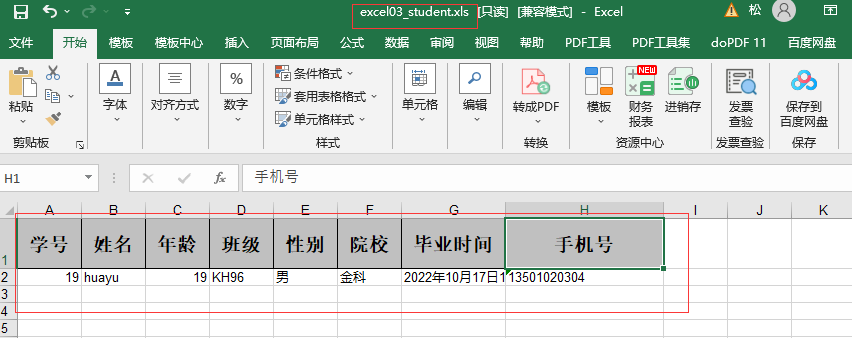
测试结果:
2.4 07版本的Excel 写入
@Test

public void testExcel07(){

   //要写入的文件的路径

   String fileName = "D:\\KEGONGCHANG\\DaiMa\\IDEA\\KH96\\SpringBoot\\SpringBoot\\springboot-03-asyztimer\\excel\\excel07_student.xls";

   //获取学生信息

    studentList.add(student);

     //07版写入文件

    EasyExcel.write(fileName, Student.class)

        	 .sheet("学生信息")

        	 .doWrite(studentList);

    log.info("学生信息写入完成!!!{}",student);

}
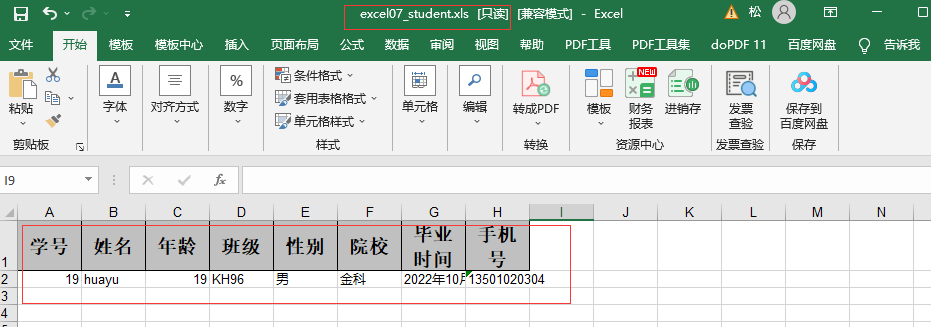
测试结果:
2.5 写入多个sheet
@Test

public void testWriteSheets(){

    String fileName = "D:\\KEGONGCHANG\\DaiMa\\IDEA\\KH96\\SpringBoot\\SpringBoot\\springboot-03-asyztimer\\excel\\excel07_student_sheets.xlsx";

    //获取学生信息

    studentList.add(student);

    // 这里 需要指定写用哪个class去写,然后写到第一个sheet,名字为模板 然后文件流会自动关闭

    ExcelWriter excelWriter = EasyExcel.write(fileName, Student.class).build();

    WriteSheet sheet;

    for (int i = 0; i < 2; i++) {

        sheet = EasyExcel.writerSheet(i, "学生信息"+(i+1)).build();

        excelWriter.write(studentList,sheet);

    }

    excelWriter.finish();

    log.info("学生信息写入完成!!!{}",student);

}
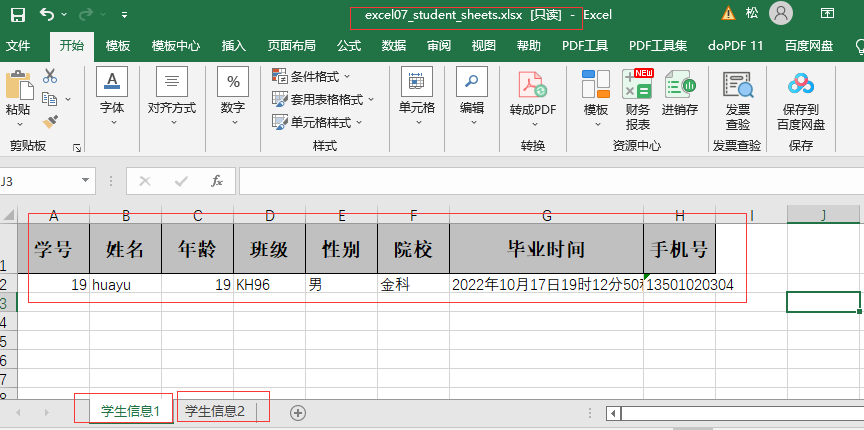
测试结果:
3、读出Excel
3.1 doRead()
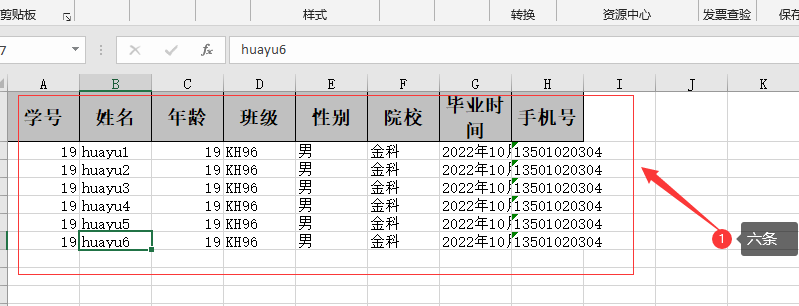
3.1.1 sheet1中的数据
sheet1:
3.1.2 doRead() 方法读取
//读取Excel中的学生信息

@Test

public void testReadExcel(){

    String fileName = "D:\\KEGONGCHANG\\DaiMa\\IDEA\\KH96\\SpringBoot\\SpringBoot\\springboot-03-asyztimer\\excel\\excel07_student_sheets.xlsx";

    // 实例化一个数据监听器

    StudentDataListener studentDataListener =  new StudentDataListener();

    //第一种

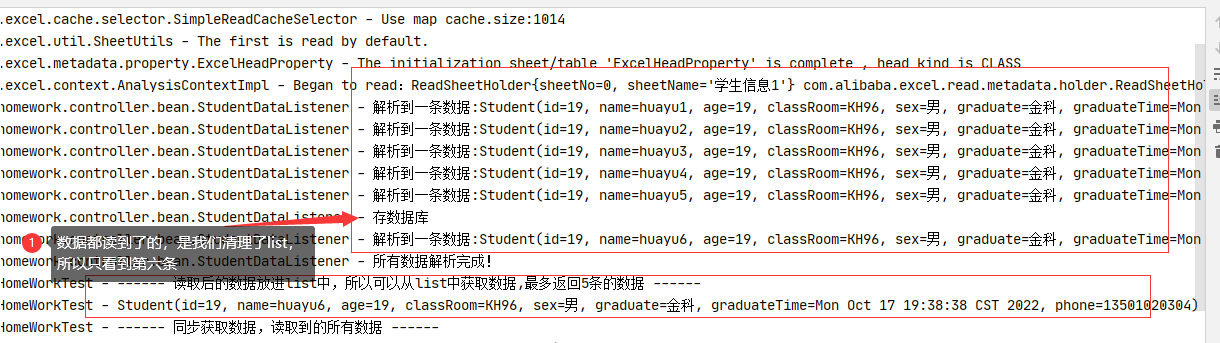
    //读取后的数据放进list中,所以可以从list中获取数据,(这里的数据是我们处理过的,最多返回5条的数据,可以根据实际境况修改)

    EasyExcel.read(fileName, Student.class,studentDataListener)

        	 .sheet()  //默认读取第一个sheet

        	 .doRead();

    List<Student> list = studentDataListener.getList();

    log.info("------ 读取后的数据放进list中,所以可以从list中获取数据,最多返回5条的数据 ------");

    list.forEach(ersonData->{

        log.info(ersonData.toString());

    });

}
3.1.3 测试结果:
3.1.4 分析 doRead() 方法
//没有任何数据返回

public void doRead() {

    if (this.excelReader == null) {

        throw new ExcelGenerateException("Must use 'EasyExcelFactory.read().sheet()' to call this method");

    } else {

        this.excelReader.read(new ReadSheet[]{this.build()});

        this.excelReader.finish();

    }

}
3.2 doReadSync()
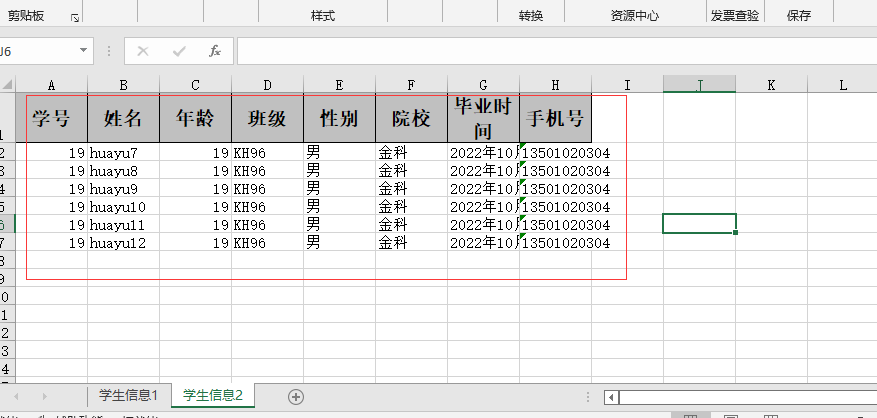
3.2.1 sheet2中的数据
sheet2:
3.2.2 doReadSync() 方法读取
//读取Excel中的学生信息

@Test

public void testReadExcel(){

    String fileName = "D:\\KEGONGCHANG\\DaiMa\\IDEA\\KH96\\SpringBoot\\SpringBoot\\springboot-03-asyztimer\\excel\\excel07_student_sheets.xlsx";

    // 实例化一个数据监听器

    StudentDataListener studentDataListener =  new StudentDataListener();

    //第二种

    log.info("------ 同步获取数据,读取到的所有数据 ------");

    //同步获取数据,读取到的所有数据

    List<Student> list2 =  EasyExcel.read(fileName, Student.class,studentDataListener)

        							.sheet(1) //读取第二个sheet

        							.doReadSync();

    list2.forEach(ersonData->{

        log.info(ersonData.toString());

    });

}
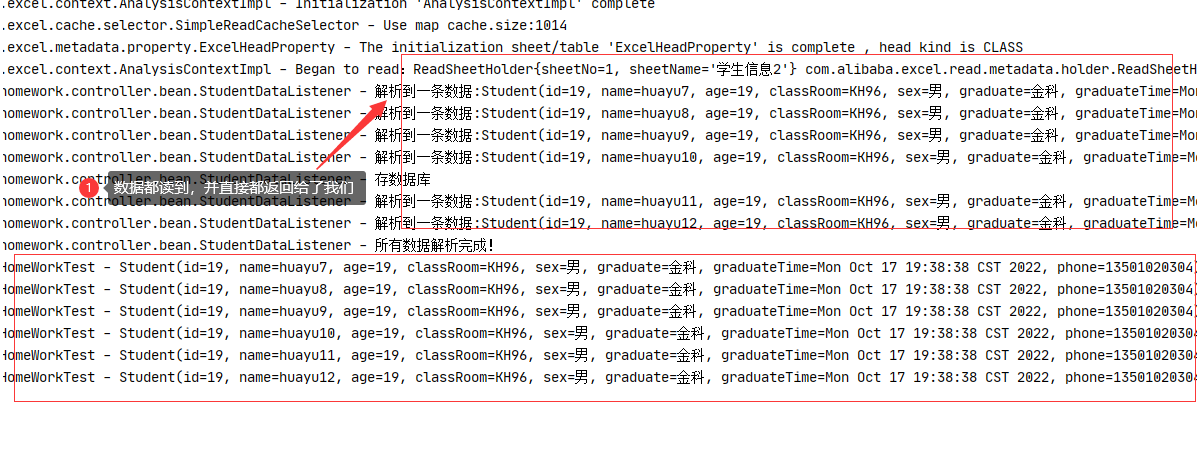
3.2.3 测试结果:
3.2.4 分析 doReadSync() 方法
//会将读取到的数据返回

public <T> List<T> doReadSync() {

    if (this.excelReader == null) {

        throw new ExcelAnalysisException("Must use 'EasyExcelFactory.read().sheet()' to call this method");

    } else {

        SyncReadListener syncReadListener = new SyncReadListener();

        this.registerReadListener(syncReadListener);

        this.excelReader.read(new ReadSheet[]{this.build()});

        this.excelReader.finish();

        return syncReadListener.getList();

    }

}
SpringBoot(六) - 阿里巴巴的EasyExcel的更多相关文章
- SpringBoot集成阿里巴巴Druid监控
druid是阿里巴巴开源的数据库连接池,提供了优秀的对数据库操作的监控功能,本文要讲解一下springboot项目怎么集成druid. 本文在基于jpa的项目下开发,首先在pom文件中额外加入drui ...
- SpringBoot 配置阿里巴巴Druid连接池
在Spring Boot下默认提供了若干种可用的连接池(dbcp,dbcp2, tomcat, hikari),当然并不支持Druid,Druid来自于阿里系的一个开源连接池,它提供了非常优秀的监控功 ...
- SpringBoot(六) SpirngBoot与Mysql关系型数据库
pom.xml文件的配置 <dependency> <groupId>org.springframework.boot</groupId> <artifact ...
- spring-boot(六) 邮件服务
学习文章来自:springboot(十):邮件服务 简单使用 1.pom包配置 pom包里面添加spring-boot-starter-mail包引用 <dependencies> < ...
- SpringBoot 六问
1.什么是springboot 用来简化spring应用的初始搭建以及开发过程 使用特定的方式来进行配置(properties或yml文件) 创建独立 ...
- springboot(六)SpringBoot问题汇总
SpringBoot2.0整合Mybatis,取datetime数据类型字段出来时,发现少了8小时. 过程:mysql中注册时间查询出来结果是正确的,只是java程序运行出来后显示少了8小时.经前辈指 ...
- springboot(六):如何优雅的使用mybatis
这两天启动了一个新项目因为项目组成员一直都使用的是mybatis,虽然个人比较喜欢jpa这种极简的模式,但是为了项目保持统一性技术选型还是定了 mybatis.到网上找了一下关于spring boot ...
- SpringBoot(六)_AOP统一处理请求
什么是AOP AOP 是一种编程范式,与编程语言无关: 将通用逻辑从业务逻辑中分离出来(假如你的业务是一条线,我们不在业务线上写一行代码就能完成附加任务!我们会把代码写在其他的地方): 具体实现 (1 ...
- SpringBoot (六) :如何优雅的使用 mybatis
原文出处: 纯洁的微笑 这两天启动了一个新项目因为项目组成员一直都使用的是mybatis,虽然个人比较喜欢jpa这种极简的模式,但是为了项目保持统一性技术选型还是定了 mybatis.到网上找了一下关 ...
- springboot(六)-使用shiro
前提 写之前纠结了一番,这一节放在shiro里面还是springboot里面.后来想了下,还是放springboot里吧,因为这里没有shiro的新东西,只有springboot添加了新东西的使用. ...
随机推荐
- IDEA 2024.2.2 最新安装教程(附激活-2099年~)
访问 IDEA 官网 下载 IDEA 2024.2.2 版本的安装包. 下载补丁https://pan.quark.cn/s/fcc23ab8cadf 检查 进入 IDEA 中后,点击菜单 Help ...
- Multi-Patch Prediction Adapting LLMs for Time Series Representation Learning
这篇论文是出自2024ICML的一篇论文,作者成功将大语言模型应用到时序模型之中,并在时序领域取得了很好的效果,不仅如此,作者还设置了多种下游任务,从论文结果得知,作者的模型在下游任务处都取得了很好的 ...
- 24/10/13 ABC375补题笔记
A 典,属于显而易见的水题,这数据范围直接暴力做就行了. # include <bits/stdc++.h> using namespace std; int main (){ int n ...
- 大便系统怎样安装RPM包
alien包转换工具 如果我们有很喜欢的RPM包,而又没有deb版本. 怎么办~? 可以同过alien来转换或者直接安装,这个小家伙可是个很方便的东西! 基本命令如下: 首先通过apt-get ins ...
- Python 潮流周刊#77:Python 依赖管理就像垃圾场火灾?(摘要)
本周刊由 Python猫 出品,精心筛选国内外的 250+ 信息源,为你挑选最值得分享的文章.教程.开源项目.软件工具.播客和视频.热门话题等内容.愿景:帮助所有读者精进 Python 技术,并增长职 ...
- Slate文档编辑器-WrapNode数据结构与操作变换
Slate文档编辑器-WrapNode数据结构与操作变换 在之前我们聊到了一些关于slate富文本引擎的基本概念,并且对基于slate实现文档编辑器的一些插件化能力设计.类型拓展.具体方案等作了探讨, ...
- callable结合FutureTask的多线程使用(免打扰模式)
import java.util.concurrent.Callable; import java.util.concurrent.ExecutionException; import java.ut ...
- highcharts中的环形图
环形图如下效果: 代码: that.options = { chart: { type: 'pie', backgroundColor: 'transparent', color: '#fff', / ...
- mysqldump+binlog备份脚本
mysqldump是一种逻辑备份工具 , 可以对数据库进行全量备份 , 和binlog增量备份共同使用可以进行数据库备份 , 基于此写了一个备份的脚本 #!/bin/bash all_path=&qu ...
- 频繁full gc 如何排查
频繁full gc 通常表明应用程序在内存管理方面存在问题,可能导致性能下降,下面是排查步骤和一个详细的示例 排查步骤 收集GC日志 首先,需要开启详细的GC日志,在JVM参数中添加 -XX:+Pri ...