
[Xamarin] 使用LayoutInflater.Inflate載入預先設計好的Layout並使用 (转帖)
開發的時候,一定會把一些東西設計成元件,並且可以多次使用,今天紀錄一篇比較簡單的方法,可以載入事先做好的Layout 並且給予事件 介紹一下範例: 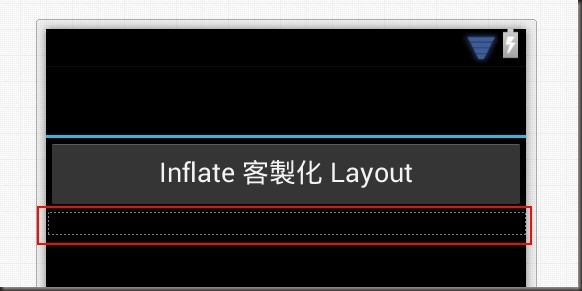
Main.axml:
<?xml version="1.0" encoding="utf-8"?>
<LinearLayout xmlns:android="http://schemas.android.com/apk/res/android"
android:orientation="vertical"
android:layout_width="fill_parent"
android:layout_height="fill_parent">
<Button
android:id="@+id/btn1"
android:layout_width="fill_parent"
android:layout_height="wrap_content"
android:text="Inflate 客製化 Layout" />
<LinearLayout
android:minWidth="25px"
android:minHeight="25px"
android:layout_width="fill_parent"
android:layout_height="wrap_content"
android:id="@+id/relativeContainer"
android:orientation="vertical" />
</LinearLayout>
紅色框起來的部分,就是我預留給客製化Layout放的地方,id 為 custContainer 的 LinearLayout 讓自訂的Layout可以被Inflate(打氣)在這地方 "Inflate 客製 Layout" 按鈕被按下時,會Inflate 一個客製化的元件至custContainer,並且給愈該元件該有的事件 介紹一下,這是我客製化的Layout
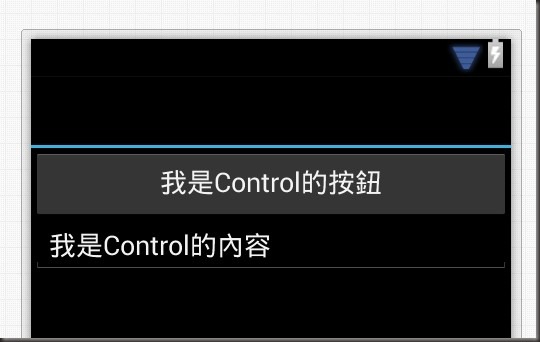
CustControlLayout.axml:
<?xml version="1.0" encoding="utf-8"?>
<LinearLayout xmlns:android="http://schemas.android.com/apk/res/android"
android:orientation="vertical"
android:layout_width="fill_parent"
android:layout_height="fill_parent"
android:minWidth="25px"
android:minHeight="25px">
<Button
android:text="我是Control的按鈕"
android:layout_width="fill_parent"
android:layout_height="wrap_content"
android:id="@+id/btnAssignText" />
<EditText
android:layout_width="fill_parent"
android:layout_height="wrap_content"
android:text="我是Control的內容"
android:id="@+id/editTextContent" />
</LinearLayout>
這是我設計的客製化Layout 功能是我希望btnAssignText 被點擊之後,可以Toast editTextContent 我們來看看,如何在主Activity 中將 CustControlLayout 載入到 custContainer 中並給予事件
using System;
using Android.App;
using Android.Widget;
using Android.OS;
namespace TestInflate
{
[Activity(Label = "TestInflate", MainLauncher = true, Icon = "@drawable/icon")]
public class Activity1 : Activity
{
protected override void OnCreate(Bundle bundle)
{
base.OnCreate(bundle);
// Set our view from the "main" layout resource
SetContentView(Resource.Layout.Main);
var btn1 = FindViewById<Button>(Resource.Id.btn1);
var custContainer = FindViewById<LinearLayout>(Resource.Id.custContainer);
btn1.Click += delegate
{
//透過 LayoutInflater 將 CustControlLayout 打氣在 custContainer 容器中
LayoutInflater.Inflate(Resource.Layout.CustControlLayout, custContainer);
var btnAssignText = FindViewById<Button>(Resource.Id.btnAssignText);
//重新給予一個亂數的Id 不然啟動後事件都會是同一個
btnAssignText.Id = new Random().Next(5000, int.MaxValue);
var editTextContent = FindViewById<EditText>(Resource.Id.editTextContent);
//重新給予一個亂數的Id 不然啟動後事件都會是同一個
editTextContent.Id = new Random().Next(5000, int.MaxValue);
btnAssignText.Click += delegate
{
Toast.MakeText(this, editTextContent.Text, ToastLength.Short).Show();
};
};
}
}
}
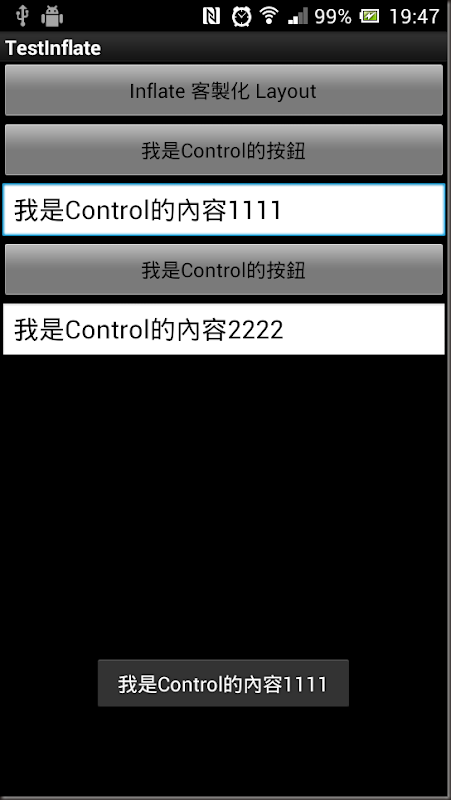
結果:
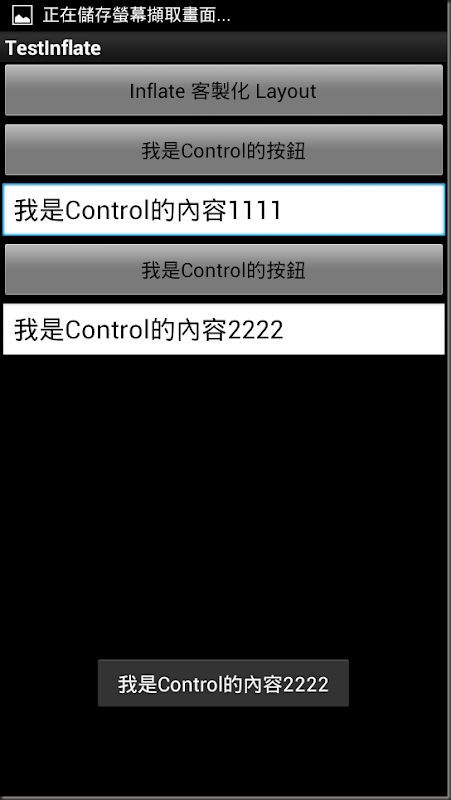
載入的第二個按下時:
References: http://lp43.blogspot.tw/2010/06/xmllayoutviewlayoutinflater.html http://developer.android.com/reference/android/view/LayoutInflater.html
http://blog.csdn.net/hwy584624785/article/details/6695301
[Xamarin] 使用LayoutInflater.Inflate載入預先設計好的Layout並使用 (转帖)的更多相关文章
- 何解決 LinqToExcel 發生「無法載入檔案或組件」問題何解決 LinqToExcel 發生「無法載入檔案或組件」問題
在自己的主機上透過 Visual Studio 2013 與 IISExpress 開發與測試都還正常,但只要部署到測試機或正式機,就是沒辦法順利執行,卡關許久之後找我協助.我發現錯誤訊息確實很「一般 ...
- 篇章三:[AngularJS] 使用AngularCSS動態載入CSS
前言 使用AngularAMD動態載入Controller 使用AngularAMD動態載入Service 上列兩篇文章裡,介紹了如何如何使用AngularAMD來動態載入Controller與Ser ...
- 篇章二:[AngularJS] 使用AngularAMD動態載入Service
前言 「使用AngularAMD動態載入Controller」:這篇文章裡介紹如何使用AngularAMD來動態載入Controller.本篇文章以此為基礎,介紹如何使用AngularAMD來動態載入 ...
- 篇章一:[AngularJS] 使用AngularAMD動態載入Controller
前言 使用AngularJS來開發Single Page Application(SPA)的時候,可以選用AngularUI Router來提供頁面內容切換的功能.但是在UI Router的使用情景裡 ...
- 在 React Native 中使用 moment.js 無法載入語系檔案
moment.js 是很常見的日期時間 library,友善的 API 與極佳的執行效率是它的兩大賣點.例如 (new Date()).getFullYear(),如果使用 moment.js 我可以 ...
- 6、Android之LayoutInflater.inflate()
LayoutInflater.inflate()的作用就是将一个xml定义的布局文件实例化为view控件对象: 与findViewById区别: LayoutInflater.inflate是加载一个 ...
- android LayoutInflater.inflate()的参数介绍
LayoutInflater.inflate()的作用就是将一个xml定义的布局文件实例化为view控件对象: 与findViewById区别: LayoutInflater.inflate是加载一个 ...
- Android LayoutInflater.inflate使用上的问题解惑
最近在在使用LayoutInflater.inflate方法时遇到了一些问题,以前没有仔细看过此类的使用方法,故将其记录下来,方便日后查阅. 相信大家都知道LayoutInflater.inflate ...
- setContentView()与LayoutInflater.inflate()作用
@Override protected void onCreate(Bundle savedInstanceState) { try{ super.onCreate(savedInstanceS ...
随机推荐
- Inside The C++ Object Model - 03
object Lessons 1.C++中布局以及存取时间上的的额外负担是由virtual引起的:virtual function.virtual base class.或是由于多继承引起的. 2.C ...
- 6. js时间比较
var v0 = ABS_DATESTRING(O_PARAMETER.FDate,"yyyy/MM/dd")var v_beginTime = v0 + " " ...
- Linux socket 获得本地IP和广播地址
#include <stdio.h> #include <stdlib.h> #include <sys/socket.h> #include <netine ...
- git init 和 git init --bare 的区别
http://blog.csdn.net/ljchlx/article/details/21805231 概念 裸仓储 :不可以在上面做git操作 the operation must be ...
- C# 判断是否联网
public static class Internet { [DllImport("winInet.dll")] private static extern bool Inter ...
- MySQL里的wait_timeout
如果你没有修改过MySQL的配置,缺省情况下,wait_timeout的初始值是28800. wait_timeout过大有弊端,其体现就是MySQL里大量的SLEEP进程无法及时释放,拖累系统性能, ...
- 简单的jquery插件写法之一
http://jsfiddle.net/kyu0hdmx/embedded/#HTML
- 在Linux下安装配置phpMyAdmin步骤
本文于CentOS 6.5下测试可行,欢迎转载和指正. phpMyAdmin是一种基于Web的免费MySQL管理工具.phpMyAdmin是用PHP编写的,因此只有支持PHP的服务器才能使用phpMy ...
- HashedWheelTimer 原理
HashedWheelTimer 是根据 Hashed and Hierarchical Timing Wheels: Data Structuresfor the Efficient Impleme ...
- jzoj[1224]
怎么说呢,这道题的题面一看就知道是最小生成树,我是把二维数组转化为一维数组来做了,1000*1000没有超过一维数组的定义范围,不会爆栈 然后用并查集的kruskal来写就好了 首先一个start函数 ...