
[Xamarin] 使用LayoutInflater.Inflate載入預先設計好的Layout並使用 (转帖)
開發的時候,一定會把一些東西設計成元件,並且可以多次使用,今天紀錄一篇比較簡單的方法,可以載入事先做好的Layout 並且給予事件 介紹一下範例: 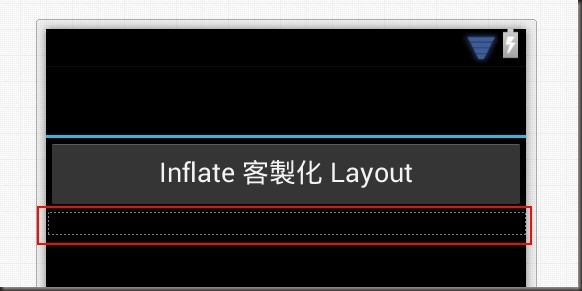
Main.axml:
<?xml version="1.0" encoding="utf-8"?>
<LinearLayout xmlns:android="http://schemas.android.com/apk/res/android"
android:orientation="vertical"
android:layout_width="fill_parent"
android:layout_height="fill_parent">
<Button
android:id="@+id/btn1"
android:layout_width="fill_parent"
android:layout_height="wrap_content"
android:text="Inflate 客製化 Layout" />
<LinearLayout
android:minWidth="25px"
android:minHeight="25px"
android:layout_width="fill_parent"
android:layout_height="wrap_content"
android:id="@+id/relativeContainer"
android:orientation="vertical" />
</LinearLayout>
紅色框起來的部分,就是我預留給客製化Layout放的地方,id 為 custContainer 的 LinearLayout 讓自訂的Layout可以被Inflate(打氣)在這地方 "Inflate 客製 Layout" 按鈕被按下時,會Inflate 一個客製化的元件至custContainer,並且給愈該元件該有的事件 介紹一下,這是我客製化的Layout
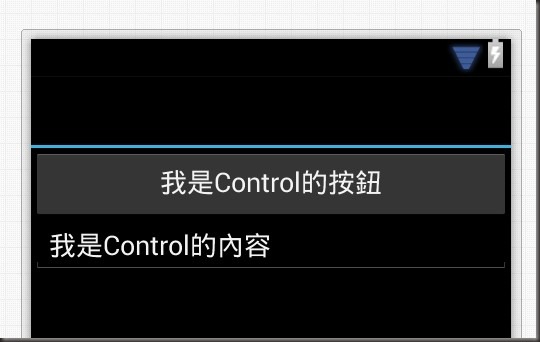
CustControlLayout.axml:
<?xml version="1.0" encoding="utf-8"?>
<LinearLayout xmlns:android="http://schemas.android.com/apk/res/android"
android:orientation="vertical"
android:layout_width="fill_parent"
android:layout_height="fill_parent"
android:minWidth="25px"
android:minHeight="25px">
<Button
android:text="我是Control的按鈕"
android:layout_width="fill_parent"
android:layout_height="wrap_content"
android:id="@+id/btnAssignText" />
<EditText
android:layout_width="fill_parent"
android:layout_height="wrap_content"
android:text="我是Control的內容"
android:id="@+id/editTextContent" />
</LinearLayout>
這是我設計的客製化Layout 功能是我希望btnAssignText 被點擊之後,可以Toast editTextContent 我們來看看,如何在主Activity 中將 CustControlLayout 載入到 custContainer 中並給予事件
using System;
using Android.App;
using Android.Widget;
using Android.OS;
namespace TestInflate
{
[Activity(Label = "TestInflate", MainLauncher = true, Icon = "@drawable/icon")]
public class Activity1 : Activity
{
protected override void OnCreate(Bundle bundle)
{
base.OnCreate(bundle);
// Set our view from the "main" layout resource
SetContentView(Resource.Layout.Main);
var btn1 = FindViewById<Button>(Resource.Id.btn1);
var custContainer = FindViewById<LinearLayout>(Resource.Id.custContainer);
btn1.Click += delegate
{
//透過 LayoutInflater 將 CustControlLayout 打氣在 custContainer 容器中
LayoutInflater.Inflate(Resource.Layout.CustControlLayout, custContainer);
var btnAssignText = FindViewById<Button>(Resource.Id.btnAssignText);
//重新給予一個亂數的Id 不然啟動後事件都會是同一個
btnAssignText.Id = new Random().Next(5000, int.MaxValue);
var editTextContent = FindViewById<EditText>(Resource.Id.editTextContent);
//重新給予一個亂數的Id 不然啟動後事件都會是同一個
editTextContent.Id = new Random().Next(5000, int.MaxValue);
btnAssignText.Click += delegate
{
Toast.MakeText(this, editTextContent.Text, ToastLength.Short).Show();
};
};
}
}
}
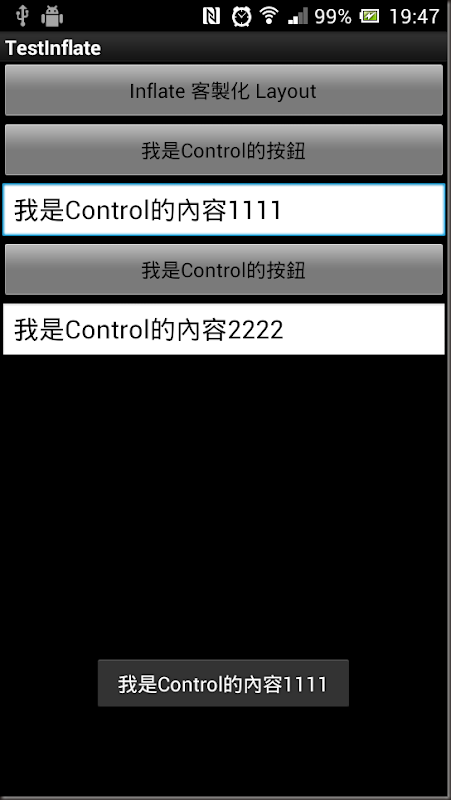
結果:
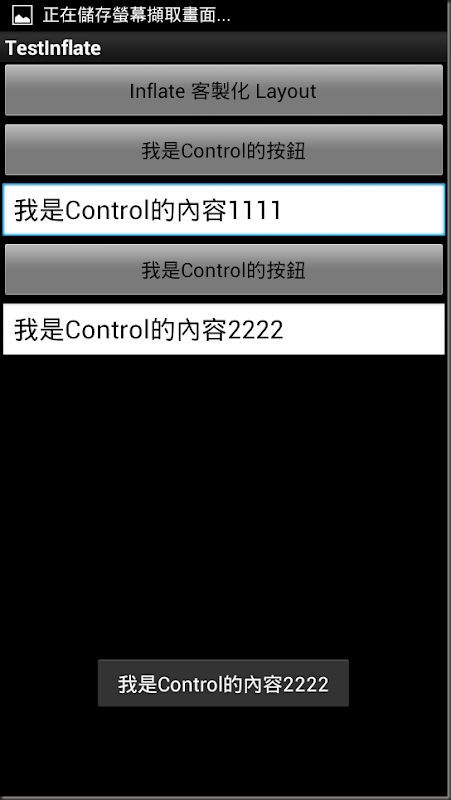
載入的第二個按下時:
References: http://lp43.blogspot.tw/2010/06/xmllayoutviewlayoutinflater.html http://developer.android.com/reference/android/view/LayoutInflater.html
http://blog.csdn.net/hwy584624785/article/details/6695301
[Xamarin] 使用LayoutInflater.Inflate載入預先設計好的Layout並使用 (转帖)的更多相关文章
- 何解決 LinqToExcel 發生「無法載入檔案或組件」問題何解決 LinqToExcel 發生「無法載入檔案或組件」問題
在自己的主機上透過 Visual Studio 2013 與 IISExpress 開發與測試都還正常,但只要部署到測試機或正式機,就是沒辦法順利執行,卡關許久之後找我協助.我發現錯誤訊息確實很「一般 ...
- 篇章三:[AngularJS] 使用AngularCSS動態載入CSS
前言 使用AngularAMD動態載入Controller 使用AngularAMD動態載入Service 上列兩篇文章裡,介紹了如何如何使用AngularAMD來動態載入Controller與Ser ...
- 篇章二:[AngularJS] 使用AngularAMD動態載入Service
前言 「使用AngularAMD動態載入Controller」:這篇文章裡介紹如何使用AngularAMD來動態載入Controller.本篇文章以此為基礎,介紹如何使用AngularAMD來動態載入 ...
- 篇章一:[AngularJS] 使用AngularAMD動態載入Controller
前言 使用AngularJS來開發Single Page Application(SPA)的時候,可以選用AngularUI Router來提供頁面內容切換的功能.但是在UI Router的使用情景裡 ...
- 在 React Native 中使用 moment.js 無法載入語系檔案
moment.js 是很常見的日期時間 library,友善的 API 與極佳的執行效率是它的兩大賣點.例如 (new Date()).getFullYear(),如果使用 moment.js 我可以 ...
- 6、Android之LayoutInflater.inflate()
LayoutInflater.inflate()的作用就是将一个xml定义的布局文件实例化为view控件对象: 与findViewById区别: LayoutInflater.inflate是加载一个 ...
- android LayoutInflater.inflate()的参数介绍
LayoutInflater.inflate()的作用就是将一个xml定义的布局文件实例化为view控件对象: 与findViewById区别: LayoutInflater.inflate是加载一个 ...
- Android LayoutInflater.inflate使用上的问题解惑
最近在在使用LayoutInflater.inflate方法时遇到了一些问题,以前没有仔细看过此类的使用方法,故将其记录下来,方便日后查阅. 相信大家都知道LayoutInflater.inflate ...
- setContentView()与LayoutInflater.inflate()作用
@Override protected void onCreate(Bundle savedInstanceState) { try{ super.onCreate(savedInstanceS ...
随机推荐
- python代码中指定时区获取时间方法
os.environ['TZ'] = 'Asia/Shanghai' os.environ['TZ'] = 'Europe/London' hour_cur = time.strftime('%H')
- java 动态编译
public class Main { public static void main(String[] args) { System.out.println("Hello World!&q ...
- android常见面试问题
重:Listview中多个类型的条目如何处理?如果条目里边有button,会出现什么问题?如何处理?如果条目里边有checkbox会出现什么问题,如何解决?(这三个问题有过开发经验都应该遇到过). 在 ...
- ipad或iPhone 访问https网站不成功
可能的原因是设备的日期不对,将设备日期调整正确即可解决
- mysql小误区关于set global sql_slave_skip_counter=N命令
背景知识1: 在主从库维护中,有时候需要跳过某个无法执行的命令,需要在slave处于stop状态下,执行 set global sql_slave_skip_counter=N以跳过命令. ...
- 共用字体-UI界面编辑器(SkinStudio)教程
添加一个Label控件,设置好字体属性 再添加一个Label控件,字体属性还是默认的 只需要将字体属性的Name字段名称改为需要使用的字体属性的Name字段名称即可(如Label1使用的字体)
- Tara's Beautiful Permutations 组合数学
https://www.hackerrank.com/contests/hourrank-15/challenges/taras-beautiful-permutations 首先先统计一下个数为2的 ...
- 创建solr集群简述
综述: 用两台服务器,每台服务器上启动两个solr实例(端口分别为8983.7574),即一共有2x2=4个节点.4个节点分散在两个分片上,每台机器上存放两个分片的各一个replica,这样等于每台机 ...
- [golang]反射的用处--代码自动生成
背景: go语言处理db.json的时候,具体代码的变量定义和db字段.json输出的时候可能不一样. 这个时候,我们需要用tag的方式来进行定义. 例如: type MyStruct struct ...
- 关于hql一些不常见但好用的技巧(个人总结)
最近一直在用spring-data-jpa这个东西,感觉方法上注解hql语句已经是很常用的方法了, 有一些关于hql的经验分享一下: 一.hql的join hql的优势就是直接的关联关系嘛,但是通过h ...