
HTML&CSS----练习隐藏导航栏(三级导航)
<!DOCTYPE html PUBLIC "-//W3C//DTD XHTML 1.0 Transitional//EN" "http://www.w3.org/TR/xhtml1/DTD/xhtml1-transitional.dtd">

<html xmlns="http://www.w3.org/1999/xhtml">

<head>

<meta http-equiv="Content-Type" content="text/html; charset=utf-8" />

<title>无标题文档</title>

<style type="text/css">

*

{

   margin:0px;

   padding:0px;}

#aa

{

    height:40px;

    width:90px;

    top:80px;

    left:200px;

    background-color:#339;

    position:absolute;

    overflow:hidden;

    text-align:center;

    line-height:40px;

}

#bb

{

    height:120px;

    width:90px;

    top:40px;

    left:0px;

    background-color:#3FC;

    position:absolute;

}

table

{

    height:120px;

    width:90px;

    border:0px;

    text-align:center;

}

#cc

{

    height:40px;

    width:90px;

    position:absolute;

    left:0px;

    top:0px;

    overflow:hidden;

    background-color:#6F6;

}

#dd

{

    height:40px;

    width:90px;

    background-color:#666;

    position:absolute;

    left:90px;

    top:0px;

}

#ee

{

    height:40px;

    width:90px;

    position:absolute;

    left:0px;

    top:40px;

    overflow:hidden;

    background-color:#6F9;

}

#ff

{

    height:40px;

    width:90px;

    background-color:#666;

    position:absolute;

    left:90px;

    top:0px;

}

#gg

{

    height:40px;

    width:90px;

    position:absolute;

    left:0px;

    top:80px;

    overflow:hidden;

    background-color:#F99;

}

#hh

{

    height:40px;

    width:90px;

    background-color:#666;

    position:absolute;

    left:90px;

    top:0px;

}

</style>

</head>

<body>

<div id="aa" onmouseover="over()"  onmouseout="out()">新闻动态

<div id="bb">

<table cellpadding="0" cellspacing="0">

<tr>

<td height="40px" width="90px">

<div id="cc" onmouseover="over1()" onmouseout="out1()">场景

<div id="dd">讲座</div></div></td></tr>

<tr><td height="40px" width="90px"><div id="ee" onmouseover="over2()" onmouseout="out2()">活动<div id="ff">比赛</div></div></td></tr>

<tr><td height="40px" width="90px"><div id="gg" onmouseover="over3()" onmouseout="out3()">杂谈<div id="hh">项目</div></div></td></tr>

</table>

<script>

function over()

{

 var a = document.getElementById("aa");

 a.setAttribute("style","overflow:visible;background-color:yellow");}

function out()

{

var a = document.getElementById("aa");

 a.setAttribute("style","overflow:hidden");

}

function over1()

{

 var a = document.getElementById("cc");

 a.setAttribute("style","overflow:visible;background-color:green");}

function out1()

{

var a = document.getElementById("cc");

 a.setAttribute("style","overflow:hidden");

}

function over2()

{

 var a = document.getElementById("ee");

 a.setAttribute("style","overflow:visible;background-color:yellow");}

function out2()

{

var a = document.getElementById("ee");

 a.setAttribute("style","overflow:hidden");

}

function over3()

{

 var a = document.getElementById("gg");

 a.setAttribute("style","overflow:visible;background-color:red");}

function out3()

{

var a = document.getElementById("gg");

 a.setAttribute("style","overflow:hidden");

}

 </script>

</div></div>

</body>

</html>
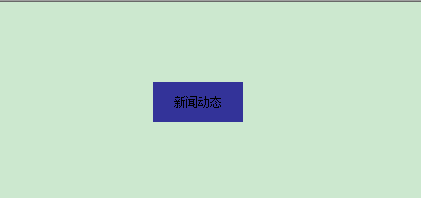
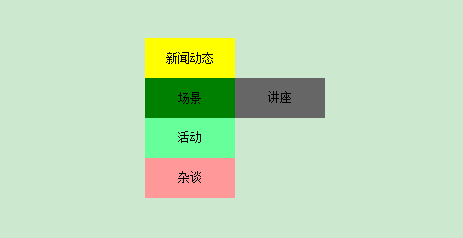
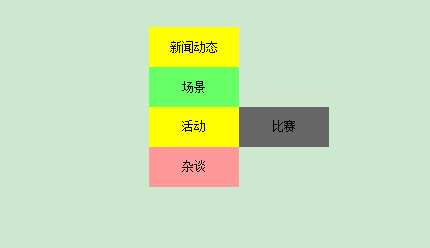
显示效果:
鼠标没有指向时:
鼠标指向“新闻动态”时:

鼠标指向“场景”时:
鼠标指向“活动”时:
鼠标指向“杂谈”时:

HTML&CSS----练习隐藏导航栏(三级导航)的更多相关文章
- 纯洁CSS实现下拉菜单和下拉容器(纯洁CSS导航栏和导航下拉容器)
虽然网上课程似即使案件大同小异,但我还是写,记笔记,也为您提供参考 我希望你能指导批评~~ 首先,我们必须列出ul li 开始我们的导航栏菜单也能说生产: 在下面的页面,我们先建XHTML结构体: & ...
- 微信小程序 自定义头部导航栏和导航栏背景图片 navigationStyle
这两天因为要做一个带背景的小程序头,哭了,小程序导航栏有背景也就算了,还得让导航栏上的背景顺下来,心态小崩.现在可以单独设置一个页面的小程序头了,但是前提是要微信7.0以上的版本,考虑到兼容性问题 ...
- React实现顶部固定滑动式导航栏(导航条下拉一定像素时显示原导航栏样式)
摘要 基于react的框架开发一个顶部固定滑动式的酷炫导航栏,当导航栏置顶时,导航栏沉浸在背景图片里:当鼠标滑动滚轮时,导航栏固定滑动并展示下拉样式. JS部分 相关技术栈:react.antd.re ...
- CSS 导航栏
实例: 导航栏 Home News Articles Forum Contact About 导航栏 熟练使用导航栏,对于任何网站都非常重要. 使用CSS你可以转换成好看的导航栏而不是枯燥的HTML菜 ...
- CSS 笔记——导航栏、下拉菜单、提示工具
8. 导航栏.下拉菜单.提示工具 (1)导航栏 垂直导航栏 <!DOCTYPE html> <html lang="en"> <head> &l ...
- CSS:CSS 导航栏
ylbtech-CSS:CSS 导航栏 1.返回顶部 1. CSS 导航栏 导航栏 熟练使用导航栏,对于任何网站都非常重要. 使用CSS你可以转换成好看的导航栏而不是枯燥的HTML菜单. 导航栏=链接 ...
- HTML&CSS基础学习笔记1.11—导航栏
上文我们介绍到的<a>标签,由于<a>标签可以用来跳转,所以我们可以拿<a>标签来生成网页的导航栏. 其实在实际运用中,<a>标签就经常会被用来生成导航 ...
- zhuang 定制iOS 7中的导航栏和状态栏
近期,跟大多数开发者一样,我也正忙于对程序进行升级以适配iOS 7.最新的iOS 7外观上有大量的改动.从开发者的角度来看,导航栏和状态栏就发生了明显的变化.状态栏现在是半透明的了,这也就意味着导航栏 ...
- 【原创+译文】官方文档中声明的如何创建抽屉导航栏(Navigation Drawer)
如需转载请注明出处:http://www.cnblogs.com/ghylzwsb/p/5831759.html 创建一个抽屉导航栏 抽屉式导航栏是显示在屏幕的左边缘,它是应用程序的主导航选项面板.它 ...
- iOS 7 教程:定制iOS 7中的导航栏和状态栏
目录(?)[-] iOS 7中默认的导航栏 设置导航栏的背景颜色 在导航栏中使用背景图片 定制返回按钮的颜 修改导航栏标题的字体 修改导航栏标题为图片 添加多个按钮 修改状态栏的风格 隐藏状态栏 总结 ...
随机推荐
- (转)SQL SERVER的锁机制(三)——概述(锁与事务隔离级别)
五.锁与事务隔离级别 事务隔离级别简单的说,就是当激活事务时,控制事务内因SQL语句产生的锁定需要保留多入,影响范围多大,以防止多人访问时,在事务内发生数据查询的错误.设置事务隔离级别将影响整条连接. ...
- python chm 中文帮助 (2.7 和 3.4)
sphinx-build 生成的(htmlhelp) 存在2个问题 1.生成的html 编码 cp2152,需要修改/sphinx/builders/html.py ctx['encoding'] = ...
- poj_2674 弹性碰撞
题目大意 给定一条直线,长度为L 表示区间[0, L].在直线上开始放置N个人,每个人有一个初始位置pos(用到直线上端点0的距离表示)和初始方向dir('p' 或 'P' 表示向端点L行走, 'n' ...
- mac os 显示文件列表命令 ls -a
显示正常文件列表用ls就行了,但是要是想显示隐藏的文件,需要加-a
- css3学习总结2--CSS3圆角边框
绘制一个圆角边框的示例 .div{ border: solid 5px blue; border-radius: 20px; -moz-border-radius:20px; -o-border-ra ...
- intellij 提交代码到git
.配置git .create git repository .git-->add commit Directory .提交代码 git remote add origin https://git ...
- 6个朋友(codevs 2832)
2832 6个朋友 时间限制: 1 s 空间限制: 128000 KB 题目等级 : 黄金 Gold 题解 题目描述 Description 有这么一种说法:认识6个人,你就认识全世 ...
- static_cast, dynamic_cast, const_cast
http://www.cnblogs.com/chio/archive/2007/07/18/822389.html 首先回顾一下C++类型转换: C++类型转换分为:隐式类型转换和显式类型转换 第1 ...
- ytu 2030: 求实数绝对值(水题)
2030: 求实数绝对值 Time Limit: 1 Sec Memory Limit: 64 MBSubmit: 10 Solved: 10[Submit][Status][Web Board] ...
- MS SQL SERVER 2000 常用 Tran-SQL 语句
一.创建数据库:create database mydb-创建数据库mydbon primary-在primary文件组中( name = mydb_data1,filename = 'd:\sql ...