
利用Google Speech API实现Speech To Text
很久很久以前, 网上流传着一个免费的,识别率暴高的,稳定的 Speech To Text API, 那就是Google Speech API. 但是最近再使用的时候,总是返回500 Error. 后来通过查看源码知道需要增加一个参数:key=.... 可能是为了防止滥用吧. 并且, 最近Chrome另外发布了一个长连接实时的识别接口, 这对开发者来说真是巨大的福音啊. 在这里主要对这两个接口的用法进行介绍.
- 博客: http://www.cnblogs.com/jhzhu
- 邮箱: jhzhuustc@gmail.com
- 作者: 知明所以
- 时间: 2014-03-28
关键字
SpeechToText,API,google,STT,ASR,SR,speech,recognition
申请Chromium API keys
本文使用的Google Speech API是为google自家的浏览器Chrome服务的. 可以通过这个Demo体验一下实际使用的效果: Google Speech To Text Demo.
Chrome来源于开源项目Chromium. 为了方便开发者调试使用, google 开放了这个STT(Speech to Text)接口. 但是, 因为这个借口只供调试使用, 所以在流量和次数上都有限制.并且, 不提供购买.
好了, 背景介绍完毕, 我们来第一步: 申请Chromium开发者权限.
具体步骤请参考how to get chromium API keys).
Acquiring Keys
- Make sure you are a member of chromium-dev@chromium.org (you can just subscribe to chromium-dev and choose not to receive mail).
For convenience, the APIs below are only visible to people subscribed to that group.- Make sure you are logged in with the Google account associated with the email address that you used to subscribe to chromium-dev.
- Go to https://cloud.google.com/console(请使用旧版console)
- Click the red Create project… button.
- (Optional) You may add other members of your organization or team on the Team tab.
- In the ‘APIs & auth’ > APIs tab, click the On/Off button to turn each of the following APIs to the On position, and read and agree to the Terms of Service that is shown:
(This list might be out of date; try searching for APIs starting with “Chrome” or having “for Chrome” in the name.) * Chrome Remote Desktop API
- Chrome Spelling API
- Chrome Suggest API
- Chrome Sync API
- Chrome Translate Element
- Google Maps Geolocation API (requires enabling billing but is free to use; you can skip this one, in which case geolocation features of Chrome will not work)
- Safe Browsing API
- Speech API
- Time Zone API
- Google Cloud Messaging for Chrome
- Google Now For Chrome API
If any of these APIs are not shown, recheck step 1.- Go to the Credentials tab under the APIs & auth tab.
- Click the red Create New Client ID button in the OAuth section to create an OAuth 2.0 client ID.
- You want “Installed Application” for the Application type section
- You want “Other” for the Installed application type section
- A new box should now appear titled “Client ID for installed applications”. In the next sections, we will refer to the values of the “Client ID” and “Client secret” fields in this box later (below).
- Click the red Create New Key button in the Public API Access section and create a new Browser key.
You want to leave the box on the “Create a browser key and configure allowed referers” empty.- A new box should appear titled “Key for browser applications”. The next sections will refer to the value of the “API key” field too.
好了, 到这里, 我们已经获得了应用key, 在下文我们用{key}表示这个key.
One Shot Recognition
我们用curl来向服务器发送请求:
curl -X POST \

--data-binary @speech.flac \

--user-agent 'Mozilla/5.0 (Macintosh; Intel Mac OS X 10_6_8) AppleWebKit/535.7 (KHTML, like Gecko) Chrome/16.0.912.77 Safari/535.7' \

--header 'Content-Type: audio/x-flac; rate=8000;' \

'https://www.google.com/speech-api/v1/recognize?client=chromium&lang=zh-CN&maxresults=5&pfilter=0&key=AIzaSyC6Tkf4*****Q0CdISn-qnHhwLaS3cg2a0' | 参数 | 解释 |
|---|---|
| -X POST | 表示发送HTTP请求 |
| –data-binary @speech.flac | 发送音频文件speech.flac |
| –user-agent ‘…’ | http的参数,设置浏览器的user-agent信息 |
| –header | http的参数. 指定了传送内容的类型(audio/flac)和音频频率(8000Hz). 注意, 只支持特定的几种频率(8000Hz,4000Hz还有几个记不清了),上传的flac文件频率要和参数一致. |
| https://www.google.com/…/&key=AIzaSyC6Tkf*****Q0CdISn-qnHhwLaS3cg2a0 | http请求地址,其中最后一部分的key,应该替换为您申请的{key}. |
等待一分钟左右, 如果你运气好的话, 能看到如下结果:
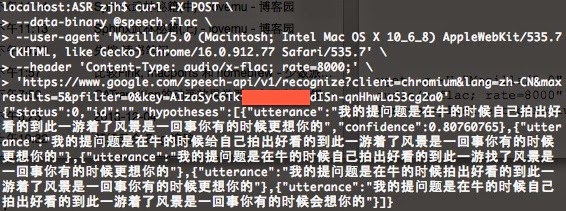
结果格式如下, 应该很清晰了吧:
{

    "status": 0,

    "id": "b3447b5d98c5653e0067f35b32c0a8ca-1",

    "hypotheses":

    [

        {

            "utterance": "i like pickles",

            "confidence": 0.9012539

        },

        {

            "utterance": "i like pickle"

        }

    ]

}
如果您录音的格式不对的话, 可以用开源软件sox方便的转换格式和码率. 举个栗子:
sox ./speech.mp3 -b 8 speech.flac trim 0 15| 参数 | 解释 |
|---|---|
| ./speech.mp3 | 输入文件 |
| -b 8 | 输出文件频率为 8kHz |
| speech.flac | 输出文件名 |
| trim 0 15 | 截取输入文件的0~15秒的部分, 输出出来 |
Stream Recognition
后来, Google 提供了更先进的live的双向的识别接口. 即同时打开两个HTTP连接, 一个负责实时发送(POST)音频流, 一个负责接受(GET).
这里有一个PHP版本的Demo. 可以参考实现您自己的Stream Recognition:
Google Speech API – Full Duplex PHP Version
引用:
Google Speech API – Full Duplex PHP Version
http://mikepultz.com/2013/07/google-speech-api-full-duplex-php-version/Accessing Google Speech API / Chrome 11
http://mikepultz.com/2011/03/accessing-google-speech-api-chrome-11/Google Speech To Text API ( 9 months ago )
https://gist.github.com/alotaiba/1730160避开Google Voice Search利用Google Speech API实现Android语音识别
http://my.eoe.cn/sisuer/archive/5960.htmlHow to Use Google Speech API( with sox )
http://www.x2q.net/blog/2013/09/16/how-to-use-google-speech-api/Google Chomium Open Project
http://src.chromium.org/viewvc/chrome/trunk/src/content/browser/speech/
http://src.chromium.org/viewvc/chrome/trunk/src/content/browser/speech/google_one_shot_remote_engine.cc
Written with StackEdit.
利用Google Speech API实现Speech To Text的更多相关文章
- 如何将经纬度利用Google Map API显示C# VS2005 Sample Code
原文 如何将经纬度利用Google Map API显示C# VS2005 Sample Code 日前写了一篇如何用GPS抓取目前所在,并回传至资料库储存,这篇将会利用这些回报的资料,将它显示在地图上 ...
- 利用Google Analytics API实现自己的统计报表
Google Analytics 简称 GA,功能实在是太强大了,正因如此,导致调研GA API花费了大量的时间,太多的名词需要梳理. 正确的学习步骤是: 首先,找个有权限的账号,登录GA(https ...
- 利用 Google Chart API 生成二维码大小不一致
大小不一致是由于 chl 参数内容不一样导致的,而 chs 参数只能指定生成图片的大小,不能指定生成具体二维码大小. 比如:https://chart.googleapis.com/chart?ch ...
- Google Map API抓取地图坐标信息小程序
因为实验室需要全国城市乡镇的地理坐标,有Execl的地名信息,需要一一查找地方的经纬度.Google Map地图实验室提供自带的查找经纬度的方法,不过需要一个点一个点的手输入,过于繁琐,所以自己利用G ...
- csharp:Google TTS API text to speech
using System; using System.Collections.Generic; using System.ComponentModel; using System.Data; usin ...
- 【miscellaneous】使用Google语音识别引擎(Google Speech API)[3月5日修改]
原文:http://blog.csdn.net/dlangu0393/article/details/7214728#comments 近期重写本文,暂时禁止评论. 最近在使用Qt编写一个客户端程序的 ...
- 必应语音API(Bing text to speech API)
前言 Link : Microsoft Speech API overview 通过这个链接,大致了解Bing speech API的语音识别和语音合成两部分, 这次是需要用到TTS,所以就直接看TT ...
- 语音识别(Web Speech API)
近期看了一个语音识别的dome-----Web Speech API 本api为js调用云端接口识别 个人测试了一下,响应速度还是比较快的 注意:本API与官网需翻墙使用和访问 展示效果: 页面代码如 ...
- HTML5 Web Speech API 结合Ext实现浏览器语音识别以及输入
简介 Web Speech API是HTML5技术中的一个提供原生语音识别技术的API,Google Chrome在25版之后开始支持Web Speech API,Google也提供了一个 ...
随机推荐
- Java中的继承
我们在以前的学习中,我们会了C#中的继承,今天我们来了解了解Java中的继承,其实都大同小异啦! 1.语法 修饰符 SubClass extends SuperClass(){ //类定义部分 } e ...
- C++ 面向对象的三个特点--继承与封装(二)
顺着上一篇的内容,我们继续来了解继承的基本知识. 派生类的构造函数和析构函数 派生类继承了基类的成员,但是不能继承基类的构造函数和析构函数,首先,我们了解构造函数和析构函数的执行顺序是当我们创建一个派 ...
- AngularJS directive 指令相关记录
.... .directive('scopeDemo',function(){ return{ template: "<div class='panel-body'>Name: ...
- WampServer搭建php环境可能遇到的问题
WampServer搭建php环境可能遇到的问题 1.安装时报错,缺少 MSVCR100.dll 文件 这是因为wampServer安装时用到的vc库没有更新,要安装更新之后再进行安装,因为之前安装的 ...
- [Microsoft Dynamics CRM 2016]Invalid Action – The selected action was not valid 错误的诱因及解决方法
详细问题描述: 由于解决windows server 评估版过期\SQL server 评估版过期的问题后而导致的Invalid Action – The selected action was no ...
- Sharepoint学习笔记—习题系列--70-573习题解析 -(Q28-Q31)
Question28You have a Microsoft Office SharePoint Server 2007 site.You upgrade the site to SharePoint ...
- 【读书笔记】iOS-写代码注意事项
一,我是尽早和经常编译的强烈支持者.通常,在写完每个方法或有点难度的代码后,都要尝试进行构建.这是一个好习惯,因为如果在上次成功编译以来添加的代码量很小,那么可以非常容易地缩小编译错误范围.这个方法还 ...
- 基础学习day06---面向对象二---static,类的初始化和调用顺序、单例模式
一.static关键字 1.1.static关键字 静态:static用法:是一个修饰符,用于修饰成员(成员变量,成员函数)static 修饰的内容,所有对象共享当成员被静态修饰后,就多了一个调用方式 ...
- MacOs终端忽略大小写
使用MacOs的终端时,唯一让人感觉不爽的就是Tab补全是区分大小的,所以查了资料就把这个问题搞定了.在用户目录下创建 .inputrc 文件,内容为以下三行代码,保存后重启终端再次输入文件名Tab补 ...
- UnityShader之顶点片段着色器Vertex and Fragment Shader【Shader资料】
顶点片段着色器 V&F Shader:英文全称Vertex and Fragment Shader,最强大的Shader类型,也是我们在使用ShaderLab中的重点部分,属于可编程管线,使用 ...