
LPC43xx SGPIO Pattern Match Mode
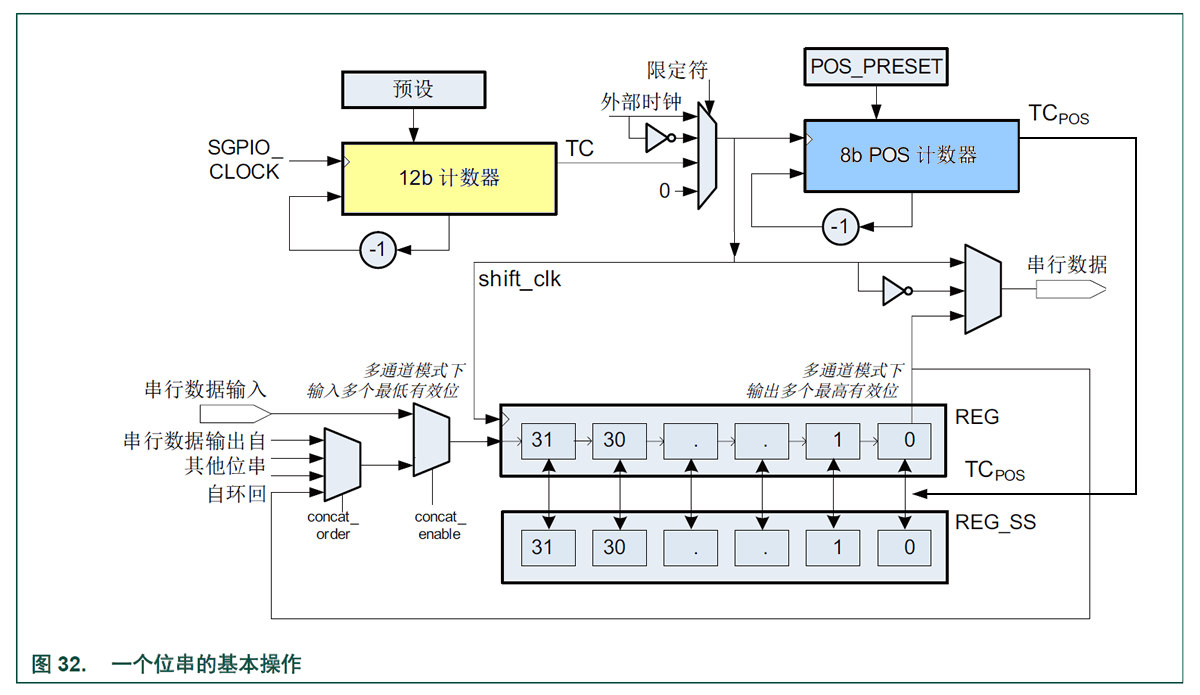
模式匹配
所有位串均具有模式匹配功能。
该功能可用于检测启动代码等。要使用该功能,则必须用需匹配的模式来对REG_SS 编程
(请注意, POS 达到零时 REG_SS 不会与 REG 交换!)
MATCH_MODE 位必须设为1。
输入数据 REG 现在与已编程的模式 REG_SS 相比较。发现匹配时会提出模式匹配中断。
Bit MATCH_MODE selects whether the match filter is active or whether data is captured.
Only slice A, H, I, and P support matching with a mask (register MASK_x).
For other slices the pattern is not masked.
匹配掩码
四个位串(A、H、I 和P)同样支持对模式的掩码;必须设置MASK_x 以便对模式位进行比较(‘1’表示比较)。
例如,寻找模式0x1234.xxxx.5678.9ABC 时,
REG 应设置为0x1234.xxxx.5678.9ABC,
MASK 设置为0xFFFF.0000.FFFF.FFFF。
When using the data match interrupt bit 0 has to be high.
When using data match mode, the slice’s shadow register [ REG_SS ] should hold the pattern to be matched.
In addition, when data match is enabled the main register [ REG ] and the shadow register [ REG_SS ] will not exchange when FIFO is done with input or output data.
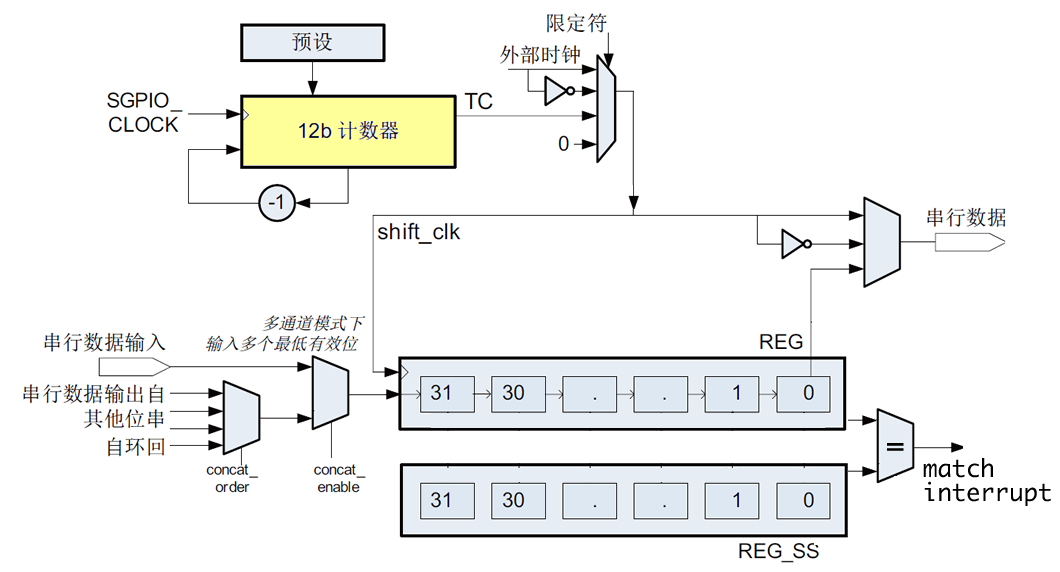
Pattern match
All slices feature pattern match functionality.
This can be used for example to detect a start code.
To use this functionality, REG_SS must be programmed with the pattern to be matched
(Note that REG_SS will not be swapped with REG when POS reaches zero!).
The MATCH_MODE bit must be set to 1.
The input data is now compared to the programmed pattern.
When a match is found the pattern match interrupt is raised.
Four slices (A, H, I and P) also support masking the pattern; MASK_x must be set for the pattern bits to be compared (1 is compare).
E.g. when looking for pattern 0x1234 XXXX, then REG_SS should be set to 0x1234 XXXX and MASK to 0xFFFF 0000.
0x1234 xxxx -- REG

0x1234  -- REG_SS

0xFFFF  -- MASK
MASK_A, MASK_H, MASK_I, MASK_P
The mask registers are used for the “on pattern match” interrupts.
With some slices it is possible to mask the data for the pattern match interrupts. Slices A, H, I and P support this function.
Every bit that is 1 in this register will be masked.
If this register contains the value 0b00001111 the first 4 bits will be masked for the pattern interrupt.
LPC43xx SGPIO Pattern Match Mode的更多相关文章
- LPC43xx SGPIO Experimentation
LPC4350 SGPIO Experimentation The NXP LPC43xx microcontrollers have an interesting, programmable ser ...
- LPC43xx SGPIO DMA and Interrupts
The SGPIO output pins SGPIO14 and SGPIO15 can trigger a GPDMA request SGPIO pins SGPIO14 and SGPIO15 ...
- LPC43xx SGPIO Configuration -- Why not use GPDMA ?
LPC43xx SGPIO Configuration The LPC43xx SGPIO peripheral is used to move samples between USB and the ...
- python正则表达式基础,以及pattern.match(),re.match(),pattern.search(),re.search()方法的使用和区别
正则表达式(regular expression)是一个特殊的字符序列,描述了一种字符串匹配的模式,可以用来检查一个字符串是否含有某种子字符串. 将匹配的子字符串替换或者从某个字符串中取出符合某个条件 ...
- G面经prepare: Pattern Match
设定一个pattern 把 'internationalization' 变成 'i18n', 比如word是house,pattern可以是h3e, 3se, 5, 1o1s1等, 给pattern ...
- LPC43xx SGPIO I2C Implementation
I²C SGPIO Configuration SGPIO is a hardware feature of LPC4300 series. There are 16 SGPIO pins calle ...
- LPC43xx SGPIO Slice 示意图
SGPIO inverted clock qualifier Hi, With bits 6:5 of SGPIO_MUX_CFG the QUALIFIER_MODE is selected (0x ...
- LPC43xx SGPIO Camera interface design
AN11196: Camera interface design using SGPIO
- LPC43xx SGPIO Slice 输入输出连接表
随机推荐
- iOS开发之AFNetworking 3.0.4使用-OC
GET请求 AFHTTPSessionManager *manager = [AFHTTPSessionManager manager]; [manager GET:URL parameters: ...
- ubuntu下非本账户的.profile文件的修改
今天不小心在账户了修改了自己的.profile文件,导致重启之后账户无法进入,点登陆账户后黑屏后就重新回到账户登陆界面.一番折腾之后终于成功修改了原账户中的.profile文件,成功从新进入了原账户. ...
- Mac上创建cocos2d-x工程
1.自选版本-下载 http://www.cocos2d-x.org/download 2.解压(自选路径) 3.在cocos2d-x解压目录下新建 Projects 文件夹. 3.打开终端 4.进入 ...
- Windows 8.1 应用再出发 - 视图状态的更新
本篇我们来了解一下Windows 8.1 给应用的视图状态带来了哪些变化,以及我们怎么利用这些变化作出更好的界面视图. 首先我们来简单回顾一下Windows 8.0 时代的视图状态: 上图中, ...
- ASP.NET WEB API 中的路由调试与执行过程跟踪
路由调试 RouteDebugger 是调试 ASP.NET MVC 路由的一个好的工具,在ASP.NET WEB API中相应的有 WebApiRouteDebugger ,Nuget安装 Inst ...
- 编译生成.NET Core Framework遇到的问题
前两天在Windows Server 2012上编译生成.NET Core Framework的代码库corefx,遭遇了几个问题,在这篇博文中记录一下. 编译生成操作方法是在命令行(Develope ...
- UML建模语言入门 -- 用例视图详解 用例视图建模实战
. 作者 :万境绝尘 转载请注明出处 : http://blog.csdn.net/shulianghan/article/details/18964835 . 一. 用例视图概述 用例视图表述哪些 ...
- Bug Tracker 使用笔记(有图有真相)
目的:管理Bug,完善业务流程. 前提条件:BugTracker是基于IIS和SQL Server和Asp.Net的.相当于一个Web端的管理系统. 1.下载地址 http://sourceforge ...
- javascript和C#比较
C#和javascript有很多相似的地方,比如: 序列化 C#序列化 首先需要引用 using System.Web.Script.Serialization;//System.Web.Extens ...
- .net使用cefsharp开源库开发chrome浏览器(一)
一.背景 公司现在使用.NET技术,有web组.有winfrom桌面组.而这两组团队业务部分有分多相似的地方,使用的数据源也是相同的,以此造成两组团队之间做了很多彼此都已经做过的工作. 有什么办法使得 ...