
Chart系列(二):数据绑定
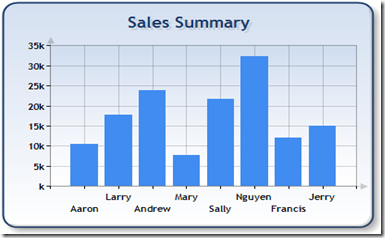
1.绑定到OleDbDataReader:
// Define the database query

string mySelectQuery="SELECT Name, Sales FROM REPS;";

// 。。。。。。
// Create a database reader

OleDbDataReader myReader = myCommand.ExecuteReader(CommandBehavior.CloseConnection);

// Since the reader implements and IEnumerable, pass the reader directly into

// the DataBindTable method with the name of the Column to be used as the XValue

Chart1.DataBindTable(myReader, "Name");
2.绑定DataSource
// Define the database query

string mySelectQuery="SELECT * FROM REPS;";

// Create a database connection object using the connection string

OleDbConnection myConnection = new OleDbConnection(myConnectionString);

// Create a database command on the connection using query

OleDbCommand myCommand = new OleDbCommand(mySelectQuery, myConnection);

myConnection.Open();
// set chart data source - the data source must implement IEnumerable

chart1.DataSource = myCommand.ExecuteReader(CommandBehavior.CloseConnection);


// Set series members names for the X and Y values

chart1.Series["Series 1"].XValueMember = "Name";

chart1.Series["Series 1"].YValueMembers = "Sales";

// Data bind to the selected data source

chart1.DataBind();

3.绑定Y值
// Create a database reader

OleDbDataReader myReader = myCommand.ExecuteReader(CommandBehavior.CloseConnection);

// Since the reader implements and IEnumerable, pass the reader directly into

// the DataBind method with the name of the Column selected in the query

chart1.Series["Default"].Points.DataBindY(myReader, "GrossSales");

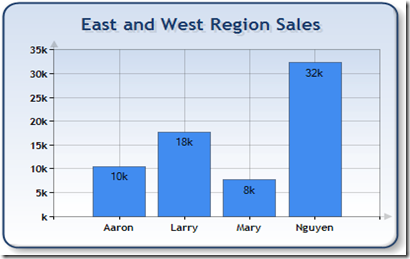
4.绑定X和Y
// Create a database reader

OleDbDataReader myReader = myCommand.ExecuteReader(CommandBehavior.CloseConnection);

// Since the reader implements IEnumerable, pass the reader directly into

//   the DataBind method with the name of the Column selected in the query

chart1.Series["Default"].Points.DataBindXY(myReader, "Name", myReader, "Sales");
Chart系列(二):数据绑定的更多相关文章
- WPF入门教程系列二十三——DataGrid示例(三)
DataGrid的选择模式 默认情况下,DataGrid 的选择模式为“全行选择”,并且可以同时选择多行(如下图所示),我们可以通过SelectionMode 和SelectionUnit 属性来修改 ...
- [知识库分享系列] 二、.NET(ASP.NET)
最近时间又有了新的想法,当我用新的眼光在整理一些很老的知识库时,发现很多东西都已经过时,或者是很基础很零碎的知识点.如果分享出去大家不看倒好,更担心的是会误人子弟,但为了保证此系列的完整,还是选择分享 ...
- highcharts 结合phantomjs纯后台生成图片系列二之php2
上篇文章中介绍了phantomjs的使用场景,方法. 本篇文章详细介绍使用php,highcharts 结合phantomjs纯后台生成图片.包含一步步详细的php代码 一.highcharts 结合 ...
- highcharts 结合phantomjs纯后台生成图片系列二之php
上篇文章中介绍了phantomjs的使用场景,方法.本篇文章详细介绍使用php,highcharts 结合phantomjs纯后台生成图片. 一.准备: 下载phantomjs解析插件,从 highc ...
- 前端构建大法 Gulp 系列 (二):为什么选择gulp
系列目录 前端构建大法 Gulp 系列 (一):为什么需要前端构建 前端构建大法 Gulp 系列 (二):为什么选择gulp 前端构建大法 Gulp 系列 (三):gulp的4个API 让你成为gul ...
- Web 开发人员和设计师必读文章推荐【系列二十九】
<Web 前端开发精华文章推荐>2014年第8期(总第29期)和大家见面了.梦想天空博客关注 前端开发 技术,分享各类能够提升网站用户体验的优秀 jQuery 插件,展示前沿的 HTML5 ...
- Web 前端开发人员和设计师必读文章推荐【系列二十八】
<Web 前端开发精华文章推荐>2014年第7期(总第28期)和大家见面了.梦想天空博客关注 前端开发 技术,分享各类能够提升网站用户体验的优秀 jQuery 插件,展示前沿的 HTML5 ...
- Web 开发精华文章集锦(jQuery、HTML5、CSS3)【系列二十七】
<Web 前端开发精华文章推荐>2014年第6期(总第27期)和大家见面了.梦想天空博客关注 前端开发 技术,分享各类能够提升网站用户体验的优秀 jQuery 插件,展示前沿的 HTML5 ...
- Web 前端开发人员和设计师必读精华文章【系列二十六】
<Web 前端开发精华文章推荐>2014年第5期(总第26期)和大家见面了.梦想天空博客关注 前端开发 技术,分享各类能够提升网站用户体验的优秀 jQuery 插件,展示前沿的 HTML5 ...
- Web 前端开发精华文章推荐(HTML5、CSS3、jQuery)【系列二十三】
<Web 前端开发精华文章推荐>2014年第2期(总第23期)和大家见面了.梦想天空博客关注 前端开发 技术,分享各类能够提升网站用户体验的优秀 jQuery 插件,展示前沿的 HTML5 ...
随机推荐
- 通过Spring @PostConstruct 和 @PreDestroy 方法 实现初始化和销毁bean之前进行的操作
关于在spring 容器初始化 bean 和销毁前所做的操作定义方式有三种: 第一种:通过@PostConstruct 和 @PreDestroy 方法 实现初始化和销毁bean之前进行的操作 第二 ...
- 安装UnityVS 2012步骤
英文原文是: Cracked by Twisted89//////////////////////////////////////////////////// INSTALL INSTRUCTIONS ...
- iPhone socket 编程之BSD Socket篇
iPhone socket 编程之BSD Socket篇 收藏在进行iPhone网络通讯程序的开发中,不可避免的要利用Socket套接字.iPhone提供了Socket网络编程的接口CFSocket, ...
- 重构edit 和 new页面
www.iwangzheng.com 由于edit和new页面的相似部分很多,需要提取出来,现在就是提取的方法 从form 的开始部分选中,shift+v选中对应的行 :Rextract form 然 ...
- OpenGL Vertex Array
转载 http://blog.csdn.net/dreamcs/article/details/7699603
- HDOJ 1075
字典树 9890974 2013-12-25 15:31:06 Accepted 1075 468MS 59832K 1342 B G++ 泽泽 #include<stdio.h> #in ...
- Tor
参考: http://www.douban.com/group/topic/67555786/ http://blog.sina.com.cn/s/blog_72a7ac670101km46.html ...
- codeforces 486B.OR in Matrix 解题报告
题目链接:http://codeforces.com/problemset/problem/486/B 题目意思:给出一个m行n列的矩阵B(每个元素只由0/1组成),问是否可以利用矩阵B,通过一定的运 ...
- github优秀开源项目大全-iOS
github优秀开源项目大全-iOS APR 25TH, 2014 前言 本文旨在搜集github上优秀的开源项目 本文搜集的项目都是用于iOS开发 本文会持续更新… 完整客户端 ioctocat g ...
- July 24th, Week 31st Sunday, 2016
Miracles happen every day. 奇迹每天都在发生. Miracles actually happen every day, every moment. You may think ...