
在IE8等不支持placeholder属性的浏览器中模拟placeholder效果
placeholder是一个很有用的属性,可以提示用户在input框中输入正确的内容,但是IE8以及IE8一下的浏览器不支持该属性,我们可以使用js来模拟相似的效果。下面直接上代码:
<!doctype html>

<html>

<header>

<meta charset="utf-8">

<title>placeholder</title>

<style type="text/css">

*{margin:0;padding:0;}

form {margin:50px;}

input {display:block;margin:0 0 6px 0;}

</style>

</header>

<body>

    <form>

        用户名:<input name="name" placeholder="请输入用户名"/>

        密码:<input name="password" placeholder="请输入登陆密码"/>

    </form>

<script type="text/javascript" src="jquery-1.11.1.min.js"></script>

<script type="text/javascript">

$(function(){

    function placeholderSupport() {    // 判断浏览器是否支持 placeholder

        return 'placeholder' in document.createElement('input');

    }

    if(!placeholderSupport()){

        $(document).on('focus', '[placeholder]',function() {

            var input = $(this);

            if (input.val() == input.attr('placeholder')) {

                input.val('');

                input.removeClass('placeholder');

            }

        });

        $(document).on('blur', '[placeholder]',function() {

            var input = $(this);

            if (input.val() == '' || input.val() == input.attr('placeholder')) {

                input.addClass('placeholder');

                input.val(input.attr('placeholder'));

            }

        });

        $('[placeholder]').blur();

    };

});

</script>

</body>

</html>
'placeholder' in document.createElement('input') ,该行代码利用 in 表达式来判断浏览器中的 input 元素中是否有 placeholder 属性存在。
$('[placeholder]') 是一个Jquery 的属性选择器,选择页面上所有的具有 placheholder 属性的元素。在页面加载完成时我们首先调用 blur() 方法,将所有 input 元素的值 设置 为 input 属性 placeholder 对应的值,从而模拟 placeholder 的效果。
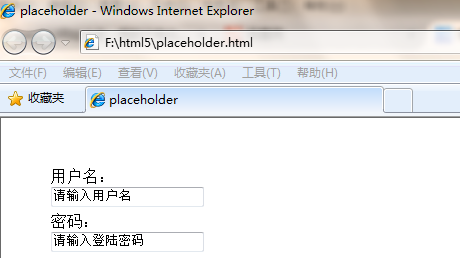
效果如下图所示:
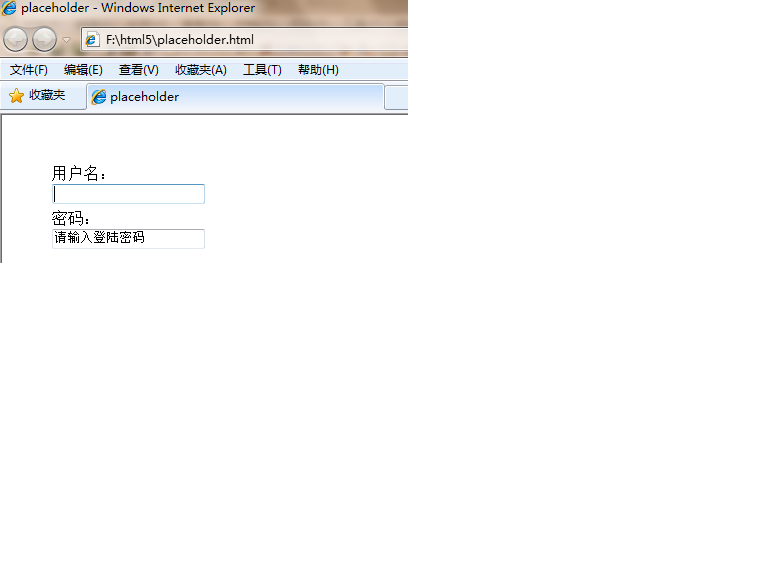
选中 input 时的效果:
在IE8等不支持placeholder属性的浏览器中模拟placeholder效果的更多相关文章
- html5的placeholder属性(IE如何兼容placeholder属性)
界面UI推荐 jquery html5 实现placeholder兼容password IE6 html5的placeholder属性(IE如何兼容placeholder属性) 2013-01-05 ...
- onunload事件火狐不支持,在IE浏览器中,只有刷新时该事件才发生
onunload事件火狐不支持,在IE浏览器中,只有刷新时该事件才发生
- 解决seajs ie8 对象不支持charAt 属性。
在使用 seajs做项目,今天偶然发现在ie9以下的ie版本会 报出 对象不支持charAt 属性.刚开始还以为是自己写的js部分出了问题,经过几个小时的奋战.最终找到了其根源.在sea-debug. ...
- 【工作笔记五】html5的placeholder属性(IE如何兼容placeholder属性)
placeholder属性,IE对其的支持表示无奈,firefox.google chrome表示毫无压力. HTML5对Web Form做了许多增强,比如input新增的type类型.Form Va ...
- 给IE9及其以下等不支持classList属性的浏览器,添加classList属性
// 解决IE9及其以下 不支持classList属性的问题 if (!("classList" in document.documentElement)) { Object.de ...
- 兼容的placeholder属性
作为一个.net后台开发的程序猿,博客里既然大多都是前端相关的博文.是不是该考虑换方向了,转前端开发得了 ... 小小吐槽一下,近期受该不该跳槽所困惑,我有选择困难症! 继续前端,这次说一下输入框 p ...
- HTML5表单提示placeholder属性兼容IE
placeholder 属性提供可描述输入字段预期值的提示信息(hint). 该提示会在输入字段为空时显示,并会在字段获得焦点时消失. 注释:placeholder 属性适用于以下的 <inpu ...
- HTML 5 <input> placeholder 属性
原文链接:http://www.w3school.com.cn/html5/att_input_placeholder.asp HTML 5 <input> placeholder 属性 ...
- Hmtl5 <input>中placeholder属性(新属性)
Hmtl5 <input>中placeholder属性(新属性) 一.定义和用法 placeholder 属性提供可描述输入字段预期值的提示信息(hint). 该提示会在输入字段为空时显示 ...
随机推荐
- SQL Server里等待统计(Wait Statistics)介绍
在今天的文章里我想详细谈下SQL Server里的统计等待(Wait Statistics),还有她们如何帮助你立即为什么你的SQL Server当前很慢.一提到性能调优,对我来说统计等待是SQL S ...
- .NET中Main函数使用小技巧
摘要:任何语言开发出来的程序,都会有一个程序入口函数,可能每个语言所使用的程序入口函数名称不一样,但是它们的作用都是一样的,都是被操作系统去调用.那么本文主要总结.NET中的程序入口函数Main使用的 ...
- 1117 新冲刺 day1
项目需求确定 现阶段我们进行的项目是到店点餐系统.主要是开发手机端app为用户提供方便快捷的点餐服务.免去顾客到店后遇到因吃饭的人太多而找不到服务人员点餐的窘境.减少了服务人员因为忙碌而导致下单慢的问 ...
- 收集了50道基础的java面试题
下面的内容是对网上原有的Java面试题集及答案进行了全面修订之后给出的负责任的题目和答案,原来的题目中有很多重复题目和无价值的题目,还有不少的参考答案也是错误的,修改后的Java面试题集参照了JDK最 ...
- 1. windows环境安装Node.js
1. 下载 地址: https://nodejs.org/en/ 2. 下载最新版本v6.1.0 Currrent
- LeetCode126:Word Ladder
题目: Given two words (start and end), and a dictionary, find the length of shortest transformation se ...
- 小白学Linux(三)--文件系统基本结构
Linux文件系统是一个倒立的单根树状结构,文件名称严格区分大小写(windows系统则是对大小写不明感的).路径用“/”分隔,跟windows的“\”不同. 这里我画了一张一般Linux系统的正常目 ...
- 小白学Linux--虚拟机下安装Ubuntu16
最近接收到任务,说是下半年可能要搞全文检索.听到后顿时炸锅了,一方面是对新技术的兴奋(当然主要还是这技术比较值钱),另一方面,我TM连Linux都不会玩,怎么搞全文检索.怀揣着对开源世界的无线向往(恐 ...
- Java中native的用法
原文来自:http://blog.csdn.net/funneies/article/details/8949660 native关键字说明其修饰的方法是一个原生态方法,方法对应的实现不是在当前文件, ...
- H5实现的可自定义贪吃蛇游戏
原创游戏,使用lufylegend.js开发 用canvas实现的贪吃蛇游戏,与一般的贪吃蛇游戏不同,图片经过美工设计,代码设计支持扩展和自定义. 游戏元素丰富,包括障碍物(仙人掌),金币(奖励),苹 ...