
centos7 部署vnc
不做过多介绍了,下面直接记录下centos7系统下安装配置vncserver的操作记录
0)更改为启动桌面或命令行模式
|
1
2
3
4
5
6
7
8
9
10
11
12
13
14
15
16
17
18
19
20
21
22
23
24
25
26
27
28
29
|
获取当前系统启动模式[root@localhost ~]# systemctl get-defaultmulti-user.target查看配置文件[root@localhost ~]# cat /etc/inittab# inittab is no longer used when using systemd.## ADDING CONFIGURATION HERE WILL HAVE NO EFFECT ON YOUR SYSTEM.## Ctrl-Alt-Delete is handled by /usr/lib/systemd/system/ctrl-alt-del.target## systemd uses 'targets' instead of runlevels. By default, there are two main targets:## multi-user.target: analogous to runlevel 3 //命令行模式# graphical.target: analogous to runlevel 5 //图形界面模式## To view current default target, run:# systemctl get-default## To set a default target, run:# systemctl set-default TARGET.target#[root@localhost ~]# systemctl set-default graphical.target //由命令行模式更改为图形界面模式[root@localhost ~]# systemctl set-default multi-user.target //由图形界面模式更改为命令行模式[root@localhost ~]# systemctl get-defaultgraphical.target |
1)关闭防火墙
centos的防火墙是firewalld,关闭防火墙的命令
[root@localhost ~]# systemctl stop firewalld.service #停止firewall
[root@localhost ~]# systemctl disable firewalld.service #禁止firewall开机启动
[root@localhost ~]# setenforce 0
[root@localhost ~]# getenforce
[root@localhost ~]# cat /etc/sysconfig/selinux
SELINUX=disabled
SELINUXTYPE=targeted
2)安装软件:
[root@localhost ~]# yum update
[root@localhost ~]# yum groupinstall "GNOME Desktop" "X Window System" "Desktop"
[root@localhost ~]# yum install tigervnc-server tigervnc vnc vnc-server
3)配置vnc连接
[root@localhost ~]# cp /lib/systemd/system/vncserver@.service /etc/systemd/system/vncserver@:1.service
修改/etc/systemd/system/vncserver@:1.service
找到这一行
ExecStart=/sbin/runuser -l <USER> -c "/usr/bin/vncserver %i"
PIDFile=/home/<USER>/.vnc/%H%i.pid
这里直接用root 用户登录,所以我替换成
ExecStart=/sbin/runuser -l root -c "/usr/bin/vncserver %i"
PIDFile=/root/.vnc/%H%i.pid
如果是其他用户的话比如john替换如下
ExecStart=/sbin/runuser -l john -c "/usr/bin/vncserver %i"
PIDFile=/home/john/.vnc/%H%i.pid
由于直接root用户登录,所以配置如下:
[root@localhost ~]# cat /etc/systemd/system/vncserver@:1.service
.........
[Unit]
Description=Remote desktop service (VNC)
After=syslog.target network.target
[Service]
Type=forking
# Clean any existing files in /tmp/.X11-unix environment
ExecStartPre=/bin/sh -c '/usr/bin/vncserver -kill %i > /dev/null 2>&1 || :'
ExecStart=/usr/sbin/runuser -l root -c "/usr/bin/vncserver %i"
PIDFile=/root/.vnc/%H%i.pid
ExecStop=/bin/sh -c '/usr/bin/vncserver -kill %i > /dev/null 2>&1 || :'
[Install]
WantedBy=multi-user.target
为VNC设密码
[root@localhost ~]# vncpasswd
123456
[root@localhost ~]# vim /etc/libvirt/qemu.conf
vnc_password = "123456"
vnc_listen = "0.0.0.0"
重加载 systemd
[root@localhost ~]# systemctl daemon-reload
启动vnc
[root@localhost ~]# systemctl enable vncserver@:1.service
[root@localhost ~]# systemctl start vncserver@:1.service
注意,此处关闭了防火墙
如果防火墙开了,需要开通一下规则:
[root@localhost ~]# firewall-cmd --permanent --add-service vnc-server
[root@localhost ~]# systemctl restart firewalld.service
如果是iptable,则需要在/etc/sysconfig/iptables里添加:
-A INPUT -m state --state NEW -m tcp -p tcp --dport 5900:5903 -j ACCEPT
关闭vnc连接
[root@localhost ~]# /usr/bin/vncserver -kill :1
测试vnc连接:
[root@localhost ~]# novnc_server --vnc 192.168.1.8:5901 --listen 6081
Warning: could not find self.pem
Starting webserver and WebSockets proxy on port 6081
WebSocket server settings:
- Listen on :6081
- Flash security policy server
- Web server. Web root: /usr/share/novnc
- No SSL/TLS support (no cert file)
- proxying from :6081 to 192.168.1.8:5901
Navigate to this URL:
http://kvm-server:6081/vnc.html?host=kvm-server&port=6081 #http访问方式
Press Ctrl-C to exit
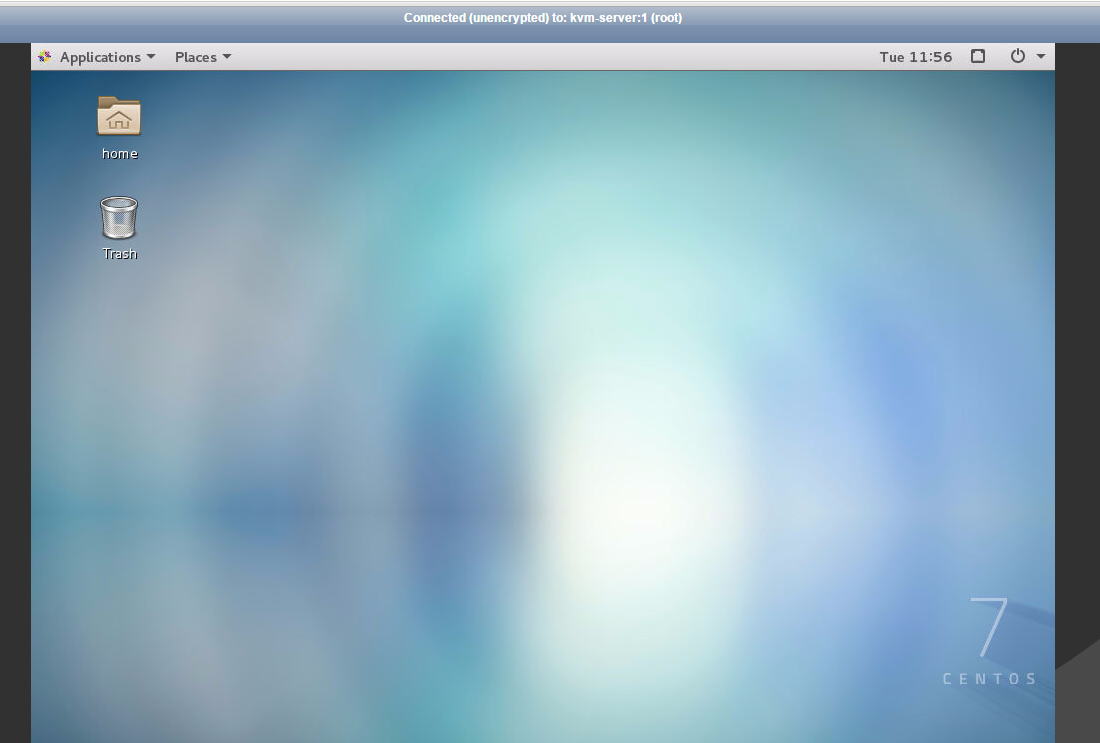
由于kvm-server的主机名对于ip是112.112.113.56,所以在浏览器里输入:
http://112.112.113.56:6081/vnc.html?host=112.112.113.56&port=6081

|
1
2
3
4
5
6
7
8
9
10
|
也可以在本地windows机器上安装vnc viewer,远程访问在windows下安装vnc客户端,下载地址:https://pan.baidu.com/s/1hrSIr4K提取密码:dqdt VNC远程连接信息(下面ip是VNC服务端的地址):VNC Server: 112.112.113.56:5901Encrytion:Let VNC Server choose 然后输入vncpasswd的密码即可完成VNC远程连接! |
centos7 部署vnc的更多相关文章
- Linux Centos7.x下安装部署VNC的实操详述
VNC (Virtual Network Console)是虚拟网络控制台的缩写.它 是一款优秀的远程控制工具软件,由著名的AT&T的欧洲研究实验室开发的.VNC 是在基于 UNIX和 Lin ...
- [原]CentOS7部署osm2pgsql
转载请注明原作者(think8848)和出处(http://think8848.cnblogs.com) 部署Postgresql和部署PostGis请参考前两篇文章 本文主要参考GitHub上osm ...
- CentOS6部署VNC服务端
VNC (Virtual Network Computer)是虚拟网络计算机的缩写.VNC 是在基于 UNIX 和 Linux 操作系统的免费的开源软件,远程控制能力强大,高效实用,其性能可以和 Wi ...
- centos7 部署ssserver
centos7 部署shadowsocks服务端 为什么要选centos7? 以后centos7 肯定是主流,在不重要的环境还是尽量使用新系统吧 centos7 的坑 默认可能会有firewall 或 ...
- Centos6.9部署vnc
Centos部署vnc [root@etl ~]# vncserver -kill :1 命令: service vncserver restart chkconfig --list vncser ...
- centos7 部署 docker compose
=============================================== 2019/4/10_第1次修改 ccb_warlock == ...
- centos7 部署 docker ce
=============================================== 2019/4/9_第1次修改 ccb_warlock === ...
- centos7 部署 open-falcon 0.2.0
=============================================== 2019/4/29_第3次修改 ccb_warlock 更新 ...
- centos7 部署 docker、shipyard
=============================================== 2019/4/9_第3次修改 ccb_warlock 更新说 ...
随机推荐
- ModuleNotFoundError: No module named '_sqlite3' -- python2.7 问题
ModuleNotFoundError: No module named '_sqlite3' 运行python 工程出现上面这个问题,以为python安装中缺少这个依赖, 注python 2.7 首 ...
- Windows2016的 IIS中配置PHP7运行环境
Windows2016的 IIS中配置PHP7运行环境 在Windows 的IIS(8.0)中搭建PHP运行环境: 一:安装IIS服务器 .进入控制面板>>程序和功能>>打开或 ...
- docker容器与宿主主机之间拷贝文件
文章链接:https://blog.csdn.net/libertine1993/article/details/80651552 https://blog.csdn.net/u011596455/a ...
- 如何把PDF文件拆分为多个文件
一个PDF文件有很多个PDF页面组成,有时候我们只需要单个页面的时候应该怎么做呢,这个时候就需要拆分PDF文件了,那么如何把 PDF文件拆分为多个文件呢,应该有很多的小伙伴都想知道吧,那就让我们一起来 ...
- 使用wps插件,实现word转PDF
项目需求:不打算用office自带的组件实现word转pdf操作 环境需求:安装wps2016专业版 新建一个控制台应用程序 添加引用:在COM下 Kingsoft Add-In Designer和U ...
- 微软拼音转换工具类ChnCharInfo.dll
1.简介 之前做汉字转拼音是使用各种枚举的方式,将各种情况列举,这种方式出错的机率很大,经常对不上号.(如果你想了解更多:http://www.cnblogs.com/islands/articles ...
- 【转】GB2312、GBK和UTF-8三种编码的简要说明
原文地址:http://www.cnblogs.com/hust-yingjie/p/5481966.htmlGB2312.GBK和UTF-8都是一种字符编码,除此之外,还有好多字符编码.只是对于我们 ...
- Kubernetes 学习1 k8s架构概述
一.概述 1.意思:舵手,飞行员 2.特点 a.自动装箱,自我修复,水平扩展,服务发现和负载均衡,自动发布和回滚. b.密钥和配置管理,存储编排,批量处理执行. 二.架构术语 1.集群 master( ...
- Scala数组| 集合
arrays :+ 5尾部 头部5 +: arrays TODO 声明不可变数组,不能删; 默认情况下,scala中集合的声明全都是不可变的 val arrays: Array[Int] = Ar ...
- Imcash:比特币减半 四年机遇你能否抓住?
减半到底是什么? 2010来,比特币已有4次下跌幅度达70%或更高. 2012年的11月份比特币减半,诞生了一次上涨10倍有余的超级牛市. 2016年7月,历史又是如此的相似,比特币产量又迎来了减半, ...